
PYTH-220 · Lesson 5 of 12 · 22 min
Forms and validation
▶ Video coming soon A video version of this lesson is on the way.
Rosa's first real requirement for the web shop is a pickup order form: the customer chooses a coffee, a quantity and a pickup time, and leaves a name and email address so the cafe can say when the order is ready. Forms are how almost all data enters a web application, and they are where most bugs and many security problems begin. Customers mistype, leave fields empty, paste strange characters, and occasionally someone sends data that never came from your form at all. This lesson covers HTML forms, how their data reaches your Python code, and how to validate it properly: checking every field, showing helpful errors and keeping what the customer typed.
The golden rule for the whole lesson is simple. Never trust data from the client. Browser checks such as required fields and number limits are a convenience for honest customers; anyone can bypass them by sending a request directly. Every check that matters must happen again on the server, in your Python code.
HTML forms
A form is a group of input elements inside a form tag. Its action attribute is the URL the data goes to and its method attribute is GET or POST. Each input needs a name, which becomes the key in the submitted data. Use GET for searches and filters, where the values belong in the URL so the page can be bookmarked and shared. Use POST for anything that changes data, such as placing an order, so the values travel in the request body and the request is not repeated by accident.
<form action="/order" method="post">
  <label for="sku">Coffee</label>
  <select id="sku" name="sku" required>
    <option value="RC-101">Sunrise Blend</option>
    <option value="RC-104">Sumatra Dark</option>
  </select>

  <label for="qty">Bags</label>
  <input id="qty" name="quantity" type="number" min="1" max="20" value="1" required>

  <label for="email">Email</label>
  <input id="email" name="email" type="email" autocomplete="email" required>

  <label for="pickup">Pickup time</label>
  <input id="pickup" name="pickup" type="time" min="07:00" max="18:00" required>

  <button type="submit">Place order</button>
</form>
Every input has a label tied to it with the for attribute, which matters for customers using screen readers and makes the label clickable. The type attributes give phones the right keyboard and let the browser check simple things before sending. When the form is submitted with POST, the browser encodes the fields as name=value pairs joined by ampersands, exactly like a query string, and sends them in the body with the content type application/x-www-form-urlencoded. Forms that upload files use multipart/form-data instead.
from urllib.parse import parse_qs

body = "sku=RC-104&quantity=3&email=sam%40example.com&pickup=08%3A30"
fields = {name: values[0] for name, values in parse_qs(body).items()}
print(fields)
print(type(fields["quantity"])){'sku': 'RC-104', 'quantity': '3', 'email': 'sam@example.com', 'pickup': '08:30'}
<class 'str'>Everything arrives as text. The quantity is the string "3", not the number 3, and nothing guarantees it is a number at all. In Flask, request.form gives you these fields as a dictionary-like object; request.form["sku"] raises an error that becomes a 400 Bad Request if the field is missing, while request.form.get("sku") returns None. Turning these strings into trustworthy values is the job of validation.
Validating on the server
Validation turns raw strings into clean values or a list of problems. A good validator checks each field independently, so the customer sees every problem at once rather than fixing one, resubmitting and finding the next. For each field it asks: is it present, does it have the right type, is it in range, and does it make sense in context? It returns two things: the cleaned data and a dictionary of error messages keyed by field name.
COFFEES = {"RC-101": "Sunrise Blend", "RC-102": "Ethiopia Guji", "RC-104": "Sumatra Dark"}

def validate_order(form):
    data, errors = {}, {}

    sku = form.get("sku", "").strip()
    if sku not in COFFEES:
        errors["sku"] = "Choose a coffee from the list."
    else:
        data["sku"] = sku

    raw_qty = form.get("quantity", "").strip()
    try:
        qty = int(raw_qty)
    except ValueError:
        errors["quantity"] = "Enter the number of bags as a whole number."
    else:
        if not 1 <= qty <= 20:
            errors["quantity"] = "Order between 1 and 20 bags."
        else:
            data["quantity"] = qty

    email = form.get("email", "").strip().lower()
    if "@" not in email or "." not in email.split("@")[-1] or len(email) > 254:
        errors["email"] = "Enter a valid email address."
    else:
        data["email"] = email

    return data, errors

print(validate_order({"sku": "RC-104", "quantity": "3", "email": " Sam@Example.com "}))
print(validate_order({"sku": "RC-999", "quantity": "lots", "email": "sam"}))({'sku': 'RC-104', 'quantity': 3, 'email': 'sam@example.com'}, {})
({}, {'sku': 'Choose a coffee from the list.', 'quantity': 'Enter the number of bags as a whole number.', 'email': 'Enter a valid email address.'})Look at what validation also does besides rejecting bad input: it normalizes good input. Spaces are stripped and the email is lowered, so " Sam@Example.com " and "sam@example.com" become the same customer. The sku check is an allow list: rather than trying to spot bad values, it accepts only values that are known to be good. Allow lists are the safest kind of validation, and you should use them whenever the set of good values is known.
Email deserves a warning. Fully checking whether an address is valid is famously complicated, and over-strict patterns reject real customers. A light check for an @ and a dot in the domain, plus a length limit, is a sensible compromise. The only real proof that an address works is sending it a message, which is why sign-up forms send confirmation links.
Try it yourself
Validate the quantity
Write clean_quantity(raw) that returns (value, error). If raw (a string, possibly with spaces) is a whole number from 1 to 20, return (number, None). Otherwise return (None, message) where the message is "Enter a whole number." for text that is not a whole number and "Order between 1 and 20 bags." for a number out of range.
def clean_quantity(raw):
    return int(raw), None

print(clean_quantity(' 3 '))
print(clean_quantity('lots'))
Showing errors and keeping values
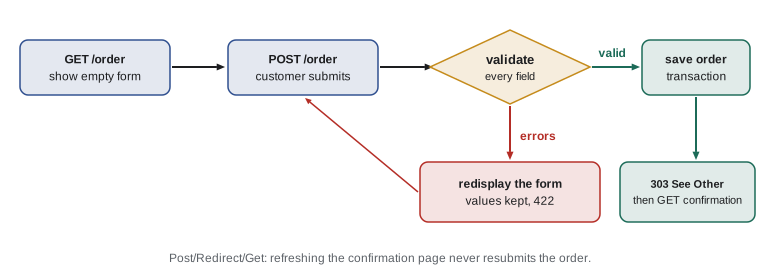
When validation fails, the worst response is a blank form and a vague message. The customer should see the form again with everything they typed still filled in, and a clear message beside each field that needs fixing. In Flask, the view re-renders the form template with the submitted values and the errors dictionary. Many applications answer a failed submission with status 422 Unprocessable Content, or 400, so that tests and tools can tell it apart from a normal page view; browsers display the page either way.
# Flask (on your own computer)
from flask import Flask, render_template, request, redirect, url_for

app = Flask(__name__)

@app.route("/order", methods=["GET", "POST"])
def order():
    if request.method == "POST":
        data, errors = validate_order(request.form)
        if not errors:
            order_id = save_order(data)                       # lesson 6
            return redirect(url_for("confirmed", order_id=order_id), code=303)
        return render_template("order.html", values=request.form, errors=errors), 422
return render_template("order.html", values={}, errors={}){# templates/order.html (part) #}
<label for="qty">Bags</label>
<input id="qty" name="quantity" type="number" value="{{ values.get('quantity', '1') }}"
aria-describedby="qty-error" {% if errors.quantity %}aria-invalid="true"{% endif %}>
{% if errors.quantity %}<p id="qty-error" class="error">{{ errors.quantity }}</p>{% endif %}The aria-invalid and aria-describedby attributes connect each error to its field for screen readers, which announce the message when the field gets focus. Because Jinja escapes values, redisplaying whatever the customer typed is safe even if they typed markup. That is a good illustration of how the defenses from different lessons work together.
import html

def field(name, label, values, errors, input_type="text"):
    value = html.escape(values.get(name, ""), quote=True)
    parts = [f'<label for="{name}">{label}</label>',
             f'<input id="{name}" name="{name}" type="{input_type}" value="{value}"'
             + (' aria-invalid="true"' if name in errors else '') + '>']
    if name in errors:
        parts.append(f'<p class="error">{html.escape(errors[name])}</p>')
    return "\n".join(parts)

values = {"quantity": "lots", "email": 'sam"><b>'}
errors = {"quantity": "Enter the number of bags as a whole number."}
print(field("quantity", "Bags", values, errors, "number"))
print(field("email", "Email", values, errors, "email"))<label for="quantity">Bags</label> <input id="quantity" name="quantity" type="number" value="lots" aria-invalid="true"> <p class="error">Enter the number of bags as a whole number.</p> <label for="email">Email</label> <input id="email" name="email" type="email" value="sam"><b>">
The email value contains a quotation mark and a tag. Because it is escaped with quote=True, it cannot break out of the value attribute and inject markup. Attribute values need their quotes escaped as well as < and >, which is what html.escape does by default.
Validating times, dates and rules that depend on each other
Some checks involve more than one field or the current time. A pickup time must be within opening hours, and on today's date it must be at least half an hour from now so the order can be prepared. A discount code may only apply to orders over a certain size. These rules belong in the same validator, after each field has been checked on its own, so the messages make sense. Code that depends on the current time should take the time as an argument, which makes it testable.
from datetime import datetime, time, timedelta

OPEN, CLOSE = time(7, 0), time(18, 0)

def clean_pickup(raw, now):
    try:
        hour, minute = (int(x) for x in raw.split(":"))
        t = time(hour, minute)
    except ValueError:
        return None, "Enter a time such as 08:30."
    if not OPEN <= t <= CLOSE:
        return None, "Pick a time between 07:00 and 18:00."
    pickup = datetime.combine(now.date(), t)
    if pickup < now + timedelta(minutes=30):
        return None, "Allow at least 30 minutes to prepare your order."
    return pickup, None

now = datetime(2026, 11, 10, 9, 15)
for raw in ["08:30", "10:00", "19:30", "9.30", "09:40"]:
print(raw, "->", clean_pickup(raw, now))08:30 -> (None, 'Allow at least 30 minutes to prepare your order.') 10:00 -> (datetime.datetime(2026, 11, 10, 10, 0), None) 19:30 -> (None, 'Pick a time between 07:00 and 18:00.') 9.30 -> (None, 'Enter a time such as 08:30.') 09:40 -> (None, 'Allow at least 30 minutes to prepare your order.')
Try it yourself
Validate a pickup time
Write pickup_error(raw) that returns None if raw is a time written as HH:MM between 07:00 and 18:00 inclusive, and otherwise returns an error message: "Use the format HH:MM." if it cannot be read as hours and minutes, or "We are open 07:00 to 18:00." if it is outside opening hours.
Use datetime.time so that a value like 25:00 counts as unreadable.
def pickup_error(raw):
    if raw < '07:00' or raw > '18:00':
        return 'We are open 07:00 to 18:00.'
    return None

print(pickup_error('06:45'))
Postal codes: one rule per country
Ridgeline ships beans as well as offering pickup, so the shipping form asks for a postal code. The format depends on the country, and the shop's checks follow the local rule. Validation code like this is a good place for a regular expression, applied with fullmatch so the whole value must fit, after normalizing case and spaces.
import re

# US ZIP code: five digits, optionally a hyphen and four more (ZIP+4)
ZIP = re.compile(r"\d{5}(-\d{4})?")

def clean_postal(raw):
    code = raw.strip().replace(" ", "")
    return code if ZIP.fullmatch(code) else None

for raw in ["83702", " 83702-1234 ", "8370", "83702-12", "V1Y 9T4"]:
print(repr(raw), "->", clean_postal(raw))'83702' -> 83702 ' 83702-1234 ' -> 83702-1234 '8370' -> None '83702-12' -> None 'V1Y 9T4' -> None
Form libraries
Writing validators by hand teaches you what is going on, and for small forms it is perfectly fine. Larger applications use a form library so that each form's fields, validation rules and error messages live in one class. In Flask the common choice is Flask-WTF, built on WTForms, which also handles the CSRF protection you will meet in lesson 11. Django has forms built in, and they work closely with its models, as lesson 7 shows. Whatever you use, the principles in this lesson stay the same: check everything on the server, collect all the errors, keep the customer's values and redirect after success.
# Flask-WTF (pip install flask-wtf), on your own computer
from flask_wtf import FlaskForm
from wtforms import IntegerField, SelectField, EmailField
from wtforms.validators import DataRequired, NumberRange, Email

class OrderForm(FlaskForm):
    sku = SelectField("Coffee", choices=[("RC-101", "Sunrise Blend"), ("RC-104", "Sumatra Dark")])
    quantity = IntegerField("Bags", validators=[DataRequired(), NumberRange(min=1, max=20)])
    email = EmailField("Email", validators=[DataRequired(), Email()])
Try it yourself
Validate the whole order
Write validate(form) that returns (data, errors) for a dictionary of strings with keys sku, quantity and email.
Rules: sku must be a key of COFFEES (in the setup); quantity must be a whole number from 1 to 20 (store it as an int); email is stripped and lowered and must contain exactly one @ with a dot somewhere after it. Each failing field gets an entry in errors (any message); each passing field goes into data. Missing keys count as empty.
def validate(form):
    data = {'sku': form['sku'], 'quantity': int(form['quantity']), 'email': form['email']}
    return data, {}

print(validate({'sku': 'RC-104', 'quantity': '2', 'email': 'Sam@Example.com'}))
Common mistakes
MistakeRelying on required and min attributes in the HTML as the only checks.
InsteadRepeat every check on the server; anyone can send a request without your form.
MistakeStopping at the first error, so the customer fixes problems one at a time.
InsteadCheck every field and return all the errors together.
MistakeClearing the form after a failed submission.
InsteadRedisplay the submitted values, escaped, next to the error messages.
MistakeUsing request.form['field'] for optional fields, causing 400 errors.
InsteadUse request.form.get with a default for anything optional.
MistakeRejecting real email addresses with an over-strict pattern.
InsteadUse a light check and confirm the address by sending a message.
MistakeTreating form values as numbers without converting and checking them.
InsteadConvert inside try/except and check the range.
Summary and key terms
- HTML forms send named fields to the action URL; use GET for searches and POST for changes.
- Submitted fields arrive as text, URL-encoded in the body; request.form gives them to a Flask view.
- Validate everything on the server: presence, type, range and context, using allow lists where possible.
- A validator returns cleaned data and a dictionary of errors for every bad field at once.
- On failure, redisplay the form with the customer's values and an error beside each field; on success, save and redirect with 303.
- Rules that depend on time or other fields go in the same validator; pass the current time in to keep it testable.
- Form libraries such as Flask-WTF and Django forms organize the same principles.
- form
- A group of input fields that the browser submits to a URL.
- validation
- Checking and cleaning submitted data before using it.
- allow list
- A list of known good values; anything else is rejected.
- normalization
- Converting equivalent inputs, such as different capitalizations, to one standard form.
- 422 Unprocessable Content
- A status for data that is well formed but fails validation.
- application/x-www-form-urlencoded
- The default encoding of a submitted form body.
- Flask-WTF
- A Flask extension for declaring forms, validation and CSRF protection.
Practice problems
Work each problem on paper first, then reveal the answer to check.
A search form for coffees by roast: GET or POST?
Show answer
GET, so the results page can be bookmarked and shared.
Why must the server check the quantity even though the HTML input has min="1" max="20"?
Show answer
Anyone can send a request directly, bypassing the browser and its checks.
What is wrong with returning only the first validation error?
Show answer
The customer must fix and resubmit repeatedly to discover each problem.
Why does validate_order lower the email address?
Show answer
To normalize it, so the same customer is recognized whatever capitals they type.
What should happen after a valid order is saved?
Show answer
Redirect with 303 to a confirmation page.
Lesson quiz · 5 questions
Score 60% or more to complete this lesson.
Create a free account to save your progress, take quizzes and earn a certificate.