
PYTH-220 · Lesson 6 of 12 · 29 min
Databases in web applications
▶ Video coming soon A video version of this lesson is on the way.
In PYTH-215 Jordan moved Ridgeline's inventory, sales and roast log into SQLite. The web shop now needs the same data: the coffee list page reads it, the order form writes to it, and Theo's stock page must show the numbers as they are right now, not as they were when the server started. This lesson shows how a web application uses a database safely and efficiently. You will see how to manage connections across requests, why every query must be parameterized, how transactions keep an order and the stock count consistent, and how to page through long lists.
All the examples use Python's built-in sqlite3 module with a database held in memory, so they run right here. The patterns are the same for PostgreSQL or MySQL in production; only the connection details change. A helper, make_db, builds a fresh copy of Ridgeline's coffee table for each example.
import sqlite3

def make_db():
    conn = sqlite3.connect(":memory:")
    conn.row_factory = sqlite3.Row
    conn.executescript("""
        CREATE TABLE coffee (sku TEXT PRIMARY KEY, name TEXT NOT NULL, price_cents INTEGER NOT NULL,
                             bags INTEGER NOT NULL CHECK (bags >= 0));
        CREATE TABLE orders (id INTEGER PRIMARY KEY, email TEXT NOT NULL, sku TEXT NOT NULL REFERENCES coffee(sku),
                             quantity INTEGER NOT NULL CHECK (quantity > 0));
        INSERT INTO coffee VALUES ('RC-101', 'Sunrise Blend', 1850, 42), ('RC-102', 'Ethiopia Guji', 2200, 15),
            ('RC-103', 'Colombia Huila', 1975, 27), ('RC-104', 'Sumatra Dark', 2025, 9),
            ('RC-105', 'Decaf Swiss Water', 1900, 12), ('RC-106', 'Espresso Ridge', 2150, 30);
    """)
    return conn


conn = make_db()
for row in conn.execute("SELECT sku, name, price_cents, bags FROM coffee ORDER BY sku"):
print(row["sku"], row["name"], f"{row['price_cents'] / 100:.2f}", row["bags"])RC-101 Sunrise Blend 18.50 42 RC-102 Ethiopia Guji 22.00 15 RC-103 Colombia Huila 19.75 27 RC-104 Sumatra Dark 20.25 9 RC-105 Decaf Swiss Water 19.00 12 RC-106 Espresso Ridge 21.50 30
Prices are stored as whole cents in an INTEGER column. As you saw in PYTH-102 with Decimal, floating-point numbers cannot represent most money amounts exactly, and an integer number of cents avoids the problem entirely in the database. Setting row_factory to sqlite3.Row lets you read columns by name, row["name"], which is far clearer than row[1] and keeps working when columns are added.
One connection per request
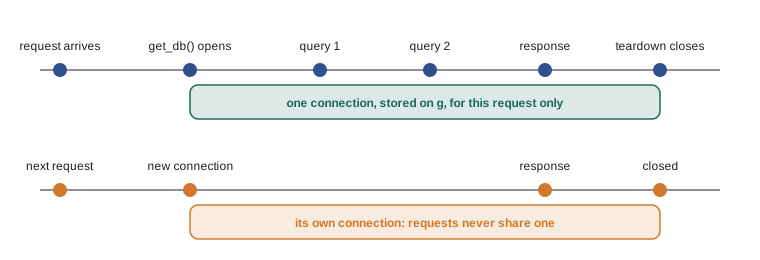
A web server handles many requests, often at the same time in different threads or processes. Opening a connection when the application starts and sharing it everywhere causes trouble, because a database connection is not meant to be used by several threads at once and a failed query in one request could leave the shared connection in a broken state. The standard pattern is one connection per request: open it when a request first needs the database, keep it for the rest of that request, and close it when the request ends, whether it succeeded or failed.
# ridgeline_web/db.py (Flask, on your own computer)
import sqlite3
from flask import current_app, g

def get_db():
    if "db" not in g:
        g.db = sqlite3.connect(current_app.config["DATABASE"])
        g.db.row_factory = sqlite3.Row
    return g.db

def close_db(error=None):
    db = g.pop("db", None)
    if db is not None:
        db.close()

def init_app(app):
    app.teardown_appcontext(close_db)       # runs at the end of every request
Flask's g object is a place to keep data for the duration of one request, and teardown_appcontext registers a function Flask calls when the request finishes, even if an exception occurred. The view simply calls get_db() whenever it needs the database. Production databases such as PostgreSQL add a connection pool, which keeps a few connections open and lends them to requests, because opening a new network connection for every request is slow. Libraries such as SQLAlchemy manage the pool for you.
Parameterized queries, always
Every value that comes from a request must reach the database as a parameter, never pasted into the SQL text. You learned why in PYTH-215: if a product code from the URL is glued into a query with an f-string, a crafted value can change the meaning of the SQL. This is SQL injection, and on the web it is not hypothetical, because anyone in the world can type anything into your URLs and forms. With a placeholder, the database receives the SQL and the value separately and can never mistake the value for code.
import sqlite3

def make_db():
    conn = sqlite3.connect(":memory:")
    conn.row_factory = sqlite3.Row
    conn.executescript("""
        CREATE TABLE coffee (sku TEXT PRIMARY KEY, name TEXT NOT NULL, price_cents INTEGER NOT NULL,
                             bags INTEGER NOT NULL CHECK (bags >= 0));
        CREATE TABLE orders (id INTEGER PRIMARY KEY, email TEXT NOT NULL, sku TEXT NOT NULL REFERENCES coffee(sku),
                             quantity INTEGER NOT NULL CHECK (quantity > 0));
        INSERT INTO coffee VALUES ('RC-101', 'Sunrise Blend', 1850, 42), ('RC-102', 'Ethiopia Guji', 2200, 15),
            ('RC-103', 'Colombia Huila', 1975, 27), ('RC-104', 'Sumatra Dark', 2025, 9),
            ('RC-105', 'Decaf Swiss Water', 1900, 12), ('RC-106', 'Espresso Ridge', 2150, 30);
    """)
    return conn


conn = make_db()

def find_coffee(conn, sku):
    row = conn.execute("SELECT sku, name, bags FROM coffee WHERE sku = ?", (sku,)).fetchone()
    return dict(row) if row else None

print(find_coffee(conn, "RC-104"))
print(find_coffee(conn, "RC-999"))
print(find_coffee(conn, "RC-104' OR '1'='1")) # just a strange code that matches nothing{'sku': 'RC-104', 'name': 'Sumatra Dark', 'bags': 9}
None
NoneThe third call passes text that would have matched every row if it had been pasted into the SQL. As a parameter it is just an unusual product code, and the query correctly finds nothing. Note the comma in (sku,): the parameters must be a tuple, and a one-item tuple needs that trailing comma. Placeholders work for values only. Table and column names cannot be parameters, so if a query's sort column comes from the request, choose it from an allow list as in the next example.
import sqlite3

def make_db():
    conn = sqlite3.connect(":memory:")
    conn.row_factory = sqlite3.Row
    conn.executescript("""
        CREATE TABLE coffee (sku TEXT PRIMARY KEY, name TEXT NOT NULL, price_cents INTEGER NOT NULL,
                             bags INTEGER NOT NULL CHECK (bags >= 0));
        CREATE TABLE orders (id INTEGER PRIMARY KEY, email TEXT NOT NULL, sku TEXT NOT NULL REFERENCES coffee(sku),
                             quantity INTEGER NOT NULL CHECK (quantity > 0));
        INSERT INTO coffee VALUES ('RC-101', 'Sunrise Blend', 1850, 42), ('RC-102', 'Ethiopia Guji', 2200, 15),
            ('RC-103', 'Colombia Huila', 1975, 27), ('RC-104', 'Sumatra Dark', 2025, 9),
            ('RC-105', 'Decaf Swiss Water', 1900, 12), ('RC-106', 'Espresso Ridge', 2150, 30);
    """)
    return conn


conn = make_db()
SORTS = {"name": "name", "price": "price_cents", "stock": "bags"}

def list_coffees(conn, sort="name", max_price_cents=None):
    column = SORTS.get(sort, "name")                      # allow list for the column name
    sql = f"SELECT sku, name, price_cents FROM coffee"
    params = []
    if max_price_cents is not None:
        sql += " WHERE price_cents <= ?"
        params.append(max_price_cents)
    sql += f" ORDER BY {column}, sku"
    return [tuple(r) for r in conn.execute(sql, params)]

print(list_coffees(conn, "price", 2000))
print(list_coffees(conn, "name; DROP TABLE coffee")) # unknown sort falls back to name[('RC-101', 'Sunrise Blend', 1850), ('RC-105', 'Decaf Swiss Water', 1900), ('RC-103', 'Colombia Huila', 1975)]
[('RC-103', 'Colombia Huila', 1975), ('RC-105', 'Decaf Swiss Water', 1900), ('RC-106', 'Espresso Ridge', 2150), ('RC-102', 'Ethiopia Guji', 2200), ('RC-104', 'Sumatra Dark', 2025), ('RC-101', 'Sunrise Blend', 1850)]Try it yourself
Look up a coffee safely
make_db() is defined in the setup. Write get_coffee(conn, sku) that returns a dictionary with keys sku, name and price (the price in dollars as a float, from the price_cents column) for the matching coffee, or None if there is none.
Use a ? placeholder, never string formatting, for the code.
def get_coffee(conn, sku):
    row = conn.execute(f"SELECT sku, name, price_cents FROM coffee WHERE sku = '{sku}'").fetchone()
    return {'sku': row['sku'], 'name': row['name'], 'price': row['price_cents']}

print(get_coffee(conn, 'RC-102'))
Transactions: all or nothing
Placing an order changes two things: it adds a row to the orders table and lowers the coffee's stock. If the server crashed between the two, or the second step failed, the shop would have an order with no stock taken, or stock taken with no order. A transaction groups changes so that either all of them happen or none do. In Python's sqlite3 module, using the connection as a context manager, with conn:, commits the transaction if the block finishes and rolls it back if an exception escapes.
import sqlite3

def make_db():
    conn = sqlite3.connect(":memory:")
    conn.row_factory = sqlite3.Row
    conn.executescript("""
        CREATE TABLE coffee (sku TEXT PRIMARY KEY, name TEXT NOT NULL, price_cents INTEGER NOT NULL,
                             bags INTEGER NOT NULL CHECK (bags >= 0));
        CREATE TABLE orders (id INTEGER PRIMARY KEY, email TEXT NOT NULL, sku TEXT NOT NULL REFERENCES coffee(sku),
                             quantity INTEGER NOT NULL CHECK (quantity > 0));
        INSERT INTO coffee VALUES ('RC-101', 'Sunrise Blend', 1850, 42), ('RC-102', 'Ethiopia Guji', 2200, 15),
            ('RC-103', 'Colombia Huila', 1975, 27), ('RC-104', 'Sumatra Dark', 2025, 9),
            ('RC-105', 'Decaf Swiss Water', 1900, 12), ('RC-106', 'Espresso Ridge', 2150, 30);
    """)
    return conn


conn = make_db()

class OutOfStock(Exception):
    pass

def place_order(conn, email, sku, quantity):
    with conn:                                            # commit on success, roll back on error
        cur = conn.execute("UPDATE coffee SET bags = bags - ? WHERE sku = ? AND bags >= ?",
                           (quantity, sku, quantity))
        if cur.rowcount == 0:
            raise OutOfStock(f"not enough {sku} for {quantity} bags")
        cur = conn.execute("INSERT INTO orders (email, sku, quantity) VALUES (?, ?, ?)", (email, sku, quantity))
        return cur.lastrowid

print("order", place_order(conn, "sam@example.com", "RC-104", 3))
try:
    place_order(conn, "lee@example.com", "RC-104", 10)
except OutOfStock as err:
    print("refused:", err)
print("RC-104 bags left:", conn.execute("SELECT bags FROM coffee WHERE sku = 'RC-104'").fetchone()[0])
print("orders:", conn.execute("SELECT COUNT(*) FROM orders").fetchone()[0])order 1 refused: not enough RC-104 for 10 bags RC-104 bags left: 6 orders: 1
The UPDATE does the stock check and the change in a single statement: it only subtracts if bags >= quantity, and rowcount tells you whether a row was changed. Checking stock with a SELECT first and then updating would leave a gap in which two customers could both see the last three bags and both buy them. This is called a race condition, and on a busy website it is not rare. Letting the database check and change in one step closes the gap.
lastrowid gives the id the database assigned to the new order, which the view can use for the confirmation page. When the order fails, the exception rolls back the transaction and travels up to the view, which can show the customer a polite message. The second order above changed nothing.
Try it yourself
Restock in a transaction
Write restock(conn, deliveries) where deliveries is a list of (sku, bags) pairs. Add each delivery to the coffee's stock inside ONE transaction. If any sku does not exist, or any bags value is not a positive int, raise ValueError and make sure NONE of the deliveries is applied.
make_db() and conn come from the setup.
def restock(conn, deliveries):
    for sku, bags in deliveries:
        conn.execute('UPDATE coffee SET bags = bags + ? WHERE sku = ?', (bags, sku))
        conn.commit()

restock(conn, [('RC-104', 20)])
print(conn.execute("SELECT bags FROM coffee WHERE sku = 'RC-104'").fetchone()[0])
Pagination
Ridgeline sells six coffees today, but the orders table grows every day, and an order history page that loads every order ever placed will get slower and slower. Long lists are shown a page at a time. The simplest method uses LIMIT and OFFSET: page 3 with 20 orders per page skips 40 rows and takes the next 20. The view reads the page number from the query string, validates it and passes the numbers to the query as parameters. To show page links, you also need the total count.
import sqlite3

def make_db():
    conn = sqlite3.connect(":memory:")
    conn.row_factory = sqlite3.Row
    conn.executescript("""
        CREATE TABLE coffee (sku TEXT PRIMARY KEY, name TEXT NOT NULL, price_cents INTEGER NOT NULL,
                             bags INTEGER NOT NULL CHECK (bags >= 0));
        CREATE TABLE orders (id INTEGER PRIMARY KEY, email TEXT NOT NULL, sku TEXT NOT NULL REFERENCES coffee(sku),
                             quantity INTEGER NOT NULL CHECK (quantity > 0));
        INSERT INTO coffee VALUES ('RC-101', 'Sunrise Blend', 1850, 42), ('RC-102', 'Ethiopia Guji', 2200, 15),
            ('RC-103', 'Colombia Huila', 1975, 27), ('RC-104', 'Sumatra Dark', 2025, 9),
            ('RC-105', 'Decaf Swiss Water', 1900, 12), ('RC-106', 'Espresso Ridge', 2150, 30);
    """)
    return conn


conn = make_db()
with conn:
    conn.executemany("INSERT INTO orders (email, sku, quantity) VALUES (?, ?, ?)",
                     [(f"customer{i}@example.com", "RC-101", 1 + i % 3) for i in range(1, 48)])

def order_page(conn, page, per_page=20):
    total = conn.execute("SELECT COUNT(*) FROM orders").fetchone()[0]
    pages = max(1, -(-total // per_page))                 # ceiling division
    page = min(max(1, page), pages)
    rows = conn.execute("SELECT id, email FROM orders ORDER BY id LIMIT ? OFFSET ?",
                        (per_page, (page - 1) * per_page)).fetchall()
    return {"page": page, "pages": pages, "total": total, "ids": [r["id"] for r in rows]}

for p in (1, 3, 99):
    info = order_page(conn, p)
print(info["page"], "of", info["pages"], "->", info["ids"][:3], "...", len(info["ids"]), "rows")1 of 3 -> [1, 2, 3] ... 20 rows 3 of 3 -> [41, 42, 43] ... 7 rows 3 of 3 -> [41, 42, 43] ... 7 rows
The page number is clamped into the valid range, so ?page=99 shows the last page instead of an empty one, and ?page=-5 shows the first. Always include ORDER BY when paging; without it the database may return rows in any order and the same order could appear on two pages. For very large tables, OFFSET becomes slow because the database still walks past the skipped rows, and sites switch to keyset pagination, which asks for rows after the last id seen, such as WHERE id > ? ORDER BY id LIMIT 20.
The N+1 query problem
A classic performance mistake in web applications is running one query for a list and then one more query for each item in it. An order history page that fetches 20 orders and then, in a loop, fetches the coffee name for each order runs 21 queries. With hundreds of rows, the page crawls. The fix is to fetch related data in one query with a JOIN, or in two queries with WHERE ... IN, and assemble the result in Python.
import sqlite3

def make_db():
    conn = sqlite3.connect(":memory:")
    conn.row_factory = sqlite3.Row
    conn.executescript("""
        CREATE TABLE coffee (sku TEXT PRIMARY KEY, name TEXT NOT NULL, price_cents INTEGER NOT NULL,
                             bags INTEGER NOT NULL CHECK (bags >= 0));
        CREATE TABLE orders (id INTEGER PRIMARY KEY, email TEXT NOT NULL, sku TEXT NOT NULL REFERENCES coffee(sku),
                             quantity INTEGER NOT NULL CHECK (quantity > 0));
        INSERT INTO coffee VALUES ('RC-101', 'Sunrise Blend', 1850, 42), ('RC-102', 'Ethiopia Guji', 2200, 15),
            ('RC-103', 'Colombia Huila', 1975, 27), ('RC-104', 'Sumatra Dark', 2025, 9),
            ('RC-105', 'Decaf Swiss Water', 1900, 12), ('RC-106', 'Espresso Ridge', 2150, 30);
    """)
    return conn


conn = make_db()
with conn:
    conn.executemany("INSERT INTO orders (email, sku, quantity) VALUES (?, ?, ?)",
                     [("sam@example.com", "RC-104", 2), ("lee@example.com", "RC-101", 1), ("ana@example.com", "RC-104", 3)])

queries = 0
def q(sql, params=()):
    global queries
    queries += 1
    return conn.execute(sql, params).fetchall()

# N+1: one query for the orders, then one per order
for o in q("SELECT id, sku, quantity FROM orders ORDER BY id"):
    name = q("SELECT name FROM coffee WHERE sku = ?", (o["sku"],))[0]["name"]
print("N+1 approach:", queries, "queries")

queries = 0
rows = q("""SELECT o.id, c.name, o.quantity FROM orders o
            JOIN coffee c ON c.sku = o.sku ORDER BY o.id""")
print("JOIN approach:", queries, "query")
for r in rows:
print(r["id"], r["name"], r["quantity"])N+1 approach: 4 queries JOIN approach: 1 query 1 Sumatra Dark 2 2 Sunrise Blend 1 3 Sumatra Dark 3
ORMs and migrations
Writing SQL by hand, as in this lesson, keeps you close to what the database does. Many applications use an object-relational mapper (ORM) instead, which represents tables as Python classes and rows as objects. SQLAlchemy is the most widely used ORM for Flask, usually through the Flask-SQLAlchemy extension, and Django has its own ORM, which you will meet in the next lesson. An ORM builds parameterized SQL for you, which removes most injection risk, but it can also hide expensive queries such as the N+1 pattern, so it pays to know the SQL underneath.
Databases change over time: Rosa will want a roast date on each coffee, and orders will need a status column. Migrations are small scripts that change the schema one step at a time and are kept in version control, so every copy of the database, on Jordan's laptop, in the tests and on the server, can be brought to the same shape. Flask projects commonly use Alembic through Flask-Migrate; Django has migrations built in.
# Flask-SQLAlchemy (pip install flask-sqlalchemy), on your own computer
from flask_sqlalchemy import SQLAlchemy
from sqlalchemy.orm import Mapped, mapped_column

db = SQLAlchemy()

class Coffee(db.Model):
    sku: Mapped[str] = mapped_column(primary_key=True)
    name: Mapped[str]
    price_cents: Mapped[int]
    bags: Mapped[int]

# in a view:
#   coffee = db.session.get(Coffee, "RC-104")
#   cheap = db.session.scalars(db.select(Coffee).where(Coffee.price_cents < 2000)).all()
Try it yourself
Page through the coffees
Write coffee_page(conn, page, per_page=2) that returns the list of skus on that page of the coffee table ordered by sku, using LIMIT ? OFFSET ? parameters. Pages are numbered from 1; a page below 1 is treated as page 1, and a page past the end returns an empty list.
make_db() and conn come from the setup (six coffees, RC-101 to RC-106).
def coffee_page(conn, page, per_page=2):
    rows = conn.execute('SELECT sku FROM coffee LIMIT ? OFFSET ?', (per_page, page * per_page)).fetchall()
    return [r['sku'] for r in rows]

print(coffee_page(conn, 1))
Common mistakes
MistakeSharing one database connection across all requests and threads.
InsteadOpen a connection per request (or use a pool) and close it in a teardown function.
MistakePasting request values into SQL with f-strings.
InsteadPass every value as a ? parameter; choose column names from an allow list.
MistakeChecking stock with SELECT and then updating, leaving a race between customers.
InsteadCheck and change in one UPDATE ... WHERE bags >= ? and test rowcount.
MistakeWriting related changes without a transaction.
InsteadGroup them in with conn: so they commit together or roll back together.
MistakeRunning one query per row of a list (N+1).
InsteadFetch related data with a JOIN or a single IN query.
MistakePaginating without ORDER BY.
InsteadAlways order by a unique column when using LIMIT and OFFSET.
Summary and key terms
- Store money as whole cents in an integer column, and use sqlite3.Row to read columns by name.
- Use one database connection per request, opened on demand and closed in a teardown function; production systems use a connection pool.
- Every value from a request goes into SQL as a parameter; identifiers such as sort columns come from an allow list.
- Transactions make related changes all-or-nothing; with conn: commits on success and rolls back on an exception.
- Check and change in one statement to avoid race conditions between simultaneous customers.
- Paginate long lists with LIMIT, OFFSET and ORDER BY, and avoid N+1 queries with JOINs.
- ORMs such as SQLAlchemy and Django's map tables to classes; migrations evolve the schema in version-controlled steps.
- connection per request
- Opening a database connection for one request and closing it when the request ends.
- parameterized query
- SQL with placeholders whose values are sent separately from the SQL text.
- SQL injection
- An attack where crafted input changes the meaning of a SQL statement.
- transaction
- A group of changes that are committed together or not at all.
- race condition
- A bug where the result depends on the timing of simultaneous operations.
- pagination
- Showing a long list one page at a time.
- N+1 query problem
- Running one query for a list and then one more for each item.
- migration
- A script that changes the database schema one versioned step at a time.
Practice problems
Work each problem on paper first, then reveal the answer to check.
Why does find_coffee pass (sku,) rather than (sku)?
Show answer
Parameters must be a tuple; (sku) is just sku in parentheses, while (sku,) is a one-item tuple.
Two customers try to buy the last 3 bags at the same moment. How does UPDATE ... WHERE bags >= ? prevent overselling?
Show answer
The database checks and subtracts in one step, so only one update can succeed; the other changes no rows and rowcount is 0.
With 20 orders per page, what OFFSET does page 4 use?
Show answer
60, because (4 - 1) * 20 = 60.
A page shows 50 orders and runs 51 queries. What is the problem called and how do you fix it?
Show answer
The N+1 query problem; fetch the related data with a JOIN or one IN query.
Why keep migrations in version control?
Show answer
So every copy of the database can be brought to the same schema in the same steps.
Lesson quiz · 5 questions
Score 60% or more to complete this lesson.
Create a free account to save your progress, take quizzes and earn a certificate.