
PYTH-220 · Lesson 10 of 12 · 21 min
Building REST APIs
▶ Video coming soon A video version of this lesson is on the way.
So far every page of the Ridgeline shop has been HTML for people to read. Theo now wants a small phone app for the warehouse that shows stock and marks orders shipped, and a delivery partner wants to send Ridgeline orders directly from its own system. Neither wants web pages; both want data. An API (application programming interface) on the web is a set of URLs that accept and return data, usually JSON, for other programs to use. This lesson designs and builds Ridgeline's order API in the REST style, the most common way to organize web APIs.
The same server, the same database and much of the same code serve both the HTML shop and the API. Only the outer layer changes: the API reads JSON instead of form fields and returns JSON with precise status codes instead of rendered templates.
Resources, URLs and methods
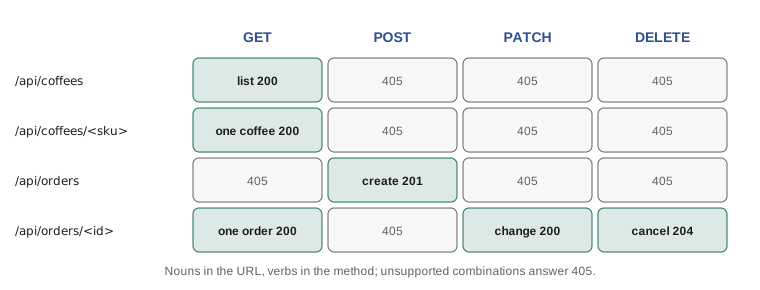
REST organizes an API around resources, the things your system manages, such as coffees and orders, each with a URL. Collections get plural nouns: /api/coffees and /api/orders. A single item adds its identifier: /api/orders/1042. The HTTP method says what to do with the resource, so the URLs contain nouns, not verbs. You do not create /api/createOrder; you send POST to /api/orders. Consistency is the main benefit: once a developer has seen how one resource works, they can guess the rest.
ENDPOINTS = [
    ("GET",    "/api/coffees",            "list coffees",                 "200 OK"),
    ("GET",    "/api/coffees/RC-104",     "one coffee",                   "200 OK or 404"),
    ("POST",   "/api/orders",             "create an order",              "201 Created + Location"),
    ("GET",    "/api/orders/1042",        "one order",                    "200 OK or 404"),
    ("PATCH",  "/api/orders/1042",        "change status, e.g. shipped",  "200 OK or 422"),
    ("DELETE", "/api/orders/1042",        "cancel an order",              "204 No Content"),
]
for method, path, meaning, result in ENDPOINTS:
print(f"{method:<7} {path:<22} {meaning:<29} {result}")GET /api/coffees list coffees 200 OK GET /api/coffees/RC-104 one coffee 200 OK or 404 POST /api/orders create an order 201 Created + Location GET /api/orders/1042 one order 200 OK or 404 PATCH /api/orders/1042 change status, e.g. shipped 200 OK or 422 DELETE /api/orders/1042 cancel an order 204 No Content
Two properties of methods matter for reliability. Safe methods (GET, HEAD) change nothing. Idempotent methods (GET, PUT, DELETE) have the same effect whether you send them once or five times: deleting order 1042 twice leaves it deleted. POST is neither, which is why a phone app that retries a timed-out POST can create a duplicate order. APIs solve this with an idempotency key: the client sends a unique value in a header, and the server remembers which keys it has already processed and returns the original result for a repeat.
JSON in and JSON out
JSON is the lingua franca of web APIs because every language can read it and its structures, objects, arrays, strings, numbers, true, false and null, map directly onto Python dictionaries, lists, strings, numbers, True, False and None. A request with a JSON body sends the header Content-Type: application/json; a JSON response sends the same. Errors are JSON too, in one consistent shape, so client programs can always read them. Ridgeline uses an error object with a short machine-readable code, a human message and, for validation problems, the details per field.
import json

COFFEES = {"RC-101": {"name": "Sunrise Blend", "price_cents": 1850, "bags": 42},
           "RC-104": {"name": "Sumatra Dark", "price_cents": 2025, "bags": 9}}
ORDERS = {}
NEXT_ID = [1000]

from http import HTTPStatus

def reply(status, data=None):
    body = "" if data is None else json.dumps(data)
    return f"{status} {HTTPStatus(status).phrase}", body

def error(status, code, message, fields=None):
    payload = {"error": {"code": code, "message": message}}
    if fields:
        payload["error"]["fields"] = fields
    return reply(status, payload)

print(reply(200, {"sku": "RC-104", **COFFEES["RC-104"]}))
print(error(404, "not_found", "No coffee with code RC-999"))
print(error(422, "invalid", "The order has problems", {"quantity": "must be between 1 and 20"}))('200 OK', '{"sku": "RC-104", "name": "Sumatra Dark", "price_cents": 2025, "bags": 9}')
('404 Not Found', '{"error": {"code": "not_found", "message": "No coffee with code RC-999"}}')
('422 Unprocessable Content', '{"error": {"code": "invalid", "message": "The order has problems", "fields": {"quantity": "must be between 1 and 20"}}}')Prices travel as whole cents, the same as in the database, so no client ever has to worry about floating-point rounding. Dates travel as ISO 8601 strings such as 2026-11-10T09:30:00Z, which every language can parse. These small conventions, chosen once and documented, save every API client from guessing.
Handling requests
An API handler looks like any view: find the route, read the input, validate it, do the work and build the response. The example below is a tiny but complete in-memory version of the orders endpoints, written as a single dispatch function so it runs here. It validates the JSON body, checks stock, returns 201 Created with a Location header for a new order, and gives 404, 405 and 422 where they apply.
import json

COFFEES = {"RC-101": {"name": "Sunrise Blend", "price_cents": 1850, "bags": 42},
           "RC-104": {"name": "Sumatra Dark", "price_cents": 2025, "bags": 9}}
ORDERS = {}
NEXT_ID = [1000]

def handle(method, path, body=""):
    parts = path.strip("/").split("/")                     # ['api', 'orders', '1000']
    if parts[:2] != ["api", "orders"]:
        return 404, {"error": "not_found"}, {}
    if len(parts) == 2:
        if method != "POST":
            return 405, {"error": "method_not_allowed"}, {"Allow": "POST"}
        try:
            data = json.loads(body)
        except json.JSONDecodeError:
            return 400, {"error": "bad_json"}, {}
        sku, qty = data.get("sku"), data.get("quantity")
        if sku not in COFFEES or not isinstance(qty, int) or not 1 <= qty <= 20:
            return 422, {"error": "invalid"}, {}
        if COFFEES[sku]["bags"] < qty:
            return 409, {"error": "out_of_stock"}, {}
        COFFEES[sku]["bags"] -= qty
        NEXT_ID[0] += 1
        order = {"id": NEXT_ID[0], "sku": sku, "quantity": qty, "status": "new"}
        ORDERS[order["id"]] = order
        return 201, order, {"Location": f"/api/orders/{order['id']}"}
    if not parts[2].isdigit() or int(parts[2]) not in ORDERS:
        return 404, {"error": "not_found"}, {}
    if method == "GET":
        return 200, ORDERS[int(parts[2])], {}
    return 405, {"error": "method_not_allowed"}, {"Allow": "GET"}

print(handle("POST", "/api/orders", '{"sku": "RC-104", "quantity": 3}'))
print(handle("GET", "/api/orders/1001"))
print(handle("POST", "/api/orders", '{"sku": "RC-104", "quantity": 30}'))
print(handle("POST", "/api/orders", "not json"))
print(handle("GET", "/api/orders"))(201, {'id': 1001, 'sku': 'RC-104', 'quantity': 3, 'status': 'new'}, {'Location': '/api/orders/1001'})
(200, {'id': 1001, 'sku': 'RC-104', 'quantity': 3, 'status': 'new'}, {})
(422, {'error': 'invalid'}, {})
(400, {'error': 'bad_json'}, {})
(405, {'error': 'method_not_allowed'}, {'Allow': 'POST'})409 Conflict fits the out-of-stock case: the request is valid, but it conflicts with the current state of the resource. Each status code tells the client program what to do next without parsing English: 400 means fix the request format, 422 means fix the values, 409 means the situation has changed and 404 means the thing is not there.
# Flask version (on your own computer)
from flask import Flask, request, jsonify, url_for

app = Flask(__name__)

@app.post("/api/orders")
def create_order():
    data = request.get_json(silent=True)
    if data is None:
        return {"error": {"code": "bad_json", "message": "Send a JSON body"}}, 400
    order, errors = place_order_from(data)              # validation + transaction, as in lessons 5 and 6
    if errors:
        return {"error": {"code": "invalid", "fields": errors}}, 422
    return order, 201, {"Location": url_for("get_order", order_id=order["id"])}

@app.get("/api/orders/<int:order_id>")
def get_order(order_id):
    order = find_order(order_id)
    if order is None:
        return {"error": {"code": "not_found"}}, 404
    return order
Try it yourself
Validate an API payload
Write check_order(payload) that takes the parsed JSON (normally a dict) and returns a dictionary of field errors, empty if the order is valid. Rules: the payload must be a dict, otherwise return {"body": "must be a JSON object"}; sku must be a key of COFFEES (setup); quantity must be an int (not a bool, not a float, not a string) from 1 to 20.
Use the field names sku and quantity as the error keys; any message text is fine.
def check_order(payload):
    errors = {}
    if payload['sku'] not in COFFEES:
        errors['sku'] = 'unknown coffee'
    return errors

print(check_order({'sku': 'RC-104', 'quantity': '3'}))
Authenticating API clients
Programs cannot fill in a sign-in form, so APIs usually authenticate with tokens. Theo's warehouse app holds an API token, a long random string issued by Ridgeline, and sends it in every request in the Authorization header: Authorization: Bearer 7Gk2.... The server looks up the token, finds which user or partner it belongs to and what it may do, and rejects the request with 401 if the token is missing or unknown, or 403 if the token is valid but not allowed to do this. Tokens are secrets: they travel only over HTTPS, are stored hashed on the server like passwords, and can be revoked individually when a phone is lost.
import hashlib, hmac

TOKENS = {  # stored as SHA-256 hashes, with the scopes each token may use
    hashlib.sha256(b"wh-7Gk2pQ9xLm4").hexdigest(): {"who": "warehouse app", "scopes": {"orders:read", "orders:ship"}},
    hashlib.sha256(b"pt-Zx81Rr0aQe2").hexdigest(): {"who": "delivery partner", "scopes": {"orders:create"}},
}

def authorize(header, scope):
    if not header or not header.startswith("Bearer "):
        return 401, "missing token"
    digest = hashlib.sha256(header[7:].strip().encode()).hexdigest()
    for stored, info in TOKENS.items():
        if hmac.compare_digest(stored, digest):
            return (200, info["who"]) if scope in info["scopes"] else (403, "not allowed")
    return 401, "unknown token"

print(authorize("Bearer wh-7Gk2pQ9xLm4", "orders:ship"))
print(authorize("Bearer pt-Zx81Rr0aQe2", "orders:ship"))
print(authorize("Bearer guessed-token", "orders:read"))
print(authorize(None, "orders:read"))(200, 'warehouse app') (403, 'not allowed') (401, 'unknown token') (401, 'missing token')
Scopes limit what each token can do: the delivery partner can create orders but cannot read other customers' orders or mark anything shipped. A fast hash is acceptable for tokens, unlike passwords, because a token is long and random, so there are no likely guesses for an attacker to try. Larger systems use standards such as OAuth 2.0 to issue short-lived tokens, but the principle is the same.
Try it yourself
Read a bearer token
Write bearer_token(headers) that takes a dictionary of request headers (names may be in any case) and returns the token from an Authorization: Bearer <token> header, or None if the header is missing, uses another scheme, or the token is empty. The word Bearer may be in any case and extra spaces around the token should be removed.
def bearer_token(headers):
    return headers['Authorization'][7:]

print(bearer_token({'Authorization': 'Bearer abc123'}))
Lists, filters, versions and documentation
Collection endpoints need the same pagination as HTML pages, usually through query parameters such as ?page=2&per_page=50 or a cursor, with the response including links or a next value so clients can follow along. Filters use query parameters too: /api/orders?status=new. Once other programs depend on an API, changing it can break them, so APIs are versioned, most simply with a prefix such as /api/v1/, and old versions are kept running for an announced period after a new one appears.
Finally, an API is only as useful as its documentation. The OpenAPI standard describes every endpoint, parameter, request body and response in a machine-readable file, from which tools generate interactive documentation pages and client code. Django REST Framework, the most popular toolkit for building APIs with Django, and FastAPI, a framework built around type hints, can generate OpenAPI descriptions from your code automatically.
# Django REST Framework (pip install djangorestframework), on your own computer
from rest_framework import serializers, viewsets, permissions
from orders.models import Order

class OrderSerializer(serializers.ModelSerializer):
    class Meta:
        model = Order
        fields = ["id", "email", "status", "created"]
        read_only_fields = ["id", "created"]

class OrderViewSet(viewsets.ModelViewSet):
    serializer_class = OrderSerializer
    permission_classes = [permissions.IsAuthenticated]

    def get_queryset(self):
        return Order.objects.filter(email=self.request.user.email)   # ownership again
Try it yourself
A tiny resource handler
Write handle(method, path) for a read-only coffee API over COFFEES (setup). GET /api/coffees returns (200, sorted list of skus). GET /api/coffees/<sku> returns (200, {"sku": sku, "bags": n}) or (404, {"error": "not_found"}) if the sku is unknown. Any other method on those paths returns (405, {"error": "method_not_allowed"}). Any other path returns (404, {"error": "not_found"}).
def handle(method, path):
    if path == '/api/coffees':
        return 200, list(COFFEES)
    sku = path.split('/')[-1]
    return 200, {'sku': sku, 'bags': COFFEES[sku]['bags']}

print(handle('GET', '/api/coffees/RC-104'))
Common mistakes
MistakePutting verbs in URLs, such as /api/getOrders or /api/deleteOrder.
InsteadUse nouns for resources and HTTP methods for actions.
MistakeReturning 200 with an error message inside the JSON.
InsteadReturn the matching status code (400, 401, 403, 404, 409, 422) with a consistent error object.
MistakeAccepting "3" or true as a quantity because Python happens to convert it.
InsteadCheck JSON types strictly: an int that is not a bool, in range.
MistakeSending money as floating-point numbers.
InsteadSend whole cents (or decimal strings) and document the unit.
MistakeStoring API tokens in plain text or putting them in URLs.
InsteadSend tokens in the Authorization header over HTTPS and store only hashes.
MistakeChanging an API in place and breaking existing clients.
InsteadVersion the API and keep the old version running for a while.
Summary and key terms
- A REST API exposes resources at noun URLs and uses HTTP methods for actions: GET reads, POST creates, PUT and PATCH change, DELETE removes.
- Safe and idempotent methods can be repeated; idempotency keys make POST retries safe.
- APIs send and receive JSON, use precise status codes and return errors in one consistent shape.
- Validate JSON types strictly; a new resource returns 201 Created with a Location header.
- API clients authenticate with bearer tokens sent in the Authorization header; tokens are stored hashed and limited by scopes.
- Collections are paginated and filtered with query parameters; APIs are versioned and documented with OpenAPI.
- API
- A set of endpoints that programs use to exchange data with a system.
- REST
- A style of API design built on resources, URLs and HTTP methods.
- resource
- A thing an API manages, such as a coffee or an order, with its own URL.
- idempotent
- Having the same effect whether a request is made once or many times.
- bearer token
- A secret string sent in the Authorization header to authenticate an API client.
- scope
- A permission attached to a token that limits what it can do.
- 409 Conflict
- The status for a valid request that conflicts with the current state.
- OpenAPI
- A standard, machine-readable way to describe an API.
Practice problems
Work each problem on paper first, then reveal the answer to check.
What URL and method create a new order in a REST API?
Show answer
POST /api/orders.
Which status code and header should the response to a successful order creation have?
Show answer
201 Created with a Location header pointing to the new order.
A request sends {"quantity": "3"}. Should the API accept it?
Show answer
No: the quantity must be a JSON number (an int), so return 422 with a field error.
Why is deleting order 1042 twice harmless?
Show answer
DELETE is idempotent: after the first request the order is gone, and the second leaves it gone.
The delivery partner's token tries to mark an order shipped. 401 or 403?
Show answer
403 Forbidden: the token is valid but its scopes do not allow shipping.
Lesson quiz · 5 questions
Score 60% or more to complete this lesson.
Create a free account to save your progress, take quizzes and earn a certificate.