
PYTH-220 · Lesson 8 of 12 · 23 min
Django views and the admin
▶ Video coming soon A video version of this lesson is on the way.
With models and migrations in place, Ridgeline's Django site has a database but no pages. This lesson adds them. You will connect URLs to views with Django's URLconf, write function-based and class-based views, render templates with the coffee data and handle missing objects properly. Then you will meet the feature many teams choose Django for: the admin site, a complete back office generated from your models, which lets Theo edit stock and update order statuses without Jordan writing a single extra page.
As in lesson 7, Django code appears in listings for your own computer, and runnable examples rebuild the key mechanisms, such as reverse URL lookup and pagination, in plain Python.
The URLconf
In Django, URLs are listed in urls.py modules as a list called urlpatterns. Each entry uses path() with a pattern, a view and, ideally, a name. Patterns use converters much like Flask's: <int:order_id> and <str:sku>, with slug and uuid also available. The project's urls.py includes each app's urls.py under a prefix, so the catalog app owns everything under coffees/ and can be moved or reused without editing the project's other URLs.
# ridgeline_site/urls.py
from django.contrib import admin
from django.urls import include, path

urlpatterns = [
    path("admin/", admin.site.urls),
    path("", include("catalog.urls")),
    path("orders/", include("orders.urls")),
]

# catalog/urls.py
from django.urls import path
from . import views

app_name = "catalog"
urlpatterns = [
    path("", views.home, name="home"),
    path("coffees/", views.CoffeeList.as_view(), name="coffee_list"),
    path("coffees/<str:sku>/", views.coffee_detail, name="coffee_detail"),
]
Names matter as much in Django as url_for did in Flask. reverse("catalog:coffee_detail", kwargs={"sku": "RC-104"}) in Python, or {% url 'catalog:coffee_detail' sku='RC-104' %} in a template, builds the URL from the name, so changing the pattern later updates every link automatically. The app_name line creates a namespace, so two apps can both have a view named detail without clashing. Reverse lookup is simple at heart: find the pattern by name and fill in its placeholders.
URLPATTERNS = [
    ("", "home"),
    ("coffees/", "coffee_list"),
    ("coffees/<str:sku>/", "coffee_detail"),
    ("orders/<int:order_id>/", "order_detail"),
]

import re

def reverse(name, **kwargs):
    for pattern, pattern_name in URLPATTERNS:
        if pattern_name == name:
            def fill(m):
                key = m.group(2)
                if key not in kwargs:
                    raise KeyError(f"missing argument {key!r} for {name}")
                return str(kwargs[key])
            return "/" + re.sub(r"<(\w+):(\w+)>", fill, pattern)
    raise LookupError(f"no URL named {name!r}")

print(reverse("home"))
print(reverse("coffee_detail", sku="RC-104"))
print(reverse("order_detail", order_id=1042))/ /coffees/RC-104/ /orders/1042/
Try it yourself
Reverse a URL
URLPATTERNS (in the setup) is a list of (pattern, name) pairs such as ("coffees/<str:sku>/", "coffee_detail"). Write reverse(name, **kwargs) that returns the path, starting with /, with each <type:key> replaced by the matching keyword argument. Raise LookupError if no pattern has that name.
For example reverse("order_detail", order_id=7) returns /orders/7/.
def reverse(name, **kwargs):
    for pattern, n in URLPATTERNS:
        if n == name:
            return '/' + pattern

print(reverse('order_detail', order_id=7))
Function-based views
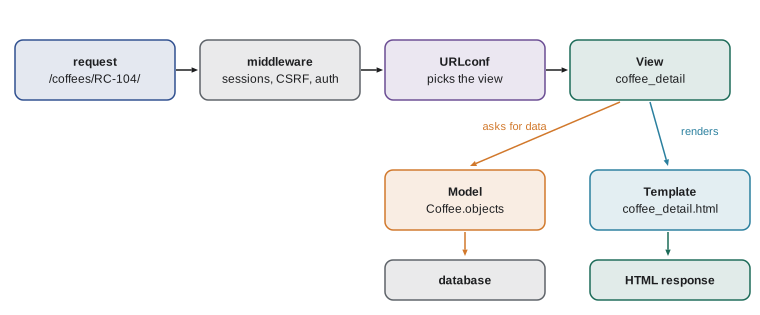
A Django view is a function that takes a request object and returns an HttpResponse. Most views follow the same three steps: fetch data from models, put it in a context dictionary, and render a template with the render shortcut. get_object_or_404 fetches one object or raises Http404, which Django turns into a proper 404 page, so a customer who types /coffees/RC-999/ sees a not-found page rather than a server error.
# catalog/views.py
from django.shortcuts import get_object_or_404, render
from .models import Coffee

def home(request):
    featured = Coffee.objects.filter(bags__gt=0).order_by("-bags")[:3]
    return render(request, "catalog/home.html", {"featured": featured})

def coffee_detail(request, sku):
    coffee = get_object_or_404(Coffee, sku=sku)
    return render(request, "catalog/coffee_detail.html", {"coffee": coffee})
Django templates look almost the same as Jinja: {{ coffee.name }} outputs a value, {% for %} and {% if %} provide logic, {% extends %} and {% block %} provide inheritance, and values are escaped automatically. The differences are small but real: Django's template language deliberately limits what you can do in a template, for example calling methods with arguments is not allowed, which pushes logic back into views where it belongs. Templates for an app go in a folder named after the app, catalog/templates/catalog/, so names never collide between apps.
{# catalog/templates/catalog/coffee_detail.html #}
{% extends "base.html" %}
{% block title %}{{ coffee.name }} | Ridgeline{% endblock %}
{% block content %}
  <h1>{{ coffee.name }}</h1>
  <p>{{ coffee.get_roast_display }} roast, {{ coffee.price }} for 340 g</p>
  {% if coffee.is_low %}<p class="low">Only {{ coffee.bags }} bags left</p>{% endif %}
  <a href="{% url 'catalog:coffee_list' %}">All coffees</a>
{% endblock %}
get_roast_display is a method Django adds for fields with choices, returning the human-readable label rather than the stored value. In templates you write it without parentheses, because Django templates call methods that take no arguments automatically.
Class-based views
Many views do the same jobs: list objects, show one object, show a form and save it. Django provides class-based views for these patterns. ListView and DetailView need only a model and a template name; Django supplies the query, the 404 handling and the context. You customize them by setting attributes, such as paginate_by, or overriding methods, such as get_queryset. They save a lot of code for standard pages, though function views are often clearer for anything unusual, and both styles are common in real projects.
# catalog/views.py
from django.views.generic import ListView
from .models import Coffee

class CoffeeList(ListView):
    model = Coffee
    template_name = "catalog/coffee_list.html"
    context_object_name = "coffees"
    paginate_by = 12

    def get_queryset(self):
        qs = super().get_queryset()
        roast = self.request.GET.get("roast")
        if roast in {"light", "medium", "dark"}:
            qs = qs.filter(roast=roast)
        return qs
Here is the allow list again: the roast parameter is only used if it is one of the three known values. Django's ORM would safely parameterize any value, so this is not about injection; it is about predictable behavior and clear URLs. paginate_by makes ListView split the results into pages and add page_obj to the template context, with the current page's items and information for page links. Django's Paginator class does the work, and its core logic is short enough to write yourself.
COFFEES = [
    {"sku": "RC-101", "name": "Sunrise Blend", "roast": "medium", "bags": 42},
    {"sku": "RC-102", "name": "Ethiopia Guji", "roast": "light", "bags": 15},
    {"sku": "RC-103", "name": "Colombia Huila", "roast": "medium", "bags": 27},
    {"sku": "RC-104", "name": "Sumatra Dark", "roast": "dark", "bags": 9},
    {"sku": "RC-105", "name": "Decaf Swiss Water", "roast": "medium", "bags": 12},
    {"sku": "RC-106", "name": "Espresso Ridge", "roast": "dark", "bags": 30},
]

import math

def paginate(items, page, per_page):
    pages = max(1, math.ceil(len(items) / per_page))
    try:
        page = int(page)
    except (TypeError, ValueError):
        page = 1
    page = min(max(page, 1), pages)
    start = (page - 1) * per_page
    return {"items": items[start:start + per_page], "number": page, "num_pages": pages,
            "has_previous": page > 1, "has_next": page < pages}

for p in (1, 2, "abc", 9):
    info = paginate(COFFEES, p, 4)
    print(p, "->", [c["sku"] for c in info["items"]], info["number"], "of", info["num_pages"],
"prev" if info["has_previous"] else "", "next" if info["has_next"] else "")1 -> ['RC-101', 'RC-102', 'RC-103', 'RC-104'] 1 of 2 next 2 -> ['RC-105', 'RC-106'] 2 of 2 prev abc -> ['RC-101', 'RC-102', 'RC-103', 'RC-104'] 1 of 2 next 9 -> ['RC-105', 'RC-106'] 2 of 2 prev
Try it yourself
A paginator
Write paginate(items, page, per_page) that returns a dictionary with items (the slice for that page), number (the page actually shown), num_pages, has_previous and has_next. page may be a string from the query string; anything that is not a whole number shows page 1, and numbers out of range are clamped to the first or last page. An empty list still has 1 page.
def paginate(items, page, per_page):
    start = (page - 1) * per_page
    return {'items': items[start:start + per_page], 'number': page}

print(paginate(COFFEES, 2, 4))
The admin site
Django's admin is a ready-made back office. Once you create a staff account with python manage.py createsuperuser and register a model in admin.py, staff can sign in at /admin/ and list, search, filter, add, edit and delete records through forms that Django builds from the model's fields and validation rules. For Ridgeline, that means Theo can correct stock counts and mark orders ready for pickup from day one, and Rosa can add a new coffee without waiting for a custom page.
# catalog/admin.py
from django.contrib import admin
from .models import Coffee

@admin.register(Coffee)
class CoffeeAdmin(admin.ModelAdmin):
    list_display = ("sku", "name", "roast", "price", "bags", "is_low")
    list_filter = ("roast",)
    search_fields = ("sku", "name")
    list_editable = ("bags",)
    ordering = ("sku",)

    @admin.display(boolean=True, description="Low stock")
    def is_low(self, obj):
        return obj.is_low

# orders/admin.py
from django.contrib import admin
from .models import Order, OrderLine

class OrderLineInline(admin.TabularInline):
    model = OrderLine
    extra = 0

@admin.register(Order)
class OrderAdmin(admin.ModelAdmin):
    list_display = ("id", "email", "status", "created")
    list_filter = ("status",)
    inlines = [OrderLineInline]
    actions = ["mark_ready"]

    @admin.action(description="Mark selected orders ready for pickup")
    def mark_ready(self, request, queryset):
        updated = queryset.update(status="ready")
        self.message_user(request, f"{updated} orders marked ready.")
list_display chooses the columns, list_filter adds a sidebar of filters, search_fields adds a search box, list_editable lets Theo change stock directly in the list, and an inline shows an order's lines on the order's page. Admin actions run code on many selected records at once. Access is controlled by Django's permission system: each staff account can be allowed to view, add, change or delete each model, so Mei can update cafe items without being able to delete orders. The admin is meant for trusted staff, not customers; the public shop always gets its own views.
Under the hood, an admin list page is a filtered, searched, sorted and paginated query plus a table. The search box, for example, looks for the search text in each listed field and keeps rows where any of them match.
COFFEES = [
    {"sku": "RC-101", "name": "Sunrise Blend", "roast": "medium", "bags": 42},
    {"sku": "RC-102", "name": "Ethiopia Guji", "roast": "light", "bags": 15},
    {"sku": "RC-103", "name": "Colombia Huila", "roast": "medium", "bags": 27},
    {"sku": "RC-104", "name": "Sumatra Dark", "roast": "dark", "bags": 9},
    {"sku": "RC-105", "name": "Decaf Swiss Water", "roast": "medium", "bags": 12},
    {"sku": "RC-106", "name": "Espresso Ridge", "roast": "dark", "bags": 30},
]

def admin_rows(rows, list_display, search="", search_fields=(), ordering=None):
    term = search.strip().lower()
    if term:
        rows = [r for r in rows if any(term in str(r[f]).lower() for f in search_fields)]
    if ordering:
        rows = sorted(rows, key=lambda r: r[ordering.lstrip("-")], reverse=ordering.startswith("-"))
    lines = [" | ".join(f.upper() for f in list_display)]
    lines += [" | ".join(str(r[f]) for f in list_display) for r in rows]
    return "\n".join(lines)

print(admin_rows(COFFEES, ("sku", "name", "bags"), search="dark", search_fields=("name", "roast"), ordering="-bags"))SKU | NAME | BAGS RC-106 | Espresso Ridge | 30 RC-104 | Sumatra Dark | 9
Try it yourself
Admin search
Write admin_search(rows, term, fields) that returns the rows (in their original order) where the search term appears, ignoring case and surrounding spaces, in ANY of the given fields. An empty or blank term returns all rows. Values may be numbers, so convert them with str before searching.
COFFEES is in the setup; admin_search(COFFEES, " ridge ", ("name",)) returns only the Espresso Ridge row.
def admin_search(rows, term, fields):
    return [r for r in rows if term in r[fields[0]]]

print([r['sku'] for r in admin_search(COFFEES, ' ridge ', ('name',))])
Messages and the request cycle
After Theo marks orders ready, the admin shows a confirmation at the top of the next page. That comes from Django's messages framework, which stores a short message in the session during one request and shows it on the next, typically after a Post/Redirect/Get redirect. Your own views use it the same way: messages.success(request, "Order placed") before redirecting, and a few lines in base.html to display any messages. Flask has the same idea under the name flash.
Between the server and your views, Django runs middleware: small layers that process every request and response. The default middleware handles sessions, authentication, CSRF protection, security headers and messages. You rarely write middleware yourself, but knowing it exists explains how request.user and CSRF checks appear without any code in your views, which you will rely on in the next lesson on user accounts.
Common mistakes
MistakeWriting URLs as fixed strings in templates and views.
InsteadName every path and build links with {% url %} and reverse().
MistakeUsing Coffee.objects.get in a view and letting a missing object crash with a 500.
InsteadUse get_object_or_404 so a missing object gives a 404 page.
MistakePutting templates for every app directly in one folder, so names collide.
InsteadUse app/templates/app/name.html for each app's templates.
MistakeGiving every staff account superuser rights.
InsteadUse groups and permissions so each person can do only what they need.
MistakeUsing the admin as the customer-facing shop.
InsteadKeep the admin for trusted staff; build public pages with your own views.
MistakePaginating without handling bad page numbers.
InsteadClamp the page or let Paginator.get_page handle invalid values.
Summary and key terms
- Django's URLconf lists path() entries with converters, includes app URL modules and names each route for reverse lookup.
- Function-based views fetch data, build a context and call render; get_object_or_404 turns a missing object into a 404.
- Django templates resemble Jinja, autoescape values and live in app/templates/app/ folders.
- Class-based views such as ListView and DetailView handle common patterns; paginate_by uses Django's Paginator.
- The admin site gives staff a full back office from registered models, customized with list_display, list_filter, search_fields, inlines and actions.
- Permissions control what each staff account can do; the messages framework and middleware support every request.
- URLconf
- The list of URL patterns in a Django urls.py module.
- reverse lookup
- Building a URL from a route name and arguments.
- get_object_or_404
- A shortcut that returns an object or raises a 404 error.
- class-based view
- A view written as a class, such as ListView, configured with attributes.
- Paginator
- Django's class for splitting results into pages.
- admin site
- Django's built-in back office generated from registered models.
- admin action
- A function the admin runs on several selected records at once.
- middleware
- A layer that processes every request and response.
Practice problems
Work each problem on paper first, then reveal the answer to check.
Which template tag builds the link to the coffee list in Django?
Show answer
{% url 'catalog:coffee_list' %}.
What happens when a customer requests /coffees/RC-999/ and the view uses get_object_or_404?
Show answer
Django raises Http404 and shows the 404 page instead of crashing.
Theo needs to change stock counts quickly from the list of coffees. Which admin option helps?
Show answer
list_editable = ("bags",).
With paginate_by = 12 and 30 coffees, how many pages are there?
Show answer
3, because 30 divided by 12 rounded up is 3.
Why should the admin not be the public shop?
Show answer
It is designed for trusted staff, exposes editing tools and is not built for customer experience.
Lesson quiz · 5 questions
Score 60% or more to complete this lesson.
Create a free account to save your progress, take quizzes and earn a certificate.