
PYTH-201 · Lesson 5 of 12 · 24 min
Hash tables and dictionaries
▶ Video coming soon A video version of this lesson is on the way.
In lesson 1, Mei's duplicate-account check compared every loyalty member with every other member, about n²/2 comparisons. With 50,000 members that is well over a billion steps. The fix takes one line: put the phone numbers in a set and watch for one that is already there. The check becomes a single pass of about 50,000 quick steps. Sets and dictionaries are fast at finding things because they are built on the hash table, arguably the most useful data structure in everyday programming.
This lesson opens up the hash table. It explains hash functions, how a key's hash picks a slot, what happens when two keys want the same slot, and how the table grows to stay fast. You will build a small hash map of your own, then use Python's dict, set, Counter and defaultdict to solve real Ridgeline problems in linear time, and learn the rules that make an object usable as a key.
The idea: compute where things go
A list finds an item by checking positions one at a time. A hash table avoids searching altogether. It keeps an array of slots, often called buckets, and uses a hash function to turn each key into a number. That number, reduced to the range of slot positions with the remainder operator, says which bucket the key belongs in. To store a key, compute its bucket and put it there; to look a key up, compute the same bucket and look only there. Computing the bucket takes the same time whatever the size of the table, so storing and finding are O(1) on average.
Python's built-in hash function returns an integer for any hashable object. Equal objects always have equal hashes, which is what makes lookup work: the key you search for lands in the same bucket as the key you stored. For security reasons, the hashes of strings change each time Python starts, so never save hash values to a file or rely on them across runs; small integers hash to themselves.
print(hash(42), hash(42) == hash(42.0), hash(True) == hash(1))

buckets = 8
for sku in ["RC-101", "RC-102", "RC-103", "RC-104"]:
    h = sum(ord(ch) * 31 ** i for i, ch in enumerate(sku))     # a simple, repeatable string hash
print(f"{sku}: hash {h:>12}, bucket {h % buckets}")42 True True RC-101: hash 1448662570, bucket 2 RC-102: hash 1477291721, bucket 1 RC-103: hash 1505920872, bucket 0 RC-104: hash 1534550023, bucket 7
The toy string hash in the listing weights each character by a power of 31, so changing or swapping characters changes the result. Real hash functions are carefully designed to spread keys evenly across buckets, because the whole speed advantage depends on keys not piling up in the same few buckets.
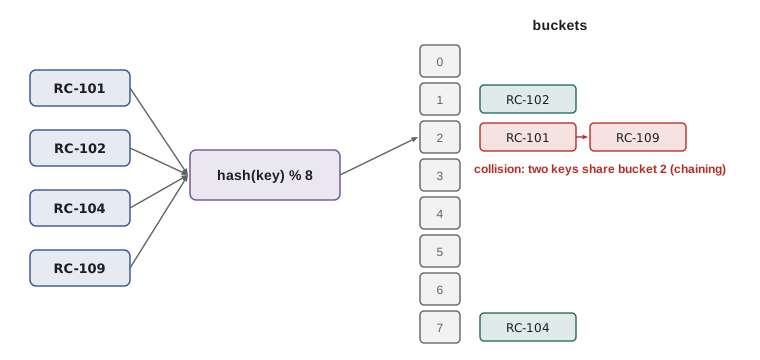
Collisions
Two different keys can produce the same bucket number. With a limited number of buckets this is unavoidable: if 20 keys go into 16 buckets, at least one bucket must hold two. This is called a collision, and every hash table needs a strategy for it. The two classic strategies are chaining and open addressing.
With chaining, each bucket holds a small list of the entries that landed there. Looking up a key means computing its bucket and scanning that short list. With open addressing, each bucket holds at most one entry; if the computed bucket is taken, the table probes other buckets in a fixed sequence until it finds the key or an empty slot. CPython's dict uses open addressing with a clever probing sequence, plus a separate compact array that remembers insertion order, which is why dictionaries keep keys in the order they were added.
class HashMap:
    """A small hash table with separate chaining (each bucket is a list of [key, value] pairs)."""
    def __init__(self, buckets=8):
        self._buckets = [[] for _ in range(buckets)]
        self._size = 0

    def _bucket(self, key):
        return self._buckets[hash(key) % len(self._buckets)]

    def put(self, key, value):
        bucket = self._bucket(key)
        for pair in bucket:
            if pair[0] == key:          # existing key: replace the value
                pair[1] = value
                return
        bucket.append([key, value])
        self._size += 1
        if self._size > 0.75 * len(self._buckets):
            self._grow()

    def get(self, key, default=None):
        for k, v in self._bucket(key):
            if k == key:
                return v
        return default

    def _grow(self):
        old = [pair for bucket in self._buckets for pair in bucket]
        self._buckets = [[] for _ in range(2 * len(self._buckets))]
        self._size = 0
        for k, v in old:
            self.put(k, v)

    def __len__(self):
        return self._size

stock = HashMap()
for k in range(101, 113):
    stock.put(f"RC-{k}", k % 40)
stock.put("RC-104", 9)
print(len(stock), stock.get("RC-104"), stock.get("RC-999", "unknown"))
print("buckets now:", len(stock._buckets))12 9 unknown buckets now: 16
Load factor and resizing
The load factor is the number of entries divided by the number of buckets. When it is low, buckets are mostly empty or hold one entry, and lookups are fast. As it rises, chains get longer (or probe sequences get longer), and lookups slow down. Hash tables therefore resize: when the load factor passes a threshold, about 0.75 in the HashMap above and two thirds in CPython's dict, the table allocates more buckets and reinserts every entry.
Resizing costs O(n), but like a list's growth in lesson 2 it happens rarely, because each resize multiplies the bucket count. Averaged over many insertions, the cost per insertion is amortized O(1). The worst case remains O(n): if a poor hash function, or a deliberately crafted set of keys, sent every key to the same bucket, every lookup would scan them all. Randomized string hashing protects Python programs against that kind of attack.
def chain_lengths(keys, buckets):
    counts = [0] * buckets
    for k in keys:
        counts[hash(k) % buckets] += 1
    return max(counts), len(keys) / buckets

ids = list(range(0, 4000, 4))                  # 1,000 order numbers, all multiples of 4
for buckets in (8, 1024, 1031):
    longest, load = chain_lengths(ids, buckets)
print(f"{buckets:>5} buckets: load factor {load:7.3f}, longest chain {longest}")8 buckets: load factor 125.000, longest chain 500 1024 buckets: load factor 0.977, longest chain 4 1031 buckets: load factor 0.970, longest chain 1
The last two rows hold a lesson about hash design. With 1,024 buckets, order numbers that are all multiples of 4 can only reach a quarter of the buckets, so chains are four times longer than they should be. With 1,031 buckets, a prime number, the same keys spread evenly. CPython avoids such patterns by mixing more bits of the hash into its probing, so you do not need to choose bucket counts yourself, but the example shows why hash tables can degrade when keys follow a pattern the hash function handles badly.
Dictionaries and sets in practice
Python's dict maps keys to values, and set stores keys alone; both are hash tables with average O(1) insertion, lookup and deletion. That makes them the right tool whenever a program asks has this been seen? or what goes with this key?. The duplicate-member check from lesson 1 becomes one pass with a set.
def has_duplicate(phones):
    seen = set()
    for p in phones:
        if p in seen:              # average O(1)
            return True
        seen.add(p)
    return False

members = [f"555-{k:04d}" for k in range(50_000)]
print(has_duplicate(members))
print(has_duplicate(members + ["555-0042"]))
print(len(set(members)) == len(members)) # the same test in one lineFalse True True
The table summarizes the costs. Iterating over a dict or set visits every entry, O(n), and the operations between whole sets, such as union and intersection, cost time proportional to the sizes involved.
| Operation | Example | Average cost |
|---|---|---|
| Look up, insert or update | d[key], d[key] = v | O(1) |
| Membership | key in d, x in s | O(1) |
| Delete | del d[key], s.discard(x) | O(1) |
| Iterate | for key in d | O(n) |
| Intersection | a & b | O(min(len(a), len(b))) |
| Union | a | b | O(len(a) + len(b)) |
Try it yourself
Spot a duplicate member
Write first_duplicate(phones) that returns the first phone number that appears for a second time while scanning the list from the start, or None if there are no repeats.
For ["555-0101", "555-0102", "555-0103", "555-0102", "555-0101"] the answer is "555-0102", because it is the first number seen twice. Use a set so the function is O(n).
def first_duplicate(phones):
    for i in range(len(phones)):
        for j in range(i + 1, len(phones)):
            if phones[i] == phones[j]:
                return phones[i]
    return None

print(first_duplicate(['555-0101', '555-0102', '555-0103', '555-0102', '555-0101']))
Counting and grouping
Two patterns appear constantly in business code: counting how often each value occurs, and grouping records by some key. Both are single passes with a dictionary. collections.Counter specializes in counting, with a most_common method that returns the top items, and collections.defaultdict creates a fresh empty value the first time a key is used, which removes the need to check whether the key exists.
from collections import Counter, defaultdict

sales = [("Priya", "RC-101"), ("Ben", "RC-104"), ("Priya", "RC-106"),
         ("Ana", "RC-101"), ("Ben", "RC-101"), ("Priya", "RC-101")]

by_coffee = Counter(sku for _, sku in sales)
print(by_coffee.most_common(2))

by_customer = defaultdict(list)
for customer, sku in sales:
    by_customer[customer].append(sku)
print(dict(by_customer))
print({c: len(v) for c, v in by_customer.items()})[('RC-101', 4), ('RC-104', 1)]
{'Priya': ['RC-101', 'RC-106', 'RC-101'], 'Ben': ['RC-104', 'RC-101'], 'Ana': ['RC-101']}
{'Priya': 3, 'Ben': 2, 'Ana': 1}Try it yourself
Group orders by customer
Orders are (customer, total) tuples. Write totals_by_customer(orders) that returns a dictionary mapping each customer to the sum of their order totals, rounded to 2 decimal places.
For [("Priya", 18.5), ("Ben", 22.0), ("Priya", 5.25)] the result is {"Priya": 23.75, "Ben": 22.0}. Use one pass with a dictionary.
def totals_by_customer(orders):
    result = {}
    for customer, total in orders:
        result[customer] = total
    return result

print(totals_by_customer([('Priya', 18.5), ('Ben', 22.0), ('Priya', 5.25)]))
What can be a key
A key must be hashable: it needs a __hash__ method that returns the same number for its whole life, and an __eq__ method consistent with it. Strings, numbers, tuples of hashable items and frozensets are hashable. Lists, dictionaries and sets are not, because they can change; if a list's contents changed after it was stored as a key, its hash would change and the table would look in the wrong bucket. Use a tuple instead when you need a compound key, such as a coffee and a date.
Your own classes are hashable by default, using identity: two separate objects are different keys even if they hold the same data. PYTH-102 showed how to define __eq__ and __hash__ together for value-like classes, and how frozen dataclasses do it automatically. The rule to remember is that objects that are equal must have equal hashes, and a key's hash must never change while it is in a dictionary or set.
roasted = {("RC-104", "2026-11-09"): 30, ("RC-101", "2026-11-09"): 60}
print(roasted[("RC-104", "2026-11-09")])
try:
    bad = {["RC-104", "2026-11-09"]: 30}
except TypeError as e:
    print("TypeError:", e)

from dataclasses import dataclass

@dataclass(frozen=True)
class Batch:
    sku: str
    day: str

print({Batch("RC-104", "2026-11-09"): 30}[Batch("RC-104", "2026-11-09")])30 TypeError: unhashable type: 'list' 30
Worked problem
Gift card pairs
The shop sells gift cards for exact amounts, and Rosa wants to suggest two different coffees whose prices add up to a card's value, such as 40.50. Given n prices, how can Jordan find a pair quickly?
Show solution
- The direct way tries every pair: O(n²).
- Instead, scan the prices once and keep a dictionary of prices already seen, mapping each price to its coffee.
- For each new price p, the partner it needs is 40.50 - p. If that partner is already in the dictionary, the pair is found.
- Each step is one O(1) dictionary lookup and one insertion, so the scan is O(n).
- Work in whole cents (4050) rather than floats, so that sums compare exactly.
Answer: One pass with a dictionary of seen prices finds a pair in O(n) time instead of O(n²).
def gift_pair(prices, target):
    seen = {}                                   # price in cents -> sku
    for sku, cents in prices.items():
        partner = target - cents
        if partner in seen:
            return seen[partner], sku
        seen[cents] = sku
    return None

prices = {"RC-101": 1850, "RC-102": 2200, "RC-103": 1975, "RC-104": 2025, "RC-105": 1900}
print(gift_pair(prices, 4050))
print(gift_pair(prices, 3750))
print(gift_pair(prices, 9999))('RC-101', 'RC-102')
('RC-101', 'RC-105')
NoneCommon mistakes
MistakeChecking membership in a list inside a loop, such as if x in results.
InsteadKeep a set alongside, or use a set or dict, so each check is O(1).
MistakeUsing a list or dict as a dictionary key.
InsteadUse a tuple, frozenset or frozen dataclass for compound keys.
MistakeDefining __eq__ without __hash__ in a class used as a key.
InsteadDefine both from the same fields, or use @dataclass(frozen=True).
MistakeChanging an object's key fields after storing it in a set or dict.
InsteadTreat keys as immutable; remove, change and reinsert if you must.
MistakeRelying on hash() values for strings between program runs.
InsteadString hashes are randomized per run; never store them.
MistakeComparing float sums as keys, such as prices that should add to 40.5.
InsteadUse whole cents or Decimal so equal amounts are exactly equal.
Summary and key terms
- A hash table stores entries in buckets chosen by a hash function, so lookup does not need a search.
- Insertion, lookup and deletion are O(1) on average; the worst case is O(n) if many keys collide.
- Collisions are handled by chaining (a list per bucket) or open addressing (probing other buckets); CPython uses open addressing.
- The load factor drives resizing; rare O(n) resizes keep insertion amortized O(1).
- dict and set are hash tables; use them whenever you look things up or test membership repeatedly.
- Counter and defaultdict make counting and grouping single O(n) passes.
- Keys must be hashable and unchanging: strings, numbers, tuples and frozen dataclasses, not lists or dicts.
- hash table
- A structure that stores entries in buckets chosen by hashing their keys.
- hash function
- A function that turns a key into an integer, the same for equal keys.
- bucket
- One slot of a hash table's array.
- collision
- Two different keys mapping to the same bucket.
- chaining
- Handling collisions by keeping a list of entries in each bucket.
- open addressing
- Handling collisions by probing other buckets for a free slot.
- load factor
- Entries divided by buckets; high values slow a hash table down.
- hashable
- Having a hash that never changes and an equality consistent with it.
- Counter
- A dict subclass for counting hashable items.
- defaultdict
- A dict that creates a default value for missing keys.
Practice problems
Work each problem on paper first, then reveal the answer to check.
Why can a hash table find a key without searching?
Show answer
The key's hash computes which bucket to look in.
A table has 16 buckets and 12 entries. What is the load factor?
Show answer
0.75.
Why does a dict occasionally take O(n) time to insert, yet count as O(1)?
Show answer
Resizing reinserts everything, but it happens rarely, so the amortized cost is constant.
Why is [1, 2] not allowed as a dictionary key?
Show answer
Lists are mutable and unhashable; use (1, 2) instead.
How would you find the three best-selling coffees from a list of sold SKUs?
Show answer
Counter(skus).most_common(3).
What is the big O of checking a list of n phone numbers for duplicates with a set?
Show answer
O(n) time and O(n) extra space.
Lesson quiz · 5 questions
Score 60% or more to complete this lesson.
Create a free account to save your progress, take quizzes and earn a certificate.