
PYTH-201 · Lesson 4 of 12 · 25 min
Linked lists
▶ Video coming soon A video version of this lesson is on the way.
An array keeps its items side by side, which makes indexing fast and inserting slow. A linked list makes the opposite trade. Each item lives in its own small object, called a node, and every node holds a reference to the next one. Nothing needs to be next to anything else in memory, so adding or removing an item at a known place only means changing a couple of references, while reaching the hundredth item means following a hundred links one at a time.
You will rarely write a linked list in everyday Python, because the built-in list and collections.deque cover most needs. But linked structures are everywhere under the surface, from deque's own blocks to the caches in web browsers, and writing one is the best practice there is for thinking in references. This lesson builds a singly linked list for Theo's delivery route, extends it to a doubly linked list, compares both with Python's list, and finishes with the classic interview task of reversing a linked list.
Nodes and links
A node is a tiny object with two fields: the value it stores and a reference to the next node. The last node's next reference is None, which marks the end. The list itself only needs to remember its first node, called the head; every other node is reached by following next references from there. In Python, a node is an ordinary class, and a dataclass with slots keeps it compact.
from dataclasses import dataclass

@dataclass(slots=True)
class Node:
    value: str
    next: "Node | None" = None

# Theo's delivery route: roastery -> Lakeview Cafe -> Pine St Deli
third = Node("Pine St Deli")
second = Node("Lakeview Cafe", third)
head = Node("Roastery", second)

node = head
while node is not None:
    print(node.value)
node = node.nextRoastery Lakeview Cafe Pine St Deli
The while loop is the pattern behind every linked-list operation: start at the head, do something with the current node, move to node.next, and stop at None. That walk visits n nodes, so anything that must find a position by walking, such as reaching the k-th stop or searching for a value, is O(n).
A LinkedList class
Wrapping the nodes in a class keeps the details in one place. Adding at the front is the linked list's best operation: create a node whose next is the current head, then make it the new head. Two reference changes, whatever the length, so O(1). Adding at the back would mean walking to the last node, O(n), unless the list also remembers its last node, called the tail, which makes appending O(1) too.
from dataclasses import dataclass

@dataclass(slots=True)
class Node:
    value: str
    next: "Node | None" = None

class LinkedList:
    def __init__(self, values=()):
        self.head = self.tail = None
        self._size = 0
        for v in values:
            self.append(v)
    def push_front(self, value):                 # O(1)
        self.head = Node(value, self.head)
        if self.tail is None:
            self.tail = self.head
        self._size += 1
    def append(self, value):                     # O(1) thanks to the tail
        node = Node(value)
        if self.tail is None:
            self.head = self.tail = node
        else:
            self.tail.next = node
            self.tail = node
        self._size += 1
    def __iter__(self):
        node = self.head
        while node:
            yield node.value
            node = node.next
    def __len__(self):
        return self._size
    def __repr__(self):
        return " -> ".join(self) or "(empty)"

route = LinkedList(["Lakeview Cafe", "Pine St Deli"])
route.push_front("Roastery")
route.append("Roastery")                 # back to base at the end
print(route, len(route))
print("Pine St Deli" in route) # works through __iter__, O(n)Roastery -> Lakeview Cafe -> Pine St Deli -> Roastery 4 True
Storing the size in a counter keeps len O(1); without it, len would have to walk the whole list. Defining __iter__ as a generator, as in PYTH-102, lets the list work with for loops, in, list() and join. The test "Pine St Deli" in route walks the nodes one by one, O(n), just as it would for an array.
Inserting and removing
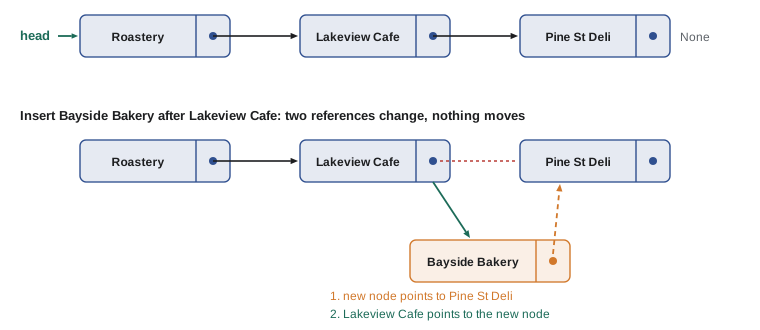
Where linked lists shine is changing the middle once you already have a reference to the right node. Rosa has signed a new wholesale customer, Bayside Bakery, which sits between Lakeview Cafe and Pine St Deli on the route. With an array of stops, inserting it would shift every later stop. With a linked list, you create the new node, point it at the node after Lakeview Cafe, and point Lakeview Cafe at it. The order of those two steps matters: if Lakeview Cafe's reference changed first, the rest of the route would be lost.
Removing works the same way in reverse: to remove the node after a given node, make the given node point past it. The removed node is no longer referenced by anything, so Python reclaims its memory automatically. Removing by value first needs a walk to find the node before the one to remove, so the search is O(n) even though the unlinking itself is O(1).
class Node:
    def __init__(self, value, next=None):
        self.value, self.next = value, next

def show(head):
    out = []
    while head:
        out.append(head.value)
        head = head.next
    return " -> ".join(out)

head = Node("Roastery", Node("Lakeview Cafe", Node("Pine St Deli")))

def insert_after(node, value):
    node.next = Node(value, node.next)        # new node points on first, then gets linked in

def remove_value(head, value):
    """Remove the first node holding value; return the (possibly new) head."""
    if head and head.value == value:
        return head.next
    prev = head
    while prev and prev.next:
        if prev.next.value == value:
            prev.next = prev.next.next        # skip over the node
            break
        prev = prev.next
    return head

insert_after(head.next, "Bayside Bakery")
print(show(head))
head = remove_value(head, "Pine St Deli")
print(show(head))
head = remove_value(head, "Roastery")
print(show(head))Roastery -> Lakeview Cafe -> Bayside Bakery -> Pine St Deli Roastery -> Lakeview Cafe -> Bayside Bakery Lakeview Cafe -> Bayside Bakery
Removing the head is a special case, because there is no node before it; the function returns the new head so the caller can update its reference. Special cases at the ends, and at an empty list, are where most linked-list bugs live, so always test those three situations: empty, one item, and the first or last item.
Try it yourself
Count and collect the stops
A node has .value and .next. Write to_list(head) that walks from head and returns a Python list of the values in order, and length(head) that returns the number of nodes.
Both must handle an empty route, where head is None. The starter only looks at the first node.
def to_list(head):
    return [head.value]

def length(head):
    return 1

route = Node('Roastery', Node('Lakeview Cafe', Node('Pine St Deli')))
print(to_list(route), length(route))
Doubly linked lists
A singly linked list can only be walked forward, and removing a node requires the node before it. A doubly linked list gives every node a second reference, prev, pointing backward. Now a node can be removed in O(1) given only a reference to the node itself, because its neighbors are reachable from it, and the list can be walked in either direction. The cost is one more reference per node and more references to keep consistent on every change.
Doubly linked lists are the classic way to build a least-recently-used (LRU) cache: the most recently used items sit at one end, and when the cache is full, the item at the other end is removed. Combined with a dictionary that maps keys to nodes, every operation is O(1). Python's collections.OrderedDict provides exactly this behavior through its move_to_end and popitem methods, so you can build an LRU cache without writing the links yourself.
from collections import OrderedDict

class RecentlyViewed:
    """Keep the last `size` products a shopper viewed, most recent last."""
    def __init__(self, size=3):
        self.size, self.items = size, OrderedDict()
    def view(self, sku):
        if sku in self.items:
            self.items.move_to_end(sku)        # O(1): relink to the newest end
        else:
            self.items[sku] = True
            if len(self.items) > self.size:
                self.items.popitem(last=False) # O(1): drop the oldest
    def __repr__(self):
        return str(list(self.items))

rv = RecentlyViewed()
for sku in ["RC-101", "RC-104", "RC-102", "RC-101", "RC-106"]:
    rv.view(sku)
print(rv)['RC-101'] ['RC-101', 'RC-104'] ['RC-101', 'RC-104', 'RC-102'] ['RC-104', 'RC-102', 'RC-101'] ['RC-102', 'RC-101', 'RC-106']
The functools.lru_cache decorator you met in PYTH-102 uses the same structure internally. Knowing how it works explains why it is fast: looking up a cached call is a dictionary lookup, and recording a use or evicting the oldest entry is a few reference changes.
Linked lists compared with Python's list
With big O in hand, the comparison is clear. Each structure is fast where the other is slow, and the choice depends on which operations a program performs most often.
| Operation | Python list (array) | Linked list |
|---|---|---|
| Index by position | O(1) | O(n): walk from the head |
| Add or remove at the front | O(n) | O(1) |
| Add at the back | O(1) amortized | O(1) with a tail reference |
| Insert or remove at a known node | O(n): items shift | O(1) (doubly linked, or with the previous node) |
| Search by value | O(n) | O(n) |
| Memory per item | One reference | A node object with one or two references |
In practice, Python's list wins far more often than the table suggests. Its items sit together in memory, which modern processors read very quickly, while a linked list's nodes are scattered, and every node is a full Python object with its own overhead. Use the built-in structures first, and reach for a linked design when profiling shows that middle insertions or removals truly dominate, or when, as with an LRU cache, you need O(1) removal of a node you already hold.
Reversing a linked list
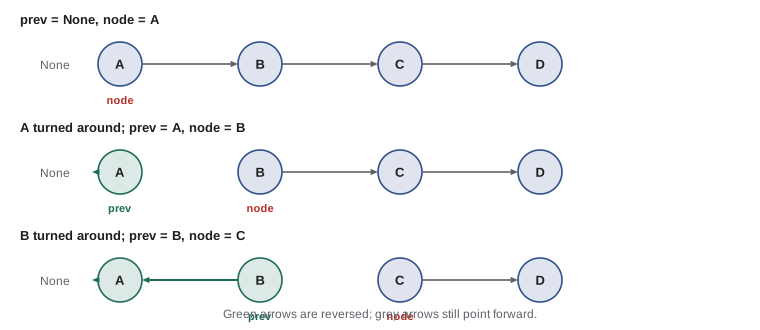
Reversing a singly linked list in place is a favorite exercise because it forces careful handling of references. Walk the list once, keeping three references: prev (the already reversed part, initially None), node (the current node) and nxt (the rest of the list, saved before it is lost). At each step, point node.next back at prev, then move all three references one step forward. When node reaches None, prev is the new head. The algorithm is O(n) time and O(1) extra space.
class Node:
    def __init__(self, value, next=None):
        self.value, self.next = value, next

def reverse(head):
    prev, node = None, head
    while node is not None:
        nxt = node.next      # save the rest of the list
        node.next = prev     # turn this node around
        prev, node = node, nxt
    return prev

def show(head):
    out = []
    while head:
        out.append(head.value)
        head = head.next
    return " -> ".join(out) or "(empty)"

route = Node("Roastery", Node("Lakeview Cafe", Node("Bayside Bakery", Node("Pine St Deli"))))
print(show(route))
back = reverse(route)
print(show(back))
print(show(reverse(None)))Roastery -> Lakeview Cafe -> Bayside Bakery -> Pine St Deli Pine St Deli -> Bayside Bakery -> Lakeview Cafe -> Roastery (empty)
Try it yourself
Reverse the route
Write reverse(head) that reverses a singly linked list in place and returns the new head. Do not build a Python list of values; change the .next references.
The function must work for an empty list (return None) and a single node.
def reverse(head):
    return head

r = reverse(Node('A', Node('B', Node('C'))))
print(r.value)
Worked problem
Choosing a structure for the route
Theo's route holds about 20 stops. Each morning he inserts and removes a few stops in the middle, and the driver app shows the stops in order. Should Jordan use a linked list or a Python list?
Show solution
- Count the operations: a handful of middle insertions and removals a day, and one full pass to display the route.
- With 20 stops, an O(n) insertion into a Python list shifts at most 20 references: a few microseconds.
- A linked list would make insertions O(1) only once the right node has been found, and finding it is itself an O(n) walk.
- The Python list is simpler, prints and indexes easily, and works with every library Jordan uses.
- Big O describes growth; for small, stable n, simplicity matters more.
Answer: A Python list. Linked lists pay off only when middle changes at known nodes dominate and n is large.
Common mistakes
MistakeChanging node.next before saving the rest of the list.
InsteadSave the following node in a variable first, then relink.
MistakeForgetting the special case of removing the head.
InsteadReturn the new head, or use a sentinel node in front of the real head.
MistakeNot updating the tail when the last node is removed or the list becomes empty.
InsteadCheck and update head and tail together on every change.
MistakeComputing the length by walking the list every time.
InsteadKeep a size counter that every operation updates.
MistakeChoosing a linked list for speed without measuring.
InsteadPython's list is usually faster in practice; use linked designs for specific needs.
MistakeIndexing a linked list in a loop, as in for i in range(n): get(i).
InsteadEach get(i) walks from the head, making the loop O(n²); iterate over the nodes instead.
Summary and key terms
- A linked list stores each item in a node that references the next node; the list remembers its head.
- Walking a linked list is O(n), so indexing and searching are O(n).
- Adding at the front is O(1); keeping a tail reference makes appending O(1) too.
- Inserting or removing after a known node changes only a couple of references, O(1).
- A doubly linked list adds prev references, allowing O(1) removal of any node you hold and backward walks.
- OrderedDict and lru_cache use doubly linked lists to provide O(1) LRU behavior.
- Reversing a singly linked list in place takes one O(n) pass with three references.
- linked list
- A sequence of nodes in which each node references the next.
- node
- An object holding a value and one or more references to other nodes.
- head
- The first node of a linked list.
- tail
- The last node of a linked list.
- singly linked list
- A linked list whose nodes reference only the next node.
- doubly linked list
- A linked list whose nodes reference both the next and the previous node.
- traversal
- Visiting every node in order by following the links.
- sentinel node
- A dummy node at an end of a list that removes special cases.
- LRU cache
- A cache that evicts the least recently used item when full.
- OrderedDict
- A dictionary that remembers and can reorder insertion order in O(1).
Practice problems
Work each problem on paper first, then reveal the answer to check.
What is the cost of finding the 50th node of a linked list, and why?
Show answer
O(n): you must follow 49 links from the head.
Why does a tail reference make append O(1)?
Show answer
The last node is known, so the new node is linked to it without walking.
In insert_after, why must the new node point to node.next before node.next is changed?
Show answer
Otherwise the reference to the rest of the list is lost.
What extra reference does a doubly linked node have, and what does it allow?
Show answer
prev; it allows O(1) removal of a node given only that node, and backward traversal.
Trace reverse on A -> B. What are prev and node after the first loop pass?
Show answer
prev is A (now pointing to None) and node is B.
Name a standard library tool built on a doubly linked list.
Show answer
collections.OrderedDict (and functools.lru_cache).
Lesson quiz · 5 questions
Score 60% or more to complete this lesson.
Create a free account to save your progress, take quizzes and earn a certificate.