
MSBA-321 · Lesson 8 of 12 · 18 min
Credit management
▶ Video coming soon A video version of this lesson is on the way.
Collections deal with money already owed. Credit management decides how much a customer should be allowed to owe in the first place, and stops orders before they create a balance the company is not willing to carry. In the old system, Cobalt Ridge's credit limit field produced a warning that sales staff had learned to click past. In one painful case a mining customer that was already 90 days overdue received two more shipments worth 260,000 before anyone in finance noticed. Thandeka's request for the eighth session was short: limits that mean something, holds that cannot be clicked past, and a clear way to release orders when the business decides the risk is worth it.
Two ways to check credit
Finance has an older, simpler credit check and a newer credit management module, and they should not be confused. The older check uses the customer's credit limit and settings in the Accounts receivable parameters to show a warning or an error when a sales order would exceed the limit. The credit management module, found under Credit and collections, adds credit groups, risk scores, temporary limits, credit insurance and guarantees, blocking rules that put sales orders on credit hold, a credit hold list, and workflow for limit changes and releases. Cobalt Ridge would use the credit management module and turn off the older check, so that only one set of rules applies.
Credit management parameters and checkpoints
Credit management is configured in the Credit and collections parameters. The settings include whether credit management is active, whether the credit limit used check runs for sales orders, automatic release behavior, and the checkpoints: the posting steps at which credit is checked. Microsoft's documentation is explicit that credit management checkpoints are required to check the credit limit on a sales order, and they are set by posting process, such as confirmation, picking list, packing slip and invoice. Cobalt Ridge checked credit at confirmation, when the order is promised to the customer, and again at packing slip, just before goods leave, because a customer's situation can change between the two.
Credit limits, credit groups and risk scores
Each customer's credit limit lives on the customer record, but in credit management it is changed through credit limit adjustments: a journal of proposed changes that can go through a workflow before it takes effect. Adjustments can raise or lower a limit permanently, set a temporary limit with an end date, or recalculate limits automatically from risk scores. A customer credit group links customers that share one limit, which is useful when several customer accounts belong to the same corporate group. Credit limits can also be given an expiry date, so that a limit approved for a year must be reviewed to stay valid.
| Credit feature | What it does | Cobalt Ridge use |
|---|---|---|
| Credit limit adjustment journal | Proposes limit changes, optionally with workflow | All limit changes; approval by Ikenna up to 250,000, Thandeka above |
| Temporary limit | Raises or lowers a limit until a date | Large mining projects for the duration of delivery |
| Customer credit group | Customers that share one limit | Mining groups with several operating companies |
| Risk score and risk group | Scores customers and groups them by risk | Low, medium and high groups from a credit report score |
| Credit limit expiry | Makes limits lapse unless reviewed | Twelve months for MINE and DIST; none for MUNI |
| Credit insurance and guarantees | Records insured amounts and guarantees | Three mining customers have insurance |
Blocking rules
Blocking rules decide when a sales order goes on credit hold. Microsoft documents seven rule categories. Each rule is set up as either a blocking rule, which puts the order on hold, or an exclusion rule, which stops another rule from blocking. Most rules can apply to one customer (Table), to a credit management group (Group) or to all customers (All), and most can be limited to a risk group.
| Rule category | Blocks an order when | Cobalt Ridge blocking rule |
|---|---|---|
| Days overdue | Invoices are overdue by more than a set number of grace days | All customers: over 15 days overdue |
| Account status | The customer has a selected account status | Status Legal or Bankrupt |
| Terms of payment | The order uses selected payment terms | Any order with cash in advance terms, until paid |
| Credit limit expired | The customer's credit limit has expired, after a grace period | Expired for more than 10 days |
| Overdue amount | The overdue balance passes an amount or percentage of the limit | Overdue more than 25 percent of the limit |
| Sales order amount | A single order exceeds a set amount | Orders over 500,000 for review |
| Credit limit used | The order would leave less than a threshold of the limit remaining | Less than 0 percent remaining (over the limit) |
Exclusion rules soften blocking rules where the business wants it. Cobalt Ridge added two. Municipal customers in the MUNI group are excluded from the days overdue rule for up to 45 days, because public bodies often pay late for administrative reasons, not for lack of money. And orders under 2,000 for distributors are excluded from the overdue amount rule, so that small parts orders keep flowing while a larger balance is discussed.
How rules are evaluated
The order in which rules are applied is precise, and Annelise drew it on the whiteboard because it explains most of the surprises users have. According to Microsoft's documentation, release sales order exclusions are checked first, and if one is true the order is released and no other rules are checked. Then blocking rules put the order on hold. Other exclusion rules run after the blocking rules and only affect the rule they belong to. Processing runs from Table to Group to All, and an exclusion at the same level does not override a blocking rule at that level. Finally, the credit limit used rule only runs if the parameter to check credit limits for sales orders is on.
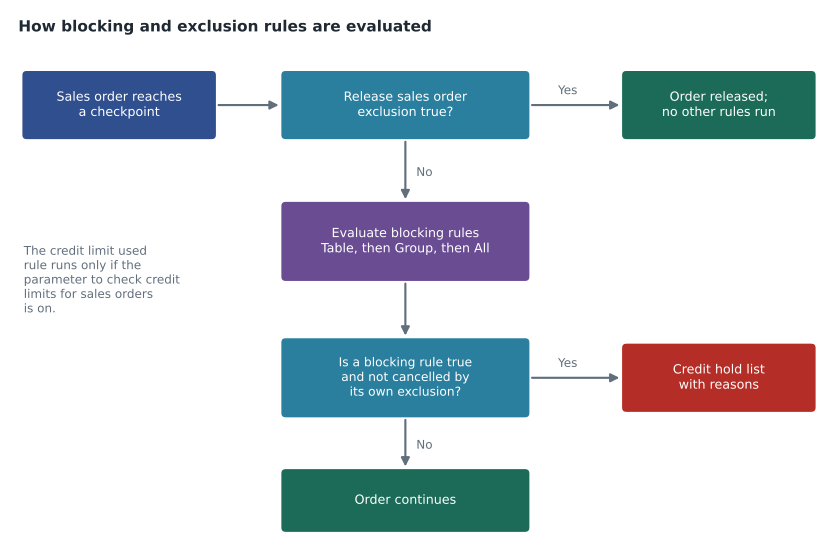
Two settings bypass credit management completely. A customer can be marked Exclude customer from credit management, and an individual sales order can be marked Exclude from credit management. Cobalt Ridge set the first only for the intercompany customers in the ICO group, and allowed nobody to set the second without Thandeka's approval, because an excluded order is an order nobody checked.
Worked problem
Why is this order on hold?
A distributor with a 100,000 limit has a balance of 70,000, of which 30,000 is 20 days overdue. It places a 1,500 parts order. Cobalt Ridge's rules are: block if more than 15 days overdue; block if overdue is more than 25 percent of the limit; exclude distributor orders under 2,000 from the overdue amount rule. Is the order held?
Show solution
- Days overdue: 20 days is more than 15, so the days overdue rule blocks.
- Overdue amount: 30,000 is 30 percent of the limit, more than 25 percent, so the rule would block, but the order is under 2,000, so its exclusion applies.
- The exclusion only cancels the overdue amount rule; it does not cancel the days overdue rule.
- The order goes on credit hold with the blocking reason Days overdue.
Answer: Yes. The overdue amount rule is excluded, but the days overdue rule still blocks the order.
Ikenna immediately saw the problem with that result: the small-order exclusion did not work as intended, because the days overdue rule would catch the same orders. The fix was to add a matching exclusion for distributor orders under 2,000 to the days overdue rule as well, or to make it a release sales order exclusion, which releases the order before any blocking rule runs. Cobalt Ridge chose the second, and tested it in the CONFIG environment with this exact case.
The credit hold list
Orders on hold appear on the credit management hold list (Credit management > Credit management hold list > All credit holds). The list is centralized across legal entities, and each user sees only the companies they have access to. Each held order shows its blocking reason, or Multiple if there is more than one; the reasons can be viewed in detail. From the list, a credit analyst can:
| Action | Effect |
|---|---|
| Release with posting | Removes the hold and continues the original posting, such as the confirmation or packing slip |
| Release without posting | Removes the hold; the order must be posted manually |
| Reject | Removes the order from the list and marks it rejected on the sales order header |
| Evaluate for release | Runs the blocking rules again and clears reasons that are no longer true |
| Submit to workflow | Sends the release or rejection for approval |
Every release needs a release reason and a review date, from release reason codes set up in each legal entity. Evaluate for release is useful after a payment arrives: the rules are run again, the reasons that are now false are cleared, and orders whose reasons are all cleared show Ready to release. An auto release parameter decides whether such orders are released with posting or without.
Workflow, forced holds and auditing
Credit management workflows can require approval before an order is released or rejected, and before credit limit adjustments take effect. Cobalt Ridge used workflow for releases over 50,000, approved by Thandeka. A credit analyst can also put an order on forced credit hold, for example when a customer is known to be in trouble even though no rule has fired. Forced holds cannot be processed by workflow or released automatically; they must be released from the Release menu.
What credit management does not cover
Microsoft's documentation sets the boundaries clearly. Credit management blocking rules apply to sales orders. Free text invoices, point of sale orders and call center orders use temporary credit limits and insurance and guarantees, but not blocking rules, and they do not go to the hold list. Project invoices are not supported. Cobalt Ridge's free text invoices, such as engineering studies, were therefore controlled through the free text invoice workflow in lesson 5, with a condition that routes invoices for customers over their limit to Ikenna.
Credit reviews and reports
Credit management is not only a gate on orders. It is a regular review. Ikenna planned a quarterly review of every MINE and DIST customer, using the aging snapshot, payment history and any updated credit report score, and recording any limit change through the adjustment journal. Credit management also provides inquiries and statistics, such as the customers closest to their limits and the history of holds and releases by reason, which showed whether rules were too tight or too loose.
Credit decisions for new customers
Credit management also shapes how new customers start. Ikenna's process for a new business customer had four steps. The customer master team created the account with a zero credit limit and the account status New. A credit analyst gathered a credit report and references and proposed a limit through a credit limit adjustment, which went through workflow. Until the adjustment was approved, any order for the customer would be held by the credit limit used rule, so the sales team knew to wait or to ask for prepayment. Once approved, the limit took effect and the account status changed to normal.
For large mining projects, the analyst could also record credit insurance or a guarantee on the customer, which credit management takes into account. Three mining customers had trade credit insurance; their insured amounts were recorded so that analysts could see how much of the exposure was covered when deciding whether to release a large order.
Testing credit rules
Credit rules interact in ways that are easy to get wrong, as the distributor example showed. Annelise built a small test matrix in the CONFIG environment: one customer for each combination of group, risk group and status, and orders designed to trigger each rule and each exclusion. Every rule change after go-live would be tested against the same matrix before it reached production.
Common mistakes
MistakeRunning the old credit limit check and credit management together.
InsteadChoose credit management and turn off the older check so one set of rules applies.
MistakeAdding an exclusion to one rule and expecting it to release the order.
InsteadRemember that exclusions only affect their own rule; use a release sales order exclusion to release before blocking rules run.
MistakeExcluding orders from credit management to get them shipped.
InsteadRelease held orders with a reason and, for large amounts, through workflow.
MistakeAssuming free text invoices are blocked by credit rules.
InsteadControl free text invoices with workflow conditions; blocking rules apply only to sales orders.
Summary and key terms
- Credit management adds credit groups, risk scores, temporary and expiring limits, blocking rules, a hold list and workflow.
- Checkpoints decide at which posting steps credit is checked.
- Seven blocking rule categories can be set up as blocking or exclusion rules, by customer, group or all.
- Release sales order exclusions are checked first; other exclusions only affect their own rule.
- Held orders are released with or without posting, rejected, or evaluated again from the credit hold list.
- Credit management
- The Finance module for credit limits, blocking rules, credit holds and related workflow.
- Checkpoint
- A posting step at which credit is checked.
- Blocking rule
- A rule that puts a sales order on credit hold when its condition is true.
- Exclusion rule
- A rule that stops a blocking rule from holding an order.
- Credit hold list
- The list of sales orders on credit hold, with reasons and release actions.
- Credit limit adjustment
- A journal entry that changes a credit limit, optionally through workflow.
- Forced credit hold
- A manual hold that must be released from the Release menu.
Practice problems
Work each problem on paper first, then reveal the answer to check.
Which kind of exclusion releases an order before any blocking rules are checked?
Show answer
A release sales order exclusion.
Why did Cobalt Ridge check credit at both confirmation and packing slip?
Show answer
A customer's position can change between promising an order and shipping it.
Are free text invoices put on the credit hold list?
Show answer
No; blocking rules apply to sales orders only.
Lesson quiz · 5 questions
Score 60% or more to complete this lesson.
Create a free account to save your progress, take quizzes and earn a certificate.