
MSBA-321 · Lesson 11 of 12 · 18 min
Copilot for collections
▶ Video coming soon A video version of this lesson is on the way.
In the foundation course, Cobalt Ridge chose two Copilot pilots for after go-live, and one of them belonged to Thandeka: the collections coordinator summary. The eleventh session looked at what that feature actually does, what data it uses, how it is enabled, and how a collections team should use AI-generated summaries and emails without giving up the judgment that good collections depends on. Ikenna was openly skeptical. His best collectors knew their customers; he wanted to know what a summary could tell them that they did not already know.
What the collections coordinator summary does
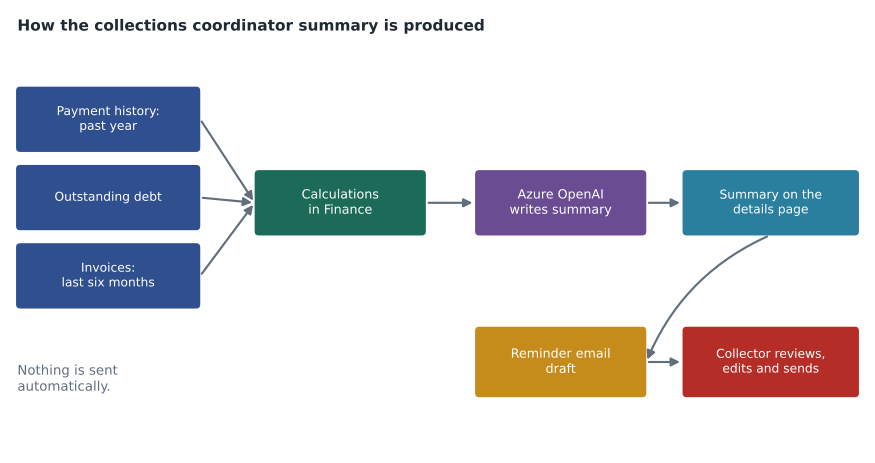
According to Microsoft Learn, the collections coordinator summary adds an optional Summary by Copilot field to the Collections coordinator details page. The summary describes a customer's overdue invoices, payment history and remaining credit, and the feature can draft a reminder email to the customer. The summary text is generated by a large language model through Azure OpenAI Service, while all the calculations, such as balances and days overdue, are done in Finance.
| Input | What Microsoft documents |
|---|---|
| Payment history | The past year of payments |
| Outstanding debt | The amount the customer owes |
| Invoices | Invoices from the last six months |
| Prompts | The prompts the feature provides to the model |
The summary appears on the details page, which is opened from the Collections coordinator workspace under Credit and collections, either by selecting a customer's name or by selecting View customer details. The workspace itself shows the collector's assigned activities, the customers with the highest balances and those with the most overdue amounts, and it works with or without Copilot.
Enabling the feature
Microsoft documents two requirements. In Feature management, the Collections coordinator workspace and Collections coordinator summary features must be on; they are on by default, but an administrator should confirm it. And for the Copilot part, the Copilot in Microsoft Dynamics 365 Finance app must be installed in the Dataverse environment linked to Finance, following the general Copilot prerequisites for finance and operations apps. In the foundation course, Cobalt Ridge confirmed that its environments were on the unified admin experience with Dataverse, which made this straightforward.
Copilot features in finance and operations apps also depend on geography and language. Microsoft publishes a list of the regions and languages in which each feature is validated, and notes that the summary can be used in other languages but might not work as intended. Cobalt Ridge's users worked in English, and the CRMX team partly in Spanish, so Annelise suggested that the Spanish experience be tested separately before CRMX collectors relied on it.
Drafting reminder emails
From the details page, the collector can select Create reminder email. Copilot drafts an email about the overdue amounts; after the collector confirms, the draft opens in the collector's default email client. The collector then edits it and sends it, or decides not to. Microsoft's documentation is clear that the email is a suggestion, and the user is responsible for reviewing and editing it before sending. Nothing is sent automatically.
Ikenna's first test produced a polite, accurate draft to a distributor about two invoices 20 days overdue. His second, for a mining customer with an open dispute case, produced a draft that asked for payment of everything overdue, including the disputed invoices. The model had no way to know that the dispute changed what should be asked for. That example became the center of Cobalt Ridge's usage guidance.
Responsible use
Microsoft's own guidance for the feature states the main risks plainly: AI-generated content, including the summary and the email, may be incomplete, inaccurate or inappropriate, and users must review it before using it. Content filters reduce the risk of offensive or abusive output, but they do not replace review. Cobalt Ridge turned those warnings into five working rules.
| Rule | Why |
|---|---|
| Read the summary as a starting point, then check the Collections page | The summary covers limited periods and may miss context such as cases |
| Never send a draft without reading every sentence | The collector, not Copilot, is responsible for what the customer receives |
| Remove disputed invoices from any payment request | Asking for disputed amounts damages relationships and trust |
| Keep tone appropriate to the customer group | Municipal customers need a different approach from distributors |
| Record the email as an activity | The next collector needs to know what was said |
Annelise added a point about data. The summary uses Finance data the collector can already see, and Microsoft states that calculations are done in Finance. But any email that leaves the company is a disclosure, so the usual rules apply: only send balance details to the customer's authorized contacts, and never paste another customer's information into a draft.
The customer page summary
A related Copilot feature appears elsewhere in Finance. The customer page summary shows an AI-generated summary of a customer's account status on the Summary FastTab when a customer is selected in the All customers list. Microsoft documents that it summarizes customer invoices, payments, sales orders, sales agreements, rebates, outstanding invoices and delayed order lines, using only data from the customer's Finance environment. It is on by default and can be turned off in Feature management. Users need access to at least one of the related menu items, such as customer transactions or sales orders, to see it.
For Cobalt Ridge, the customer page summary was useful to the sales team as much as to collections. A sales manager about to call a distributor could see in a paragraph that two orders were delayed and one invoice was overdue, and avoid being surprised on the call. Ikenna saw the value immediately: a collector and a salesperson looking at the same summary would at least start from the same facts.
Finance agents in Outlook and Excel
Microsoft also offers finance agents that work inside Microsoft 365 apps, previously known as Copilot for Finance. Microsoft's training describes collections capabilities in Outlook, such as summarizing a customer's emails, customer details, outstanding invoices and contacts, and drafting replies, and reconciliation capabilities in Excel, with partial matching and amount tolerances. These agents connect to existing financial systems rather than replacing them. Cobalt Ridge decided to finish its in-Finance pilot first and revisit the Outlook experience later, because collectors already spent their day in the Collections coordinator workspace.
Designing the pilot
Thandeka's pilot plan, written in the session, had a clear scope and a clear measure.
| Element | Plan |
|---|---|
| Scope | Collections coordinator summary and reminder emails for CRCA and CRUS distributors and mining customers |
| Users | Ikenna and the two collectors; CRMX later, after Spanish testing |
| Duration | Eight weeks after go-live stabilization |
| Measures | Minutes per customer review; share of drafts sent with minor edits; customer complaints; days sales outstanding for pilot customers |
| Guardrails | The five usage rules; no automatic sending; activities recorded for every email |
| Decision | Continue, change or stop, decided by Thandeka with Ikenna at the end of the pilot |
Worked problem
Is the pilot worth it?
Before the pilot, a collector spends an average of 9 minutes reviewing a customer before a call or email and handles about 40 customers a day. With the summary, review time falls to 6 minutes. How much time does one collector save per day, and what is the right way to use it?
Show solution
- Saving per customer: 9 minus 6 is 3 minutes.
- Per day: 3 times 40 is 120 minutes, or 2 hours.
- The saving should go into the work AI cannot do: calls with disputed and high-risk customers, and resolving cases.
- The pilot should also check that the shorter review did not lead to more mistakes, such as chasing disputed amounts.
Answer: About two hours a day per collector, best spent on difficult customers, provided quality does not fall.
Agents and the line Cobalt Ridge drew
Microsoft's direction is toward agents that do more than draft, and the guidance for this course is to expect that the list of features will change. Cobalt Ridge's foundation decision applies to all of them: agents may draft and submit, but never post directly. In collections, that means an AI tool may suggest a summary, an email, or a write-off for review, but a person decides what is sent, written off or released. Desmond added that any new agent would go through the same approval and testing as a change to workflow, starting in the CONFIG environment.
Ikenna's conclusion at the end of the session was more positive than his opening. The summary would not replace knowing the customer, but it would remove the five minutes of clicking that came before every call, and it would help new collectors most of all.
Training collectors to use AI well
Annelise suggested that training for the pilot focus on judgment rather than buttons. Opening the summary and creating a draft takes seconds to learn. Knowing when the summary is incomplete, when a draft's tone is wrong for a customer, and when not to send anything at all takes practice. Ikenna designed three exercises from real test data: a customer with a dispute case the summary did not mention, a municipal customer whose draft was too firm, and a distributor whose summary was accurate but whose best next step was a phone call, not an email.
Each collector worked through the exercises and compared notes. The discussion produced two additions to the usage rules: always check for a promise to pay before sending a reminder, because a reminder after a promise annoys customers; and never mention internal information such as credit holds in an email unless a collector has decided the customer should know. The training took an hour and was repeated for each new collector.
| Exercise | What the summary missed or got wrong | Right action |
|---|---|---|
| Mining customer with a damage dispute | Asked for disputed invoices | Edit the draft to cover only undisputed amounts |
| Municipal utility waiting for approval | Tone too firm for a public customer | Call the project contact instead |
| Distributor with a promise due tomorrow | Reminder would ignore the promise | Wait until the promise date passes |
| Distributor slowing payments | Accurate summary | Phone call and a credit review, not just an email |
Reporting on the pilot
At the end of the pilot, Thandeka wanted evidence rather than impressions. The collectors recorded each use of a summary and each draft in an activity, with a note on whether the draft was sent unchanged, edited, or discarded. Combined with the review-time estimates and the days sales outstanding for pilot customers, those notes would show whether the feature saved time, whether it changed customer outcomes, and whether any customer complained. The decision to continue would be based on those results, not on the novelty of the tool.
When not to use the summary
The pilot rules also listed situations where collectors should not rely on Copilot at all: customers in legal proceedings, where every communication goes through a manager or counsel; customers with a write-off under review; and any customer where the collector was about to discuss a credit hold or a change of terms. In those cases the summary might still be read for background, but any message would be written by a person from scratch. Ikenna's reasoning was simple: the more sensitive the conversation, the less the collector should start from a draft written by someone, or something, that did not know the full situation.
Keeping the feature list current
Copilot features in finance and operations apps change with each release wave, and some are added, renamed or retired between them. Annelise suggested that the collections team check Microsoft Learn's list of Copilot capabilities in finance and operations apps at the start of each release wave, and test any new or changed collections feature in the CONFIG environment before turning it on in production. Feature management makes that possible, because most features can be switched on and off per environment. The same review would confirm that the regions and languages Cobalt Ridge used were still on Microsoft's validated list, so the CRMX team would know when Spanish support had been validated for the features they relied on.
Common mistakes
MistakeSending a Copilot draft without reading it.
InsteadReview and edit every draft; the collector is responsible for the message.
MistakeTrusting the summary to know about disputes.
InsteadCheck cases and activities on the Collections page before asking for payment.
MistakeAssuming the feature works equally well in every language.
InsteadTest in each language your collectors use, against Microsoft's validated list.
MistakeLetting an AI tool post write-offs or release holds.
InsteadKeep posting and release decisions with people, under workflow.
Summary and key terms
- The collections coordinator summary adds a Copilot-generated summary of overdue invoices, payment history and remaining credit, and can draft reminder emails.
- It uses a year of payment history, outstanding debt and six months of invoices; calculations are done in Finance.
- It needs the features on in Feature management and the Copilot in Microsoft Dynamics 365 Finance app in Dataverse.
- Drafts open in the email client and must be reviewed and edited before sending.
- The customer page summary and finance agents in Microsoft 365 apps offer related AI help; people keep posting decisions.
- Collections coordinator workspace
- A Finance workspace showing a collector's activities and priority customers.
- Collections coordinator summary
- A Copilot feature that summarizes a customer's collections situation and drafts reminder emails.
- Customer page summary
- A Copilot summary of a customer's account status on the customer page.
- Feature management
- The Finance workspace for turning features on and off.
- Finance agents
- AI capabilities for finance work inside Microsoft 365 apps such as Outlook and Excel.
Practice problems
Work each problem on paper first, then reveal the answer to check.
Where does a Copilot reminder email draft open?
Show answer
In the collector's default email client, after the collector confirms.
What did Ikenna's mining customer test show?
Show answer
The draft asked for disputed amounts, so collectors must check cases before sending.
What must be installed in Dataverse to use the Copilot part of the feature?
Show answer
The Copilot in Microsoft Dynamics 365 Finance app.
Lesson quiz · 5 questions
Score 60% or more to complete this lesson.
Create a free account to save your progress, take quizzes and earn a certificate.