
MSBA-321 · Lesson 10 of 12 · 18 min
Invoice capture and automation
▶ Video coming soon A video version of this lesson is on the way.
Lesson 2 showed how matching and workflow can post most materials invoices without a human approval. But someone still has to type each invoice into Finance in the first place. Clemency's team received about 2,600 invoices a month: roughly 70 percent as PDF attachments by email, 20 percent on paper scanned in the mail room, and 10 percent through two large suppliers' electronic portals. The tenth session was about removing the typing: getting invoice data from documents into pending vendor invoices automatically, and handling the exceptions efficiently.
Two building blocks
Microsoft offers two related pieces for invoice automation in Finance, and it helps to keep them apart. The first is an import interface for scanned documents, sometimes described as invoice automation for scanned documents: a standard set of data entities that let an external system, such as an optical character recognition (OCR) service, send vendor invoice headers, lines and attachments into Finance through data packages, with a page for invoices that fail to import. The second is the Invoice capture solution: Microsoft's own application, running on Power Platform and Dataverse, that reads invoice documents with AI, lets clerks review and correct them, and transfers them to Finance as pending vendor invoices.
The import interface for scanned documents
The import interface is useful when a company already uses an OCR or invoice service from a partner. According to Microsoft's documentation, the interface uses three data entities: the vendor invoice header (extended to support attachments), the vendor invoice line, and a vendor invoice document attachment entity. Attachments are supported at the header level, not on lines. The legal entity of the import job decides which company the invoice belongs to, unless the calling system includes a company ID in the request, which overrides it.
Invoices that fail to import, for example because the vendor account is unknown, appear on Vendor invoices that failed to import under Accounts payable > Invoices > Import failures. A clerk can fix the data there and select Create pending invoice; any attachments must be added again. Access to the failure list follows the import job's security, by role, user or legal entity. Finance also includes an attachment viewer on the exception page, the pending vendor invoices page and the invoice journal inquiry, so the clerk can see the scanned invoice next to the data, with zoom, highlighting and annotation.
The Invoice capture solution
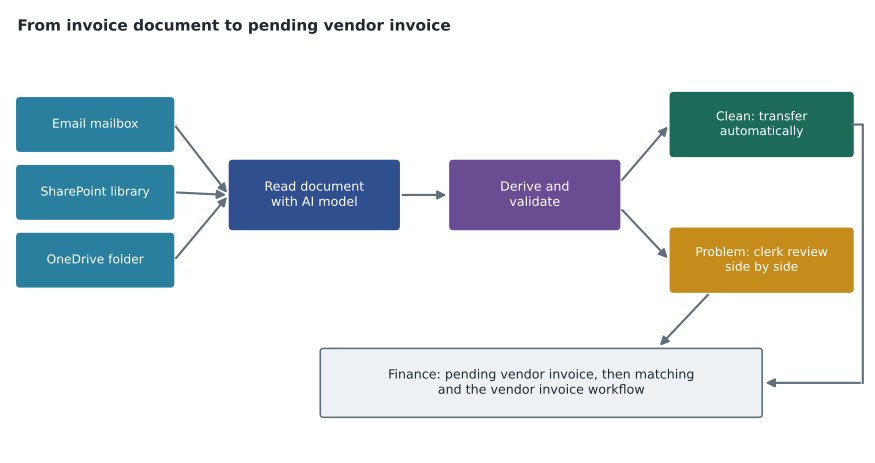
Invoice capture is the more complete option and the one Cobalt Ridge chose. Microsoft describes it as automatically creating vendor invoices in Finance from digital invoice images, using AI-based OCR that can read invoices from many vendors with little human intervention. It runs in Power Platform, stores files and data in Dataverse, and can use Azure Data Lake Storage. Its high-level process, as Microsoft documents it, has five parts.
| Step | Who | What happens |
|---|---|---|
| 1. Prepare environments | Power Platform and Finance administrators | Set up the Power Platform environment and solutions, connect Finance to AI Builder, configure storage, install Invoice capture |
| 2. Prepare models and flows | Environment makers | Create or adjust AI models and Power Automate flows |
| 3. Configure | Accounts payable administrator | Set up channels, legal entities, vendor and field mapping, and processing rules (creating channels needs the Environment maker role) |
| 4. Review | Accounts payable clerk | Review and correct captured invoices that need attention |
| 5. Derive, validate and transfer | Invoice capture, with the InvoiceCaptureOperator role | Derive missing values, validate, and transfer the invoice to Finance |
Channels are where documents come from: an email mailbox, a SharePoint library or a OneDrive folder, for example. Cobalt Ridge created one shared mailbox per company, invoices-crca and invoices-crus, and asked vendors to send PDFs there; the mail room scanned paper invoices to a SharePoint library that was also a channel. A file filter on the channel ignored documents that were not invoices, such as email signatures and marketing images.
Derivation fills in what the document does not say directly. The invoice shows a vendor name and address; Invoice capture looks up the vendor account. It shows a purchase order number; Invoice capture finds the order and the legal entity. It shows an amount; Invoice capture checks it against the total of the lines. Validation then checks that the invoice is complete and consistent before it is transferred, so that invoices reaching Finance are ready for matching.
Touchless processing and review
The goal is touchless processing for routine invoices: the document arrives, is read, derived, validated and transferred to Finance without a person opening it. Microsoft notes that a touchless scenario is possible when the flow user on the Finance side has the InvoiceCaptureOperator role. Invoices that cannot be processed cleanly go to a review queue, where a clerk sees the document beside the captured fields, corrects what the model misread, and transfers the invoice.
Clemency worried that touchless meant unchecked. Annelise drew the line between capture and approval. Invoice capture only creates the pending invoice; everything from lesson 2 still applies. A touchless captured invoice still runs three-way matching, still fails if the price is wrong, and still goes through the vendor invoice workflow. The only work removed is the typing.
Worked problem
Estimating the effect
Clemency's team receives 2,600 invoices a month. Typing an invoice takes about 4 minutes; reviewing a captured invoice that needs attention takes about 1.5 minutes. In the pilot, 65 percent of invoices were touchless and the rest needed review. How many hours of entry and review are needed per month before and after?
Show solution
- Before: 2,600 times 4 minutes is 10,400 minutes, about 173 hours.
- After: 35 percent of 2,600 is 910 invoices needing review.
- 910 times 1.5 minutes is 1,365 minutes, about 23 hours.
- The saving is about 150 hours a month, before counting fewer keying errors.
Answer: Entry work falls from about 173 hours to about 23 hours a month in this estimate.
Licensing and capacity
Invoice capture has its own licensing and capacity rules, which Annelise checked on Microsoft Learn because they affect the business case. Users who work in Invoice capture and do not have a full Finance license need a Power Apps per-user license. Original documents are stored in Dataverse file capacity, and the captured data in Dataverse database capacity; extra storage is only needed if the included capacity runs out. Microsoft's documentation states that each tenant gets 100 captured invoice transactions a month, with additional capacity sold in blocks (the page lists 300 US dollars per 1,000 transactions per tenant per month, sold as Electronic Invoicing SKUs), and that unused capacity expires each month. Only captured invoices count; files dropped by the file filter do not.
| Item | What Microsoft documents | Cobalt Ridge estimate |
|---|---|---|
| Included transactions | 100 captured invoices per tenant per month | Covers a small part of the volume |
| Additional transactions | Blocks of 1,000 per tenant per month | Three blocks for about 2,600 invoices |
| Unused capacity | Expires monthly | Size blocks to the normal month, not the peak |
| Reviewer licenses | Power Apps per user for users without a Finance license | None needed; reviewers have Finance licenses |
| Storage | Dataverse file and database capacity | Within included capacity for the first year |
Setting up vendors for capture
Capture works best when vendors behave predictably. Cobalt Ridge prepared three things before the pilot. Every vendor's invoices had to show the purchase order number, which the payables team requested in a letter to the top 200 vendors. Vendors who send many invoices got their own mapping rules in Invoice capture where their layouts were unusual. And vendor master data had to be clean, because derivation finds vendors by name, address and tax registration, and the 300 duplicates removed in lesson 1 would otherwise have made the lookup ambiguous.
Electronic invoices from vendors
The best invoice to capture is one that never needs reading. Two large suppliers already sent invoices through their own portals, and some countries require structured electronic invoices for business-to-business trade. Where vendors can send structured invoices, such as through Finance's electronic invoicing service or a partner network, the data arrives without OCR at all. For CRMX, suppliers must issue Mexican electronic invoices (CFDI) anyway, and the Mexican localization validates them; capturing the XML is more reliable than reading a PDF. Annelise suggested treating capture as the bridge until more vendors send structured data.
Monitoring the automation
Automation needs its own measures. Cobalt Ridge decided to track four each month: the touchless rate, the average time an invoice waits in review, the number of invoices that fail to transfer, and the number of captured invoices that later fail matching because a value was misread. The last measure was the most important, because a misread that passes validation and fails matching costs more time than typing would have. Invoice capture provides processing history and a workspace for these views, and the numbers could also be reported in Power BI.
Copilot and agents in payables
Clemency asked whether Copilot would soon do all of this. Microsoft has been adding AI features and agents across its finance products; for example, Business Central has a Payables Agent in preview that drafts purchase invoices from received documents. In Dynamics 365 Finance, Invoice capture is the generally available tool for reading invoices today. Desmond, the developer, repeated the canon rule from the foundation course: agents and AI tools at Cobalt Ridge may draft and submit, but never post directly. Capture creates pending invoices; matching and workflow decide whether they post.
Running the pilot
Cobalt Ridge ran an Invoice capture pilot in the UAT environment with three months of real invoices from 40 vendors, chosen to include clean PDF senders, scanned paper, unusual layouts and invoices in French and Spanish. The pilot measured how many invoices were touchless, how many needed review, and how many captured values were wrong after transfer. Invoices that needed review fell into a few groups: purchase order numbers missing from the document, vendors with multiple addresses that matched more than one vendor account, and line descriptions that did not match any order line.
Each group had a remedy outside Invoice capture itself. Missing purchase order numbers went back to the vendors, through the letter mentioned earlier. Vendors with several addresses were cleaned up in the vendor master. And for vendors who invoiced in summary lines rather than order lines, the team configured line matching to the order header and let three-way matching do the detailed check. By the end of the pilot, the touchless rate for the 40 vendors had risen from 41 percent in the first week to 65 percent.
| Review reason in the pilot | Share of reviewed invoices | Remedy |
|---|---|---|
| Purchase order number missing | About 35 percent | Ask vendors to include it |
| Vendor matched more than one account | About 20 percent | Clean vendor master addresses |
| Lines did not match order lines | About 25 percent | Match at header level and rely on three-way matching |
| Poor scan quality | About 20 percent | Ask vendors for PDF; improve mail room scanning |
Exceptions and ownership
Automation changes where people spend their time. Instead of typing invoices, Clemency's team would own the review queue, the import failures list, and the matching discrepancies that workflow sent to buyers. Each queue needed an owner and a daily routine, or invoices would wait unseen. Clemency assigned one person per company to the Invoice capture review queue each morning, the same person to the import failures list, and asked buyers to clear matching discrepancies within two business days, a target reported weekly. The vendor invoice workflow's three-day escalation would catch anything that slipped.
Finance and Invoice capture both keep history for each invoice, from capture to posting, so a question such as why an invoice took twelve days to post could be answered by looking at the steps: when it arrived, when it was captured, how long it waited in review, how long in matching discrepancy, and how long in approval. Clemency planned to use those timestamps to find bottlenecks rather than guessing.
Common mistakes
MistakeTreating touchless capture as touchless approval.
InsteadKeep matching and workflow on captured invoices; capture only removes typing.
MistakeStarting capture with a messy vendor master.
InsteadRemove duplicates and complete vendor data first, because derivation depends on it.
MistakeBuying capacity for the busiest month.
InsteadSize capacity to normal volume, because unused monthly capacity expires.
MistakeMeasuring only the touchless rate.
InsteadAlso track misreads that fail later, review time and transfer failures.
Summary and key terms
- Finance has an import interface for scanned invoices from external OCR services and a Microsoft Invoice capture solution on Power Platform.
- Failed imports are fixed on the import failures page; the attachment viewer shows the document next to the data.
- Invoice capture reads documents from channels, derives and validates data, and transfers pending invoices to Finance.
- Touchless processing removes entry work, but matching and workflow still control posting.
- Capacity is licensed by captured transactions per tenant per month; unused capacity expires.
- Invoice capture
- A Microsoft solution on Power Platform that reads invoice documents with AI and creates vendor invoices in Finance.
- Channel
- A source of invoice documents for Invoice capture, such as a mailbox or document library.
- Derivation
- Filling in values such as vendor account and legal entity from what the document shows.
- Touchless processing
- Capturing, validating and transferring an invoice without human review.
- Import failures page
- The Finance page that lists imported vendor invoices that could not be created.
- OCR
- Optical character recognition: reading text from images.
Practice problems
Work each problem on paper first, then reveal the answer to check.
Which role must the Finance-side flow user have for touchless transfer?
Show answer
InvoiceCaptureOperator.
What happens to attachments when a failed import is fixed and a pending invoice is created?
Show answer
They must be reattached.
Why is a captured invoice that later fails matching worse than a typed one?
Show answer
The misread passed validation, so it costs investigation time later instead of saving time.
Lesson quiz · 5 questions
Score 60% or more to complete this lesson.
Create a free account to save your progress, take quizzes and earn a certificate.