
MSBA-320 · Lesson 5 of 12 · 18 min
Account structures and rules
▶ Video coming soon A video version of this lesson is on the way.
Five dimensions and 260 main accounts can produce an enormous number of combinations, and most of them make no sense. Nobody should post cash at the bank with a product line, or a sales commission without a business unit. The fifth session was about account structures, the feature that decides which combinations of main account and dimension values are valid. Annelise called them the grammar of the ledger: the chart of accounts and dimensions are the vocabulary, and the account structures say how the words can be put together.
What an account structure does
An account structure defines a set of segments, one of which must be the main account, and for each segment the values that are allowed. It is created on the Configure account structures page under General ledger chart of accounts structures, activated, and then assigned to a ledger on the Ledger page. When a user enters a ledger account on a journal line, or when a document posts, the system finds the account structure that contains the main account and checks every dimension value against that structure's rules. A combination that does not satisfy the rules is rejected before it can post.
Microsoft's documentation sets out the key limits. An account structure can contain up to eleven segments: one main account and up to ten financial dimensions. When a structure already has eleven segments, the button to add a segment is unavailable. To validate more dimensions, you use advanced rules, which allow up to sixteen segments in total. Every structure needs a main account segment, but the main account does not have to be first, although placing it first gives users the best guided entry experience.
One main account, one structure
The most important rule is that each main account can belong to only one account structure assigned to a ledger. The main account is how the system decides which structure applies when someone types an account. If the same main account appeared in two structures on the same ledger, the system could not tell which one to use, and it reports an overlap. Ranges and wildcards are allowed in segment criteria, so in practice structures are usually defined by main account ranges: one structure for balance sheet accounts, another for profit and loss accounts, and perhaps a third for a special group such as intercompany accounts.
Designing Cobalt Ridge's structures
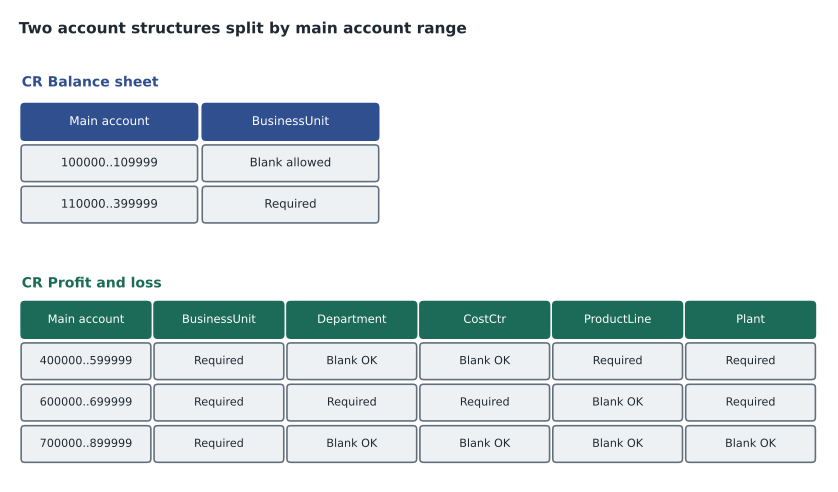
Annelise designed two structures for CR-COA. The CR Balance sheet structure covered main accounts 100000 to 399999 and included only the BusinessUnit dimension, because BusinessUnit was the balancing dimension and every balance sheet posting needed it, except for a small range of group cash accounts. The CR Profit and loss structure covered 400000 to 899999 and included all five dimensions. Within it, rows of criteria said which dimensions were required for which account ranges.
| Main account range | BusinessUnit | Department | CostCtr | ProductLine | Plant |
|---|---|---|---|---|---|
| 400000..499999 Revenue | Required | Blank allowed | Blank allowed | Required | Required |
| 500000..599999 Cost of goods sold | Required | Blank allowed | Blank allowed | Required | Required |
| 600000..699999 Operating expenses | Required | Required | Required | Blank allowed | Required |
| 700000..899999 Other and taxes | Required | Blank allowed | Blank allowed | Blank allowed | Blank allowed |
Each cell in the structure grid holds criteria: a single value, a range, a list, a wildcard, or the setting that allows blank values. The grid is read row by row. A combination is valid if it satisfies one complete row for its main account. That is why the structure has one row for each group of accounts that behaves differently. Thandeka liked that she could read the rules in the grid without understanding any code.
Constraining values between segments
Account structures can also say that particular values only go together. Because criteria are entered in rows, you can create a row for MIN business unit with only the cost centers that belong to Mining, and a row for MUN with only Municipal Water's cost centers. A posting to MIN with a Municipal cost center would then fail validation. Annelise used this for a few critical pairs, but warned against encoding the whole organization chart in account structures: every reorganization would then require structure changes. Derived dimensions from lesson 4 were a lighter way to keep cost centers and business units consistent.
Advanced rules
Advanced rules add dimensions to a structure for some combinations only. An advanced rule is created on the Advanced rule structures page with its own segments, then linked to an account structure with a filter that says when it applies, such as when the main account is in a certain range. Cobalt Ridge used one advanced rule: for warranty expense accounts 645000 to 645999, the Project dimension would be required, so every warranty claim could be traced to the customer project that caused it. Including Project in the main profit and loss structure would have forced users to think about projects on every expense, which nobody wanted.
Microsoft notes one important limitation. Budgeting does not use advanced rules, so if a team plans to budget against a dimension, that dimension should be included in an account structure itself. Since Cobalt Ridge budgeted by cost center, CostCtr had to be in the main structure rather than an advanced rule. Project-level warranty cost was not budgeted, so the advanced rule was acceptable.
Validate versus activate
Account structures are edited as drafts and only take effect when activated. Microsoft's documentation is explicit about the difference between the two buttons on the page. Validate performs a limited check and might pass even when overlapping criteria exist. Full overlap detection runs only during activation, which checks the structure against the active versions of other structures on the same ledger. For any combination of segment values, there must be exactly one valid path, both within a single structure and across all structures on the same ledger. If more than one path matches, activation reports an overlapping criteria error and the structure stays a draft.
Worked problem
Moving an account between structures
Cobalt Ridge decides that main account 395000, Intercompany investment, should move from the CR Balance sheet structure to a new CR Intercompany structure that requires a Plant value. Simply adding 395000 to the new structure fails activation with an overlap. What is the correct sequence?
Show solution
- Edit the CR Balance sheet structure to exclude 395000, for example by splitting its range into 100000..394999 and 395001..399999, and activate it.
- Add 395000 to the CR Intercompany structure and activate it.
- Assign the new structure to the ledgers that use the account if it is not already assigned.
- Run dimension data validation to find defaults and open documents that no longer satisfy the rules.
Answer: Remove first, then add: remove the account from its current structure and activate, then add it to the new structure and activate. Doing it in the other order creates an overlap.
Activation performance and timing
Activating a structure can take time on a large ledger, because the system rebuilds the information it uses to validate combinations. Microsoft has improved activation performance in recent releases, but Annelise still treated structure activation in production as a planned change: done after hours, tested first in a sandbox with a copy of production data, and followed by a quick test posting in each company. Activation does not change posted vouchers. It changes what can be entered from that moment on.
Structures and the Ledger page
A structure has no effect until it is assigned to a ledger. On the Ledger page for CRCA, Annelise added both CR Balance sheet and CR Profit and loss. The same two structures were assigned to CRUS and would be assigned to CRMX. Sharing structures across ledgers keeps validation identical across the group, but it also means that a change for one company affects every company that uses the structure. Where a company genuinely needs different rules, it can be given its own structure, as long as the main account ranges in its structures do not overlap.
Entering accounts with segmented entry
Users see account structures through the segmented entry control, the field used for ledger accounts on journals and documents. As a user types, the control shows one segment at a time, offers only the values allowed by the structure, and marks required segments. If the user leaves a required segment blank, the control flags the error before the line is saved. This guided entry is why Microsoft recommends placing the main account first: once the main account is known, the control can show exactly which dimensions are needed for it.
| Combination entered | Valid? | Reason |
|---|---|---|
| 620100-MUN-ENG-CC110--HAM | Yes | Operating expense row satisfied; ProductLine blank allowed |
| 620100-MUN-ENG---HAM | No | CostCtr is required for operating expenses |
| 401100-MIN---SLURRY-AKR | Yes | Revenue row satisfied; Department and CostCtr blank allowed |
| 110100-MIN | Yes | Receivables in the balance sheet structure need only BusinessUnit |
| 101000 | Yes | Group cash accounts allow a blank BusinessUnit |
Testing structures before go-live
Annelise built a test script for the structures, because a rule that is too loose lets bad data in and a rule that is too strict stops the business. The script had three kinds of cases. Positive cases were combinations that must post, such as a travel expense with all required dimensions, a revenue line with a product line and plant, and a cash transfer with no business unit. Negative cases were combinations that must fail, such as an operating expense without a cost center or a CRCA posting to the Denver plant. Process cases ran real documents end to end, such as a vendor invoice, a customer invoice and an inventory receipt, to prove that posting profiles and default dimensions produced combinations the structures accepted.
The process cases found two problems in the first test cycle. Inventory postings for spare parts had no plant, because the site on those items had not been mapped to a plant value, and freight charges on customer invoices had no product line, which the revenue row required. Both were fixed in setup rather than by loosening the structure: the site-to-plant defaults were completed, and freight charges were moved to their own revenue account with a row that allowed a blank product line.
Structures and integrations
Account structures validate every source of postings, not only users. Integrations that import journals, such as the payroll file from Cobalt Ridge's payroll provider or bank statement imports, must also produce valid combinations. Desmond added a check to the payroll integration that rejected any line whose combination failed validation and sent it back to the payroll team, rather than letting the whole journal fail on import. That small piece of design saved a great deal of month-end frustration.
Design advice
Annelise summarized her design advice in four points. Keep the number of structures small and split them by main account range. Require only the dimensions that each group of accounts genuinely needs. Use advanced rules for occasional extra detail, but keep budgeted dimensions in the main structure. And document every structure in plain language, so the controller can read and approve the rules without opening the configuration page. With the structures active in CONFIG, the team was ready to look at currencies.
When rules block a posting
Validation errors are frustrating for users, so the team agreed how to handle them. If an account structure blocks a posting that should be valid, the user reports it with the full combination and the document number. The finance master data team checks the structure rules, and either explains which value is missing or changes the rule through the normal change process. Annelise added a short page to the user guide showing the most common error messages from the segmented entry control and what each one means. Most turned out to be a missing cost center on an operating expense, exactly the error the rules were designed to catch.
Common mistakes
MistakePutting the same main account range in two structures on one ledger.
InsteadEach main account can exist in only one structure per ledger; split structures by range.
MistakeRelying on Validate to catch overlaps.
InsteadOnly activation performs full overlap detection; test activation in a sandbox.
MistakeUsing an advanced rule for a dimension the business budgets by.
InsteadBudgeting does not use advanced rules; put budgeted dimensions in the account structure.
MistakeEncoding the whole organization chart as account structure rows.
InsteadUse derived dimensions for routine consistency and keep structures for essential rules.
Summary and key terms
- Account structures define which combinations of main account and dimension values are valid; they are activated and assigned to ledgers.
- A structure has up to eleven segments, one main account plus ten dimensions; advanced rules allow up to sixteen segments.
- Each main account can belong to only one structure on a ledger; overlaps fail activation.
- Validate does a limited check; only activation detects all overlapping criteria.
- The segmented entry control guides users through the segments each structure requires.
- Account structure
- A set of segments and criteria that validates combinations of a main account and dimensions.
- Segment
- One position in an account structure, such as the main account or a dimension.
- Advanced rule
- A rule that adds dimension segments to an account structure for selected combinations.
- Overlapping criteria
- An error raised when a combination could be validated by more than one path.
- Segmented entry control
- The field that guides users segment by segment when they enter a ledger account.
Practice problems
Work each problem on paper first, then reveal the answer to check.
Why should the main account be the first segment?
Show answer
It identifies the structure, so guided entry can then show the right dimensions.
What sequence avoids an overlap when moving an account between structures?
Show answer
Remove it from the old structure and activate, then add it to the new one and activate.
Why was CostCtr not placed in an advanced rule?
Show answer
Cobalt Ridge budgets by cost center and budgeting does not use advanced rules.
Lesson quiz · 5 questions
Score 60% or more to complete this lesson.
Create a free account to save your progress, take quizzes and earn a certificate.