
MSBA-320 · Lesson 2 of 12 · 18 min
Fiscal calendars and ledgers
▶ Video coming soon A video version of this lesson is on the way.
The second finance session was about time. Every amount in the general ledger belongs to a date, and every date belongs to a period. Thandeka's old system had one calendar per company and a homemade spreadsheet that told the team which months were locked. In Finance, Annelise explained, calendars are shared objects with periods that can be opened, held and closed for each ledger and each module. Getting the calendar right is the first piece of setup, because the ledger cannot exist without one.
Fiscal calendars, years and periods
A fiscal calendar is a named container for fiscal years. It is created on the Fiscal calendars page under General ledger calendar setup and is shared across the environment. A fiscal year has a start date, an end date and a set of periods. When you create a year, you choose the length of each period, such as one month, and the system generates the periods. Each year can have three kinds of periods. Operating periods are the normal months in which day-to-day transactions post. An opening period holds opening balances brought forward from the previous year. A closing period holds year-end closing entries, so that closing adjustments are kept apart from December's operating transactions.
A typical calendar year with monthly periods therefore contains fourteen periods: one opening period dated the first day of the year, twelve operating periods, and one closing period dated the last day of the year. Opening and closing periods share a date with an operating period, but they are separate periods with their own status, which is how the year-end close can be reopened and rerun without disturbing operating transactions.
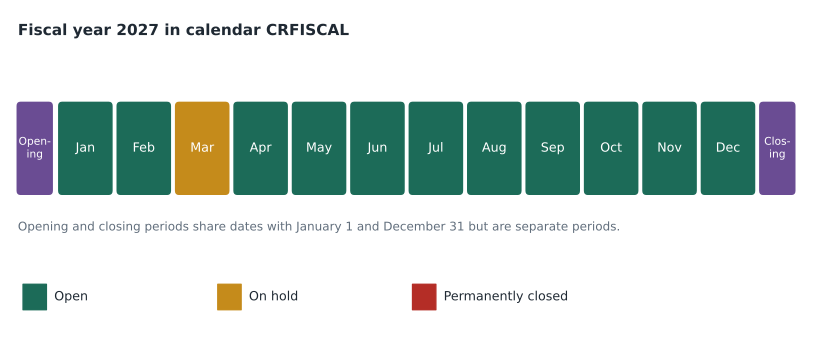
Fiscal years do not have to follow the calendar year or have monthly periods. A retailer might use a 4-4-5 pattern of weeks. A company in a country whose tax year ends in March might run April to March. Calendars can also be short years, for example when a company is acquired partway through a year and needs to align with its new parent. The rule is simple: create each calendar once, and assign it to as many ledgers as use the same pattern.
Cobalt Ridge's calendar decision
Cobalt Ridge's old companies already ran calendar years, and Mexican tax law requires a calendar tax year for CRMX. Annelise therefore created one fiscal calendar named CRFISCAL with calendar years and monthly periods, and planned to assign it to all three ledgers. She created fiscal years 2025, 2026 and 2027: 2025 and 2026 so that migrated history and opening balances had periods to land in, and 2027 because CRMX would start trading on January 1 and production would need it from go-live.
| Setting | Value | Reason |
|---|---|---|
| Calendar name | CRFISCAL | One calendar shared by all three ledgers |
| Year pattern | January 1 to December 31 | Matches existing practice and Mexican tax rules |
| Period length | One month | Monthly close and management reporting |
| Years created at go-live | 2025, 2026, 2027 | History, opening balances and the first live year |
| Opening and closing periods | Yes, each year | Separate opening balances and year-end entries |
Period status: open, on hold, permanently closed
Creating a period does not by itself let anyone post into it. Each ledger has its own view of the calendar, called the ledger calendar, in which every period has a status. A period that is Open accepts postings. A period On hold rejects postings but can be reopened, which is the usual state for a month that has been closed for reporting but might still need an adjustment approved by the controller. A period that is Permanently closed can never be reopened. Permanent closure is normally used only after audited statements are issued and the year is final.
Status is set per ledger, not per calendar. That matters in a group: CRUS might close October on the third working day while CRCA waits for one late invoice, even though both use CRFISCAL. Thandeka liked this; her old system forced every company to close together.
Module access in a period
Inside an open period, Finance can also restrict which modules can post. On the Ledger calendars page each period has an access level for modules such as accounts payable, accounts receivable, inventory, fixed assets, projects, sales and purchasing, and general ledger. A module can be open to all users or limited to selected user groups. The common pattern at month end is to close the subledgers first while keeping the general ledger open for the accounting team. For example, on the first working day of November, Thandeka's team would set October to on hold for inventory and accounts payable for everyone except the accounting user group, which still needs to post accruals.
Worked problem
Closing October in stages
On November 2, CRCA wants to stop new payables and inventory postings in October, keep the general ledger open for the accounting team for two days, and then lock October completely while still allowing the controller to reopen it if the auditors find something. What statuses should be used?
Show solution
- Leave October open in the CRCA ledger calendar, but limit accounts payable and inventory access to the accounting user group.
- On November 4, when accruals and reconciliations are done, set October to On hold for the CRCA ledger.
- Do not use Permanently closed, because an on-hold period can still be reopened by the controller.
- Permanently close the periods only after the year-end audit is signed.
Answer: Module restrictions first, then On hold for the whole period, and Permanently closed only after the audited year end.
The ledger
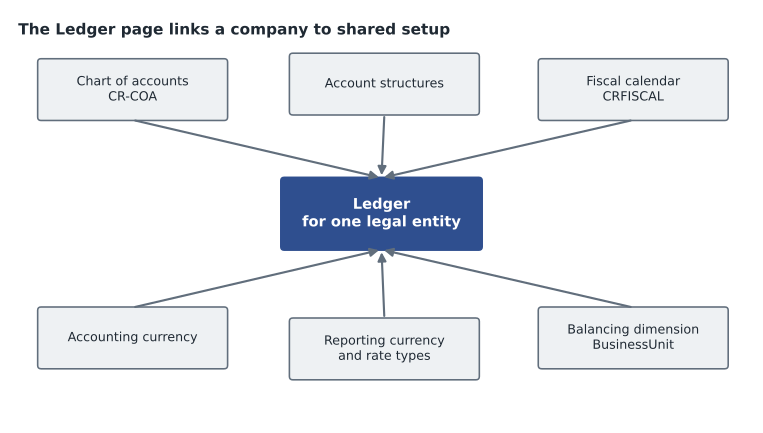
Once a calendar exists, each legal entity needs a ledger. The Ledger page, under General ledger ledger setup, is one of the most important pages in Finance, because almost everything you set there is difficult to change after transactions post. Annelise opened it for CRCA in the CONFIG sandbox and walked through each field.
| Ledger field | What it does | Can it change later? |
|---|---|---|
| Chart of accounts | The shared chart whose main accounts this company uses | Not once transactions exist |
| Account structures | The structures that validate account and dimension combinations | Yes, with care; new structures must not overlap |
| Fiscal calendar | The calendar whose periods the company posts into | Not easily once transactions exist |
| Accounting currency | The currency the books are kept in | No, once transactions exist |
| Reporting currency | A second currency recorded on every voucher | Treat as fixed after go-live |
| Default exchange rate type | Rates used to convert transactions | Yes |
| Budget exchange rate type | Rates used for budget amounts | Yes |
| Balancing financial dimension | A dimension whose values must each balance | Yes, but plan it at design time |
The accounting currency is the currency in which the legal entity keeps its books. For CRCA it is the Canadian dollar, for CRUS the US dollar, and for CRMX the Mexican peso. The reporting currency is an optional second currency. When it is set, every voucher records its amount in the transaction currency, the accounting currency and the reporting currency. Cobalt Ridge set the reporting currency for all three ledgers to USD, the parent company's currency, so that group reports could be produced in one currency directly from each company's ledger. Lesson 6 explains how the reporting currency amount is calculated and how it differs from translation during consolidation.
The exchange rate type settings tell the ledger which set of rates to use. The default exchange rate type converts everyday transactions, and a budget exchange rate type converts budget amounts, which often use a planning rate fixed for the year. Exchange rate types and rates are shared setup covered in lesson 6.
The balancing financial dimension
The balancing financial dimension is an option on the Ledger page that tells the system to keep each value of one dimension balanced on its own. If Business unit is the balancing dimension, every voucher must balance for each business unit, not only for the company as a whole. When a voucher moves value from Municipal Water to Mining within CRCA, the system automatically adds interunit due-to and due-from lines so that both business units stay balanced. This lets a company produce a balance sheet by business unit. Lesson 8 shows the entries. Annelise warned that the balancing dimension is best chosen at design time, because switching it on later means older vouchers were not balanced by that dimension.
One ledger per legal entity
Every legal entity has exactly one ledger, and every voucher posts to the ledger of the company it belongs to. Ledgers can share a chart of accounts, account structures and a fiscal calendar, but their balances are always separate. That separation is what keeps CRCA's books Canadian and CRUS's books American, and it is why intercompany accounting and consolidation are needed to see the group as a whole.
Annelise finished the CRCA ledger, then configured CRUS the same way with US dollars as the accounting currency. CRMX would be done at the end of the course as part of the case study, once the team had seen every piece. Before leaving, she ran the Validate step from the ledger's action pane, which checks that the account structures and calendars selected are consistent. The CRCA ledger was ready to receive its first test journal.
Other calendars in the system
The fiscal calendar on the ledger is not the only calendar a finance team meets. Budget cycles in budgeting use time spans that are linked to a fiscal calendar but can cover more than one year, such as a three-year forecast. Fixed asset depreciation can follow the fiscal calendar or a separate depreciation calendar if a country's tax depreciation rules use a different year. Working time calendars used for payment dates and production scheduling are a different thing entirely: they describe which days are business days, not which period an amount belongs to. Annelise made the distinction early, because people new to Finance often look for public holidays in the fiscal calendar.
There is also the question of dates on documents. Every voucher has an accounting date, which decides the period, and many documents also have a document date or an invoice date. A vendor invoice dated October 30 and received on November 3 can be posted with an accounting date in October if October is still open for accounts payable, or in November if it is not. Thandeka's policy was that invoices received after the third working day would post to the new month, with an accrual in the old one. The module access settings on the ledger calendar would enforce the first half of that policy automatically.
Changing calendars after go-live
Calendars can be extended at any time by adding fiscal years. What cannot easily be changed is the calendar assigned to a ledger once transactions exist, because every posted voucher refers to a period in that calendar. If a company changes its year end, for instance after an acquisition, the normal approach is to create a short year in the existing calendar that ends on the new date, and then continue with the new pattern. Microsoft documents this short-year approach for fiscal calendars. Annelise added a line to the design document: any change to the year end requires finance sign-off and a test in a sandbox first.
Calendars, ledgers and the close
The calendar is also the backbone of the period close. In a later course the team would use the financial period close workspace to schedule close tasks against each period and company. The statuses described here are what those tasks change: each subledger is restricted, then the period is put on hold, then, after audit, permanently closed. A clear calendar design makes those tasks predictable.
Common mistakes
MistakeCreating a separate fiscal calendar for each company that uses the same year pattern.
InsteadCreate one calendar per pattern and assign it to every ledger that uses it.
MistakeForgetting to create next year's fiscal year until users cannot post on January 1.
InsteadCreate future years well before they are needed; production needs the go-live year at cutover.
MistakePermanently closing a period at month end.
InsteadUse On hold for closed months and Permanently closed only after audited year end.
MistakeChoosing a reporting currency without agreeing how group reports will be produced.
InsteadDecide the group reporting currency and consolidation approach before setting the ledger.
Summary and key terms
- Fiscal calendars are shared; each fiscal year has operating periods plus optional opening and closing periods.
- Each ledger has its own calendar view with period status Open, On hold or Permanently closed, and module access per period.
- The Ledger page links a company to its chart of accounts, account structures, fiscal calendar, currencies, exchange rate types and balancing dimension.
- Accounting currency and chart of accounts are effectively fixed once transactions post.
- A balancing dimension keeps each value, such as a business unit, balanced within one company.
- Fiscal calendar
- A shared container of fiscal years and periods assigned to ledgers.
- Operating period
- A normal period in which day-to-day transactions post.
- Closing period
- A separate period at year end for closing entries.
- Ledger calendar
- A ledger's view of the fiscal calendar, where period status and module access are set.
- Accounting currency
- The currency in which a legal entity keeps its books.
- Balancing financial dimension
- A dimension whose values must each balance on every voucher within one legal entity.
Practice problems
Work each problem on paper first, then reveal the answer to check.
Why does a closing period exist separately from December?
Show answer
So year-end closing entries are kept apart from December operating transactions and the year-end close can be rerun.
CRUS has closed October but CRCA has not. How is that possible with one shared calendar?
Show answer
Period status is set per ledger on the ledger calendar.
Which ledger setting gives Cobalt Ridge a balance sheet by business unit?
Show answer
The balancing financial dimension set to Business unit.
Lesson quiz · 5 questions
Score 60% or more to complete this lesson.
Create a free account to save your progress, take quizzes and earn a certificate.