
MSBA-320 · Lesson 11 of 12 · 18 min
Data entities for finance
▶ Video coming soon A video version of this lesson is on the way.
Configuration can be built by hand in a sandbox, but migration cannot. Cobalt Ridge had about 260 main accounts, five dimensions with several hundred values, exchange rate history, opening balances for three companies and two years of monthly balances for comparison reports. The eleventh session covered how the data management framework moves finance setup and balances into Finance, in what order, and how the results are checked. Desmond joined the session, because some of the extracts from the old system would need his help.
The data management framework, briefly
The foundation course introduced the data management framework: data entities that represent business data in a flat, importable form; import and export projects that load files through a staging table into the target tables; templates that group entities in a set order; and data packages that bundle files with a manifest. Finance setup uses the same tools as any other migration. What is specific to finance is the set of entities involved and the strict order in which they must be loaded, because almost every financial record refers to another one.
Finance entities you will use
Microsoft provides data entities for nearly every part of financial setup. Annelise listed the ones the team would use. Entity names can change slightly between versions, so the team always searched for them in the data entity list in their own environment rather than relying on names from old guides.
| Area | Typical entities | Shared or company |
|---|---|---|
| Fiscal calendars | Fiscal calendars, fiscal years and periods | Shared |
| Currencies and rates | Currencies, exchange rate types, exchange rates | Shared |
| Chart of accounts | Chart of accounts, main account categories, main accounts | Shared |
| Dimensions | Financial dimensions, financial dimension values, legal entity overrides | Shared |
| Account structures | Account structures and advanced rules (configuration only; activation is a separate step) | Shared |
| Ledger | Ledger settings, accounts for automatic transactions | Company |
| Journals | Journal names, general journal lines | Company |
| Group setup | Intercompany accounting, allocation rules | Company or between companies |
Load order
The order of loading follows the same dependencies as manual setup in lesson 1. A main account cannot be imported before its chart of accounts exists. A dimension value cannot be imported before its dimension. An account structure refers to main account ranges and dimensions. A ledger refers to the chart, structures, calendar and currencies. Journal lines refer to main accounts, dimension values, journal names and open periods. Importing in the wrong order produces errors in staging that can take hours to untangle.
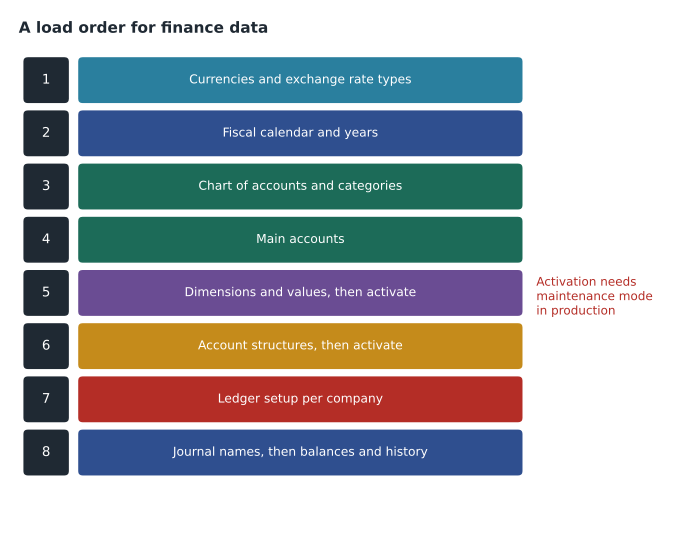
Annelise built a data management template with the entities in this order and saved it as Finance setup. Each entity in a template has a sequence number and an execution unit, so the template can load several entities in parallel where they do not depend on each other and in series where they do. She exported the configured CONFIG data with the template as a data package, imported it into UAT, and later into production. Shared setup came across once; company-specific setup was imported into each legal entity in turn.
Activation steps between loads
Two steps in the order are not imports at all. Financial dimensions must be activated after they are created, and account structures must be activated after they are imported. As lesson 4 explained, dimension activation in production requires maintenance mode, and the Dimension attribute activation entity cannot be used in production. Annelise therefore planned the production cutover in two parts: first the shared setup import and the maintenance window for activation, then the company setup and balances. In the sandboxes, activation could be included in the template.
Opening balances
Most migrations do not bring every historical transaction across. Cobalt Ridge migrated opening balances as of the go-live date and monthly net change for 2025 and 2026, so that comparison reports would work from day one. Both are imported as general journal lines through the general journal entity into a journal name created for migration, with a voucher series that made migration vouchers easy to recognize.
The approach for balances is to extract the old system's trial balance by account and organizational detail, map each old account to a new main account and dimension values using the mapping spreadsheet from lesson 3, and produce journal lines. Balance sheet accounts receive their opening balances in the opening period of the go-live year, or as of the cutover date. Profit and loss history is loaded as one line per account, dimension combination and month. Each company's opening balance journal must balance in total, and Annelise added a line per company to an offset account, 399900 Migration clearing, that should always end at zero once all journals were posted.
Worked problem
Checking an opening balance load
After importing CRCA's opening balances, the trial balance for the opening period shows the migration clearing account 399900 with a debit of 18,640. The old system's trial balance totaled to zero. What should the team check, and in what order?
Show solution
- Look at staging and the journal for lines that failed validation and were transferred to an error journal; these are often the missing amount.
- Compare totals by main account range between the old trial balance and the new one to find which range is short.
- Check that subledger control accounts, such as receivables and payables, were loaded through subledger opening transactions rather than journals, if that was the plan.
- Correct the cause and repost; the clearing account must end at zero.
Answer: Start with rejected lines, then compare by account range. A clearing account that does not return to zero means something did not post or was mapped twice.
Subledger balances
Control accounts such as accounts receivable, accounts payable and inventory are not loaded as plain journal lines, because the subledger details would be missing. Open customer invoices, open vendor invoices, inventory on hand and fixed asset values are migrated through their own entities in their own modules, which post to the control accounts automatically. The general ledger opening balance for those control accounts is then left out of the journal import, or loaded to a clearing account that the subledger imports offset. Annelise coordinated this with the payables, receivables and supply chain leads, because a double load of receivables is one of the most common migration errors.
Validating the migration
Every migration rehearsal ended with the same checks. The trial balance in Finance by main account and legal entity had to match the old trial balance after mapping. The migration clearing account had to be zero. Subledger totals had to match their control accounts. Dimension data validation from lesson 4 had to show no invalid default dimensions on master records. And a sample of balances by dimension had to match the old system's reports for the same organizational units. The results were recorded in a sign-off sheet that Thandeka signed for each rehearsal and for the final cutover.
| Check | Pass condition | Owner |
|---|---|---|
| Trial balance by account | Matches old system after mapping, per company | Annelise |
| Migration clearing account 399900 | Zero in every company | Annelise |
| Subledger to control accounts | Receivables, payables, inventory and fixed assets agree | Module leads |
| Dimension data validation | No invalid combinations on master records | Master data team |
| Sample by business unit | Matches old management report | Thandeka |
Large journal imports
Opening balance and history journals can be large. Imports run through staging, so they can be scheduled as batch jobs, and the general journal can post in batch. Older guidance recommended enabling the Financial dimension service for large general journal imports through data management. As lesson 4 noted, Microsoft has deprecated that service from September 2026 with version 10.0.49 in favor of optimized financial dimension handling, so the team used the current standard import path. Desmond tested the full CRCA history file, about 90,000 lines, in UAT to measure the time before the cutover plan was finalized.
The cutover timeline
Annelise wrote the finance part of the cutover plan as a timeline counted back from go-live. Three weeks before, production would be provisioned from UAT and the shared finance setup imported. Two weeks before, a maintenance window would activate dimensions and account structures, followed by company setup for CRCA and CRUS. One week before, the final history load of monthly net change for 2025 and 2026 would run and be reconciled. On the last weekend, the old system would close for posting, the final trial balance would be extracted, and opening balances and subledger balances would be loaded and checked. On Monday morning, users would post their first live transactions.
The plan named a decision point at each stage: if a reconciliation failed, the team would know by when it had to be fixed and who decided whether to continue. Kiri insisted on this, because a go-live that slips at the last moment is far less damaging than one that goes ahead with unreconciled balances.
Number sequences after migration
Migrated documents bring their own numbers. Open vendor invoices from the old system keep their old invoice numbers, and migration vouchers use the migration voucher series. Before go-live, Annelise checked that every number sequence for live documents started above any number used in migration, so that the first live purchase order would not collide with a migrated one. This is a small check that prevents confusing duplicate numbers in the first week.
Integrations after go-live
Data entities are not only for migration. The same entities support recurring integrations. Cobalt Ridge's payroll provider would send a payroll file every two weeks, which would be imported through a recurring data job into the PAYROLL journal name with its journal controls from lesson 7. Exchange rates would arrive through the provider import from lesson 6 rather than a file. And the board's monthly pack would draw data from Finance into Power BI. Annelise reminded the team that every integration needs an owner, a monitoring plan and a way to handle rejected records.
Exporting and comparing configuration
Data entities also help after go-live in a less obvious way: comparing configuration between environments. If a journal name behaves differently in UAT and production, exporting the journal names entity from both and comparing the files shows the difference in minutes. Annelise used the same technique before each production change, exporting the affected entities from production first so that the change could be undone by reimporting the previous version if necessary. For finance setup, where a wrong setting can affect every posting, that safety net was worth the few minutes it took.
The export files themselves are plain spreadsheets or text, so finance users can review them without opening Finance. Thandeka reviewed the main accounts export before each migration rehearsal, checking names, types and categories line by line, a task that is much faster in a spreadsheet than one record at a time on screen.
Copy into legal entity
Finally, the Copy into legal entity feature in data management copies company-specific setup from one legal entity to another in the same environment. For CRMX, it would copy journal names, accounts for automatic transactions and other ledger setup from CRCA, which could then be adjusted. Shared setup did not need copying because it already applied to every company. This feature, together with the data package from the template, made adding a company a matter of days rather than weeks.
Keeping configuration in step
Once production is live, configuration keeps changing: new main accounts, new dimension values, new journal names, new allocation rules. Each change made in production should also reach the sandboxes, or the next test will run against old setup. Annelise suggested two practices. Make finance configuration changes in the CONFIG sandbox first, test them, and move them with a small data package. And refresh UAT from production regularly, so testers always work with current configuration and data. The environment copy features in the Power Platform admin center described in the foundation course make the second practice routine.
Documenting the migration
Every migration decision ended up in one document: which data was migrated and which was not, the mapping from old accounts to new, the load order, the activation windows, the validation checks and who signed each rehearsal. Auditors would ask for it in the first audit after go-live, and the team would need it again for every future company. Thandeka asked that the document be stored with the project's other design documents, not on someone's laptop.
Common mistakes
MistakeImporting journal lines before main accounts, dimension values and journal names exist.
InsteadFollow the dependency order and use a template with sequence numbers.
MistakeLoading receivables and payables control balances as journals and then importing open invoices too.
InsteadLoad subledger details through their own entities and keep control accounts out of the journal import.
MistakePlanning to activate dimensions in production during business hours.
InsteadActivation needs maintenance mode in production; schedule it in the cutover plan.
MistakeSigning off a migration because the import finished without errors.
InsteadReconcile trial balances, clearing accounts and subledgers before sign-off.
Summary and key terms
- The data management framework moves finance setup and balances with entities, projects, templates and packages.
- Load order follows dependencies: currencies and calendars, chart and accounts, dimensions, structures, ledger, journal names, balances.
- Dimension and account structure activation are separate steps; dimension activation needs maintenance mode in production.
- Opening balances and history are imported as journals; subledger balances come through their own entities.
- Validation compares trial balances, clearing accounts, subledgers and dimension data before sign-off.
- Data entity
- A flat, importable representation of business data used by the data management framework.
- Data management template
- An ordered list of entities used to export and import data in sequence.
- Staging
- The intermediate table where imported data is validated before it reaches the target tables.
- Opening balance
- The balance of an account brought into the new system as of go-live.
- Migration clearing account
- A temporary account that balances migration journals and must end at zero.
Practice problems
Work each problem on paper first, then reveal the answer to check.
Why are subledger control accounts usually left out of opening balance journals?
Show answer
Their balances come from subledger imports such as open invoices, which post to the control accounts automatically.
Which two activation steps sit between imports?
Show answer
Financial dimension activation and account structure activation.
What must the migration clearing account show after all journals post?
Show answer
Zero in every company.
Lesson quiz · 5 questions
Score 60% or more to complete this lesson.
Create a free account to save your progress, take quizzes and earn a certificate.