
MSBA-290 · Lesson 8 of 12 · 23 min
Enterprise policies
▶ Video coming soon A video version of this lesson is on the way.
The eighth session was the one Marisol had been waiting for. With identity, provisioning and roles settled, the question became what everyone in the enterprise would be allowed to do. "Every setting we leave to organizations," she said, "is a setting three organizations will set three different ways. Every setting we lock down is a request my team will have to handle. Policies are where we decide which is worse."
What an enterprise policy is
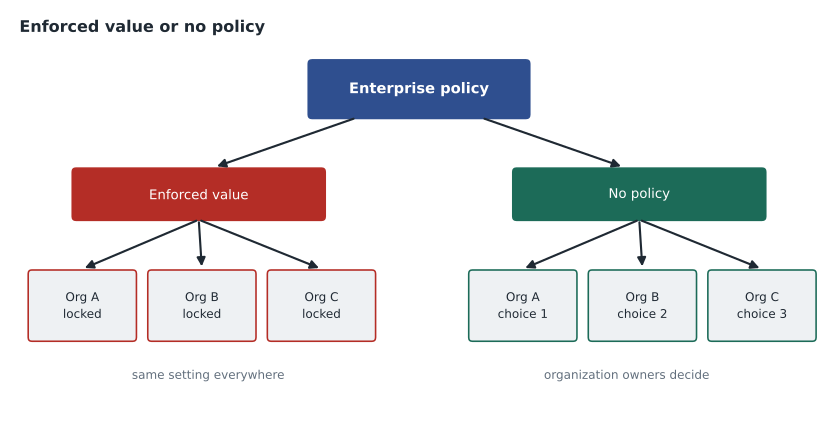
An enterprise policy is a setting that enterprise owners make once and that applies to every organization in the enterprise. Most policies have two kinds of value. An enforced value, such as "members cannot change repository visibility", applies everywhere, and organization owners cannot override it. No policy leaves the decision to each organization's owners, who then see the setting in their own organization settings as usual. Choosing No policy is a deliberate decision to delegate, not a gap.
Policies live under the enterprise account's Policies settings and are grouped by area. The GH-100 study guide asks administrators to define organization and enterprise policies, strengthen the enterprise security posture, and apply organizational policies for GitHub Actions, so it is worth knowing the main areas.
Repository management policies
Repository management policies decide what members can do with repositories. They are the ones most likely to cause a security incident if left open, and most likely to cause support tickets if closed too tightly.
| Policy | What it controls | Skerry's choice |
|---|---|---|
| Base permissions | The default access every member has to every repository in each organization | Enforced: no permission, with access through teams and internal visibility |
| Repository creation | Whether members can create repositories, and with which visibilities | Enforced: members may create private and internal repositories |
| Repository visibility change | Whether members with admin access can change visibility | Enforced: only organization owners |
| Repository deletion and transfer | Whether repository admins can delete or transfer repositories | Enforced: only organization owners |
| Forking private and internal repositories | Whether such repositories can be forked, and where forks may go | Enforced: forks allowed only within the same organization |
| Outside collaborators | Who can invite outside collaborators | Not applicable with managed users; guest collaborators come from the IdP |
| Default branch name | The name of the default branch for new repositories | Enforced: main |
| Issue deletion | Whether repository admins can delete issues | Enforced: not allowed |
The base permission choice deserves explanation. A base permission of Read in every organization would let every developer read every private repository, which Skerry did not want for the payment code. A base permission of No permission, combined with internal visibility as the default for new repositories, gave the inner source openness Marisol wanted for most code while letting the stores group keep payment repositories private. People get more than read access through teams, which are backed by Entra ID groups.
Worked problem
Predicting the effect of a policy change
The enterprise enforces that only organization owners can change repository visibility. A repository administrator in the data group wants to make an internal repository private. What happens, and what should she do?
Show solution
- The visibility setting is grayed out for her because the enterprise policy is enforced.
- The organization owners can still make the change, because the policy reserves it for them.
- She should ask an owner through the platform team's request process.
- The change will appear in the audit log with the owner as actor.
Answer: She cannot change it herself; an organization owner must, and the change is logged.
Rulesets and custom properties at enterprise scale
MSBA-161 introduced rulesets for repositories and organizations. In Enterprise Cloud, enterprise owners can also create enterprise rulesets that target repositories across organizations, and enterprise custom properties that label repositories consistently; both became generally available in March 2025. Custom properties are what make enterprise rulesets practical. Instead of listing repositories by name, a ruleset can target every repository whose property data-classification is restricted, wherever it lives, and new repositories inherit the rules as soon as they are labeled. Skerry defined three properties, data-classification, owning-team and lifecycle, required them on every new repository, and wrote an enterprise ruleset requiring two approvals, code owner review and signed commits on default branches of restricted repositories.
| Tool | Scope | Typical use |
|---|---|---|
| Repository ruleset | One repository | Project-specific rules such as required status checks |
| Organization ruleset | Repositories in one organization, targeted by name or property | Organization-wide baselines such as no force pushes |
| Enterprise ruleset | Repositories across organizations, targeted by organization and property | Company-wide controls for classified repositories |
Actions policies
GitHub Actions has its own policy area, and it matters because workflows run code with access to secrets. Enterprise owners can choose which organizations may use Actions at all, and which actions and reusable workflows may run: all actions; only actions and workflows defined in the enterprise; or a selected set, which can include actions created by GitHub, actions from verified Marketplace creators, and named patterns such as a specific publisher or a specific action pinned to a commit. Owners can also set retention periods for artifacts and logs within the limits GitHub allows, control whether workflows from fork pull requests need approval before running, and set the default permissions of the GITHUB_TOKEN that each workflow receives, which should be read-only by default.
# An example "selected actions" allow list, entered in the enterprise Actions policy
actions/*
github/codeql-action/*
skerry/*
azure/login@a1b2c3d4e5f60718293a4b5c6d7e8f9012345678
Skerry chose the selected-actions approach: GitHub-created actions, verified creators, anything in its own enterprise, and a short list of third-party actions pinned to full commit SHAs after review. Pinning to a SHA instead of a tag means a compromised publisher cannot change what Skerry runs by moving a tag. MSBA-291 covers runners and the rest of Actions administration.
Security and access policies
Several enterprise settings strengthen the security posture of every organization at once.
| Setting | What it does | Notes |
|---|---|---|
| Two-factor authentication requirement | Requires 2FA for members of all organizations | Personal-account enterprises; managed users rely on the IdP |
| IP allow list | Limits access to enterprise resources to listed IP ranges | Covers web, Git and API access; GitHub Apps can have their own lists |
| IdP Conditional Access policy | Applies Entra ID conditions to GitHub sign-in | Managed users with OIDC; an alternative to GitHub's own IP allow list |
| SSH certificate authorities | Lets members authenticate with SSH certificates issued by the company | Certificates can be short-lived |
| Personal access token policies | Controls whether classic and fine-grained tokens can access organizations, and whether fine-grained tokens need approval | Covered with apps in MSBA-291 |
| Security configurations | Applies sets of security features, such as secret scanning and push protection, to repositories | Can be enforced across the enterprise |
An IP allow list is a blunt but effective control: requests from addresses outside the listed ranges are refused, even with valid credentials. It also has a cost. GitHub-hosted runners, Codespaces and third-party services come from addresses that change, so a strict allow list can break them unless their ranges are added or the company runs its own runners inside its network. Skerry, with OIDC and Conditional Access, decided to rely on the Entra ID policy for location rules instead of maintaining a GitHub IP allow list, and to revisit the decision after six months.
Copilot, Codespaces and other product policies
Product-specific policies sit alongside the others. Copilot policies decide which Copilot features are enabled, which AI models may be used, and whether suggestions matching public code are allowed. Codespaces policies decide which organizations may use codespaces, the machine types allowed and who pays. Policies for GitHub Projects, Discussions and Packages control their visibility and creation. Each follows the same pattern of enforced value or no policy, and each can be targeted more precisely with enterprise teams in places where GitHub supports it.
Writing a policy baseline
Freya insisted that every policy decision be written down with a reason, an owner and a review date, because policies outlive the people who chose them. The platform team kept the baseline as a Markdown file in a repository, with each change made through a pull request that security reviewed.
Worked problem
Deciding whether to enforce
The data group wants members to be allowed to create public repositories so it can publish sample datasets. The enterprise uses managed users. Should the platform team change the repository creation policy?
Show solution
- Managed user accounts cannot create public content, so changing the policy would not help.
- Public sample data belongs in the separate open source organization with personal accounts.
- The enterprise policy can stay enforced at private and internal.
- Record the request and the answer in the policy baseline so the next request gets the same answer.
Answer: No. Public publishing happens in the separate open source organization; the policy stays enforced.
Rolling out a policy change safely
Changing an enterprise policy can affect thousands of repositories at once, so the platform team treated each change like a software release. First, measure the impact: the API can list which repositories or organizations currently rely on the behavior being restricted, for example repositories with forks outside their organization. Second, announce the change with a date and the reason. Third, where the feature supports it, test before enforcing; rulesets, for example, can be set to Evaluate, which reports what would have been blocked without blocking it, on GitHub Enterprise. Fourth, enforce and watch the audit log and the support queue for a week. Finally, record the change and its reason in the policy baseline.
Worked problem
Tightening the forking policy
Skerry's old enterprise allowed private repositories to be forked to any organization. The new policy will allow forks only within the same organization. How should the change be rolled out?
Show solution
- Use the API to list existing forks of private repositories that live in other organizations.
- Contact the owners of those forks and agree whether to delete them or move the work back.
- Announce the enforcement date and the reason: keeping private code inside its organization.
- Enforce the policy, then watch for support requests and audit events in the following week.
Answer: Measure existing forks, resolve them with their owners, announce, enforce and monitor.
How policies and identity work together
Policies and identity settings reinforce each other. In a managed users enterprise, the policy that forbids public repositories is backed by the account model itself, since managed users cannot create public content at all. The repository creation policy decides where managed users may create repositories. A base permission of no access only makes sense if teams are reliably maintained, which SCIM-connected teams provide. And the Conditional Access policy in Entra ID becomes, in effect, a GitHub access policy. When reviewing the baseline, Freya read each GitHub policy next to the identity setting that supported it, and found two places where a policy assumed something about identity that was no longer true after the move to managed users.
Policies for products that cost money
Some policies are as much about cost as about security. Codespaces policies can restrict machine types and set idle timeouts and retention, so that a forgotten large codespace does not run all weekend. Actions policies decide whether teams may use larger runners. Copilot policies decide which models can be used, which matters when some models consume more of the enterprise's AI budget than others. Skerry set these policies jointly with finance, so that the cost controls in lesson 10 and the policy baseline here told the same story.
Exceptions
Every policy eventually meets a good reason to break it. Skerry's baseline included an exceptions section: each exception named the policy, the repositories or organization affected, the reason, the person who approved it and an expiry date, after which it would be reviewed or removed. Exceptions were implemented in the narrowest way GitHub allowed, such as a single repository excluded from a ruleset by property rather than a policy relaxed for everyone. At the first review, three of the five exceptions granted during migration had expired without anyone noticing they were gone, which suggested they had not been needed in the first place.
Common mistakes
MistakeTreating No policy as a missing setting.
InsteadNo policy deliberately lets organization owners decide.
MistakeSetting a base permission of Read everywhere for openness.
InsteadUse internal visibility for openness and keep sensitive repositories private.
MistakeAllowing all actions from the Marketplace.
InsteadAllow selected actions and pin third-party actions to full commit SHAs.
MistakeTurning on a strict IP allow list without checking runners and integrations.
InsteadAdd the ranges they need, use self-hosted runners, or rely on Conditional Access where available.
Summary and key terms
- Enterprise policies apply to every organization; enforced values cannot be overridden, while No policy delegates to organization owners.
- Repository management policies cover base permission, creation, visibility, deletion, forking and the default branch name.
- Enterprise rulesets and custom properties, generally available since March 2025, apply rules across organizations by repository labels.
- Actions policies control which actions run, retention, fork workflow approval and default token permissions.
- Security settings include 2FA requirements, IP allow lists, Conditional Access, SSH certificate authorities and token policies.
- Keep a written policy baseline with reasons, owners and review dates.
- Enterprise policy
- A setting made at the enterprise level that applies to all its organizations.
- Enforced value
- A policy value that organization owners cannot change.
- No policy
- A policy choice that leaves a setting to each organization.
- Enterprise ruleset
- A ruleset created at the enterprise level that targets repositories across organizations.
- Custom property
- A label with defined values attached to repositories and used for targeting and reporting.
- IP allow list
- A list of IP ranges outside which access to enterprise resources is refused.
- SHA pinning
- Referencing an action by its full commit SHA so that it cannot change unexpectedly.
Practice problems
Work each problem on paper first, then reveal the answer to check.
What does No policy mean for an enterprise setting?
Show answer
Each organization's owners decide the setting for their organization.
Why pin third-party actions to a full commit SHA?
Show answer
So a moved tag or compromised publisher cannot change the code that runs.
What makes enterprise rulesets practical to target?
Show answer
Enterprise custom properties that label repositories consistently.
Lesson quiz · 5 questions
Score 60% or more to complete this lesson.
Create a free account to save your progress, take quizzes and earn a certificate.