
MSBA-290 · Lesson 10 of 12 · 24 min
Billing and licensing
▶ Video coming soon A video version of this lesson is on the way.
Skerry's finance partner for technology, Lorcan Adeyemi-Brooke, joined the tenth session with a single slide showing what the company had paid GitHub the previous year: three credit cards for Team plans, one invoice for the old enterprise, a separate renewal for the Server appliance, and Actions overages nobody had approved. "I do not need to understand Git," he said. "I need one bill, a forecast I can believe, and to know which department to charge." The GH-100 study guide puts licensing and billing models, license monitoring and cost optimization in two different domains, which tells you how often administrators get asked about money.
What a GitHub Enterprise license covers
A GitHub Enterprise license is assigned per unique user, not per organization or per repository. One license covers a person wherever they work in the enterprise: in any number of organizations on Enterprise Cloud, and on Enterprise Server too when license use is synchronized through GitHub Connect, so that someone who uses both is counted once. The license includes the platform itself and a monthly allowance of some metered resources, such as Actions minutes and Packages storage for private repositories; anything beyond the allowance, and several separate products, is billed on top.
Broadly, anyone with access to the enterprise's private or internal resources consumes a license: owners and members of its organizations, outside collaborators on private or internal repositories in an enterprise with personal accounts, and guest collaborators in a managed users enterprise. Pending invitations do not consume a license until they are accepted. Suspended managed users do not consume one either, which is another reason deprovisioning through the IdP matters.
Two ways to pay for licenses
GitHub sells Enterprise licenses in two models. Under volume licensing, the customer commits to a number of licenses for a term, usually a year, and pays for that number whether or not all are used. Under usage-based billing, the customer pays monthly for the licenses actually used. Enterprises that started an Enterprise Cloud trial on or after August 1, 2024 are on usage-based billing automatically. Customers who pay by invoice under a volume, subscription or prepaid agreement stay on that model until it expires and can choose metered billing at renewal.
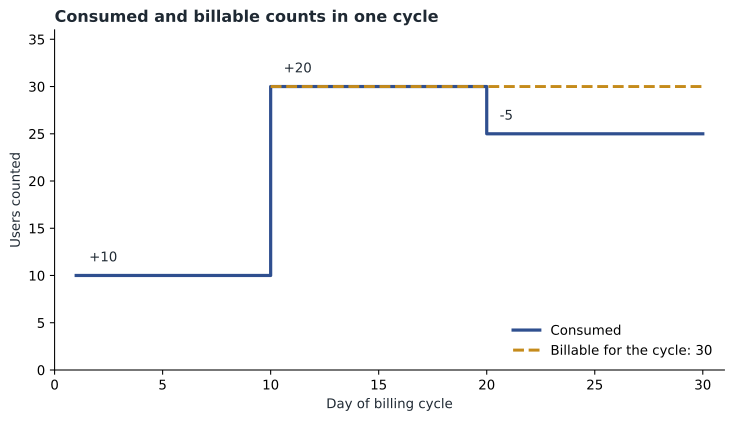
Usage-based billing distinguishes two numbers. Consumed licenses are those in use at a given moment. Billable licenses are the unique licenses used at any point in a billing cycle. If someone is removed partway through a month, they still count for that month and drop off the next bill; someone who starts partway through a month is charged for the part of the month they were there.
Worked problem
Reading a usage-based bill
In October, Skerry's new enterprise starts with 400 managed users. On October 12 another 300 are provisioned from the commerce group, and on October 25, 40 leavers are deprovisioned. How many consumed licenses are there at the end of October, and how many are billable for October?
Show solution
- Consumed at month end: 400 + 300 - 40 = 660.
- Billable for the cycle: every unique user who held a license during October, 400 + 300 = 700.
- Proration means the 300 added on October 12 are charged only for the part of the month they held a license.
- The 40 leavers drop off the November bill.
Answer: 660 consumed at month end and 700 billable for October, with the October additions prorated.
Visual Studio subscriptions and Server
Many large companies buy GitHub Enterprise bundled with Visual Studio subscriptions from Microsoft. Bundled licenses stay on a volume agreement. Usage-based billing applies only to GitHub Enterprise licenses that are not bundled: members who are not matched to a Visual Studio subscriber, and any use beyond the licenses purchased in the volume agreement. Matching matters. Before switching models, administrators should match Visual Studio subscribers to their GitHub accounts and add them to the enterprise on Enterprise Cloud before adding them to Server; users who exist only on Server consume a separate GitHub Enterprise license. GitHub describes usage-based licensing as a cloud-first model for this reason.
Metered products
On top of licenses, several things are metered: billed by how much is used rather than per seat.
| Product or resource | How it is charged | Who decides how much is used |
|---|---|---|
| GitHub Actions minutes and storage beyond the included allowance | Per minute by runner type and per gigabyte of storage | Workflow authors and their choice of runners |
| Larger GitHub-hosted runners | Per minute, at higher rates than standard runners | Teams that select them in workflows |
| Codespaces | Compute per hour by machine type, and storage | Developers who create codespaces, within policy |
| GitHub Packages storage and data transfer beyond the allowance | Per gigabyte | Teams that publish packages |
| GitHub Secret Protection and GitHub Code Security | Per active committer | Which repositories have them enabled |
| GitHub Copilot | Per seat for Copilot Business or Enterprise, or included with GitHub Enterprise for some customers, plus metered AI usage | Who is given access, and how much they use features that consume budget |
GitHub Advanced Security was split in April 2025 into two products, GitHub Secret Protection and GitHub Code Security, each billed per active committer: a person who committed to a repository with the product enabled during the billing period. A committer to several such repositories counts once. Enabling Code Security on a seldom-touched repository costs little; enabling it on the busiest monorepo makes almost every developer billable.
Copilot billing changed again in October 2026. Enterprises that work with a GitHub or Microsoft account team can now have Copilot included with GitHub Enterprise for every licensed user on Enterprise Cloud, with AI usage metered from the first request against an enterprise budget rather than through per-seat allowances. Code completion and next edit suggestions keep working even when no budget is available, while features such as Copilot Chat and Copilot code review need budget. Self-serve customers will get the option in stages, Copilot Business and Copilot Enterprise remain available, and users in an enterprise account who do not have a GitHub Enterprise license can be given Copilot Standalone. MSBA-303 covers Copilot itself; for billing, the point is that Copilot spend is now largely a question of budgets.
Cost centers and budgets
Lorcan's other request, knowing which department to charge, is what cost centers are for. On GitHub's billing platform an enterprise owner or billing manager creates cost centers and assigns resources to them: organizations, repositories or users. Usage from those resources is reported against the cost center, so the stores group's Actions minutes and Codespaces hours appear on the stores group's line, and finance can charge them back. In July 2026 GitHub added per-user budgets for cost centers to the billing interface.
Budgets set a spending limit for a metered product at the enterprise, organization, repository or cost center level, with alerts as spending approaches it. A budget can either stop further usage when reached or only alert, depending on the product and the setting chosen. Without budgets, a misconfigured workflow that loops overnight on a large runner can produce a surprising bill; with them, the overspend stops or someone is told.
Worked problem
Setting up chargeback
Skerry wants each product group charged for its own Actions, Codespaces and Copilot usage, with the platform team's shared tooling charged to IT. The stores group has its own organization; commerce and data share the skerry organization. How should cost centers be arranged?
Show solution
- Create a cost center for stores and assign the skerry-stores organization to it.
- Commerce and data share an organization, so assign their repositories, or for Copilot their users, to separate cost centers.
- Create an IT cost center for the platform team's repositories and users.
- Set a budget with alerts on each cost center for Actions and Codespaces.
Answer: One cost center per product group plus IT, assigned by organization where possible and by repository or user inside the shared organization, each with budgets.
Monitoring license use
The enterprise settings show license consumption, with a downloadable list of who holds a license and why, and usage reports for metered products. The REST API exposes the same data for dashboards. Two reports matter most for optimization. The dormant users report lists accounts with no recent activity; in a personal-account enterprise they are candidates for removal, and in a managed users enterprise a dormant account usually means the IdP still assigns GitHub to someone who no longer needs it. The metered usage report shows which organizations, repositories and workflows drive Actions and Codespaces costs.
| Signal | Likely cause | Optimization |
|---|---|---|
| Many dormant licensed users | Access assigned by default to whole departments | Assign the GitHub app in the IdP only to groups that need it |
| Actions minutes concentrated in a few repositories | Workflows running on every push or with long test matrices | Path filters, caching, concurrency limits and smaller matrices |
| Larger runners used for small jobs | Copied workflow templates | Default to standard runners; reserve larger ones |
| Code Security active committers rising | Enabled on busy repositories without a plan | Enable where risk justifies it and review quarterly |
| Codespaces storage growing | Idle codespaces left running or retained | Shorter idle timeout and retention policies |
Worked problem
Estimating the license saving
The old setup had 1,240 licensed accounts across four bills, including 9 leavers, 7 automation accounts and about 150 people in finance and marketing who had been added to read a single wiki. In the new enterprise, automation moves to GitHub Apps, leavers are suspended by SCIM, and the wiki moves to the company intranet. Roughly how many licenses remain?
Show solution
- Start with 1,240.
- Remove 9 leavers and 7 automation accounts: 1,240 - 16 = 1,224.
- Remove about 150 wiki readers: about 1,074.
- Apps and suspended users do not consume licenses.
Answer: About 1,074 licenses, roughly 13 percent fewer than before.
Forecasting
Finance wants a forecast, and a GitHub bill has three parts that behave differently. Licenses track headcount, which HR can forecast. Security products track active committers, which follow the number of developers in enabled repositories. Metered usage tracks engineering behavior, which changes when a team adopts a new test suite or a new runner type. Lorcan agreed to a monthly review: the platform team would explain any metered line that moved by more than ten percent, and budgets would catch anything sudden in between.
Who can see and change billing
Billing access follows the roles from lesson 6. Enterprise owners can see and change everything, including payment methods and budgets. Billing managers can manage billing settings, licenses, cost centers and budgets without any access to organizations or code, which made the role the obvious choice for Lorcan and one colleague in finance. Organization owners see usage for their own organization. Keeping billing with billing managers means finance can act on spending alerts without waiting for a platform engineer, and platform engineers do not need access to invoices and payment details.
Worked problem
Responding to a budget alert
At 02:00 a budget alert fires: the iOS cost center has used 90 percent of its monthly Actions budget in nine days. Who should act, and what are the first checks?
Show solution
- The alert goes to the billing managers and the platform on-call engineer.
- The engineer checks the usage report for the cost center to find which repository and workflow drove the minutes.
- A workflow running in a loop or on an unexpectedly large runner is canceled and fixed.
- Finance decides whether to raise the budget for the rest of the month once the cause is known.
Answer: The on-call engineer finds and stops the cause using the usage report; finance then decides on the budget.
Free and paid usage on Enterprise Server
Enterprise Server changes part of the cost picture. There are no GitHub-hosted runner minutes or Codespaces on Server, because workflows run on self-hosted runners that the customer pays for in its own infrastructure. Storage for repositories, packages and artifacts is the appliance's own disk. The license is still a GitHub Enterprise license, so the main GitHub charge for Server is the number of licensed users, while compute and storage costs move into the customer's data center or cloud bill. When comparing Cloud and Server on cost, Lorcan insisted on including those infrastructure and staff costs, which made the old appliance look considerably more expensive than its renewal invoice suggested.
Common mistakes
MistakeCounting licenses per organization.
InsteadLicenses are per unique user across the enterprise, and across Server with license sync.
MistakeExpecting a user removed mid-month to vanish from that month's bill.
InsteadThey remain billable for the cycle and drop off the next one.
MistakeEnabling Code Security everywhere without checking active committers.
InsteadEstimate committers per repository first; enable where risk justifies it.
MistakeRunning metered products without budgets.
InsteadSet budgets with alerts or limits at the right level.
Summary and key terms
- GitHub Enterprise licenses are per unique user and cover Cloud and, with license sync, Server.
- Volume licensing commits to a number; usage-based billing charges monthly for billable licenses, with proration.
- Consumed licenses are in use now; billable licenses are unique users during the cycle.
- Visual Studio bundles stay on volume agreements; match subscribers to accounts before adding them to Server.
- Actions, Codespaces, Packages, Secret Protection, Code Security and Copilot usage are metered or billed separately.
- Cost centers support chargeback and budgets prevent surprises; dormant user and usage reports drive optimization.
- Volume licensing
- Committing to a number of licenses for a term.
- Usage-based billing
- Paying monthly for the licenses and resources actually used.
- Consumed license
- A license in use at a given moment.
- Billable license
- A unique license used at any time during a billing cycle.
- Active committer
- A person who committed to a repository with a security product enabled during the billing period.
- Cost center
- A billing grouping of organizations, repositories or users used for chargeback.
- Budget
- A spending limit with alerts for a metered product.
Practice problems
Work each problem on paper first, then reveal the answer to check.
Do pending invitations consume a license?
Show answer
No, not until they are accepted.
Which enterprises were placed on usage-based billing automatically?
Show answer
Those that started an Enterprise Cloud trial on or after August 1, 2024.
What is the difference between a cost center and a budget?
Show answer
A cost center groups usage for reporting and chargeback; a budget limits or alerts on spending.
Lesson quiz · 5 questions
Score 60% or more to complete this lesson.
Create a free account to save your progress, take quizzes and earn a certificate.