
MSBA-290 · Lesson 6 of 12 · 25 min
Enterprise and organization roles
▶ Video coming soon A video version of this lesson is on the way.
Freya opened the sixth session with a spreadsheet nobody enjoyed reading. Across Skerry's 14 organizations there were 61 organization owners. Some were former managers, some were automation accounts, and one was a developer who had been made an owner in 2020 to fix a webhook and never removed. Each of those 61 accounts could delete repositories, change security settings and remove other owners. "Identity tells us who someone is," she said. "Roles decide how much damage a mistake or a stolen token can do. We are going to get that number down to single digits."
Roles at three levels
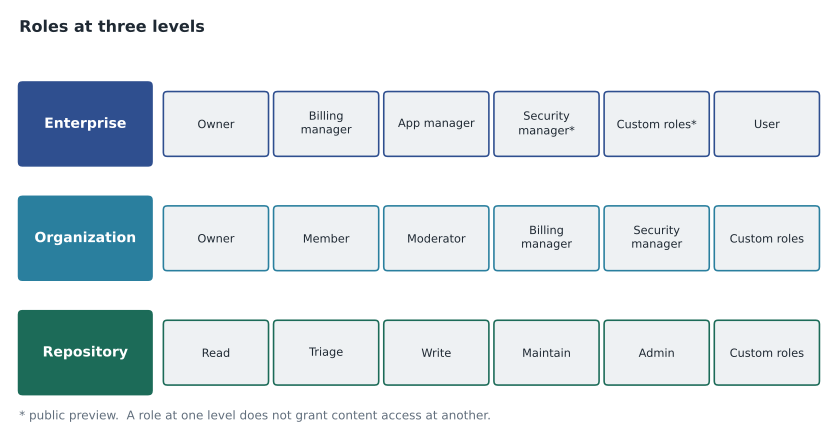
GitHub grants administrative power at three levels. Enterprise roles control the enterprise account and its settings. Organization roles control a single organization. Repository roles control access to code, which MSBA-161 introduced and lesson 7 extends with custom roles. A person can hold different roles at each level, and power at one level does not automatically give power at another. In particular, being an enterprise owner does not, by default, let someone see the code inside an organization.
Enterprise roles
Enterprise roles decide who can change enterprise settings. The table summarizes the roles GitHub documents for Enterprise Cloud as of November 2026.
| Enterprise role | What it can do | Notes |
|---|---|---|
| Enterprise owner | Complete control of the enterprise: administrators, organizations, billing, policies, identity, audit log | Cannot see organization content by default, but can join any organization |
| Billing manager | View and manage billing settings, licensing and usage-based billing | No access to organization settings or content |
| App manager | Create, edit and delete GitHub App registrations owned by the enterprise | Cannot install or uninstall apps |
| Security manager | Manage security configurations, alerts, dashboards and campaigns across the enterprise; read code in all repositories | In public preview and subject to change |
| Custom enterprise roles | A chosen set of fine-grained permissions for enterprise settings | In public preview; not every predefined capability can be replicated |
| User | No enterprise administration by default; access comes from organizations | Unaffiliated users and guest collaborators are special cases |
The separation between ownership and content is deliberate. An enterprise owner who wants to look inside an organization must add themselves to it, an action that appears in the audit log and that organization owners can see. Skerry decided that its four enterprise owners would join organizations only during incidents, and that the security team would get the security manager role instead of ownership for its daily work of reviewing alerts.
Organization roles
Organization roles are the ones most people in a company actually hold. Every organization member has at least the member role; a few hold more.
| Organization role | What it can do |
|---|---|
| Owner | Full administrative control of the organization, including members, teams, billing, settings and deletion |
| Member | Create and work in repositories according to the organization's settings, base permission and team access |
| Moderator | Block and unblock non-members, set interaction limits and hide comments in public repositories |
| Billing manager | View and manage the organization's billing settings without other access |
| Security manager | View and manage security alerts and settings across the organization, with read access to every repository |
| Custom organization role | A chosen set of fine-grained organization permissions |
GitHub also offers predefined organization roles that grant a common bundle of permissions across every repository in the organization, for example read or write access to all repositories, or administration of CI/CD settings, so that a platform team does not have to be added to hundreds of repositories one by one. And custom organization roles let owners combine fine-grained permissions, such as managing organization webhooks, viewing the organization audit log, or managing Actions runners and secrets, into a role that fits a real job. Enterprise owners can create custom organization roles for use across the enterprise, but only organization owners assign them, and organization owners cannot change roles defined at the enterprise level.
Worked problem
Replacing an owner with a custom role
In the stores organization, a release engineer is an owner only because she manages self-hosted runners and organization secrets for the build pipeline. What should replace her ownership?
Show solution
- List what she actually does: runners, runner groups and organization secrets.
- Create a custom organization role with only those fine-grained permissions.
- Assign the role to her, or to a release-engineering team so it survives staff changes.
- Remove her owner role and confirm in the audit log that her pipeline work still succeeds.
Answer: A custom organization role for runners and secrets, assigned to a team, with her ownership removed.
Assigning roles to teams
Roles can be assigned to individuals or to teams, and assigning them to teams is almost always better. A team assignment documents why the access exists ("the release-engineering team manages runners"), survives people changing jobs, and in a managed users enterprise can be driven from an IdP group so that the identity team's access reviews cover it. Skerry set a rule: no individual role assignments except owners, and every owner assignment is backed by an Entra ID group reviewed quarterly.
Least privilege in practice
The principle of least privilege says each person and each automation should have only the access its job needs. Applied to GitHub administration, it leads to a few concrete habits.
| Habit | Why it matters |
|---|---|
| Keep enterprise and organization owners to a small named group, with at least two per organization | Owners can do anything; two avoids a single point of failure |
| Use billing manager, security manager and app manager roles instead of ownership | Specialist work does not need full control |
| Use custom organization roles for recurring tasks | Grants exactly the needed permissions |
| Assign roles to teams backed by IdP groups | Access reviews in the IdP cover GitHub |
| Give automation GitHub Apps with narrow permissions rather than owner accounts | A stolen token can do far less |
| Review role assignments on a schedule | Access drifts as people change jobs |
Auditing access and permissions
The GH-100 study guide asks administrators to audit access and permissions, not just grant them. GitHub gives several ways to see who has what. The enterprise People page lists members and their roles across organizations, and can be exported. Each organization's People page shows roles, two-factor status for personal accounts and the organizations a member belongs to. A repository's access page shows the effective permission of each person and team, including a warning when someone has mixed roles from different sources. The audit log records every change in roles and memberships. And the REST and GraphQL APIs expose all of it for scripted reviews.
# Owners of every organization in an enterprise (GitHub CLI and GraphQL)
gh api graphql --paginate -f query='
query($cursor: String) {
  enterprise(slug: "skerry") {
    organizations(first: 25, after: $cursor) {
      pageInfo { hasNextPage endCursor }
      nodes {
        login
        membersWithRole(first: 100) {
          edges { role node { login } }
        }
      }
    }
  }
}' --jq '.data.enterprise.organizations.nodes[]
  | {org: .login, owners: [.membersWithRole.edges[] | select(.role=="ADMIN") | .node.login]}'
Worked problem
Counting the reduction
Skerry had 61 organization owners across 14 organizations. The new design has three organizations, each with the same three platform owners plus one organization-specific owner, and four enterprise owners, two of whom are among the platform owners. How many distinct people hold an owner role at either level?
Show solution
- Organization owners: 3 shared platform owners plus 1 specific owner in each of 3 organizations, so 3 + 3 = 6 people.
- Enterprise owners: 4 people, 2 of whom are already counted.
- Add the 2 new enterprise owners: 6 + 2 = 8.
Answer: 8 distinct people, down from 61.
Freya ran the owner script against the old organizations. Of the 61 owners, 9 were people who had left Skerry but whose personal accounts were still members, 7 were automation accounts that should have been GitHub Apps, and 22 had not used any owner capability in the audit log during the previous 180 days. That last number was the strongest argument for least privilege she could have asked for.
Roles and the support boundary
One more distinction matters for the exam. Some problems are for administrators to solve, such as a developer who cannot see a repository because their team lacks access, and some are for GitHub Support, such as a platform outage or an account locked in a way no owner can fix. Knowing which roles can do what is how an administrator decides quickly whether a problem is theirs. Lesson 11 returns to the support boundary.
Organization owners and the two-owner rule
GitHub recommends that every organization have at least two owners, and the reason is practical. If the only owner leaves, is unavailable during an incident, or loses access, nobody can change members, settings or billing without GitHub Support. Two owners also make it possible to require that sensitive changes be made by one and checked by the other, a habit auditors look for. More than a handful of owners has the opposite problem: each extra owner is another account whose compromise would give an attacker full control. Skerry settled on three platform owners shared across organizations plus one owner from the business area of each organization, all provisioned from an Entra ID group with quarterly reviews.
Break-glass access
Even a carefully designed role model needs an emergency path. A break-glass arrangement gives a small, named group the ability to act with high privilege during an incident, under conditions that make the use visible: the access is granted only when needed, every use is logged, and someone reviews it afterwards. At Skerry, the platform-oncall enterprise team was the bypass actor on rulesets, and enterprise ownership itself was held by the four people in the GitHub-Enterprise-Owners Entra ID group. Any use of a ruleset bypass created an audit event that the SIEM report from lesson 9 flagged within the hour.
| Job | Role at Skerry | Why not ownership |
|---|---|---|
| Reviewing security alerts across all repositories | Security manager | Needs alerts and read access, not settings |
| Managing invoices and cost centers | Billing manager | Needs billing only |
| Registering the deployment GitHub App | App manager | Needs app registrations, not installations or settings |
| Managing runners and organization secrets | Custom organization role | Needs two areas of settings only |
| Moderating the open source organization | Moderator | Needs community tools only |
| Emergency ruleset bypass | platform-oncall enterprise team as bypass actor | Needed only during incidents, and logged |
Worked problem
Reviewing a role request
A data engineering lead asks to be made an owner of the skerry organization so she can see the audit log for her team's repositories during an investigation. What should the platform team offer instead?
Show solution
- Her need is to read audit events, not to change settings.
- A custom organization role can grant permission to view the organization audit log.
- Alternatively, the security team can run the query in the SIEM and share the results.
- Either option avoids giving full ownership for a read-only need.
Answer: A custom organization role with audit log viewing, or a SIEM query run for her, instead of ownership.
The security manager role in practice
The security manager role deserves a closer look because it is often the right answer to "the security team needs access". At the organization level it gives a team the ability to view and manage security alerts and settings across every repository, with read access to all of them, without any ability to change members, billing or other settings. At the enterprise level, still in public preview as of November 2026, it extends to security configurations, alerts, dashboards and security campaigns across the enterprise. Because it includes read access to code in every repository, it is a powerful role in its own right, and Skerry assigned it only to its five-person security team through an Entra ID group, reviewed quarterly like ownership.
Outside collaborators and roles
In enterprises with personal accounts, outside collaborators deserve their own line in any role design. They are not organization members, so organization roles do not apply to them; they hold repository roles only, on the repositories where they are added. That makes them convenient for a contractor who needs one repository, and risky when they accumulate: an outside collaborator added to twenty repositories over two years is effectively a member nobody reviews. Owners can restrict who may invite outside collaborators through an enterprise policy, and the organization People page lists them separately so they can be reviewed. In a managed users enterprise the guest collaborator role replaces this pattern, with the IdP as the source of truth.
Worked problem
An access review finding
During Freya's review of the old enterprise, one contractor's personal account turned out to be an outside collaborator on 23 repositories across three organizations, although her contract covered only two of them. What should happen, and what prevents it in the new enterprise?
Show solution
- Remove her from the 21 repositories outside her contract, keeping the two she needs.
- Check the audit log for when and by whom each access was granted, to fix the process that allowed it.
- In the new enterprise she is provisioned as a guest collaborator through her agency's Entra ID group.
- Repository access is granted to the agency group's team only on contracted repositories, and reviewed in the IdP.
Answer: Trim her access to the two contracted repositories now; in the new enterprise, the guest collaborator role and IdP group make the access reviewable.
Common mistakes
MistakeAssuming enterprise owners can read every repository.
InsteadEnterprise owners must join an organization to see its content.
MistakeMaking someone an organization owner to fix a single setting.
InsteadUse a specialist or custom role with only the needed permissions.
MistakeAssigning roles to individuals.
InsteadAssign them to teams, ideally driven by IdP groups, so reviews cover them.
MistakeUsing a human owner account for automation.
InsteadUse a GitHub App with narrow permissions.
Summary and key terms
- Roles exist at the enterprise, organization and repository levels.
- Enterprise owners control everything about the enterprise but do not see organization content by default.
- Billing manager, app manager, security manager and custom enterprise roles cover specialist work; the last two are in preview.
- Organization roles include owner, member, moderator, billing manager and security manager, plus predefined and custom roles.
- Assign roles to IdP-backed teams and follow least privilege.
- Audit access through People pages, repository access views, the audit log and the API.
- Enterprise owner
- A role with complete control of an enterprise account.
- Security manager
- A role that manages security alerts and settings with read access to code.
- App manager
- An enterprise role that manages the enterprise's GitHub App registrations.
- Custom organization role
- An organization role built from chosen fine-grained permissions.
- Predefined organization role
- A ready-made organization role that grants a bundle of permissions across all repositories.
- Least privilege
- Giving each person or system only the access its job needs.
- Mixed roles
- A warning that a person has conflicting access to a repository from different sources.
Practice problems
Work each problem on paper first, then reveal the answer to check.
What must an enterprise owner do to view code in an organization?
Show answer
Join the organization, which is recorded in the audit log.
Which enterprise role manages GitHub App registrations but cannot install apps?
Show answer
App manager.
Why assign roles to teams?
Show answer
It documents the reason, survives staff changes and lets IdP access reviews cover it.
Lesson quiz · 5 questions
Score 60% or more to complete this lesson.
Create a free account to save your progress, take quizzes and earn a certificate.