
MSBA-290 · Lesson 11 of 12 · 22 min
Supporting developers
▶ Video coming soon A video version of this lesson is on the way.
In the eleventh session Priya finally paid for her seat. She had kept a list of every question developers asked during the first pilot week, when 120 engineers from the data group moved to managed accounts. There were 214 questions. She had sorted them into piles: 141 were answered by a short guide nobody had written yet, 52 needed a platform engineer, 17 were really about Entra ID, and 4 needed GitHub Support. "Most of your support load," she told the room, "is documentation you have not published."
What administrators solve and what GitHub Support solves
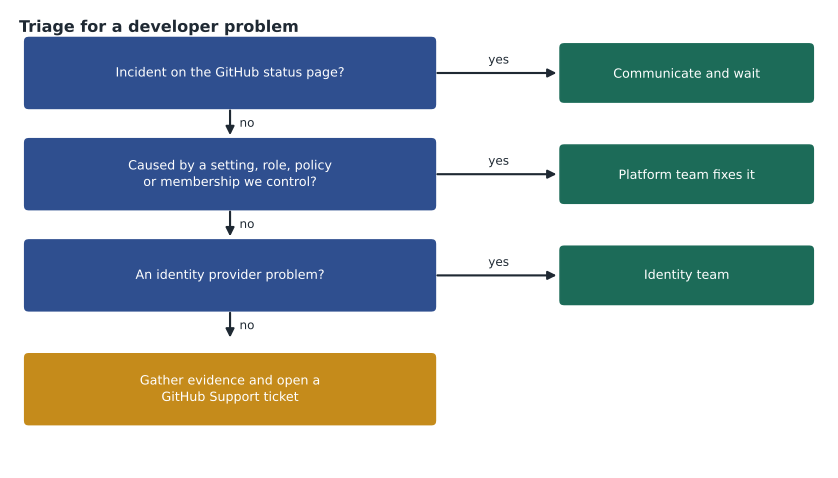
The GH-100 study guide asks administrators to identify which issues they can resolve themselves and which need GitHub Support, and to know how to generate diagnostics. The dividing line is control. Anything governed by a setting, role, policy or membership that an owner can change is the administrator's to fix. Anything inside GitHub's own systems, such as an outage, a bug, data that must be recovered, an account locked beyond an owner's reach, or a billing correction, belongs to Support.
| Problem | Usually resolved by | Why |
|---|---|---|
| A developer cannot see a repository | Administrator | Access comes from teams, roles and visibility, which owners control |
| A new hire has no account | Administrator or identity team | Managed accounts come from SCIM assignments in the IdP |
| An action is blocked by policy | Administrator | The enterprise Actions policy decides what may run |
| A repository was deleted by mistake | Administrator, within the restore window; otherwise Support | Owners can restore recently deleted repositories |
| GitHub.com is slow or returning errors for everyone | GitHub, tracked on the status page | Platform incidents are GitHub's responsibility |
| Single sign-on locked out every owner and recovery codes are lost | GitHub Support | No owner can reach the settings |
| An Enterprise Server appliance fails to upgrade | Administrator first, then Support with a support bundle | Server is customer-run, but Support helps diagnose |
| An invoice is wrong | GitHub Support or the account team | Billing records are GitHub's |
GitHub Support
GitHub Enterprise includes access to GitHub Enterprise Support through the GitHub Support portal. Companies that need faster response targets, named contacts or proactive help can buy higher tiers, Premium and Premium Plus, whose response commitments are set out in GitHub's support terms. Whatever the tier, the quality of a ticket decides how quickly it is solved. A good ticket says which product is affected (Enterprise Cloud with managed users, or Server and its version), exactly what happened with timestamps and time zone, who was affected, what was already tried, and the evidence: request IDs from error pages, screenshots, links to the affected resources, and for Server, diagnostics.
Before opening a ticket for anything that looks like an outage, administrators should check the GitHub status page, which reports incidents for each service such as Git operations, Actions, Pages and Copilot, and subscribe their on-call channel to it. Enterprises on GHE.com have their own status information for their region. Nothing wastes a Thursday afternoon like debugging your own workflow configuration during a GitHub Actions incident.
Diagnostics and support bundles on Server
Enterprise Server is run by the customer, so Support often needs to see inside it. Two kinds of file help. A diagnostics file summarizes the appliance's settings and environment. A support bundle collects logs from the appliance, with sensitive data such as passwords removed, so that Support can investigate. Both can be produced from the Management Console or from the administrative shell, and a support bundle can be uploaded directly to a ticket. Freya's rule was that every Server ticket included a fresh bundle taken after the problem occurred, because a bundle from the previous week rarely contains the relevant log lines.
# On an Enterprise Server appliance, from the administrative shell (SSH on port 122)
ghe-diagnostics > diagnostics.txt

# Create a support bundle and upload it to a Support ticket
ghe-support-bundle -t TICKET-ID
Enterprise Cloud has no appliance, so there is no bundle. Instead, administrators gather evidence from the browser and the audit log: the request ID shown on an error page, the exact time, the affected repository or workflow run, and relevant audit events. For Actions problems, workflow run logs with debug logging enabled are often what Support asks for first.
Worked problem
Routing three tickets
Three problems arrive on Monday morning. One developer cannot push to a repository and sees a ruleset error. A second reports that every workflow in the enterprise has been queued for an hour. A third cannot sign in at all and sees a Conditional Access message. Who handles each?
Show solution
- A ruleset error is an enterprise or organization setting, so the platform team checks the ruleset and the developer's role.
- Every workflow queued points to a possible Actions incident; check the status page first, and if there is none, check runner groups and self-hosted runners before contacting Support.
- A Conditional Access message comes from Entra ID, so the identity team handles it.
Answer: Platform team for the ruleset, status page then platform team then Support for the queue, and identity team for the sign-in.
Rate limits developers run into
A frequent developer question is "why did my script stop working?", and the answer is often a rate limit. GitHub limits how many API requests a client can make in a period. Requests authenticated with a personal access token are limited per user, typically 5,000 REST requests per hour. GitHub Apps installed in an Enterprise Cloud organization get a higher limit, 15,000 requests per hour per installation. GraphQL uses a points-based limit, and there are secondary limits on bursts of requests and on content creation. The GH-100 study guide asks administrators to understand rate limits for personal access tokens and GitHub Apps, because the fix for a throttled integration is often to move it from a token to an app. Responses include headers that show the limit, how much remains and when it resets, and well-behaved scripts read them.
Standards for developer processes
The study guide also asks administrators to recommend standards for developer processes and to define standards for workflows, branching, reviews and releases. That is less about enforcement than about making the right way the easy way. Skerry's platform team published a short engineering standard and then built the defaults to match it.
| Area | Standard | How the platform makes it easy |
|---|---|---|
| Branching | Short-lived branches from main, merged through pull requests | Default branch name enforced; rulesets block direct pushes |
| Reviews | At least one approving review, two and a code owner for restricted repositories | Enterprise and organization rulesets by custom property; CODEOWNERS templates |
| Workflows | Reuse shared workflows for build, test and security scanning | Reusable workflows in an internal repository, allowed by Actions policy |
| Releases | Semantic version tags and release notes for every deployable change | Tag rulesets and a release workflow template |
| Repository setup | README, CODEOWNERS, issue templates and a security policy in every repository | Repository templates and organization-wide default community health files |
Organization-wide defaults live in a special repository named .github in each organization: default community health files such as CONTRIBUTING and SECURITY, issue and pull request templates, and workflow templates that appear when a developer creates a new workflow. Repository templates let teams start a new service with the standard files, workflows and settings already in place. A developer who starts from the template gets the standards for free; one who starts from scratch has to discover them.
Documentation, office hours and champions
Priya's 141 questions became a developer guide in an internal repository, published with GitHub Pages to everyone in the enterprise. It answered the first-week questions: how to set up Git with a managed account alongside a personal one, how to find repositories now that names had changed, why some actions were blocked and how to request one, how to get access to a repository through the right Entra ID group, and how to report a problem. Each page ended with a link to the platform team's issue form, so that questions the guide did not answer became issues that improved it.
The platform team also ran weekly office hours during the migration and recruited champions, one experienced developer in each product group who learned the new setup first and answered their colleagues' questions. Champions reduced tickets more than any document, because developers ask people they know before they read a guide.
Worked problem
Measuring the effect
In the data group's pilot week, 214 questions reached the platform team from 120 developers. After the guide, templates and champions, the commerce group's first week produced 96 questions from 300 developers. How many questions per developer did each group raise, and what was the reduction?
Show solution
- Data group: 214 / 120 is about 1.78 questions per developer.
- Commerce group: 96 / 300 = 0.32 questions per developer.
- Reduction: (1.78 - 0.32) / 1.78 is about 0.82.
Answer: About 1.78 against 0.32 questions per developer, a reduction of roughly 82 percent.
Evaluating adoption
Supporting developers also means noticing what they are not using. The study guide's monitoring domain asks administrators to evaluate usage patterns to find adoption, activity and underutilized features. Usage data in the enterprise, audit events and the API can show which teams still push directly instead of using pull requests, which repositories lack CODEOWNERS, which teams never use the shared workflows, and how many licensed users are dormant. The platform team used these signals to decide where champions should spend their time, which is a more useful outcome than a dashboard.
Communicating with developers
Support is also about telling people things before they ask. The platform team published a short change log in the developer guide, posted planned changes to policies a week in advance, and used a single channel for incident updates during GitHub outages, linking to the status page instead of repeating it. When a GitHub incident affected Actions for two hours in November, developers already knew where to look, and the platform team received four questions instead of the dozens it had seen in earlier outages.
| Service | Who to contact | Target response |
|---|---|---|
| Access to a repository or team | Request form in the developer guide | Same working day |
| Allow a new third-party action | Issue in the platform repository | Review within five working days |
| Runner or workflow failures across a group | On-call channel | Within one hour during working hours |
| Identity and sign-in problems | Help desk, routed to the identity team | Same working day |
| Suspected security incident | Security on-call | Immediately |
Supporting Enterprise Server users
Until the store-systems appliance was retired, Skerry had two platforms to support, and Server added its own questions. Developers on Server could not use GitHub-hosted runners or Codespaces, saw features later than colleagues on Enterprise Cloud, and sometimes followed documentation for the wrong product version. The developer guide therefore said which product each page applied to, linked to the GitHub Docs version for the appliance's release, and listed the features that Server users would not have until migration. The platform team also scheduled the appliance's upgrade to a supported feature release and announced the maintenance window two weeks ahead, since an upgrade makes the appliance unavailable for a while.
Worked problem
Answering a version question
A store-systems developer follows a GitHub Docs page and cannot find a setting it describes. She is using the Enterprise Server appliance. What is the most likely cause, and what should support tell her?
Show solution
- GitHub Docs has separate versions for Enterprise Cloud and each Server release.
- The page she followed is probably the Enterprise Cloud version, describing a feature Server does not have yet.
- Support should point her to the docs version matching the appliance's release.
- If the feature matters, it becomes another reason in the case for migrating.
Answer: She is reading the wrong docs version; point her to the version for the appliance's release.
Common mistakes
MistakeOpening a Support ticket for an access problem.
InsteadCheck teams, roles and policies first; access is the administrator's to fix.
MistakeDebugging during a platform incident.
InsteadCheck the GitHub status page before investigating widespread failures.
MistakeSending Support an old support bundle.
InsteadCreate a fresh bundle after the problem occurs.
MistakeWriting standards that the defaults contradict.
InsteadBuild templates, rulesets and shared workflows that make the standard the easy path.
Summary and key terms
- Administrators fix anything governed by settings, roles, policies and membership; GitHub Support handles GitHub's own systems.
- Check the status page first, then enterprise settings, then the identity provider, then open a ticket with evidence.
- On Server, include diagnostics and a fresh support bundle; on Cloud, include request IDs, times and audit events.
- Rate limits are per user for tokens and higher for GitHub Apps on Enterprise Cloud; integrations should read the rate limit headers.
- Publish standards for branching, reviews, workflows and releases, and back them with templates, rulesets and shared workflows.
- Documentation, office hours and champions cut support load; usage data shows where adoption lags.
- GitHub Support portal
- The site where enterprise customers open and track support tickets.
- Support bundle
- A collection of Enterprise Server logs, with sensitive data removed, for GitHub Support.
- Diagnostics file
- A summary of an Enterprise Server appliance's settings and environment.
- Status page
- GitHub's public page reporting the health of its services.
- Rate limit
- A cap on how many API requests a client may make in a period.
- Workflow template
- A starter workflow published by an organization for its members to reuse.
- Champion
- An experienced developer who helps colleagues adopt new tools and practices.
Practice problems
Work each problem on paper first, then reveal the answer to check.
What should be checked before investigating a problem that affects everyone?
Show answer
The GitHub status page.
Where do organization-wide default community health files and workflow templates live?
Show answer
In the organization's .github repository.
Why move an integration from a personal access token to a GitHub App?
Show answer
Apps installed in Enterprise Cloud organizations get higher rate limits and narrower, auditable permissions.
Lesson quiz · 5 questions
Score 60% or more to complete this lesson.
Create a free account to save your progress, take quizzes and earn a certificate.