
MSBA-290 · Lesson 1 of 12 · 22 min
GitHub Enterprise Cloud and Server
▶ Video coming soon A video version of this lesson is on the way.
In November 2026 Priya Nair started spending her Thursday afternoons somewhere other than Tidewater. Skerry Outdoor Group, the national outdoor-gear retailer that sponsors TrailCheck and shows its trail conditions in the Skerry store app, had asked Tidewater for help connecting the two systems. In the meeting about the integration Priya mentioned that she was studying for the GitHub Administration exam, GH-100. Marisol Varga-Reyes, Skerry's director of platform engineering, laughed and said that her team was about to spend six months doing everything on that exam for real. She offered Priya a seat at the platform team's weekly enterprise working session in Boston, in exchange for Priya's notes on what developers found confusing. Tidewater is a small organization on the GitHub Team plan, and MSBA-161 explained why it does not need more. Skerry is a different world: about 1,100 developers, 14 GitHub organizations, a GitHub Enterprise Server appliance that nobody wanted to touch, and auditors asking who could see what. This course follows those sessions.
The first session was about the map. Marisol drew what Skerry actually had on the whiteboard. The e-commerce group, the data group and the supply chain group each ran their own organizations on the GitHub Team plan, paid on three different company credit cards. A 2019 Enterprise Cloud account held three more organizations, using developers' personal GitHub accounts. And in a server room at the main distribution center sat a GitHub Enterprise Server appliance that the store-systems group used for point-of-sale software, two major releases behind. "Before we decide anything," she said, "everyone in this room needs to be able to say what GitHub Enterprise actually is."
One product, several ways to run it
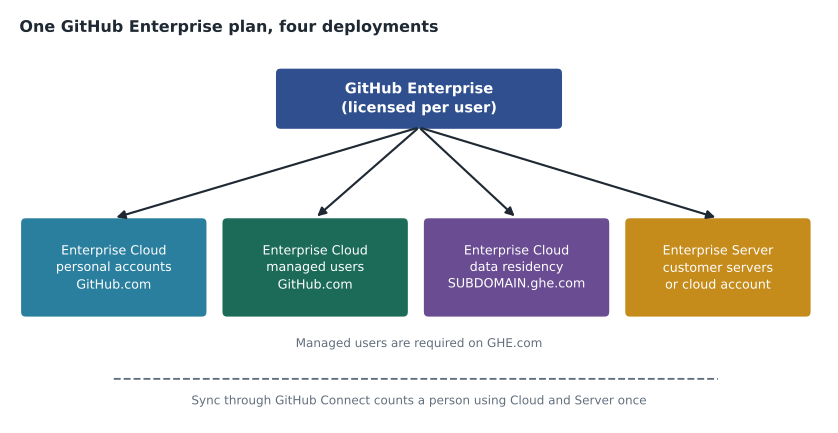
GitHub Enterprise is GitHub's top plan. Buying it gives an organization a license for each user that can be used on either of two deployment types: GitHub Enterprise Cloud, which GitHub hosts and runs, and GitHub Enterprise Server, which the customer installs and runs on its own infrastructure. A licensed user can work in both, and an enterprise that uses both can synchronize license use between them so that the same person is not counted twice. That point surprised several people in the room: Skerry had been treating its server appliance as a separate product with a separate budget, when its people could have been covered by the same licenses all along.
Enterprise Cloud itself comes in more than one shape. The GH-100 study guide, revised in July 2026, lists four deployment scenarios that an administrator must be able to describe and choose between:
| Deployment scenario | Where it runs | Who owns the user accounts | Typical reason to choose it |
|---|---|---|---|
| Enterprise Cloud with personal accounts | GitHub.com | Each developer owns a personal GitHub account and joins the enterprise's organizations | Open source work, contractors, and teams that want developers to keep one account across jobs |
| Enterprise Cloud with Enterprise Managed Users | GitHub.com | The company's identity provider creates and controls managed user accounts | Central control of identity, no public content, clean offboarding |
| Enterprise Cloud with data residency | A dedicated subdomain of GHE.com in a chosen region | Always Enterprise Managed Users | Regulatory or contractual need to keep code and data in a region |
| Enterprise Server | The customer's own data center or cloud account | Accounts on the appliance, usually backed by SAML, LDAP or CAS | Air-gapped or tightly controlled networks, or full control of upgrades |
GitHub Enterprise Cloud
Enterprise Cloud is GitHub.com with an enterprise account on top. Developers use the same website, the same API and the same tools as anyone else on GitHub.com, and GitHub runs the infrastructure, applies updates continuously and publishes its availability on the GitHub status page. What the enterprise plan adds is a layer of control. An enterprise account groups the company's organizations so that owners can set policies once, see one audit log, manage one bill, and connect one identity provider. Enterprise Cloud also adds features that the Team plan lacks: SAML single sign-on, internal repositories that every member of the enterprise can see, audit log streaming, more Actions minutes and storage, environment protection rules for private repositories, and access to products that are only sold to enterprises.
Because Enterprise Cloud runs on GitHub.com, new features arrive there first. A feature announced in the GitHub changelog usually appears in Enterprise Cloud on the day it is announced, either generally available or in public preview, and reaches Enterprise Server months later in a feature release, if it reaches Server at all. For a platform team this is the main argument for the cloud: nobody has to plan an upgrade window to get the new Copilot policy page or a new ruleset option.
Personal accounts or managed users
The biggest decision inside Enterprise Cloud is who owns the accounts. With personal accounts, a developer signs in to GitHub.com with an account they created themselves, often years ago, and the company adds that account to its organizations. The company can require SAML single sign-on so that the developer must also authenticate with the corporate identity provider before reaching company resources, but the account itself still belongs to the developer. When they leave, the company removes them from its organizations; the account and its public history leave with them.
With Enterprise Managed Users, the company's identity provider creates the accounts. A managed user account exists only inside the enterprise, is named by the identity provider, cannot create public repositories or gists, and cannot collaborate outside the enterprise. When the person leaves and the identity provider deprovisions them, the account is suspended. Lesson 5 is devoted to managed users; for now the point is that the choice is made when the enterprise is created and is hard to reverse. Moving from personal accounts to managed users means creating a new enterprise and migrating repositories into it.
Data residency on GHE.com
GitHub Enterprise Cloud with data residency puts the enterprise on its own subdomain of GHE.com, for example skerry.ghe.com, with its code and most of its data stored in a chosen region. As of November 2026 the regions are the European Union (which now also includes Azure regions in the EFTA countries Norway and Switzerland), Australia, the United States and Japan. Every enterprise on GHE.com uses Enterprise Managed Users, so public repositories are not available. Integrations must call the enterprise's own API address, such as api.skerry.ghe.com, instead of api.github.com, and network details such as IP ranges and SSH key fingerprints differ from GitHub.com, so firewalls and tools need their own configuration. A few GitHub.com features arrive on GHE.com later than on GitHub.com; Codespaces, for example, became generally available for data residency enterprises only in April 2026.
Amadou Ferrand-Bakari, Skerry's identity engineer, asked the obvious question: was there a Canadian region? There was not. Skerry's lawyers had confirmed that nothing in its contracts required code to stay in a particular country, and its customer data never went into repositories anyway, so data residency would add cost and integration work for no benefit. That is a common outcome. Data residency is the right answer when a regulator, a government contract or a works council requires it, and an unnecessary constraint when nothing does.
Worked problem
Reading a requirement
A public-sector client tells a software vendor that "all source code for our project must be stored in the European Union and must not be accessible through public accounts." Which Enterprise Cloud option meets both conditions?
Show solution
- Storage in a region is a data residency requirement, which GitHub.com does not offer.
- GHE.com with data residency offers an EU region.
- Every GHE.com enterprise uses managed user accounts, which cannot create public content.
Answer: GitHub Enterprise Cloud with data residency in the EU region, which necessarily uses Enterprise Managed Users.
GitHub Enterprise Server
GitHub Enterprise Server is the same core product packaged as a virtual appliance that the customer runs. It can be installed on common hypervisors and in the major public clouds, and it is administered through the Management Console, the site admin dashboard and an administrative shell reached over SSH. Everything about the platform is the customer's responsibility: sizing the virtual machine, storage, backups with the backup utilities, high-availability replicas, upgrades, TLS certificates, monitoring and network access. In return the customer gets complete control. Server can run with no connection to the internet at all, which is why it is still used on classified networks, in factories and in some banks.
Server is released in numbered feature releases. A new feature release arrives roughly every quarter, each followed by patch releases, and each feature release is supported for a limited time, so a site that falls several releases behind loses security fixes. Version 3.21 became generally available in June 2026 and 3.22 in September 2026. Skerry's store-systems appliance was on a release that had already left support, which Freya Abernathy-Oduya, the security lead, had flagged in two audits. Features also differ: some Enterprise Cloud capabilities never come to Server, and others arrive later, so the GitHub Docs site keeps a separate version of the documentation for each Server release.
Connecting Server to the cloud
GitHub Connect links an Enterprise Server instance to an Enterprise Cloud enterprise. Once connected, administrators can turn on individual features: synchronizing license use so that people who use both are counted once, letting Server workflows use actions from GitHub.com, sending dependency data so Dependabot alerts work on Server, and showing Server contributions on developers' GitHub.com profiles. Each feature is enabled separately, and none of them sends repository content to GitHub.com.
Comparing the options
| Question | Enterprise Cloud | Enterprise Server |
|---|---|---|
| Who runs the infrastructure? | GitHub | The customer |
| How do updates arrive? | Continuously, with no action needed | Planned upgrades to feature and patch releases |
| Newest features | First | Later, in feature releases, and not all of them |
| Can it run with no internet access? | No | Yes |
| Where is the data? | GitHub.com, or a GHE.com region with data residency | Wherever the customer installs it |
| Backups and high availability | Included in the service | Customer configures backup utilities and replicas |
| Identity options | Personal accounts with SAML, or managed users with SAML or OIDC | Built-in accounts, SAML, LDAP or CAS |
| GitHub-hosted runners and Codespaces | Available | Not available; self-hosted runners only |
Marisol's team scored the options against Skerry's needs. The company had no air-gapped networks, no regional data requirement and a small platform team that did not want to run appliances. Its developers wanted Copilot and the newest Actions features. Its auditors wanted central identity and a clean answer to "how do you remove a leaver's access". The point-of-sale firmware was the only thing tied to the distribution center, and only because nobody had moved it.
Worked problem
Choosing a deployment
Skerry needs central identity from Microsoft Entra ID, no public repositories, the newest features, no data residency requirement, and a platform team of five people. Which deployment scenario fits best, and what should happen to the Server appliance?
Show solution
- Central identity and no public content point to Enterprise Managed Users.
- With no regional requirement, GitHub.com is simpler than GHE.com.
- A small team and a wish for the newest features favor the cloud over running appliances.
- The appliance holds one group's repositories and is out of support, so it should be upgraded to a supported release for now and its repositories migrated later.
Answer: Enterprise Cloud with Enterprise Managed Users on GitHub.com, with the Server appliance upgraded in the short term and retired after its repositories move.
The decision was not unanimous. The store-systems lead, who had not been in the room, worried that point-of-sale builds would stop if the internet link to a store went down. Marisol pointed out that builds ran in the distribution center, not in stores, and that self-hosted runners on Enterprise Cloud could stay on the distribution center network. Priya noted in her notebook that most objections to the cloud turned out to be about runners and networks, not about where the repositories lived, a point that MSBA-291 picks up.
Pricing at a glance
GitHub publishes a list price for GitHub Enterprise per user per month, 21 US dollars at the time of writing, and large customers usually buy through an invoiced agreement with GitHub or Microsoft. Several products are sold on top: GitHub Secret Protection and GitHub Code Security (the two parts of what used to be sold as GitHub Advanced Security), GitHub Copilot, extra Actions minutes and storage, Codespaces, and larger runners. In October 2026 GitHub announced that enterprises working with a GitHub or Microsoft account team can have Copilot included with GitHub Enterprise for every licensed user on Enterprise Cloud, with AI usage charged against an enterprise budget; self-serve customers will get the option later. Lesson 10 covers billing in detail, because a platform team that cannot explain the bill soon loses its budget.
Common mistakes
MistakeThinking Enterprise Cloud and Enterprise Server need separate licenses for the same person.
InsteadA GitHub Enterprise license covers both, and license sync stops a person who uses both from being counted twice.
MistakeChoosing data residency because it sounds safer.
InsteadChoose it when a regulation or contract requires regional storage; otherwise it adds integration work and some feature delays.
MistakeAssuming an enterprise can switch from personal accounts to managed users with a setting.
InsteadManaged users require a new enterprise; existing repositories must be migrated into it.
MistakeLeaving an Enterprise Server appliance on an old release because it still works.
InsteadReleases leave support on a schedule; an unsupported appliance stops getting security fixes.
Summary and key terms
- GitHub Enterprise licenses cover both Enterprise Cloud and Enterprise Server.
- Enterprise Cloud runs on GitHub.com with personal accounts or Enterprise Managed Users, or on GHE.com with data residency.
- Data residency regions are the EU, Australia, the US and Japan, and always use managed users.
- Enterprise Server is a self-run appliance that can work offline but needs upgrades, backups and capacity planning.
- GitHub Connect links Server to the cloud for license sync, actions, Dependabot data and contributions.
- Choose the deployment from requirements: identity control, data location, network isolation and the team's capacity to run infrastructure.
- GitHub Enterprise
- GitHub's top plan, licensed per user, usable on Enterprise Cloud and Enterprise Server.
- Enterprise Cloud
- GitHub Enterprise hosted by GitHub on GitHub.com or GHE.com.
- Enterprise Server
- GitHub Enterprise installed and run by the customer as a virtual appliance.
- Enterprise account
- The top-level account that groups an enterprise's organizations, policies, billing and identity settings.
- Data residency
- Storing an Enterprise Cloud enterprise's data in a chosen region on GHE.com.
- GitHub Connect
- A link between Enterprise Server and Enterprise Cloud that enables features such as license sync.
- Feature release
- A numbered Enterprise Server release, such as 3.22, that adds features and has a support window.
Practice problems
Work each problem on paper first, then reveal the answer to check.
Which Enterprise Cloud option always uses Enterprise Managed Users?
Show answer
Enterprise Cloud with data residency on GHE.com.
Name two responsibilities a Server customer has that a Cloud customer does not.
Show answer
Any two of upgrades, backups, high-availability replicas, capacity planning, TLS certificates and network access.
What does license sync through GitHub Connect prevent?
Show answer
A person who uses both Server and Enterprise Cloud being counted as two licensed users.
Lesson quiz · 5 questions
Score 60% or more to complete this lesson.
Create a free account to save your progress, take quizzes and earn a certificate.