
MSBA-290 · Lesson 5 of 12 · 22 min
Enterprise managed users
▶ Video coming soon A video version of this lesson is on the way.
By the fifth session the decision in principle was made, and some developers had heard about it. Marisol read out a message from a senior engineer in the commerce group: "I have had my GitHub account since 2012. My profile is my CV. Are you taking it away?" The session was spent answering that question honestly, because Enterprise Managed Users changes what developers can do as well as what administrators can control.
What a managed user account is
With Enterprise Managed Users (EMU), the enterprise's identity provider owns the accounts. Each managed user account is created by SCIM provisioning, authenticated only through the IdP with SAML or OIDC, and named by GitHub from the IdP's identifier with the enterprise shortcode appended. The person using it cannot change the account's profile name or email address on GitHub; those come from the IdP. If the IdP's email for the person changes, the account is unlinked from contribution history tied to the old address, so identity teams should treat that attribute as stable.
A managed user account is a work account in the fullest sense. GitHub describes the defining restriction simply: managed user accounts cannot create public content or collaborate outside the enterprise. In practice that means no public repositories, no public gists, no contributing to repositories outside the enterprise, and no interacting with users outside it. A managed user can still read public open source projects on GitHub.com, as any anonymous visitor could, but cannot open an issue on them, comment or push a contribution with that account.
| A managed user can | A managed user cannot |
|---|---|
| Work in the enterprise's private and internal repositories according to their access | Create public repositories or public gists |
| Use Actions, Codespaces, Packages and Copilot as the enterprise allows | Contribute to or comment on repositories outside the enterprise |
| Read public repositories on GitHub.com | Change their profile name or email on GitHub |
| Use the GitHub CLI, mobile app and desktop with their managed account | Sign up for Copilot Individual |
So the honest answer to the senior engineer was: no, nobody is taking your account. Her personal account would stay hers, with its history and its public work. She would also get a separate managed account, something like ana-kowalczyk_skr, for Skerry's code. Her personal profile would no longer show Skerry contributions, because they would happen under the managed account. Some developers dislike that; others like the separation between work and personal identity.
The shortcode and the setup user
Every managed users enterprise has a shortcode, an alphanumeric code of 3 to 8 characters that is unique to the enterprise and appended to every managed username after an underscore. On GitHub.com the company chooses the shortcode when the enterprise is created and cannot change it afterwards. On GHE.com it is generated randomly and hidden, though still added to usernames. Usernames, including the underscore and shortcode, may not exceed 39 characters on GitHub.com, or 30 on GHE.com because of the hidden shortcode.
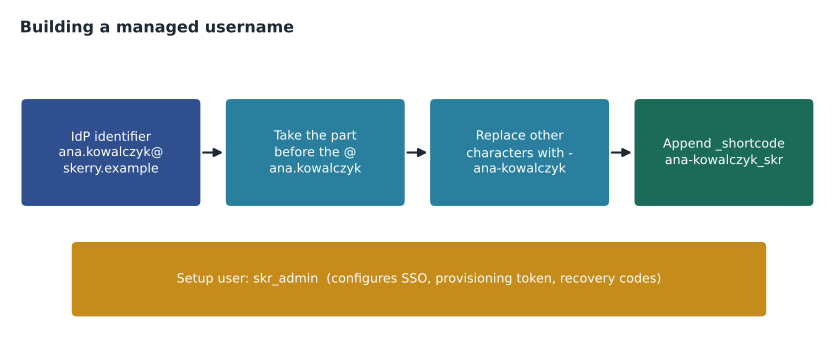
Each new managed users enterprise also has a setup user named after the shortcode, for example skr_admin. The setup user is the one account that is not provisioned from the IdP. It exists so that someone can sign in before single sign-on is configured, configure SAML or OIDC, create the provisioning token described in lesson 4, and hold the SSO recovery codes. After setup, GitHub's guidance is to use it only for those tasks. Skerry stored its password in the privileged access vault, required two people to retrieve it, and logged every use in the change system.
Worked problem
Choosing a shortcode
Skerry's first choice of shortcode is skerryoutdoor. Is it valid, and is it a good choice?
Show solution
- Shortcodes must be 3 to 8 alphanumeric characters.
- skerryoutdoor has 13 characters, so it is too long.
- A shorter code also leaves more of the 39-character username limit for people's names.
- A short, permanent and recognizable code such as skr is better, since it cannot be changed later.
Answer: It is not valid because it has 13 characters; a short code such as skr is a better choice.
Guest collaborators
Contractors and vendors need access too, and a managed users enterprise has no outside collaborators in the usual sense, because every account must come from the IdP. Instead, the IdP can provision a managed user with the guest collaborator role. A guest collaborator can be added as a member of particular organizations or as a collaborator on particular repositories. Unlike ordinary members, guest collaborators do not see internal repositories across the enterprise, only those in organizations where they are made members. Skerry created an Entra ID group for its two development agencies, mapped it to the guest collaborator role, and gave each agency access only to the repositories in its contract.
Choosing between managed users and personal accounts
Managed users is not always the right choice, and GitHub says so. The decision usually turns on a few questions.
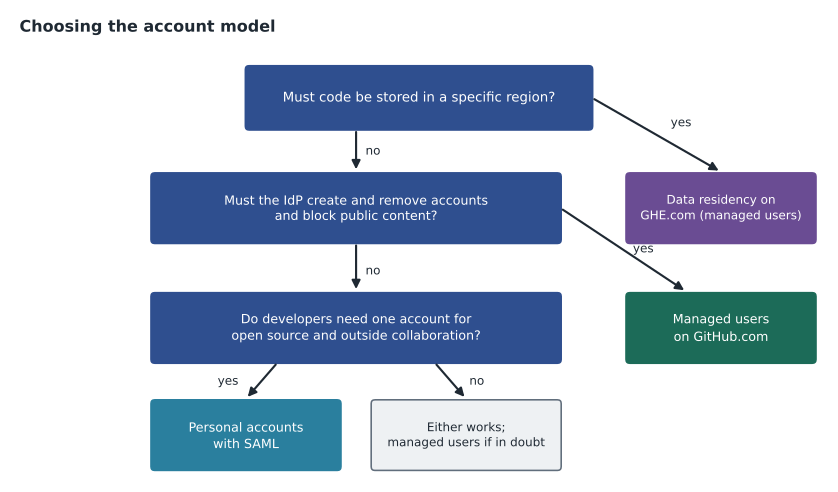
| Consideration | Favors managed users | Favors personal accounts |
|---|---|---|
| Control of identity | IdP creates, names and removes every account | Developers own accounts; SAML only gates access |
| Public and open source work | Not possible from managed accounts | Same account works on company and public projects |
| Offboarding | Suspension follows the IdP automatically | Requires removing memberships and revoking credentials |
| Data residency | Required on GHE.com | Not available |
| Developer experience | Two accounts for those with personal open source work | One account everywhere |
| Collaboration with outsiders | Only through guest collaborators provisioned by the IdP | Outside collaborators can be invited directly |
Skerry chose managed users for three reasons that its auditors and Freya had written down: leavers must lose access automatically, nobody should be able to make company code public by accident, and Conditional Access must apply. It accepted the costs: developers with public work would juggle two accounts, and the company's two open source libraries needed a home outside the managed users enterprise.
Where open source goes
A managed users enterprise cannot host public repositories, so a company that publishes open source needs somewhere else to do it. The common pattern, and the one Skerry adopted, is a separate organization for open source that is not part of the managed users enterprise, using personal accounts. Developers who maintain those projects join it with their personal accounts. Skerry put the skerry-oss organization under a small, separate Enterprise Cloud account with personal accounts and SAML so that its two maintainers still signed in through Entra ID, and wrote a short policy on what may be published there and who approves it.
Getting into a managed users enterprise
An enterprise's account type is chosen when it is created. An existing enterprise with personal accounts cannot be converted to managed users, and existing organizations with personal accounts cannot be invited into a managed users enterprise. A company in Skerry's position therefore creates a new enterprise with managed users, configures authentication and provisioning, creates its organizations inside it, and then migrates repositories in. GitHub Enterprise Importer moves repositories with their pull requests, issues and history. Because the old authors were personal accounts that do not exist in the new enterprise, the importer attributes their past activity to placeholder identities called mannequins, which administrators then reclaim, mapping each mannequin to the person's new managed account. MSBA-291 walks through the migration itself.
Worked problem
Planning the cut-over
Skerry must move 1,100 developers from personal accounts to managed accounts. List the order of the main steps.
Show solution
- Create the new managed users enterprise and choose the shortcode.
- Use the setup user to configure OIDC with Entra ID, save recovery codes and create the provisioning token.
- Provision users and groups from Entra ID and create the target organizations and connected teams.
- Migrate repositories with GitHub Enterprise Importer, organization by organization.
- Reclaim mannequins to map history to managed accounts, then archive the old organizations.
Answer: Enterprise and shortcode, authentication and token, provisioning and organizations, migration, then mannequin reclaim and clean-up.
Living with two accounts
Priya's notes for the session ended with the practical problems developers would raise in their first week, and the team turned them into an FAQ. Git on a laptop can hold credentials for both a personal and a managed account; Git Credential Manager and the GitHub CLI can switch between them. Commit email configuration should be set per repository folder so that work commits use the managed account's email. Browser profiles keep the two sessions apart. And the single most common support question in GitHub's experience, "why can't I comment on that open source issue?", has a one-line answer: use your personal account for public work.
Suspension, reactivation and long leave
Because managed accounts follow the IdP, ordinary HR events have predictable effects. A leaver is suspended and stops consuming a license. Someone on a long leave can be unassigned from the GitHub application to free a license and reassigned on return, at which point the account and its memberships come back. A person who changes name has their display name updated from the IdP; their username may change too if the identifier it is built from changes, which is one more reason to build usernames from a stable identifier. Repository ownership does not depend on any one person, because repositories belong to organizations, so suspending a developer never makes code disappear.
Communicating the change
Technical decisions about identity land on people, and the session ended with the communication plan. Marisol's team wrote a one-page announcement for developers that answered four questions in plain words: what changes (a new work account, signed in with Entra ID), what does not (your personal account is still yours), when it happens (by product group, with dates), and where to get help (the developer guide and office hours). The announcement went out three weeks before the first group moved, and engineering managers were briefed a week earlier so that they could answer questions in their own team meetings. The senior engineer whose message had opened the session replied that she was relieved; she had assumed her personal history would be deleted.
Worked problem
Explaining the profile change
A developer asks why her contribution graph on her personal profile stopped growing after the move. What is the accurate answer?
Show solution
- Her work is now done with her managed account, so contributions are recorded there.
- Contributions to private and internal repositories appear on the managed account's profile, visible inside the enterprise.
- Her personal account keeps its existing history and any public work she does with it.
Answer: Work contributions now accrue to the managed account; the personal account keeps its history and public work.
Managed users and Copilot
Copilot works for managed users, but only through the enterprise. A managed user account cannot sign up for Copilot Individual; it receives Copilot through the enterprise, as Copilot Business or Copilot Enterprise, or under the newer arrangement in which Copilot is included with GitHub Enterprise for some customers. That matters for developers who had been paying for Copilot on their personal accounts: their personal subscription keeps working for personal work, and the enterprise decides what Copilot features and models they can use at work. Copilot policies set at the enterprise level apply to managed users like any other policy. Data residency enterprises on GHE.com have Copilot Business and Enterprise available, with some features not yet available there.
Repositories in a managed user's namespace
Managed users can usually create repositories in their own user namespace for scratch work, subject to enterprise policy. Those repositories are never public, and because the account belongs to the enterprise, the enterprise keeps oversight of them: enterprise owners can control whether members may create them at all and can see them when needed. Skerry allowed personal namespace repositories for experiments but told developers that anything other people depend on belongs in an organization, where teams, rulesets and backups apply, and where it does not become an orphan when its creator moves on.
Common mistakes
MistakeChoosing a long, descriptive shortcode.
InsteadShortcodes are 3 to 8 characters, permanent and part of every username, so keep them short.
MistakeUsing the setup user as a daily administrator account.
InsteadReserve it for setup, provisioning tokens and recovery; give owners provisioned accounts.
MistakePlanning to publish open source from the managed users enterprise.
InsteadHost public projects in a separate organization that uses personal accounts.
MistakeGiving contractors ordinary member roles.
InsteadProvision them as guest collaborators and add them only where needed.
Summary and key terms
- Managed user accounts are created and named from the IdP and cannot create public content or collaborate outside the enterprise.
- The shortcode is 3 to 8 alphanumeric characters, permanent on GitHub.com, and appended to every username.
- The setup user, SHORTCODE_admin, configures SSO, creates the provisioning token and holds recovery codes.
- Guest collaborators give contractors limited access without enterprise-wide internal visibility.
- Choose managed users for central identity control; choose personal accounts when open source and outside collaboration matter more.
- Moving to managed users means a new enterprise and a migration, with mannequins reclaimed afterwards.
- Enterprise Managed Users
- An Enterprise Cloud model in which the IdP creates and controls all user accounts.
- Managed user account
- An account created by provisioning that exists only inside its enterprise.
- Setup user
- The first, non-provisioned account in a managed users enterprise, named SHORTCODE_admin.
- Guest collaborator
- A managed user role with access only to organizations and repositories it is specifically given.
- GitHub Enterprise Importer
- GitHub's tool for migrating repositories and their history between GitHub products and from other platforms.
- Mannequin
- A placeholder identity that holds migrated activity until it is reclaimed by a real account.
- Reclaiming
- Mapping a mannequin's activity to a user's account after migration.
Practice problems
Work each problem on paper first, then reveal the answer to check.
What is the setup user for an enterprise with shortcode tide?
Show answer
tide_admin.
Why does a managed users enterprise need a separate home for open source?
Show answer
Managed users cannot create public repositories or contribute outside the enterprise.
What does GitHub Enterprise Importer use to hold activity from authors who do not exist in the new enterprise?
Show answer
Mannequins, which are later reclaimed.
Lesson quiz · 5 questions
Score 60% or more to complete this lesson.
Create a free account to save your progress, take quizzes and earn a certificate.