
MSBA-290 · Lesson 2 of 12 · 23 min
Enterprise accounts and organizations
▶ Video coming soon A video version of this lesson is on the way.
At the second Thursday session Marisol put a single question on the screen: how many organizations should Skerry have? The current answer, 14, had not been designed by anyone. Three organizations existed because three teams had bought the Team plan on their own; two existed because a 2021 reorganization had renamed a department; one, skerry-old, existed because nobody dared delete it. Before choosing a number, the group needed to understand what an enterprise account is, what an organization is for, and which settings live at each level.
The hierarchy
GitHub Enterprise Cloud has four levels. The enterprise account sits at the top and has a slug, such as skerry, that appears in its address, github.com/enterprises/skerry. Below it are organizations, each with its own name, members, teams, repositories and settings. Inside organizations are teams, which group people for access and review, and repositories, which hold the code. People belong to organizations; the enterprise counts everyone who belongs to any of its organizations, plus a few other kinds of user described below.
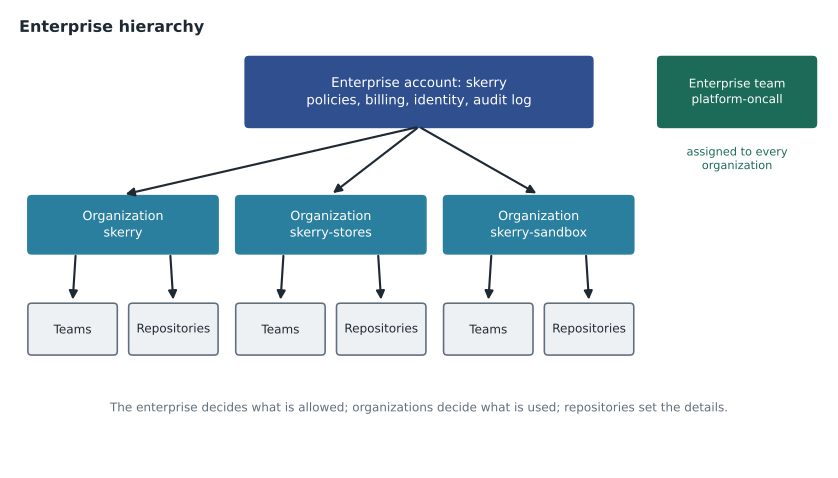
Each level has its own owners and settings. Enterprise owners manage the enterprise account: its organizations, policies, billing, identity provider connection and audit log. Organization owners manage one organization. Repository administrators manage one repository. A policy set at a higher level can override or restrict what lower levels may choose, which lesson 8 covers. A useful way to remember it: the enterprise decides what is allowed, the organization decides what is used, and the repository decides the details.
| Level | Typical settings | Who manages them |
|---|---|---|
| Enterprise | Identity provider, enterprise policies, billing, audit log streaming, enterprise teams, enterprise roles | Enterprise owners |
| Organization | Members, teams, base repository permission, organization rulesets, Actions settings within enterprise limits, security configurations | Organization owners |
| Team | Membership, maintainers, review assignment, visibility | Team maintainers and organization owners |
| Repository | Collaborators and team access, branch rules, environments, secrets, webhooks | Repository administrators |
What organizations are for
An organization is a boundary. Its members, teams, base permissions, security configurations, Actions secrets and settings apply inside it and not beyond it. That makes organizations the right tool when parts of the company genuinely need different rules, and the wrong tool for mirroring the organization chart, which changes more often than code does.
GitHub's own guidance for enterprises is to start with as few organizations as possible, often a single one, and add more only for a clear reason. Good reasons include a legal or regulatory boundary, such as a subsidiary that must keep its code separate; a genuinely different set of policies, such as an open source organization that allows public repositories when the rest of the company does not; a separate billing arrangement; or a sandbox where people can experiment without touching production. Weak reasons include a team wanting its own name in the address bar, a reorganization, or a manager wanting a dashboard of only their repositories, which topics, custom properties and teams can provide.
Worked problem
Testing a proposed organization
The data group asks for its own organization so that its repositories are not visible to the rest of Skerry. In the current design, all repositories are created as internal. Is a separate organization needed?
Show solution
- Internal repositories are visible to all enterprise members in Skerry's design, so the concern is real.
- But the same goal can be met within one organization: create the data repositories as private and grant access through a data team.
- A separate organization would add a second set of settings and owners to maintain.
- Unless the data group needs different policies, not just different visibility, a team and private repositories solve it.
Answer: No. Private repositories with team access meet the need; a separate organization is justified only if the data group needs different policies.
Internal repositories
Enterprise Cloud adds a third repository visibility to public and private: internal. An internal repository can be read by every member of any organization in the enterprise, but not by anyone outside it. Internal visibility is what makes inner source practical across a large company: an engineer in the stores group can find and read the shared logging library owned by the commerce group, open an issue or propose a change, without anyone adding them to a team. In an enterprise with managed users, internal repositories also replace public ones, since managed users cannot create public content.
Two groups of people do not see internal repositories automatically. Outside collaborators, who are added to individual repositories but are not organization members, see only the repositories they were added to. Guest collaborators in a managed users enterprise, covered in lesson 6, see internal repositories only in organizations where they are made members. Both rules exist for contractors and vendors, who should not be able to browse everything a company has written.
Members, outside collaborators and unaffiliated users
An enterprise counts several kinds of user, and the differences matter for both access and billing.
| Kind of user | How they get there | What they can reach |
|---|---|---|
| Organization member | Invited to or provisioned into an organization | The organization's repositories according to base permission and team access, plus internal repositories in the enterprise |
| Outside collaborator | Added directly to specific repositories | Only those repositories |
| Unaffiliated user | Added to the enterprise without joining any organization | No private or internal repositories; can be given licenses such as Copilot, and can join enterprise teams |
| Guest collaborator | A managed user given the guest collaborator role by the identity provider | Repositories and organizations they are specifically added to |
Unaffiliated users became generally available for Enterprise Cloud in October 2025. They exist mainly so that an enterprise can license someone for a product such as Copilot without giving them organization membership, for example an analyst who uses Copilot Chat in the browser but never touches a repository.
Enterprise teams
Teams normally live inside one organization, so a group of people who work across organizations, such as the platform team itself, had to be recreated and kept in sync in each organization. Enterprise teams, generally available since June 2026, are defined once at the enterprise level. An enterprise team can be assigned to roles in any organization in the enterprise, requested as a reviewer and mentioned across those organizations, chosen as a bypass actor in rulesets, and used to assign licenses. In a managed users enterprise its membership can come from an identity provider group through SCIM. GitHub documents limits of up to 2,500 enterprise teams per enterprise and 5,000 members per team.
For Skerry, enterprise teams settled an argument. The platform engineers wanted break-glass access to bypass rulesets across every organization during an incident, and the security team wanted that access to belong to one auditable group. One enterprise team, platform-oncall, driven by an Entra ID group, did both.
Adding, moving and removing organizations
Enterprise owners can create new organizations inside the enterprise, or invite an existing organization to join. Inviting an existing organization keeps its repositories, members and history; once it accepts, the enterprise's policies apply to it and its billing moves to the enterprise. An organization can also be transferred from one enterprise to another, and removed from an enterprise, at which point it falls back to its own plan. In a managed users enterprise, only organizations created inside the enterprise can be used, because their members must be managed accounts; existing organizations with personal accounts cannot simply be invited in. Their repositories must be migrated instead.
# List the organizations in an enterprise with the GitHub CLI and GraphQL
gh api graphql -f query='
query {
  enterprise(slug: "skerry") {
    organizations(first: 50) {
      totalCount
      nodes { login createdAt }
    }
  }
}'
Before deciding the target design, Skerry took an inventory. The query above showed 14 organizations, and a second script counted repositories, last push dates and members in each. Two organizations had not had a push in over a year. One held only forks of public projects. The inventory made the case better than any argument: most of the 14 were accidents.
Skerry's target design
The group settled on four organizations. skerry would hold almost everything, with teams for each product group and internal repositories by default. skerry-stores would hold point-of-sale software, because its regulated payment components needed stricter rulesets and a smaller set of approved actions. skerry-sandbox would allow experimentation with looser policies and automatic archiving of idle repositories. skerry-oss would exist in a separate enterprise with personal accounts, because managed users cannot publish open source, and Skerry maintained two public libraries. That last point needed its own explanation, which lesson 5 gives.
Worked problem
Counting what moves
Skerry has 14 organizations. Two are abandoned and will be archived and exported, one holding only forks will be deleted, two public libraries will move to a separate open source organization, and the remaining nine will be consolidated into skerry and skerry-stores, with a new sandbox. How many organizations will the managed users enterprise contain?
Show solution
- The open source organization lives in a different enterprise, so it does not count.
- The managed users enterprise will contain skerry, skerry-stores and skerry-sandbox.
- The nine active organizations do not survive as organizations; their repositories migrate into the new ones.
Answer: Three organizations, down from 14.
Priya asked what developers would see on the first day. The answer was a different account name, the same repositories in new addresses with redirects where migration tools allowed them, and far fewer places to look. She wrote down a reminder that redirects from old repository addresses only work for transfers and renames within GitHub, not for every migration path, which MSBA-291 covers.
Naming and documenting organizations
Organization names are permanent in practice: they appear in every repository address, in clone URLs on thousands of laptops and in links pasted into tickets and wikis. Renaming an organization is possible, and GitHub redirects many old web and Git addresses, but redirects are not guaranteed forever and some integrations break. Skerry chose short names with the company prefix and no department names, so that a future reorganization would not make them wrong. Each organization also got a profile README in its .github repository explaining what belongs there, who its owners are and how to ask for access, because the first question any newcomer asks is where to put a new repository.
Moving repositories between organizations
Within an enterprise, a repository can be transferred from one organization to another by someone with admin access to the repository and permission to create repositories in the destination. A transfer keeps the repository's history, issues, pull requests, wiki, stars and watchers, and GitHub redirects the old web and Git addresses to the new location. What does not move automatically is access: team permissions from the old organization do not exist in the new one, so the destination's teams must be granted access, and organization-level secrets, variables and runners must be available in the destination for workflows to keep working. Transfers are the cheap way to consolidate organizations that are already inside the same enterprise; migrations with GitHub Enterprise Importer are for moves between enterprises or products.
Worked problem
Planning a transfer
Before the managed users enterprise existed, Skerry wanted to tidy its old enterprise by transferring 40 repositories from skerry-old into skerry-commerce. Both organizations are in the same enterprise with personal accounts. What must be checked before and after the transfer?
Show solution
- Before: confirm the person transferring has admin on each repository and can create repositories in skerry-commerce.
- Before: list the organization secrets, variables and runner groups the workflows use, and make them available in the destination.
- After: grant the destination teams the right repository roles, since old team access does not carry over.
- After: confirm redirects work and update integrations that call the API by the old owner name.
Answer: Check permissions and workflow dependencies before, and re-grant team access and update integrations after.
Custom properties for structure
If organizations are not the tool for mirroring the organization chart, something else must answer questions such as "which repositories does the stores group own?". Skerry used custom properties, which let owners define named labels with allowed values, such as owning-team or lifecycle, and require them on repositories. Properties can be searched and filtered, used in reports through the API, and used to target rulesets and security configurations, which lesson 8 shows. A reorganization then means editing property values, not moving repositories between organizations.
Common mistakes
MistakeCreating one organization per department.
InsteadStart with as few organizations as possible and use teams, topics and custom properties for structure.
MistakeAssuming internal repositories are visible to outside collaborators.
InsteadOutside collaborators see only the repositories they are added to.
MistakeRecreating the same team in every organization.
InsteadUse an enterprise team and assign it to each organization.
MistakePlanning to invite existing personal-account organizations into a managed users enterprise.
InsteadManaged users enterprises need organizations created inside them; migrate the repositories instead.
Summary and key terms
- An enterprise account sits above organizations, which contain teams and repositories.
- Enterprise owners set policies, billing, identity and audit settings that organizations inherit.
- Use few organizations, adding one only for a legal, policy, billing or sandbox boundary.
- Internal repositories are readable by every enterprise member and make inner source possible.
- Outside collaborators, unaffiliated users and guest collaborators have deliberately limited access.
- Enterprise teams are defined once and assigned across organizations, with membership from an identity provider in managed users enterprises.
- Enterprise slug
- The short name of an enterprise account used in its address.
- Organization
- A shared account that owns repositories and teams and applies its own settings.
- Internal repository
- A repository visible to all members of the enterprise's organizations but not to the public.
- Outside collaborator
- A person with access to specific repositories who is not an organization member.
- Unaffiliated user
- A user added to an enterprise without membership in any organization.
- Enterprise team
- A team defined at the enterprise level and assignable to roles across organizations.
- Inner source
- Using open source practices, such as open reading and contribution, inside a company.
Practice problems
Work each problem on paper first, then reveal the answer to check.
Give two good reasons for a separate organization.
Show answer
Any two of a legal or regulatory boundary, different policies such as public repositories, separate billing, or a sandbox.
Who can read an internal repository?
Show answer
Members of any organization in the enterprise, but not outside collaborators unless added, and not the public.
What does an enterprise team solve?
Show answer
Having to recreate and synchronize the same team in every organization.
Lesson quiz · 5 questions
Score 60% or more to complete this lesson.
Create a free account to save your progress, take quizzes and earn a certificate.