
MSBA-281 · Lesson 7 of 12 · 18 min
Sales Opportunity Agent
▶ Video coming soon A video version of this lesson is on the way.
The pipeline clean-up in lesson 5 had made Kestrelbay's opportunities honest. It had not made anyone better at noticing when an honest deal started to go quiet. Ottilie's Monday meeting still depended on her memory of which marina manager had sounded hesitant on the phone. The Sales Opportunity Agent was meant to take some of that load: read the large deals every few days, look for warning signs and promising signals, and put a short note in front of the owner. Mirela set it up in Kestrelbay-Test with one narrow purpose: refit projects and fleet contracts above 40,000 dollars.
What the Sales Opportunity Agent does
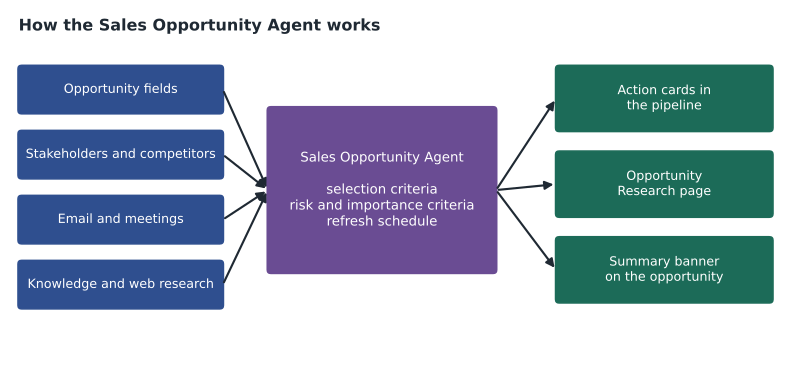
Microsoft describes the Sales Opportunity Agent as helping sales teams close deals faster by autonomously researching opportunities, providing visibility into emerging risks and highlighting promising opportunities. Its setup guide names three capabilities: automated opportunity research from multiple sources, stakeholder and competitor intelligence, and risk assessment with mitigation strategies. It draws on CRM updates, email threads, meeting intelligence and web research, and it shows its results as action cards in the opportunities list, on an Opportunity Research page and in the Summary banner on the opportunity form.
Unlike the Sales Qualification Agent in engage mode, this agent does not contact customers. It researches and advises. That makes it a lower-risk agent to introduce, but not a free one: every refresh of every selected opportunity consumes capacity, and a careless selection can research hundreds of small deals nobody needed help with.
Prerequisites and permissions
The prerequisites mirror those of the Sales Qualification Agent: the common prerequisites for all Sales agents, administrator permissions in Dynamics 365 Sales, a Copilot Studio license, the modern UI turned on for the Sales Hub app, and data policies that allow the Copilot Studio, Direct Line channels and public website knowledge connectors, plus the SharePoint or OneDrive and documents connectors if those knowledge sources are used.
For sellers, the Salesperson and Sales Manager roles have the permissions they need. A custom role needs at least user-level Read on the Connector table, which lets sellers consent to the agent using their Microsoft 365 email for research. Kestrelbay's copied seller role had been copied before that table existed in its environment, so Mirela added the privilege and tested with Callan's account. Without it, sellers saw research based only on CRM and web data, with no insight from their own emails.
The configuration steps
Microsoft's setup guide lists twelve steps: open the agent settings page; configure requirements; configure the agent profile (name and language); configure company information, meaning the value proposition; set selection criteria; configure refresh frequency; configure opportunity assessment; configure agent research, meaning knowledge sources; configure risk criteria; configure importance criteria, under advanced settings; configure connected skills; and start the agent. Mirela worked through them with Ottilie.
Selection criteria
Selection criteria decide which opportunities the agent researches. Microsoft's own example selects opportunities that are Hot with estimated revenue of 100,000 dollars or more. Kestrelbay's first instance, named Refits and fleets, selected open opportunities where kb_dealtype was Refit project or Fleet contract and estimated revenue was at least 40,000 dollars. In November that was 27 opportunities.
Refresh frequency
The agent refreshes its research on a schedule. Microsoft's FAQ gives three settings: every three days by default, daily for High and every seven days for Low. Updates to specific fields trigger an immediate refresh regardless of the schedule. More frequent refreshes mean fresher insights and more capacity used. Kestrelbay chose the default; refit deals at Kestrelbay moved over weeks, not hours, and a seller updating the close date or revenue would trigger a refresh anyway.
| Refresh setting | How often | Suits |
|---|---|---|
| High | Daily | Fast-moving deals where a day matters |
| Default | Every three days | Most business-to-business pipelines |
| Low | Every seven days | Long deals or tight capacity budgets |
| Field update | Immediately, when certain fields change | All settings |
Opportunity assessment, risk and importance
Opportunity assessment chooses the fields the agent uses to evaluate importance and risk. Risk criteria define when an opportunity counts as high risk, and Microsoft singles these out for attention because they are what make the agent's responses specific to the organization. Importance criteria define when an opportunity counts as important. Ottilie wrote Kestrelbay's criteria in the same plain style as her email instructions.
| Kestrelbay criteria | Definition |
|---|---|
| High risk | No activity with any stakeholder for 21 days; or close date moved more than once; or a competitor named in email in the last 30 days; or no decision maker stakeholder |
| Important | Estimated revenue of 75,000 or more; or a fleet contract with one of the three largest fleets; or an account with more than 200 berths |
Knowledge sources and connected skills
The agent can use public and internal knowledge sources, including SharePoint, OneDrive and uploaded documents. All agent instances share one Copilot Studio knowledge base, and each instance can filter which sources it uses. The Sales Opportunity Agent also shares a Copilot Studio research agent and its knowledge sources with the Sales Qualification Agent, so a change made for one affects the other. Kestrelbay reused the product family sheets and the competitor note from lesson 4 and added a one-page refit methodology document. Connected skills add recommendations to the seller's suggested actions.
Predictive scoring
The agent uses predictive opportunity scoring as part of its risk assessment. If scoring is not already set up, Microsoft configures it automatically when the agent starts. Kestrelbay had configured scoring in the previous course, with quarterly retraining, so nothing changed.
Multiple instances
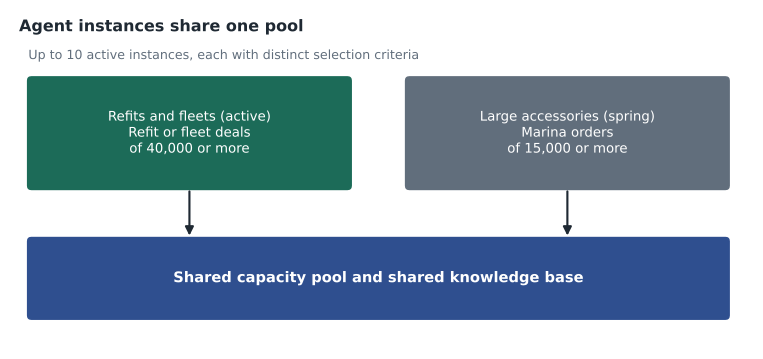
An organization can run up to 10 active instances of the Sales Opportunity Agent, for example one per product line or one for enterprise deals and one for mid-market. Each instance has its own profile, selection criteria and knowledge source filters, and each must have distinct selection criteria. All instances draw from the same capacity pool, so administrators should watch usage when running several. Mirela planned a second instance for the spring, Large accessories, for orders above 15,000 dollars from marina accounts, but only after the first had been measured.
Piloting the agent
Microsoft's implementation guidance for the Sales Opportunity Agent is specific: pick one product line with a meaningful volume of opportunities, define a small segment for the pilot, tune during the pilot to limit credit consumption, and expand after a configuration review. Kestrelbay followed it closely. The pilot ran for three weeks in November in production, after a week in the test environment, with Joaquim and two other field reps as the main users.
The first week produced a lesson about data. Four of the 27 deals showed "No insights available" for stakeholders, because nobody had been added; the agent was right to say so. Two deals were flagged as high risk because a competitor had been named in an email, but in both cases the customer had mentioned the competitor only to say they preferred Kestrelbay. Ottilie changed the risk criterion to a competitor named in email together with no reply from Kestrelbay within five days.
What sellers see and do
Insights take a few minutes to appear after a trigger. On the opportunity, the seller sees the agent's research in the Opportunity Research page and the Summary banner; section headings follow the seller's language, but the generated insights are in the agent's configured language. If research data cannot be fetched, the seller sees an error message; if the agent is paused or stopped, the insights may be out of date.
Sellers can improve the agent's work by adding missing information, such as competitors, connected accounts and stakeholders. That became Kestrelbay's rule for every risk card: read it, decide whether it is right, act or record why not, and fill in any data the card says is missing.
Worked problem
Acting on a risk card
The agent flags Joaquim's Harbor View Marina refit as high risk: no stakeholder activity in 24 days, close date moved twice, no decision maker. It also notes from web research that the marina posted a tender for dock repairs last week. What should Joaquim do?
Show solution
- Check the card against what he knows: the dates and silence are accurate.
- Treat the tender as both a risk and an opportunity: the board may be reconsidering scope.
- Call the marina manager, ask about the tender and who on the board decides.
- Add the board chair as a decision maker stakeholder and update the close date honestly.
Answer: Contact the customer the same day, add the missing stakeholder and update the deal; the next refresh will reflect the new activity.
Stopping, pausing and moving the agent
Administrators can start, pause and stop the agent. While it is paused or stopped, insights may become outdated and research in progress may be incomplete. As with the Sales Qualification Agent, the configuration can be exported as a solution from a sandbox and imported into production, which is how Kestrelbay moved the Refits and fleets instance after its test week.
Where agent research can mislead
The Sales Opportunity Agent reads public information and internal records, and both can be wrong or out of date. Web research may pick up an old news item, a different company with a similar name or a social media post that does not reflect a decision. Email-based insight depends on sellers having consented and on the conversation being in synchronized mailboxes; a deal negotiated mostly by phone looks quiet to the agent even when it is healthy. Kestrelbay told its field reps that a risk card is a question, not an accusation: the right response is "is this true?", followed by either action or a short note on the opportunity explaining why the card is wrong.
Language is a smaller but real issue. Section headings follow each user's language, while the agent writes insights in the language configured in its profile. Kestrelbay worked in English only, but an organization with French- and English-speaking sellers, common in some parts of North America, needs to decide which language the agent writes in, or run instances per language with distinct selection criteria.
Tuning after the pilot
At the end of the three-week pilot, Mirela and Ottilie reviewed every card the agent had raised and every deal it had not flagged that was later lost. They made three changes: the competitor rule now required no reply from Kestrelbay within five days; the stakeholder silence threshold moved from 21 to 28 days for fleet contracts, whose buying cycles were longer; and the importance criteria added any deal where the customer had more than one open opportunity, because Ottilie wanted those deals handled together. Each change went through the test environment first, with an estimate of its effect on credits, following the same runbook rule as the Sales Qualification Agent.
| Pilot finding | Change made |
|---|---|
| Competitor mentions were often positive | Flag only when a competitor is named and Kestrelbay has not replied within five days |
| Fleet contracts move slowly | Silence threshold 28 days for fleet contracts, 21 for refits |
| Customers with several open deals were handled separately | Mark them important so they are reviewed together |
Cards in the Monday meeting
By the third week of the pilot, the risk cards had changed the Monday meeting. Ottilie opened the pipeline view filtered to the Refits and fleets instance, sorted by risk, and went through the flagged deals first. Each owner had a minute: agree or disagree, and what next. Deals without cards were discussed only if their owner raised them. The meeting dropped from an hour to about forty minutes, and the time saved went into the two or three deals that really needed a team decision, such as whether to offer a fleet a longer payment schedule. Joaquim, who had been the most skeptical field rep, admitted that the cards were usually right about silence, even when he disagreed about what the silence meant.
Common mistakes
MistakeSelecting every open opportunity for research.
InsteadStart with one segment with meaningful volume, measure, tune and then expand.
MistakeChoosing daily refresh for slow-moving deals.
InsteadUse the default every three days or Low, and rely on field updates for immediate refresh.
MistakeLeaving risk criteria at vague defaults.
InsteadWrite specific risk and importance criteria that reflect the organization's deals.
MistakeForgetting the Connector table privilege on custom seller roles.
InsteadGrant user-level Read on Connector so sellers can consent to email-based research.
Summary and key terms
- The Sales Opportunity Agent researches selected opportunities, surfaces stakeholder and competitor intelligence and assesses risk and importance.
- It shows insights as action cards in the opportunities list, on the Opportunity Research page and in the opportunity's Summary banner.
- Configuration includes selection criteria, refresh frequency, opportunity assessment, knowledge, risk and importance criteria and connected skills.
- Refresh runs every three days by default, daily on High and every seven days on Low; field updates trigger immediate refresh.
- Up to 10 instances can run with distinct criteria; all share one capacity pool and knowledge base.
- Sales Opportunity Agent
- The agent that researches opportunities and highlights risk and importance.
- Risk criteria
- Definitions of when an opportunity counts as high risk.
- Importance criteria
- Definitions of when an opportunity counts as important.
- Refresh frequency
- How often the agent updates its research on each selected opportunity.
- Agent instance
- One configured copy of the agent with its own profile and selection criteria.
- Opportunity Research page
- The page on an opportunity where the agent's research appears.
Practice problems
Work each problem on paper first, then reveal the answer to check.
What is the default refresh frequency of the Sales Opportunity Agent?
Show answer
Every three days; High is daily and Low is every seven days.
How many active instances of the Sales Opportunity Agent can an organization run?
Show answer
Up to 10, each with distinct selection criteria.
What happens if predictive opportunity scoring is not set up when the agent starts?
Show answer
It is configured automatically.
Lesson quiz · 5 questions
Score 60% or more to complete this lesson.
Create a free account to save your progress, take quizzes and earn a certificate.