
MSBA-281 · Lesson 4 of 12 · 18 min
Configuring and monitoring qualification
▶ Video coming soon A video version of this lesson is on the way.
When the Sales Qualification Agent first went live at Kestrelbay in October, Mirela had configured it in an afternoon, in research-only mode, with broad settings: all new leads, a short company description and the default instructions. That had been the right call for a first look. Now, with an upgrade to research and engage under consideration for January, she rebuilt the configuration properly in Kestrelbay-Test, step by step, with Ottilie and Bronagh beside her. This lesson follows that rebuild and then the monitoring that tells a supervisor whether the agent is doing its job.
Prerequisites
Microsoft lists prerequisites that apply to all Sales agents and some specific to the Sales Qualification Agent. Mirela checked them as a list before touching any settings.
| Prerequisite | Why it matters |
|---|---|
| Common prerequisites for Sales agents completed | Region availability, Copilot capacity and environment settings shared by all agents |
| Administrator permissions in Dynamics 365 Sales | Only administrators can configure and start the agent |
| A Copilot Studio license for the person configuring | The agent is built on Copilot Studio |
| Modern UI turned on for the Sales Hub app | The agent settings and insights use the modern experience |
| Data policies that allow the required connectors | The agent uses Copilot Studio, Dataverse, Direct Line channels and public web knowledge |
| Server-side synchronization with Exchange | Needed for outreach emails; without it the agent does not engage |
| In-app notifications turned on | Sellers are notified of hand-overs in the app |
| Copilot in Dynamics 365 Sales (recommended) | Not required, but Microsoft recommends it |
The data policy check caught Kestrelbay out. In phase one, Mirela had created a strict data policy for the production environment that blocked connectors not used by the apps. Copilot Studio, Dataverse and Direct Line channels were in the business group, but the connector for knowledge from public websites was blocked. Microsoft lists that connector as required for the Sales Qualification Agent, because company research uses public web data. Connectors for SharePoint or OneDrive knowledge and for uploaded documents are needed only if those knowledge sources are used. Mirela moved the public website connector into the business group for the sales environments, with the IT manager's agreement, and recorded the change.
The configuration steps
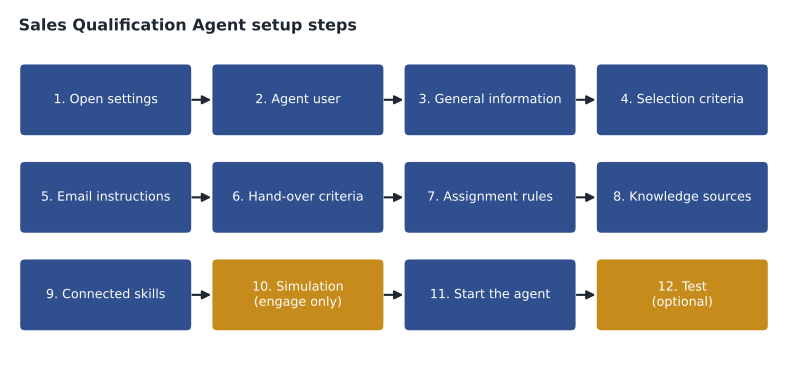
Microsoft's setup guide lists twelve steps. Two of them, the simulation and the separate engage settings, apply only to research and engage mode, and the last is an optional test.
Agent user
The agent acts in Dataverse as an application user. For research-only mode that needs an app registration in Microsoft Entra ID and a Dataverse application user with the AISalesPerson role. For research and engage mode it also needs a shared mailbox, configured for server-side synchronization, so that emails the agent sends are recorded against the lead like any seller's email. Mirela named the app registration Kestrelbay Sales Agent so that audit history would make sense to anyone reading it later.
General information
The profile gives the agent a name and language. Company information and products tell the agent what Kestrelbay sells and to whom, which is what it uses to judge fit and write outreach. Mirela had used two lines of company text in October. This time Ottilie wrote half a page: Kestrelbay sells engines, electronics, mooring and safety gear and refit services to marinas, yacht clubs, fishing fleets and retail sailors on the coast; its strengths are stock on hand, local delivery and staff who can come to the dock; it does not sell boats or offer financing. That last sentence mattered, because in October the agent had twice suggested financing in a draft.
Selection criteria
Selection criteria decide which leads the agent processes. They are filters on lead columns. Kestrelbay's new criteria for the planned engage pilot were: status open; lead source Web form; kb_emailconsent Yes; created in the last seven days; and customer type not Harbor authority or Fishing fleet. Everything else stayed with sellers. Narrow criteria keep the agent focused, keep costs predictable and make it easier to judge quality.
Email instructions, scenarios and the custom email field
Email instructions shape how the agent writes. Microsoft's settings include an email signature, customized instructions and a custom email field, plus custom outreach scenarios for particular situations. Ottilie wrote the instructions in plain language: write as a local marine supplier; keep emails under 120 words; mention one relevant product family; never discuss prices beyond what is on the website; never offer discounts or financing; always offer a call with a named seller. Microsoft validates email instructions and warns about instructions that conflict or are unclear, so Mirela kept them short and specific.
Hand-over criteria and assignment rules
Hand-over criteria identify leads that are a good fit for a seller. In research and engage mode they use BANT. Kestrelbay set them so that a lead was handed over when it named a need in a Kestrelbay product family, showed a timeline within six months, and either named a budget or asked for a quote. Authority was treated as optional for retail sailors, who usually decide for themselves.
Assignment rules route handed-over leads to sellers or teams. Kestrelbay reused the work assignment rule from the previous course: web leads go to the inside seller with the fewest open web leads, skipping anyone marked unavailable. Microsoft notes that custom security roles must have specific privileges for their users to appear in the assignment rule's seller and team picker, and that reassignment fails if the target lacks the needed table permissions. Kestrelbay's copied seller role had been copied from the out-of-the-box Salesperson role, so it already had them; Mirela checked anyway.
Knowledge sources and connected skills
Knowledge sources give the agent company and competitor insights and material for outreach and follow-up. Public websites are used for research. Kestrelbay added two internal sources: a SharePoint folder with its product family sheets and a short competitor note Ottilie had written about the three coastal distributors and the large online retailer named in the previous course. Because the Sales Qualification Agent and the Sales Opportunity Agent share a Copilot Studio research agent and its knowledge sources, changes here affect both agents, which Mirela recorded for lesson 7.
Connected skills surface recommendations in a Suggested actions carousel for sellers, such as calling the lead or creating an opportunity. Kestrelbay left the defaults on.
Simulation, start and test
In research and engage mode, a simulation generates sample outreach emails before the agent goes live, so that people can review tone and content. Bronagh and Callan rated twenty simulated emails from 1 to 5. The first run averaged 3.4; after Ottilie added two example emails to the instructions, the second run averaged 4.2. Starting the agent begins processing leads that match the criteria. Microsoft also documents an optional test, in which test leads are run through the agent in the test environment before real ones.
Worked problem
Writing selection criteria for a pilot
Ottilie wants the agent to handle web leads from retail sailors and small clubs only, with consent, and to leave existing customers to their account managers. Which conditions should the selection criteria include?
Show solution
- Status equals Open, so closed leads are ignored.
- Lead source equals Web form.
- kb_emailconsent equals Yes, so only consenting leads are contacted.
- Customer type is Retail or Club; this excludes harbor authorities and fleets.
- Existing account is empty, so leads already linked to a customer stay with account managers.
- Created on is within the last seven days, so the agent does not reach back to old leads.
Answer: Six conditions combined with AND give a narrow, lawful and predictable pilot scope.
Moving the configuration to production
Microsoft lets administrators export a configured agent as a solution and import it into another environment. Mirela finished and tested the configuration in Kestrelbay-Test, exported it, and imported it into production during a quiet Friday afternoon, then re-entered the environment-specific parts: the production shared mailbox and the application user. She kept the exported solution in the project's SharePoint library as the record of what was deployed.
Monitoring with agent insights
Once the agent runs, supervisors monitor it on the Agent insights page in the Dynamics 365 AI hub. In the Sales Hub app, the path is App settings, then Dynamics 365 AI hub, then See insights on the AI optimization hub card, then Sales Qualification Agent. The default time period is the last seven days, and the data refreshes when the dashboard opens.
The metrics differ by mode. In research-only mode, the top metrics include total leads researched, the agent's lead handling rate, its hand-off rate and total leads disqualified, with a lead processing funnel, a Hot, Warm and Cold classification and top accounts. In research and engage mode, the metrics add the lead qualification rate, agent-generated pipeline and lead qualification time, plus agent effectiveness measures such as email response rate and customer queries responded to, and a customer engagement funnel.
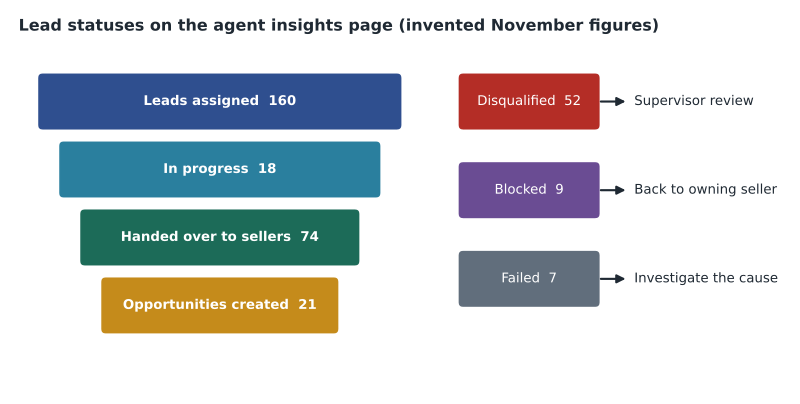
Lead statuses and what to do with each
The dashboard groups leads by status. Leads assigned are waiting for the agent. In progress leads are being researched or emailed. Handed over to sellers includes leads the agent passed on and disqualified leads a supervisor reassigned. Opportunities created are handed-over leads that sellers converted. On the side, Disqualified leads were judged low fit; Blocked leads, in engage mode, have an open question the agent could not answer and go to the seller who owned the lead; and Failed leads were not processed successfully. A supervisor can open a disqualified lead's insights and select Reassign if it is worth pursuing.
Bronagh's daily hour as supervisor followed a routine: check failed leads for a pattern, such as a bad email address format from the web form; skim the disqualified list and reassign anything wrongly rejected; and read three handed-over leads end to end to judge quality. Once a week she reported three numbers to Ottilie: hand-off rate, disqualify reassignment rate and the share of handed-over leads that sellers rated as good.
Tuning
Monitoring is only useful if it leads to changes. In the research-only period Bronagh found that the agent disqualified small yacht clubs whose websites were out of date, because it found no sign of activity. Mirela added a sentence to the company information explaining that many clubs are run by volunteers with old websites and that club leads should be judged on the enquiry itself. The reassignment rate for clubs fell from about one in three to one in ten over the next fortnight.
Changing the configuration safely
After the agent is live, every configuration change is a change to how customers are treated. Kestrelbay's runbook required four things for any change to selection criteria, email instructions or hand-over criteria: the change is made first in Kestrelbay-Test; for email instructions, a new simulation is run and rated; an estimate of the effect on credits is written down; and the agent owner approves the move to production. Small wording changes to company information were allowed directly in production with a note in the runbook, because they were easy to reverse.
| Change | Test first? | Approval |
|---|---|---|
| Selection criteria | Yes, with a credit estimate | Agent owner |
| Email instructions or scenarios | Yes, with a new simulation | Agent owner |
| Hand-over criteria or assignment rules | Yes | Agent owner and sales manager |
| Company information wording | No, note in runbook | Configuration administrator |
Mirela also scheduled a short configuration review every quarter, separate from the monthly results review. In it she reread the company information, the instructions and the criteria against the current business, because a configuration written in November slowly drifts out of date as products, prices and priorities change, even when nobody touches it.
Common mistakes
MistakeLeaving the public website knowledge connector blocked by a strict data policy.
InsteadAllow the connectors the agent needs, with an owner's approval, and record the change.
MistakeWriting long, vague email instructions.
InsteadKeep instructions short, specific and testable, with one or two example emails.
MistakeStarting engage mode without running the simulation.
InsteadRun the simulation and have sellers rate sample emails before starting.
MistakeTreating the dashboard as a report to read monthly.
InsteadReview failed, blocked and disqualified leads often, and change the configuration when patterns appear.
Summary and key terms
- Prerequisites include admin rights, a Copilot Studio license, modern UI, connector-friendly data policies, server-side synchronization and in-app notifications.
- Configuration covers the agent user, general information, selection criteria, email instructions, hand-over criteria, assignment rules, knowledge sources and connected skills.
- Research and engage mode adds a simulation before start; an optional test runs test leads.
- A configured agent can be exported as a solution and imported into production.
- Agent insights in the Dynamics 365 AI hub show metrics by mode and lead statuses that supervisors act on.
- Selection criteria
- Filters on lead columns that decide which leads the agent processes.
- Hand-over criteria
- Rules that decide when a lead is ready for a seller.
- Assignment rule
- A rule that routes handed-over leads to a seller or team.
- Knowledge source
- Public or internal content the agent uses for research and emails.
- Agent insights
- The dashboard in the Dynamics 365 AI hub that reports an agent's work.
- Simulation
- A preview of sample outreach emails before engage mode starts.
Practice problems
Work each problem on paper first, then reveal the answer to check.
Which connector did Kestrelbay's data policy block, and why did it matter?
Show answer
The knowledge source with public websites and data; the agent needs it for company research.
Where does a supervisor see the Sales Qualification Agent's metrics?
Show answer
On the Agent insights page in the Dynamics 365 AI hub, opened from App settings in the Sales Hub app.
What should a supervisor do with a disqualified lead that looks promising?
Show answer
Open its insights and select Reassign to send it to a seller.
Lesson quiz · 5 questions
Score 60% or more to complete this lesson.
Create a free account to save your progress, take quizzes and earn a certificate.