
MSBA-281 · Lesson 10 of 12 · 18 min
Extending Sales with Power Automate and Power BI
▶ Video coming soon A video version of this lesson is on the way.
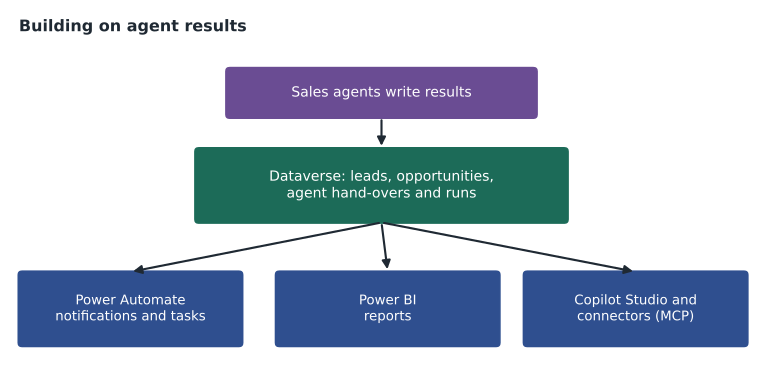
By mid-November the agents were producing a steady stream of events: leads researched and handed over, leads disqualified, risk cards raised on refit deals. Sellers saw them in the app, but some of Kestrelbay's work did not happen in the app. Ottilie lived in Teams, the owners wanted a monthly report in a form they could read on a tablet, and the warehouse lead wanted to know when a refit deal reached Propose so he could check stock. Mirela's answer was the usual one for Dynamics 365: extend it with the Power Platform. This lesson covers the extension patterns Kestrelbay used around the agents, using Power Automate for actions and notifications and Power BI for reporting, plus the newer ways agents can be connected to other tools.
Why extend around agents
The Sales agents are configured, not coded. Their settings cover what they work on and how they behave, but they do not cover every process an organization runs around them. Extensions fill three gaps. Notifications tell people outside the Sales app what the agents did. Automation takes the next step after an agent event, such as creating a task or updating a field. Reporting combines agent results with business results so that managers can judge value. The AB-210 study guide includes extending Sales with the Power Platform as a skill area, and the patterns below are the common ones.
Working with agent data in Dataverse
Everything an agent does that matters to the business ends up in Dataverse: leads change owner and status, activities record emails, and the agents keep their own records of runs, configuration and hand-overs. The Sales Qualification Agent's security requirements, for instance, name tables such as Sales Agent Handover, Sales Agent Run and SalesAgentProfile. Extensions should build on the standard tables where possible, such as a lead's owner and status or an opportunity's fields, because those are stable and understood. Agent-specific tables are useful for reporting on the agents themselves, but their structure is more likely to change between releases, so treat them with care and test after each release wave.
Power Automate patterns
Notify a seller in Teams when a lead is handed over
Sellers already got an in-app notification when the agent handed them a lead. Inside sellers spent most of their day in Teams, so Mirela added a cloud flow that posted a short message to the seller in Teams with the lead's name, company and the agent's one-line summary. The trigger was a change of owner on a lead from the agent's application user to a person.
Trigger: When a row is added, modified or deleted (Dataverse)
  Change type: Modified   Table: Leads
  Select columns: ownerid
Condition: previous owner = Kestrelbay Sales Agent (application user)
           AND new owner is a user
Action: Post message in a chat or channel (Teams)
  Post as: Flow bot   Post in: Chat with Flow bot
  Recipient: new owner's email
  Message: New lead from the agent: {Full name}, {Company}. Summary: {Description}
Create follow-up tasks from risk
The overdue deals rule from lesson 5 became a scheduled flow that ran every Monday at six: list open opportunities whose estimated close date had passed, and create a task for each owner titled "Update or close this deal". For deals in the agent's pilot, the same flow added a second task when the deal had been flagged high risk and had no activity since the flag. Mirela kept the risk logic in the agent and the task logic in the flow, so each tool did one job.
Tell the warehouse when a refit reaches Propose
The stage-change flow from the previous course already posted new proposals to the Sales channel. Mirela added a branch for refit projects: when one entered Propose, the flow emailed the warehouse lead a list of the main products on the linked quote so he could check stock and lead times. This was a direct response to the Sales Research Agent's finding in lesson 8 that delivery time was losing northern refits.
Worked problem
Choosing the right automation for an agent event
Ottilie wants three things: a Teams message when the agent disqualifies a lead from a marina account; a weekly email listing high-risk deals; and the agent to stop researching deals once they are Won. Which tool fits each?
Show solution
- Teams message on disqualification: a Power Automate cloud flow triggered by the lead status change, with a condition on customer type.
- Weekly list of high-risk deals: a scheduled cloud flow, or a Power BI report subscription if the risk data is in the report.
- Stopping research on won deals: no automation needed; the agent's selection criteria include only open opportunities.
Answer: Use cloud flows for notifications and lists, and use the agent's own selection criteria for what the agent works on.
Power BI for sales and agent reporting
Microsoft retired two older reporting options, which pushes organizations toward their own Power BI reports. The Sales usage reports were deprecated on December 1, 2025, with a sample Power BI report offered instead that Microsoft does not support, and the Power BI template apps for Sales Analytics and Process Analytics were deprecated in May 2025 and are no longer available for download. For agent activity itself, the agent insights pages in the Dynamics 365 AI hub remain the built-in view.
Kestrelbay's analyst, working with Mirela, built one Power BI report for the owners with four pages: pipeline by stage and deal type; won revenue against goal; lead sources and conversion; and an agent page. The report used the Dataverse connector against the production environment. For a larger organization, Microsoft Fabric with Dataverse data linked into a lakehouse would be the scalable route, and the same lakehouse could be added as a source for the Sales Research Agent.
| Report page | Key visuals | Source tables |
|---|---|---|
| Pipeline | Pipeline value by stage and deal type; overdue deals | Opportunity, business process flow table |
| Revenue | Won revenue against goal by quarter | Opportunity, Goal |
| Leads | Leads by source; conversion to opportunity and won | Lead, Opportunity |
| Agents | Leads handed over by the agent and their conversion; deals with risk flags and their outcomes | Lead (owner history), Opportunity, agent tables |
Defining measures carefully
An agent report is only as fair as its definitions. Mirela wrote down each measure before the analyst built it. Agent-sourced opportunity: an opportunity created from a lead that the agent handed over. Seller-sourced opportunity: one created from a lead a seller worked without the agent. Conversion rate: opportunities created divided by leads in scope, over the same period. Risk-flag outcome: for deals flagged high risk, the share later won, lost or still open. These definitions are what lesson 11 uses to judge whether the agents helped.
Agent conversion rate =
DIVIDE (
    CALCULATE ( COUNTROWS ( Opportunity ), Opportunity[Source] = "Agent" ),
    CALCULATE ( COUNTROWS ( Lead ), Lead[InAgentScope] = TRUE () )
)
Connecting agents to other tools
Microsoft has been opening Dynamics 365 Sales to agents built elsewhere. Release notes in October 2026 announced general availability of a Dynamics 365 customer experience MCP server for Sales, offering a set of governed tools that agents and seller experiences can call; the Model Context Protocol (MCP) is an open standard for connecting AI agents to tools and data. The Dynamics 365 Sales agent overview also mentions MCP support. At the same time, Microsoft deprecated two older SharePoint MCP tools in August 2026, and customizations that used them had to be updated. The lesson for administrators is that agent integrations are a fast-moving area: inventory any custom agent or tool that connects to Sales, and check it against release notes each wave.
For custom needs, Copilot Studio can build agents that use Dynamics 365 data through Dataverse and connectors. Kestrelbay did not build one in this stage, but Mirela noted a candidate for 2027: an internal agent in Teams that answers sellers' questions about stock levels and lead times by reading the warehouse system, so that the delivery-time problem could be addressed in the conversation with the customer.
Governance of extensions
Extensions are part of the solution and follow the same rules. Kestrelbay kept its flows in the Kestrelbay Core solution, used connection references so that moving between test and production did not need editing, ran flows under a service account rather than Mirela's own, and documented each flow's purpose and owner in the runbook. The Power BI report lived in a workspace owned by the sales operations team, with the owners given view access through an app.
Testing flows that react to agents
Flows that react to agent events are harder to test than flows that react to people, because the agent decides when events happen. Mirela tested Kestrelbay's hand-over flow in three ways. She created test leads in Kestrelbay-Test that matched the agent's selection criteria and waited for real hand-overs. She manually changed the owner of a test lead from the agent's application user to a seller to simulate a hand-over on demand. And she checked the flow's run history in production for the first week, looking for failures and for runs that should not have happened, such as a hand-over notification when a supervisor reassigned a disqualified lead. That last case turned out to be useful rather than wrong, so the flow was left as it was, with a note in the runbook.
Reporting fairly on agents in Power BI
A report page about agents invites comparisons between agent-handled and seller-handled work, and those comparisons are easy to get wrong. Mirela asked the analyst to show agent results next to the comparison group from lesson 11, not next to all seller leads, because boat show leads were warmer by nature. She also asked for every percentage to show its count, so that "68 percent of drafts sent with light edits" appeared as "124 of 182". And the page carried a short text box explaining definitions, so that an owner reading on a tablet would not mistake agent-sourced pipeline for agent-won revenue.
| Report practice | Why |
|---|---|
| Compare with a like-for-like comparison group | Avoids crediting the agent for differences in lead type |
| Show counts beside percentages | Small numbers make percentages unstable |
| State definitions on the page | Readers may not know what agent-sourced means |
| Show the date range and refresh time | Agent data changes daily |
Keeping integrations documented
By the end of November, Kestrelbay had five flows, one Power BI report and three agents, each depending on the others. Mirela kept a one-page integration map in the runbook: each component, what triggers it, what it reads and writes, who owns it and how to turn it off. When Microsoft's next release wave arrived, the map was the checklist for retesting. When the sales operations hire started in the new year, it was the first document they read.
Choosing between building and configuring
A recurring question in the project was whether to build something custom or to configure what Microsoft provides. Mirela's rule was to configure first, extend with flows and reports second, and build custom agents only when the first two could not meet a clear business need. Configured agents are maintained by Microsoft and improve with each release; flows and reports are simple to change; custom agents built in Copilot Studio are powerful but must be designed, tested, secured, paid for and maintained by the organization. The warehouse stock agent planned for 2027 passed that test because no built-in agent reads Kestrelbay's warehouse system. A custom lead-scoring agent proposed by one enthusiastic seller did not, because predictive lead scoring and the Sales Qualification Agent already did the job.
| Option | Best when | Who maintains it |
|---|---|---|
| Configure a built-in agent | Microsoft provides the capability | Microsoft, with the organization's settings |
| Extend with flows and reports | A step or view around the agent is missing | The organization, with little effort |
| Build a custom agent | No built-in capability meets a clear need | The organization, fully |
Common mistakes
MistakeBuilding notifications on agent-specific tables without testing after releases.
InsteadPrefer standard lead and opportunity fields, and retest extensions after each release wave.
MistakeDuplicating an agent's logic in a flow.
InsteadLet the agent decide and the flow notify or act; keep each rule in one place.
MistakeRelying on retired Sales usage reports or template apps.
InsteadBuild supported Power BI reports on Dataverse or Fabric data.
MistakeRunning flows under a personal account.
InsteadUse a service account and connection references inside a solution.
Summary and key terms
- Extensions fill gaps around agents: notifications, follow-up automation and reporting.
- Power Automate cloud flows can react to agent events such as hand-overs and stage changes, or run on a schedule.
- Sales usage reports and the Sales Power BI template apps are deprecated; build your own Power BI reports on Dataverse or Fabric.
- Define measures such as agent-sourced opportunities and conversion rate before building reports.
- Agents can connect to tools through MCP and Copilot Studio; inventory and retest these integrations each release wave.
- Cloud flow
- A Power Automate automation triggered by an event or schedule.
- Connection reference
- A solution component that lets flows use different connections in each environment.
- Model Context Protocol (MCP)
- An open standard for connecting AI agents to tools and data.
- Agent-sourced opportunity
- An opportunity created from a lead handed over by an agent.
- Dataverse connector
- The Power BI and Power Automate connector for Dataverse data.
- Release wave
- One of Microsoft's twice-yearly sets of planned feature releases.
Practice problems
Work each problem on paper first, then reveal the answer to check.
Which two Microsoft reporting options for Sales were deprecated in 2025?
Show answer
The Sales usage reports (December 1, 2025) and the Sales Analytics and Process Analytics Power BI template apps (May 2025).
Why did Mirela keep risk logic in the agent and task creation in a flow?
Show answer
So each rule lives in one place and the tools do not contradict each other.
What is MCP?
Show answer
The Model Context Protocol, an open standard for connecting AI agents to tools and data.
Lesson quiz · 5 questions
Score 60% or more to complete this lesson.
Create a free account to save your progress, take quizzes and earn a certificate.