
MSBA-281 · Lesson 3 of 12 · 18 min
Sales Qualification Agent modes
▶ Video coming soon A video version of this lesson is on the way.
Kestrelbay's Sales Qualification Agent had been running since the second week after go-live, in the mode Microsoft calls research-only. Every morning the inside sellers found new notes on their web leads: what the company did, how many berths a marina had, whether a yacht club had posted about a new dock project, and a suggested first email. Bronagh, the most experienced inside seller, liked it. "It does the reading I used to do with my coffee," she said. Callan was less sure. "It drafts nice emails. I still rewrite half of them." Ottilie's question for this stage was whether to let the agent send those emails itself.
This lesson explains what the Sales Qualification Agent does, its two modes, what changes when an organization moves from one to the other, and how to decide which mode fits. Lesson 4 covers the configuration steps and monitoring in detail.
What the Sales Qualification Agent does
The Sales Qualification Agent works on leads. Microsoft describes it as helping sales teams qualify leads by autonomously researching them, determining whether they are a good fit for further engagement, sending outreach emails and engaging with them. It evaluates each lead against the organization's ideal customer profile, looks for signs of purchase interest, and in the engage mode uses the BANT framework (budget, authority, need and timeline) to decide when a lead is ready for a seller. Leads are classified as a high, moderate or low fit.
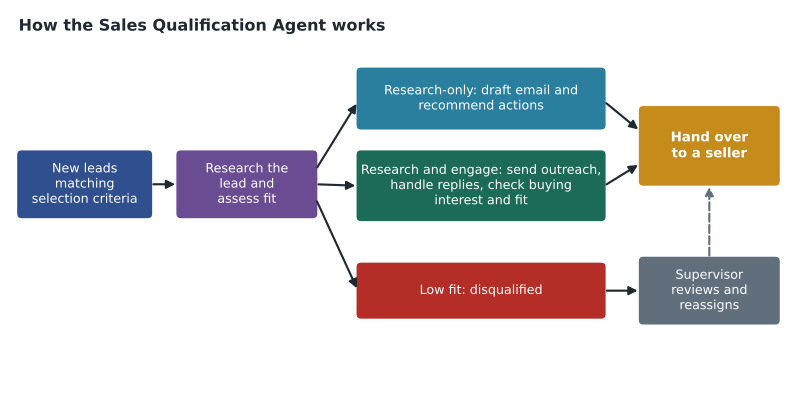
The agent only works on leads that match its selection criteria, which an administrator sets. When it has finished with a lead, it either hands it over to a seller according to assignment rules, or disqualifies it for low fit and records why. A supervisor can review what the agent disqualified and reassign any lead that deserves a second look. The agent is built on Copilot Studio and uses a research agent and knowledge sources there, which it shares with the Sales Opportunity Agent.
Research-only mode
In research-only mode, the agent analyses assigned leads, drafts an outreach email and recommends actions, but it does not contact anyone. A seller receives the research and the draft and decides what to do. Microsoft's training describes this mode as focusing on gathering insights about leads based on criteria such as lead source and geography.
Research-only mode is the safer starting point. Sellers see the quality of the agent's work before any customer does, nothing leaves the company without a person choosing to send it, and the setup is simpler. The agent needs an application user in Dataverse, created from an app registration in Microsoft Entra ID, and that user is given the AISalesPerson security role. It does not need its own mailbox.
The value of research-only mode is time. At Kestrelbay, sellers estimated that researching a marina lead properly took between ten and twenty minutes: website, social posts, news, the marina directory and the old customer database. With 190 web leads a month, that was most of a seller's week. In research-only mode the agent did that reading, and sellers spent their time on the conversation.
Research and engage mode
In research and engage mode, the agent does everything research-only mode does and also engages with leads on its own. It sends the outreach email, follows up, answers simple questions from what it knows, and evaluates replies for buying interest. When a lead shows positive buying interest and fits the profile, according to the configured hand-over criteria, the agent hands it to a seller. If it meets a question it cannot answer, it stops and passes the lead back to its owner.
This mode needs more setup. The agent sends email from a shared mailbox that must be set up with server-side synchronization in Dynamics 365; without server-side synchronization, Microsoft notes, the agent does not generate outreach emails or engage with leads. There are extra configuration steps for email instructions, custom outreach scenarios and a simulation that shows sample emails before the agent goes live.
| Research-only | Research and engage | |
|---|---|---|
| Researches leads and assesses fit | Yes | Yes |
| Drafts outreach email | Yes, for the seller | Yes, and sends it |
| Follows up and reads replies | No | Yes |
| Hands over to sellers | With research and a draft | When buying interest and fit are detected (BANT hand-over criteria) |
| Agent user needs | App user with AISalesPerson role | Same, plus a shared mailbox with server-side synchronization |
| Simulation step before start | No | Yes, review sample emails |
| Main risk | Low; people send everything | Customers receive messages written by the agent |
One mode per organization, and upgrades go one way
Two rules shape the decision. First, only one mode can be deployed for the Sales Qualification Agent in an organization. Kestrelbay could not run research-only for boat show leads and research and engage for web leads at the same time with this agent. Second, you can upgrade from research-only to research and engage, but you cannot go back. Microsoft documents a separate upgrade procedure, and once an organization has upgraded, the way to limit outreach is through selection criteria, email instructions and stopping the agent, not by downgrading.
There is a third rule worth remembering: once configured, an agent cannot simply be deleted; Microsoft's documentation says to contact support for that. Stopping the agent stops new leads being assigned to it, while leads already in progress continue until they are handed to a seller or added to the supervisor dashboard.
Choosing a mode
Because the upgrade cannot be undone, the decision deserves a short, honest review. Mirela used five questions with Ottilie.
How good are the drafts? After four weeks, Callan's comment was typical: about half of the drafts went out with small edits, and half were rewritten. The most common problem was tone. The agent wrote like a large distributor, and Kestrelbay's customers expected the voice of a local supplier who knew their dock. Email instructions can fix tone, but Mirela wanted to see that fix work before letting the agent send.
Are the leads suitable? Engage mode works best for high volume, lower complexity first contact: a retail sailor asking about winter storage gear, a small yacht club asking for a catalog. It is less suitable for a harbor authority planning a new dock, where the first conversation shapes a large deal.
Is the legal basis clear? As lesson 2 explained, automated outreach must respect consent and anti-spam rules. Kestrelbay's consent column made it possible to restrict the agent to consenting leads.
Is the mailbox and sync ready? The shared mailbox, server-side synchronization and a reply-handling process must exist. Kestrelbay already had a sales mailbox from phase one, but it was used by people. Mirela created a new shared mailbox, sales-assistant at the Kestrelbay domain, so that agent emails would be clearly separate.
Will people supervise it? Engage mode needs someone to read the agent's conversations, especially in the first weeks. Ottilie named Bronagh as the agent's supervisor for the pilot, with an hour a day set aside.
Worked problem
Deciding whether to upgrade
After four weeks in research-only mode, Kestrelbay's sellers sent 52 percent of agent drafts with light edits and rewrote the rest. Ottilie wants to upgrade to research and engage before the spring boat show in February. What should Mirela recommend?
Show solution
- Fix tone first: add email instructions that describe Kestrelbay's voice and give examples, and measure the share of drafts sent with light edits for two more weeks.
- Narrow the scope: plan selection criteria for the upgraded agent that include only web leads with recorded consent, from retail sailors and small clubs, excluding authorities and fleets.
- Prepare the mailbox, server-side synchronization and the supervisor's time.
- Run the simulation in the test environment and have Bronagh and Callan rate the sample emails.
- Upgrade only if the draft acceptance rate and simulation ratings meet an agreed bar, remembering that the change is permanent.
Answer: Upgrade in January if the improved drafts pass the bar, with narrow selection criteria and a named supervisor; otherwise stay in research-only mode for the boat show.
How hand-over works
Hand-over is where the agent's work meets a seller. In research-only mode, every processed lead that is not disqualified is handed over with its research and a draft. In research and engage mode, hand-over happens when the lead meets the hand-over criteria: Microsoft's documentation describes these as identifying leads that are a good fit for engagement, using BANT in engage mode. The agent uses assignment rules to decide which seller or team receives the lead, and the seller receives an in-app notification, so in-app notifications must be turned on.
Leads that the agent cannot process, or that are blocked by an open question in engage mode, go back to the seller who owned the lead. Disqualified leads go to a list a supervisor reviews. That review is not optional in a well-run pilot: an agent that is too strict quietly throws away business, and the only way to know is to look.
What sellers see
Sellers see the agent's work on the lead. Microsoft adds Sales Qualification Agent views and AI insights to the Sales Hub app; custom model-driven apps need those views added before sellers can see the insights. The lead shows the agent's summary, fit assessment, research on the company and person, the draft or sent emails, and suggested actions. In research-only mode the seller can send the draft from the lead after editing it.
Kestrelbay asked sellers to do one thing with every handed-over lead: read the agent summary before calling. It took a minute, and it meant the seller never asked a question the customer had already answered in a reply to the agent.
How the agent judges fit
Fit is the agent's central judgment, and it is worth understanding what it rests on. The agent compares what it learns about a lead with the ideal customer profile and company information an administrator has written, and with the lead's own data, such as source, location, company and the enquiry. Microsoft's training describes research-only mode as focusing on insights based on criteria such as lead source and geography. In engage mode, replies from the lead add evidence of purchase interest. The result is a classification of high, moderate or low fit, with the reasons shown to the seller.
Because the judgment depends on what the administrator wrote, vague profiles produce vague fit. Kestrelbay's first profile in October had said only "marine customers on the coast", which led the agent to rate an inland canoe club as a high fit because it mentioned boats. The rewritten profile in lesson 4 named the customer types, the product families, the service area and the kinds of enquiry Kestrelbay did not want, such as boat sales and financing.
A note on transparency to customers
When an agent writes to a customer, the customer should not be misled about who is writing. Kestrelbay decided that agent emails would be signed "Kestrelbay sales assistant" with the named seller who would follow up, rather than signed as a person. Microsoft's responsible AI guidance for its agents stresses transparency and human oversight, and local consumer and privacy laws may also be relevant. The decision cost nothing in response rates during the simulation: Bronagh and Callan rated the clearly labeled emails as just as good, and Ottilie thought they were more honest.
Finally, Mirela reminded the team that modes and settings are not the whole story. The quality of the agent's work depends on the company information, knowledge sources and instructions it is given, which lesson 4 covers step by step. A well-configured research-only agent is more useful than a poorly configured engage agent.
Common mistakes
MistakeUpgrading to research and engage to save setup time later.
InsteadUpgrade only when draft quality, scope, consent and supervision are ready, because the upgrade cannot be reversed.
MistakeExpecting to run both modes for different lead sources.
InsteadPlan for one mode per organization and use selection criteria to limit which leads the agent works on.
MistakeUsing the people's sales mailbox for agent outreach.
InsteadGive the agent its own shared mailbox with server-side synchronization so its emails are clearly separate.
MistakeIgnoring disqualified leads.
InsteadHave a supervisor review disqualified leads and reassign any worth pursuing.
Summary and key terms
- The Sales Qualification Agent researches leads, assesses fit against the ideal customer profile and hands promising leads to sellers.
- Research-only mode researches, drafts and recommends; people send everything.
- Research and engage mode also sends outreach, follows up and hands over leads with buying interest using BANT criteria.
- One mode runs per organization, and the upgrade from research-only to research and engage is one way.
- Engage mode needs a shared mailbox with server-side synchronization, email instructions, a simulation and active supervision.
- Sales Qualification Agent
- The Dynamics 365 Sales agent that researches and qualifies leads.
- Research-only mode
- The mode in which the agent researches leads and drafts emails but does not contact anyone.
- Research and engage mode
- The mode in which the agent also sends outreach and engages leads until hand-over.
- Ideal customer profile
- A description of the customers most likely to buy, used to judge lead fit.
- BANT
- Budget, authority, need and timeline: criteria used to judge readiness for hand-over.
- AISalesPerson
- The security role given to the agent's application user in Dataverse.
Practice problems
Work each problem on paper first, then reveal the answer to check.
Kestrelbay wants research-only for boat show leads and engage mode for web leads. Is that possible with the Sales Qualification Agent?
Show answer
No. Only one mode runs per organization; selection criteria can limit which leads the agent processes.
What extra setup does research and engage mode need compared with research-only?
Show answer
A shared mailbox with server-side synchronization, email instructions and custom scenarios, and a simulation before starting.
What happens to a lead the agent cannot answer a question about in engage mode?
Show answer
It is blocked and passed back to the seller who owned the lead.
Lesson quiz · 5 questions
Score 60% or more to complete this lesson.
Create a free account to save your progress, take quizzes and earn a certificate.