
MSBA-160 · Lesson 9 of 12 · 20 min
Forks and open source contribution
▶ Video coming soon A video version of this lesson is on the way.
At the ninth session, on February 1, the public trail-report repository had its first outside contribution, and Malik Osei walked the team through how he had made it. Malik has no write access to anything at Tidewater, so he could not push a branch to the repository. Instead he made a fork, his own copy of the repository under his own account, changed it there and opened a pull request back to the original. Lena Fischer, a co-op student who had just joined the web team for the winter term, listened closely, because she had never contributed to an open-source project and wanted to.
What a fork is
A fork is a new repository on GitHub that copies another repository, including its files, history and branches, and stays linked to the original. The original is called the upstream repository. You own your fork: you can push to it, create branches in it and change its settings, without any permission from the upstream maintainers. Because GitHub remembers the link, it can show how far your fork is ahead of or behind the upstream, and it lets you open pull requests from your fork into the upstream repository.
Forking is how people contribute to repositories they cannot write to, which is the normal situation in open source: maintainers would never give push access to everyone, but they welcome proposed changes they can review. Forks are also used to start an independent project from an existing one, which the project's license must allow.
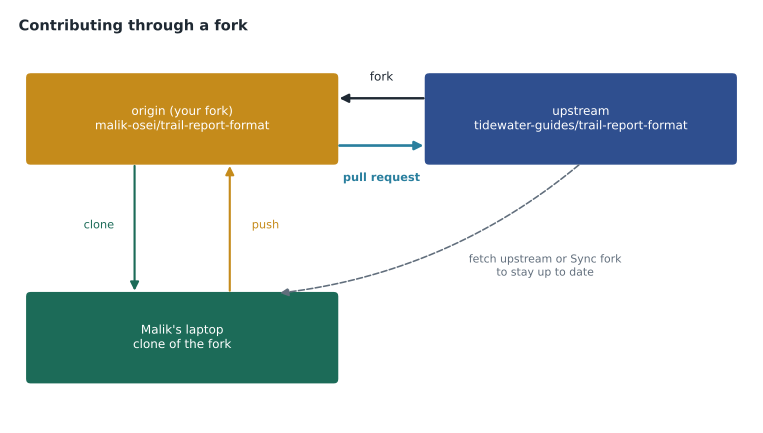
Fork, clone, branch or template?
These four ideas are easy to mix up, and the exam tests the differences.
| Option | Where the copy lives | History and link | Use it when |
|---|---|---|---|
| Branch | Inside the same repository | Same history; part of the repository | You have write access and are working on a change |
| Clone | On your computer | Full history; remote points to the source | You want to work locally on any repository you can read |
| Fork | A new repository on GitHub under your account or organization | Full history; linked to upstream for pull requests | You lack write access, or want your own copy to build on |
| Template | A new repository on GitHub | Fresh history; no link to the original | You want to start a new project with the same structure |
Inside Tidewater, the team members work with branches in the organization's repositories, because they have write access; forking their own company repositories would only add steps. Outside contributors such as Malik fork. Lena, who would join the web team as a member, used branches for her work, but she practiced the fork workflow on a well-known open-source documentation project in her own time.
The fork and pull request workflow
Malik described the steps he followed to add a new trail surface field to the format.
| Step | What Malik did | Command or button |
|---|---|---|
| 1. Fork | Created his fork of the upstream repository | Fork button on the repository page |
| 2. Clone | Copied his fork to his laptop | git clone https://github.com/malik-osei/trail-report-format.git |
| 3. Add upstream | Linked the original so he could get its updates | git remote add upstream https://github.com/tidewater-guides/trail-report-format.git |
| 4. Branch | Started a branch for the change | git switch -c add-surface-field |
| 5. Commit and push | Made the change with an example file, then pushed to his fork | git push -u origin add-surface-field |
| 6. Open a pull request | Proposed merging his branch into upstream main | Compare and pull request button |
| 7. Respond to review | Pushed fixes to the same branch | git push |
In this setup, origin is Malik's fork and upstream is Tidewater's original. Before starting new work he brings his fork up to date, either with the Sync fork button on his fork's page on GitHub, which updates the fork's branch from upstream, or locally by fetching from upstream and merging into his main, then pushing to origin. Keeping the fork in sync reduces conflicts, because his branch starts from the latest version of the format.
git switch main
git fetch upstream
git merge upstream/main
git push origin main
When a pull request comes from a fork, the maintainers review it just like any other. For first-time contributors, GitHub can require a maintainer to approve before automated workflows run on the pull request, to prevent strangers from running code in the project's automation. Pull requests from forks can also allow maintainers to push small fixes to the contributor's branch, if the contributor leaves the option ticked.
Worked problem
Origin or upstream?
Malik has been away for two weeks. The upstream main has gained 6 commits, and his fork's main has none of them. He wants to start a new branch for another field. Where should he fetch from, and where should he push his new branch?
Show solution
- The new commits are in Tidewater's original repository, which is the upstream remote.
- So he updates first: fetch from upstream and merge upstream/main into his main, or use Sync fork on GitHub and then pull.
- He creates the new branch from his updated main.
- He cannot push to upstream, so he pushes the new branch to origin, his fork, and opens a pull request to upstream from there.
Answer: Fetch from upstream to update, push to origin (his fork), and open the pull request into upstream.
Forks, visibility and permissions
Forks follow some rules that matter when a company owns private code. A fork of a public repository is public. A fork of a private repository stays private and keeps the same access restrictions, and organizations can turn off forking of their private repositories altogether in the organization settings, which Rosa did for trail-notes so that unpublished guidebook text could not be copied into personal accounts. If a private repository is deleted, its private forks are deleted too; if a public repository is deleted, its public forks remain and one of them becomes the new root of the fork network, the group of repositories that share a common origin. The fork network is visible under a repository's Insights, which helps maintainers see who is building on their work.
Forking also copies only what is in the repository. Issues, pull requests, discussions, wiki settings and repository secrets stay with the original, so a fork starts with an empty issue list and no access to the upstream project's automation secrets. Contributors who need to test automation in their fork must set up their own configuration.
Worked problem
Lena's first open-source pull request
Lena finds a broken link in the documentation of a large open-source project. The project's CONTRIBUTING file asks for one fix per pull request, a commit message starting with docs:, and an issue for anything larger than a typo. She has no write access. What should she do?
Show solution
- A broken link is a small fix, so the CONTRIBUTING rules do not require an issue first; she checks open pull requests in case someone has already fixed it.
- She forks the project, and because the fix is one line she can even edit the file in her fork on the GitHub website, which creates a commit there.
- Her commit message follows the project's rule: docs: fix broken link to installation guide.
- She opens a pull request from her fork's branch to upstream main, describes the broken and corrected links, and waits for review without pinging maintainers repeatedly.
Answer: Fork, make one focused commit with the required message style, and open a small pull request to upstream that explains the fix.
Why open source matters
Open source software is software whose source code is published under a license that lets anyone use, study, change and share it. Much of the software the world runs on, including Git itself, Linux and most programming languages, is open source, and GitHub hosts more open-source projects than any other service. The GH-900 outline expects you to describe the benefits.
For users, open source offers transparency, because anyone can inspect the code, flexibility to adapt it, and freedom from depending on one supplier. For contributors, it is a way to learn, build a public portfolio and help tools they rely on. For organizations, it spreads the cost of shared tools across many companies, attracts talent and builds goodwill. Tidewater's reason was simpler: if other trail groups adopted the same report format, volunteer reports could flow between websites, and hikers would get better information everywhere.
Open source also brings responsibilities. Maintainers spend real time on review and support, and many popular projects depend on a handful of unpaid volunteers. Good contributors read the README and CONTRIBUTING files first, search existing issues before opening new ones, keep pull requests small and focused, follow the code of conduct, and accept that a maintainer may say no.
Forking to start an independent project, rather than to contribute back, depends entirely on the license from lesson 5. A permissive or copyleft license allows it, with conditions; a repository with no license does not, even though GitHub's Fork button works on any public repository. The button creates a copy for contributing under GitHub's terms of service, but it does not grant permission to reuse the work elsewhere. Malik checked the trail-report repository's MIT license before he started building his phone app on top of it.
| Benefit | For whom | Example |
|---|---|---|
| Transparency and trust | Users | Anyone can check how trail data is processed |
| Shared cost and effort | Organizations | Several trail groups improve one format together |
| Learning and portfolio | Contributors | Lena's first merged pull request is public |
| Faster fixes | Everyone | A volunteer fixes a bug the team had not seen |
How GitHub supports the open-source community
GitHub provides features aimed at open-source communities. GitHub Sponsors lets people and companies fund maintainers and projects with one-time or monthly payments, shown by a Sponsor button on repositories that set it up through a FUNDING file. Stars let people bookmark projects and signal appreciation. Following a person or organization adds their public activity to your dashboard feed. The Explore pages, topics and trending lists help people discover projects, and labels such as good first issue help newcomers find a place to start. The community profile under a repository's Insights checks for the standard files from lesson 5.
GitHub Marketplace is a catalog of apps and GitHub Actions that extend GitHub, many made by the community, which MSBA-161 covers. GitHub also runs programs for students and educators, and the GitHub Security Lab and advisory database help open-source projects handle security problems responsibly.
Inner source
Inner source means using open-source practices inside an organization: making internal repositories visible across teams, accepting pull requests from other departments, and documenting projects so anyone in the company can contribute. Enterprises often use internal visibility for this, as lesson 4 described. Tidewater is too small to need a formal program, but the editors began to behave this way when they started submitting fixes to the website repository themselves instead of emailing the web team. MSBA-161 covers inner source practices in more depth.
Making a repository easy to contribute to
After Malik's pull request was merged, Priya asked what had nearly stopped him. His list became the team's checklist for public repositories: a README that explains the goal; a license; a CONTRIBUTING file with the exact steps, including how to run checks; issue templates so reports arrive complete; good first issue labels on a few small tasks; a code of conduct; quick, friendly first responses to new contributors; and automated checks that tell a contributor what is wrong before a human has to. Within a month, two other trail groups had starred the repository and one had opened a discussion about adopting the format.
Common mistakes
MistakeForking your own organization's repository to make a change.
InsteadIf you have write access, use a branch in the same repository.
MistakeConfusing a fork with a clone.
InsteadA fork is a linked copy on GitHub; a clone is a copy on your computer.
MistakeStarting new work on a fork that is weeks out of date.
InsteadSync the fork with upstream first to avoid conflicts.
MistakeOpening a large, unannounced pull request to a busy project.
InsteadRead CONTRIBUTING, discuss big changes in an issue first and keep pull requests small.
Summary and key terms
- A fork is a linked copy of a repository on GitHub that you own and can push to.
- Contributors without write access fork, clone, branch, push to the fork and open a pull request to upstream.
- origin usually points to your fork and upstream to the original; Sync fork or fetch and merge keeps the fork current.
- Branches, clones, forks and templates differ in where the copy lives and whether it keeps history and a link.
- Open source offers transparency, shared effort, learning and faster fixes, and asks contributors to respect maintainers' time.
- GitHub supports the community with Sponsors, stars, following, Explore, Marketplace and inner source practices.
- Fork
- A copy of a repository on GitHub, owned by you and linked to the original.
- Upstream
- The original repository that a fork was made from.
- Sync fork
- A GitHub button that updates a fork's branch from the upstream repository.
- Open source
- Software published under a license that lets anyone use, study, change and share it.
- GitHub Sponsors
- A GitHub feature for funding open-source maintainers and projects.
- Inner source
- Using open-source practices within an organization.
Practice problems
Work each problem on paper first, then reveal the answer to check.
Why do outside contributors fork instead of creating a branch?
Show answer
They do not have write access to the upstream repository, but they can push to their own fork.
In the fork workflow, what does the upstream remote point to?
Show answer
The original repository the fork was made from.
What is the difference between a fork and a repository made from a template?
Show answer
A fork keeps the history and a link to the original; a template copy starts with fresh history and no link.
Lesson quiz · 5 questions
Score 60% or more to complete this lesson.
Create a free account to save your progress, take quizzes and earn a certificate.