
MSBA-160 · Lesson 5 of 12 · 21 min
README, licenses and repository files
▶ Video coming soon A video version of this lesson is on the way.
At the fifth session, on December 14, Malik Osei came in as a guest. Malik is a volunteer trail reporter who files condition reports for TrailCheck and, in his spare time, writes small programs. Tidewater had decided to publish the TrailCheck trail-report format as a public repository, so that volunteers and other trail groups could build tools around it, and Malik would be the first outside contributor. "When I land on a repository I have never seen," he told Owen, "I read three things before anything else: the README, the license and the contributing guide. If any of them is missing, I usually leave." The lesson was about those files and the others GitHub recognizes by name.
Files GitHub recognizes by name
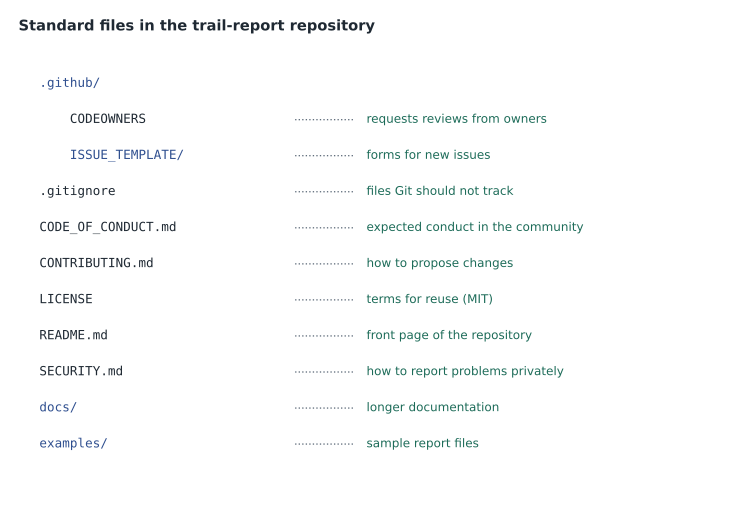
Git treats every file the same, but GitHub gives special treatment to a handful of files when they have particular names, usually in the top folder of the repository, in a folder called .github, or in a docs folder. It shows them in the repository sidebar, links to them from issue and pull request pages, and uses them to fill the community profile that public repositories have under Insights.
| File | Purpose | Where GitHub uses it |
|---|---|---|
| README.md | Explains what the project is and how to use it | Shown below the file list on the Code tab |
| LICENSE | States the terms on which others may use the work | License name shown in the sidebar |
| CONTRIBUTING.md | Explains how to propose changes | Linked when someone opens an issue or pull request |
| CODE_OF_CONDUCT.md | Sets expectations for behavior in the community | Community profile and sidebar |
| SECURITY.md | Explains how to report security problems privately | Security tab and the issue form |
| CODEOWNERS | Names the people or teams responsible for parts of the repository | Automatically requests their review on pull requests |
| .gitignore | Lists files Git should not track | Used by Git itself |
The README
A README is the front page of a repository. GitHub displays it automatically on the Code tab, so it is the first thing most visitors read. A good README answers a newcomer's questions in order: what this project is and why it exists, how to install or use it, how to get help, how to contribute, and who maintains it. For the trail-notes repository, the README explained that the folder held the Markdown source of Tidewater's guidebooks, how the chapters were organized, how to preview a chapter, and that all changes went through pull requests reviewed by the editors.
READMEs are usually written in Markdown, a plain-text format in which a few simple marks turn into formatted text. GitHub uses its own version, GitHub Flavored Markdown, everywhere: in README files, issues, pull requests, discussions, comments and wikis. The exam expects you to recognize the basics.
# TrailCheck trail-report format

A simple, open format for **trail condition reports**.

## Quick start

1. Copy `examples/report.json`
2. Fill in the trail ID, date and condition
3. Open a pull request

- [x] Mud and washout conditions
- [ ] Winter conditions (planned)

See the [contributing guide](CONTRIBUTING.md) for details.

| Field | Meaning |
|-------|---------|
| trail_id | Unique ID of the trail |
| status | open, caution or closed || Markdown | Result |
|---|---|
| # Heading, ## Smaller heading | Headings of decreasing size |
| **bold**, *italic* | Bold and italic text |
| 1. item, - item | Numbered and bulleted lists |
| [text](address) | A link |
|  | An image with alternative text |
| `code` and blocks fenced with three backticks | Code shown in a fixed-width font |
| - [ ] and - [x] | Task-list check boxes, unticked and ticked |
| | a | b | rows | A table |
| @username, #42 | A mention that notifies a person; a link to issue or pull request 42 |
Two GitHub additions are worth knowing for the exam. Typing @ followed by a username or team name mentions that person or team and notifies them. Typing # followed by a number links to that issue or pull request in the same repository. GitHub also turns a commit identifier typed in a comment into a link to that commit. Your personal profile can have a README too: create a public repository with exactly the same name as your username, and its README appears at the top of your profile page.
Licenses
A license tells others what they may do with the work. This is the file Owen understood least, and the one Grace cared about most, because the guidebook text is the company's product. Under copyright law in both Canada and the United States, a creative work belongs to its author or their employer as soon as it is written. If a public repository has no license, people can view it on GitHub, but they have no legal permission to copy, change or share the work. So a public repository with no license is not "open source"; it is simply visible.
Open-source software licenses come in two broad families. Permissive licenses, such as the MIT License and the Apache License 2.0, let others use, change and redistribute the work, including in closed products, as long as they keep the copyright and license notice. Apache 2.0 also includes an explicit grant of patent rights. Copyleft licenses, such as the GNU General Public License (GPL), also allow use and change, but require anyone who distributes a modified version to release it under the same license, so the work stays open. For text, images and data rather than code, many projects use Creative Commons licenses, such as CC BY 4.0, which allows reuse with credit, or CC BY-NC, which also forbids commercial use.
| License | Family | Main condition | Good for |
|---|---|---|---|
| MIT License | Permissive | Keep the copyright and license notice | Small libraries and tools |
| Apache License 2.0 | Permissive | Keep notices; state changes; includes a patent grant | Larger projects that care about patents |
| GNU GPL v3 | Copyleft | Share modified versions under the same license | Software that must stay open |
| CC BY 4.0 | Creative Commons | Give credit | Documentation, data and images |
| No license | None | All rights reserved by default | Private or not-yet-decided work |
When you create a repository, GitHub offers a menu of common licenses and adds the right LICENSE file. The site choosealicense.com, maintained by GitHub, compares them in plain language. Tidewater chose the MIT License for the code in the public trail-report repository and CC BY 4.0 for its documentation, so that other trail groups could reuse both with credit. The trail-notes repository with the guidebook text stayed private, with no open license, because the books are sold.
Worked problem
Choosing a license
Malik wants to build a phone app that reads TrailCheck trail reports and to sell it for a few dollars. Under which of these licenses on the public trail-report code could he do that without releasing his own app's code: MIT, GPL v3, or no license?
Show solution
- With no license, he has no permission to copy or reuse the code at all, so that option fails.
- GPL v3 lets him use the code, but if he distributes an app that includes modified GPL code, he must release that app under the GPL too.
- MIT lets him use, change and sell the code in a closed app, provided he keeps the copyright and license notice.
- Tidewater chose MIT, so his plan works as long as the notice is included.
Answer: Only under the MIT License. GPL v3 would require him to share his app's code, and no license gives no permission at all.
CONTRIBUTING, code of conduct and security policy
A CONTRIBUTING file tells people how to help: how to report a problem, how to propose a change, the branch and commit message conventions, how to run any checks, and what to expect from review. GitHub links to it when someone opens an issue or a pull request, so contributors see it at the right moment. Malik wrote the first version for the trail-report repository with Priya, including a rule that every new field in the format needs an example file.
A code of conduct sets out the behavior expected of everyone in the community and how problems will be handled. Many projects adopt a standard text such as the Contributor Covenant, which GitHub offers as a template. A security policy, in a file called SECURITY.md, tells people how to report a security weakness privately instead of in a public issue, which would warn attackers before a fix was ready. Lesson 5 of MSBA-161 covers these community health files in more detail, including templates for issues and pull requests.
CODEOWNERS
A CODEOWNERS file names the people or teams responsible for particular files or folders. When a pull request changes files covered by the file, GitHub automatically requests a review from the listed owners. Combined with branch protection, which MSBA-161 covers, an organization can require that a code owner approve the change before it merges. The file lives in the top folder, in .github, or in docs, and each line pairs a pattern with one or more owners.
# Everything defaults to the web team
*                  @tidewater-guides/web
# Chapters need an editor
/chapters/         @tidewater-guides/editors
# Trail safety text needs Grace
/chapters/*safety* @grace-achterberg
Worked problem
Who reviews this pull request?
Owen opens a pull request that changes chapters/ch02-tide-safety.md and images/tide-chart.png in trail-notes. Using the CODEOWNERS file above, whose review does GitHub request?
Show solution
- For each file, the last matching line in CODEOWNERS wins.
- chapters/ch02-tide-safety.md matches * (web), /chapters/ (editors) and /chapters/*safety* (Grace). The last match is Grace.
- images/tide-chart.png matches only *, so the owner is the web team.
- GitHub requests reviews from every owner of every changed file.
Answer: GitHub requests reviews from @grace-achterberg for the safety chapter and from the web team for the image.
.gitignore
Lesson 2 introduced the .gitignore file, which lists patterns of files that Git should not track. A pattern can be a file name, a wildcard such as *.log, or a folder name ending in a slash. A line starting with ! makes an exception. GitHub keeps a public collection of ready-made .gitignore templates for most programming languages and tools, and offers them when you create a repository. Remember that .gitignore affects only files that are not yet tracked; to stop tracking a file that was already committed, you must remove it from Git with git rm --cached and commit, and if it contained a secret, that secret must also be changed, because it remains in history.
README, wiki or docs folder?
Owen asked where longer documentation should go, since the README for trail-notes was already getting long. Priya described three places. The README should stay short enough to read in a few minutes: what the repository is, how to start, and where to find more. A docs folder in the repository holds longer guides as Markdown files that change through the same branches and pull requests as everything else, so documentation is reviewed and versioned alongside the work it describes. A wiki is a separate set of pages attached to the repository and edited in the browser; it is quick to update, but changes to it do not go through pull requests in the usual way, so it suits notes that do not need formal review. For a public format that others build tools on, Malik argued for the docs folder, because a change to the documentation should be reviewed as carefully as a change to the format itself. The team agreed, and the trail-report repository got a docs folder with a field-by-field reference, a page of worked examples and a short history of each version of the format.
| Where | Best for | Reviewed through pull requests? |
|---|---|---|
| README.md | A short introduction and quick start | Yes |
| docs folder | Longer guides that change with the project | Yes |
| Wiki | Informal pages edited in the browser | Not in the usual way |
Templates, descriptions and topics
A template repository is a repository marked in its settings as a template, so that others can create new repositories with the same files and folders but a fresh history. Tidewater made a style-guide template containing the standard README layout, license, CONTRIBUTING file, CODEOWNERS and .gitignore, so every new guidebook repository started with the same structure. Using a template differs from forking, which keeps a link to the original and its history; lesson 9 compares them.
Finally, every repository has a short description and can have topics, keywords such as hiking, trail-data or open-data that appear as tags on the repository page and help people find it through GitHub search and topic pages. A social preview image can also be set for links shared on social media.
Common mistakes
MistakeAssuming a public repository without a license is free to reuse.
InsteadWithout a license the default is all rights reserved; visibility is not permission.
MistakeReporting a security weakness in a public issue.
InsteadFollow SECURITY.md and report it privately.
MistakeExpecting .gitignore to remove an already committed file.
InsteadUse git rm --cached and commit; change any secret it held.
MistakeWriting a README that only lists the files.
InsteadExplain what the project is for, how to use it, how to get help and how to contribute.
Summary and key terms
- GitHub gives special treatment to README, LICENSE, CONTRIBUTING, CODE_OF_CONDUCT, SECURITY and CODEOWNERS files.
- The README is the repository's front page and is written in Markdown.
- GitHub Flavored Markdown supports headings, lists, links, images, code, tables, task lists, mentions and issue references.
- Permissive licenses allow reuse with notice; copyleft licenses require sharing changes; no license means all rights reserved.
- CODEOWNERS requests reviews automatically from the people responsible for changed files.
- Template repositories give new projects the same files with a fresh history.
- README
- The file that introduces a repository and appears on its Code tab.
- Markdown
- A plain-text format with simple marks for formatting.
- Permissive license
- A license that allows reuse, including in closed products, with notice kept.
- Copyleft license
- A license requiring that distributed changes be shared under the same license.
- CODEOWNERS
- A file that names the owners of paths and requests their reviews.
- SECURITY.md
- A file explaining how to report security problems privately.
- Template repository
- A repository others can copy to start a new project with fresh history.
Practice problems
Work each problem on paper first, then reveal the answer to check.
What happens on GitHub when you type #42 in a comment?
Show answer
It links to issue or pull request number 42 in the repository.
Which license family requires distributed changes to stay under the same license?
Show answer
Copyleft, such as the GPL.
Where can a CODEOWNERS file live?
Show answer
In the top folder, in .github or in docs.
Lesson quiz · 5 questions
Score 60% or more to complete this lesson.
Create a free account to save your progress, take quizzes and earn a certificate.