
MSBA-160 · Lesson 11 of 12 · 21 min
GitHub Pages, Actions and Copilot at a glance
▶ Video coming soon A video version of this lesson is on the way.
The eleventh Git lunch, on February 15, covered three features that the team would rely on for the spring release but that each have a full course of their own later in the program. "Today is the tour, not the manual," Priya said. GitHub Pages would publish the new TrailCheck site straight from its repository; GitHub Actions would check every pull request automatically and publish the site when main changed; and GitHub Copilot, the AI assistant, was something Lena already used and Owen was curious about. Priya also added two smaller features the exam expects you to know, gists and wikis.
GitHub Pages
GitHub Pages is a hosting service that publishes a static website directly from a repository. A static site is made of files, such as HTML pages, style sheets, images and scripts, that are sent to visitors as they are, without a database or server-side program. That suits documentation, project pages, portfolios and sites such as TrailCheck, whose trail reports are data files turned into pages when the site is built.
There are two kinds of Pages site. A user or organization site is published from a repository named exactly after the account, such as tidewater-guides.github.io, and appears at that address. A project site is published from any other repository and appears under a path, such as tidewater-guides.github.io/trailcheck. A site can also use a custom domain, such as trailcheck.example, by adding the domain in the repository's Pages settings and pointing the domain's DNS records at GitHub; GitHub then provides an HTTPS certificate automatically.
A site is published in one of two ways, chosen in Settings, then Pages. The simplest is to deploy from a branch: choose a branch, such as main, and a folder, either the top folder or docs, and GitHub publishes it, building it with the Jekyll static site generator if it finds Jekyll files. The more flexible way is to publish with a GitHub Actions workflow, which can use any static site generator and run checks before publishing. Pages is available for public repositories on GitHub Free; publishing from private repositories needs a paid plan. A Pages site is public on the internet unless the organization uses GitHub Enterprise Cloud with access control, so it must never contain anything private.
| Pages setting | Options |
|---|---|
| Site type | User or organization site (username.github.io) or project site |
| Source | Deploy from a branch and folder, or a GitHub Actions workflow |
| Folder when deploying from a branch | The top folder (/) or /docs |
| Domain | The github.io address or a custom domain with HTTPS |
Worked problem
Where will the site appear?
The tidewater-guides organization publishes Pages from two repositories: tidewater-guides.github.io, which holds a small company page, and trailcheck, which holds the conditions site. No custom domains are set yet. What are the two addresses?
Show solution
- A repository named after the organization with .github.io is the organization site, so it appears at https://tidewater-guides.github.io.
- Any other repository is a project site, published under the organization address plus the repository name.
- So trailcheck appears at https://tidewater-guides.github.io/trailcheck.
- Later, adding trailcheck.example as a custom domain in the trailcheck repository's Pages settings would move the site to that address with HTTPS.
Answer: https://tidewater-guides.github.io for the company page and https://tidewater-guides.github.io/trailcheck for the conditions site.
GitHub Actions
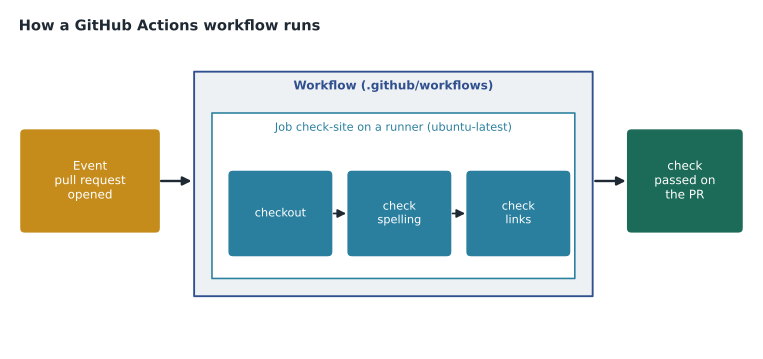
GitHub Actions is GitHub's automation and continuous integration and delivery platform. It runs workflows, automated processes defined in YAML files in the .github/workflows folder of a repository. A workflow starts when an event happens, such as a push, a pull request being opened or updated, an issue being labeled, a schedule, or someone pressing a button. A workflow contains one or more jobs, and each job runs on a runner, a machine that executes the job's steps in order. A step either runs a command or uses an action, a reusable packaged task such as checking out the repository or setting up a language; thousands of actions are shared in GitHub Marketplace.
name: Check pull requests
on:
  pull_request:
    branches: [main]
jobs:
  check-site:
    runs-on: ubuntu-latest
    steps:
      - uses: actions/checkout@v4
      - name: Check spelling
        run: npx cspell "chapters/**/*.md"
      - name: Check links
        run: npx markdown-link-check README.md
In this workflow, the event is a pull request targeting main; there is one job, check-site, which runs on a GitHub-hosted Ubuntu runner; and the job has three steps: one uses the checkout action, and two run commands. The result appears on the pull request's Checks tab and in the merge box, and with branch protection the pull request cannot merge until the check passes. That was exactly the spelling check Rosa required in lesson 6.
| Actions term | Meaning | In the example |
|---|---|---|
| Workflow | An automated process in a YAML file | Check pull requests |
| Event | What starts the workflow | pull_request to main |
| Job | A set of steps that run on one runner | check-site |
| Runner | The machine that runs a job | ubuntu-latest, hosted by GitHub |
| Step | One command or action in a job | Check spelling |
| Action | A reusable task used by a step | actions/checkout |
GitHub-hosted runners are fresh virtual machines that GitHub provides for each job, running Linux, Windows or macOS. Self-hosted runners are machines an organization runs itself, for special hardware or networks. Actions is free for public repositories on standard GitHub-hosted runners; private repositories get a monthly allowance of minutes that depends on the plan, with extra use billed. Workflows can store sensitive values as secrets, which are hidden in logs, and the GitHub Actions course in this program covers workflows in depth.
GitHub Copilot
GitHub Copilot is an AI assistant built into GitHub and into editors such as Visual Studio Code, Visual Studio and JetBrains IDEs. It began as code completion, suggesting the next lines as you type, and now includes Copilot Chat, a conversation panel for asking questions about code, explaining errors and generating tests or documentation; agent mode in the editor, where Copilot plans and carries out a multi-step change across files, runs commands and fixes problems it finds, with the developer approving the work; and the Copilot coding agent, which can be assigned an issue on GitHub, works in its own environment powered by GitHub Actions, and opens a pull request for a person to review. Copilot lets users choose among several AI models from different providers for chat and agents.
Copilot is offered in several plans. For individuals there is Copilot Free, with a limited number of completions and chat requests each month, and paid individual plans such as Copilot Pro and Pro+. For organizations there are Copilot Business and Copilot Enterprise, which add central management of licenses and policies, such as which features and models members may use, and controls over the use of organization data; Enterprise adds further features for large companies. Students, teachers and maintainers of popular open-source projects can get Copilot Pro free. Plans and limits change often, so check GitHub's Copilot plans page for current details.
| Copilot feature | What it does |
|---|---|
| Code completion | Suggests the next lines while you type |
| Copilot Chat | Answers questions, explains and generates code in a chat panel |
| Agent mode | Carries out multi-step changes in the editor with your approval |
| Coding agent | Works on an assigned issue and opens a pull request for review |
| Model choice | Lets users pick among several AI models for chat and agents |
Using Copilot responsibly matters. Its suggestions can be wrong, insecure or out of date, so everything it writes still goes through the same review as human work, and the coding agent's pull requests need a human approval before they merge. Organizations decide in Copilot policies which features members can use and whether suggestions that match public code are blocked. At Tidewater, Lena uses Copilot in her codespace for website code, Priya reviews her pull requests as usual, and Owen tried Copilot Chat for help writing a GitHub Actions workflow and found it useful as long as he checked each line against the documentation.
How the pieces fit together for TrailCheck
Priya ended the tour by showing how the three features would work together for the new site. The repository would hold the site's source and the trail report data. Every pull request would run the checking workflow from earlier in this lesson, and branch protection would require it to pass. When a pull request merged into main, a second workflow would build the site and publish it to GitHub Pages. Copilot would help write and review the workflow files, but a person would approve every change. The publishing workflow was short enough to read in one sitting.
name: Publish site
on:
  push:
    branches: [main]
permissions:
  contents: read
  pages: write
  id-token: write
jobs:
  build:
    runs-on: ubuntu-latest
    steps:
      - uses: actions/checkout@v4
      - uses: actions/jekyll-build-pages@v1
      - uses: actions/upload-pages-artifact@v3
  deploy:
    needs: build
    runs-on: ubuntu-latest
    environment: github-pages
    steps:
      - uses: actions/deploy-pages@v4
Owen read it line by line with Priya. The event is a push to main, which is what happens when a pull request merges. The permissions section gives the workflow only the access it needs: to read the repository and to publish Pages. There are two jobs. The build job checks out the repository, builds the site with Jekyll and uploads the result as an artifact, a packaged set of files. The deploy job waits for build to finish, because of needs: build, and then publishes the artifact to Pages in an environment named github-pages, which records each deployment and its address on the repository page. Every step uses an action published by GitHub, so the team writes no build scripts of its own.
The arrangement gives Grace what she wanted from the start of the course: nothing reaches readers without review, every change has a trail, and the site updates within minutes of an approved merge. If a published change turns out to be wrong, reverting the pull request from lesson 6 triggers the same workflow and publishes the corrected site.
Gists and wikis
Two smaller features round out the collaboration tools. A gist is a lightweight way to share a snippet, note or small file. Each gist is actually a small Git repository with its own history, can contain several files, and can be public, listed and searchable, or secret, unlisted but visible to anyone who has the link. Gists can be forked, starred and commented on. Lena keeps her favorite terminal commands in a secret gist. A secret gist is not private, so it must not hold passwords.
A wiki is a set of documentation pages attached to a repository, turned on in its settings and edited in the browser in Markdown. Wikis are also stored as Git repositories, so they can be cloned and edited locally. Repository settings decide whether anyone who can read the repository may edit the wiki or only collaborators. As lesson 5 explained, a docs folder is better for documentation that should be reviewed through pull requests, while a wiki suits informal pages.
| Feature | Use it for | Remember |
|---|---|---|
| GitHub Pages | Publishing a static website from a repository | Public on the internet; never include private data |
| GitHub Actions | Automating checks, builds and deployments | Workflows live in .github/workflows |
| GitHub Copilot | AI help with code, explanations and changes | Review its work like any other contribution |
| Gist | Sharing a snippet or small file | Secret gists are unlisted, not private |
| Wiki | Informal documentation pages | Edits do not go through pull requests |
Worked problem
Matching a need to a feature
Before the spring release the team has four needs: publish the new TrailCheck site whenever main changes; stop a pull request from merging if it adds a broken link; let Lena share a ten-line configuration snippet with a friend at another trail group; and get help drafting the YAML for a new workflow. Which feature answers each?
Show solution
- Publishing the site from the repository is GitHub Pages, set to publish with a GitHub Actions workflow that runs on every push to main.
- Blocking merges with broken links is a GitHub Actions workflow on pull requests, required by branch protection.
- Sharing a small snippet with someone outside the organization is a gist; a secret gist keeps it unlisted.
- Help drafting YAML is a job for Copilot Chat, with the result reviewed before use.
Answer: Pages with an Actions publishing workflow; an Actions check required by branch protection; a gist; Copilot Chat.
Common mistakes
MistakeExpecting GitHub Pages to run a database or server-side code.
InsteadPages serves static files only.
MistakeTreating a secret gist as private storage.
InsteadAnyone with the link can see a secret gist; keep secrets out.
MistakeMerging Copilot's changes without review.
InsteadAI-written code goes through the same review and checks as human work.
MistakePutting workflow files anywhere in the repository.
InsteadWorkflows must be in .github/workflows to run.
Summary and key terms
- GitHub Pages publishes static sites from a branch and folder or from an Actions workflow, at github.io addresses or custom domains.
- User or organization sites come from a repository named account.github.io; project sites appear under a path.
- GitHub Actions runs YAML workflows in .github/workflows, started by events, made of jobs and steps on runners.
- GitHub Copilot offers completion, chat, agent mode and a coding agent, with Free, individual and Business and Enterprise plans.
- Gists share snippets as small repositories, public or secret; wikis hold informal documentation pages.
- Every automated or AI-generated change still needs human review.
- GitHub Pages
- A service that publishes static websites from repositories.
- Workflow
- An automated process defined in YAML in .github/workflows.
- Runner
- A machine that executes a GitHub Actions job.
- Action
- A reusable task used as a step in a workflow.
- GitHub Copilot
- GitHub's AI assistant for writing and understanding code.
- Coding agent
- A Copilot feature that works on an assigned issue and opens a pull request.
- Gist
- A small, shareable Git repository for snippets and notes.
Practice problems
Work each problem on paper first, then reveal the answer to check.
Which repository name gives an organization site for tidewater-guides?
Show answer
tidewater-guides.github.io.
In which folder must GitHub Actions workflow files be placed?
Show answer
.github/workflows.
Is a secret gist private?
Show answer
No. It is unlisted, but anyone with its link can view it.
Lesson quiz · 5 questions
Score 60% or more to complete this lesson.
Create a free account to save your progress, take quizzes and earn a certificate.