
MSBA-160 · Lesson 12 of 12 · 23 min
Case study: a team project from first commit to release
▶ Video coming soon A video version of this lesson is on the way.
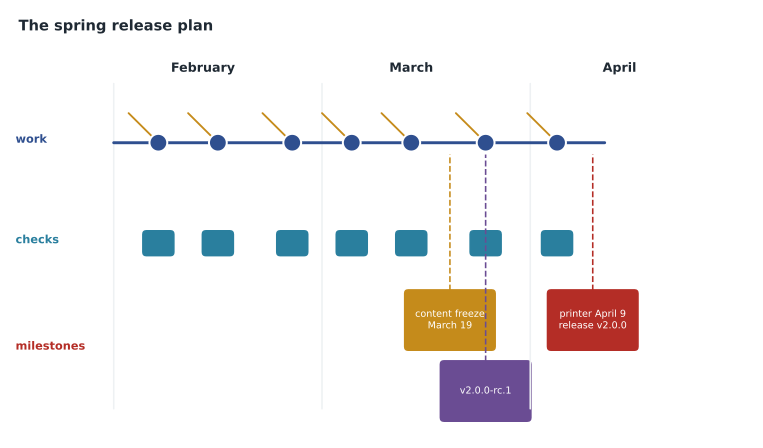
The last Git lunch of the course, on February 22, was a planning session rather than a lesson. Tidewater's two spring deliverables, the third edition of Coastal Day Hikes and TrailCheck 2.0, would both be finished in the repositories the team had set up over the winter, and Priya asked Owen to lead the session using everything the course had covered. The plan below is the one the team agreed on that day for the weeks to April. It brings together commits, branches, pull requests, issues, projects, forks, codespaces, Actions and Pages, and adds the last piece: releases.
Where the team started
Owen began by listing what already existed, so the plan would build on it rather than reinvent it.
| Item | Where it lives | Set up in |
|---|---|---|
| Guidebook text in Markdown | trail-notes (private) | Lessons 2 to 4 |
| README, CODEOWNERS, .gitignore, templates | Each repository | Lesson 5 |
| Review rules: pull request, one approval, editor code owners | Branch protection on main | Lesson 6 |
| 40 corrections with labels and a milestone | trail-notes Issues | Lesson 7 |
| Spring 2027 release project with iterations | tidewater-guides organization | Lesson 8 |
| Public trail-report format with outside contributors | trail-report-format (public, MIT) | Lesson 9 |
| Dev container for the website | trailcheck/.devcontainer | Lesson 10 |
| Check and publish workflows, Pages site | trailcheck/.github/workflows | Lesson 11 |
Step 1: one issue per piece of work
Every remaining task became an issue before anyone started it, so that the project would show the whole picture. Owen used the correction form for the remaining text fixes, and Priya created issues for the website work: the new search box, the redesigned closures page, trail status colors, and support for version 2 of the trail-report format, which Malik's contributions had shaped. Big items were split into sub-issues. Each issue got labels, an assignee, the right milestone, a Target date and an Iteration in the project. The auto-add workflow from lesson 8 meant every new correction joined the project automatically.
Step 2: a branch and a pull request per issue
Work followed GitHub flow from lesson 3. Each person created a short-lived branch for one issue, named after it, such as 58-closures-redesign, committed in small steps with clear messages, and opened a pull request early, as a draft if it was not ready. Pull request descriptions used Closes #58 so that merging would close the issue and the project workflow would move it to Done. Editors worked in github.dev or the web editor; the web team worked in codespaces from the dev container, so that Lena's environment matched Priya's exactly.
Step 3: review, checks and protection
Every pull request needed the checks from lesson 11 to pass and one approval, and changes to chapters needed an editor code owner. Safety-related text needed Grace herself, through the CODEOWNERS rule from lesson 5. Reviewers used suggested changes for small fixes and the Request changes outcome when something had to be fixed before merging. The team agreed to use squash and merge, so each pull request became one commit on main with its number in the message, which made the history of the release easy to read.
Worked problem
Checking a pull request against the rules
Pull request #61 changes chapters/ch05-tide-pools.md and site/closures.html. The spelling and link checks have passed. Priya has approved. Nobody from the editors has reviewed. Can it merge?
Show solution
- The checks pass and there is one approval, from Priya, which meets the one-approval rule.
- But the pull request changes a chapter, and CODEOWNERS makes the editors team the owner of /chapters/, with code owner review required by branch protection.
- Priya is on the web team, not the editors team, so her approval does not count as a code owner approval for the chapter.
- An editor must approve. If the chapter is a safety chapter, Grace must approve.
Answer: Not yet. It needs an approval from the editors team for the chapter file before branch protection allows the merge.
Step 4: tracking progress
Each Monday the Git lunch became a fifteen-minute stand-up around the project board. The team looked at the current iteration, moved anything blocked, and read the insights chart. Grace posted a status update on the project each Friday, marked on track or at risk, which the owners read instead of asking for reports. The 3rd edition milestone in trail-notes showed the corrections on their own.
The plan set a content freeze on Friday, March 19: after that date, only corrections labeled safety or approved by Grace could merge into the guidebook text, so that the proofs sent to the printer would match main.
Step 5: tags and releases
A tag is a name that permanently marks one commit, such as the commit that went to the printer. Unlike a branch, a tag does not move when new commits are made. Git has lightweight tags, which are just names, and annotated tags, which also store a message, the tagger and a date and are recommended for releases. Tags are created with git tag and must be pushed explicitly.
git switch main
git pull
git tag -a v2.0.0-rc.1 -m "Release candidate for TrailCheck 2.0"
git push origin v2.0.0-rc.1
A release on GitHub is built on a tag. It adds a title, release notes written in Markdown, optional files to download, such as the PDF proof of the guidebook, and a flag that can mark it as a pre-release. Releases appear on the repository page and can be watched, so people can be notified only about new releases. GitHub can generate release notes automatically, listing the pull requests merged since the previous release and thanking new contributors, which the maintainer then edits. Releases can also be created by a GitHub Actions workflow when a tag is pushed.
For version numbers the team adopted semantic versioning, a widely used scheme written MAJOR.MINOR.PATCH. The major number goes up for changes that break compatibility, such as version 2 of the trail-report format, which removed an old field. The minor number goes up for new features that keep compatibility, and the patch number for fixes. A suffix such as -rc.1 marks a release candidate. The guidebook used edition names instead, but each printed edition got an annotated tag such as coastal-day-hikes-3rd-edition, so the exact text sent to the printer could always be found.
| Version change | Meaning | TrailCheck example |
|---|---|---|
| 1.4.2 to 1.4.3 (patch) | Fixes only | Correct a broken closures link |
| 1.4.3 to 1.5.0 (minor) | New features, still compatible | Add the search box |
| 1.5.0 to 2.0.0 (major) | Breaking changes | Switch to version 2 of the trail-report format |
| 2.0.0-rc.1 | A release candidate before 2.0.0 | Published as a pre-release for testing |
Worked problem
Choosing the next version number
After TrailCheck 2.0.0 is released, three changes merge in May: a fix to the date format on report pages, a fix to a typo in the footer, and a new filter for dog-friendly trails that does not change anything existing. What version should the next release be?
Show solution
- The two fixes on their own would raise the patch number, giving 2.0.1.
- The dog-friendly filter is a new feature that keeps compatibility, which raises the minor number.
- When the minor number goes up, the patch number resets to 0.
- Nothing breaks compatibility, so the major number stays 2.
Answer: Version 2.1.0, because the release contains a compatible new feature as well as fixes.
Step 6: the release checklist
Owen wrote the release day checklist as a task list in a pinned issue, so that each box could be ticked by the person who did it and the issue would record when everything happened.
## Release checklist: TrailCheck 2.0.0
- [ ] All issues in the Spring 2027 milestone closed or moved
- [ ] Checks green on main
- [ ] Release candidate v2.0.0-rc.1 tested on phones and desktop
- [ ] Tag v2.0.0 created from main
- [ ] Release published with generated notes, edited
- [ ] Publish workflow finished; site checked at its address
- [ ] Trail-report format v2 release published in the public repository
- [ ] Announcement posted in Discussions
- [ ] Retrospective booked
Planning for things going wrong
Grace asked what would happen if a mistake was found after release, for example a wrong tide time on TrailCheck the day after 2.0.0 went live. The plan answered with a hotfix: a small branch from main, named for the issue, with one focused commit, an expedited review by Grace and one developer, and a patch release, 2.0.1, as soon as it merged. Because the publish workflow runs on every merge to main, the corrected site would be live within minutes, and the release notes for 2.0.1 would say exactly what changed and why. For the printed book, the team agreed that corrections found after the printer date would go into an errata page on TrailCheck, each one linked to its issue, and into the next printing.
| Risk | What the plan does about it |
|---|---|
| A wrong safety detail found after release | Hotfix branch, fast review by Grace, patch release |
| Too many changes just before the content freeze | Iterations and the insights chart show the load early |
| Reviews piling up | Status filter for In review; reviewers named in CODEOWNERS |
| A broken site after a merge | Required checks before merge; revert the pull request if needed |
| Someone leaving mid-project | All work in issues and pull requests, not in personal notes |
Worked problem
Planning a hotfix
TrailCheck 2.0.0 is live. A reader reports that the low-tide time for one beach is an hour off. The issue is number 77. Using the team's rules, what are the steps and what is the new version?
Show solution
- Label issue 77 safety and website, assign it, and create the branch 77-fix-low-tide-time from main.
- Commit the corrected time with a message that cites the tide table used as the source, and open a pull request with Closes #77.
- The checks run; Grace, as code owner for safety text, and one developer review and approve; the pull request is squash-merged and the publish workflow updates the site.
- A fix with no new features raises only the patch number, so the team tags and releases 2.0.1 with notes linking issue 77.
Answer: A short hotfix branch and pull request, reviewed by Grace, merged and published, then released as 2.0.1.
Step 7: after the release
The plan ended with a short retrospective, a meeting to ask what went well and what to change. Owen proposed three questions for it, using data from GitHub rather than memory: the project's historical chart, to see whether work arrived evenly or in a rush before the freeze; the pull request list, to see how long reviews took; and Insights on each repository, to see who contributed. Any improvements would become issues for the autumn guide, which would start from a copy of the project, saved as a template.
| GitHub feature | Used in the release for |
|---|---|
| Issues, labels, milestones | Every task and correction, organized by kind and edition |
| Projects | One plan across three repositories, with iterations and status updates |
| Branches and pull requests | Every change reviewed before reaching main |
| CODEOWNERS and branch protection | The right reviewers, enforced |
| Codespaces and github.dev | Identical environments and quick edits without setup |
| Actions and Pages | Automatic checks and publishing |
| Forks and Discussions | Outside contributions and community conversation |
| Tags and releases | Permanent markers and notes for each version |
Looking ahead to the exam
Owen's GH-900 exam is planned for March 2027. The exam, according to Microsoft's study guide updated in early 2026, has seven areas: Git and GitHub basics (25 to 30 parts in 100), working with repositories (10 to 15), collaboration (10 to 15), modern development practices (10 to 15), project management (5 to 10), privacy, security and administration (10 to 15), and the GitHub community (5 to 10). It is a proctored exam of 100 minutes, scheduled through Pearson VUE, with a passing score of 700, and as a fundamentals-level exam it does not need renewing. This course covered most of the basics, repositories, collaboration, modern development and project management areas. MSBA-161 covers the security, administration and community areas in depth, and MSBA-169 reviews all seven with practice questions. Prices vary by country, so candidates should check the exam page when they schedule.
| GH-900 area | Weight (parts in 100) | Covered in |
|---|---|---|
| Git and GitHub basics | 25 to 30 | MSBA-160 lessons 1 to 4 |
| Work with GitHub repositories | 10 to 15 | MSBA-160 lessons 4 and 5 |
| Collaborate using GitHub | 10 to 15 | MSBA-160 lessons 6, 7 and 11 |
| Apply modern development practices | 10 to 15 | MSBA-160 lessons 10 and 11 |
| Manage projects with GitHub | 5 to 10 | MSBA-160 lessons 7 and 8 |
| Understand privacy, security and administration | 10 to 15 | MSBA-160 lesson 4; MSBA-161 |
| Explore the GitHub community | 5 to 10 | MSBA-160 lesson 9; MSBA-161 |
Common mistakes
MistakeThinking a tag moves forward like a branch.
InsteadA tag permanently marks one commit.
MistakeForgetting to push tags.
Insteadgit push does not send tags by default; push them by name or with --tags.
MistakeRaising the major version for a new compatible feature.
InsteadCompatible features raise the minor number; only breaking changes raise the major.
MistakeStarting release work without issues.
InsteadCreate an issue per task so the project shows the whole plan.
Summary and key terms
- A team release combines issues, branches, pull requests, review rules, projects, automation and releases.
- Each task is an issue; each change is a branch and a pull request that closes its issue on merge.
- Branch protection and CODEOWNERS make sure the right people approve; checks must pass.
- Annotated tags permanently mark commits; GitHub releases add notes, files and pre-release flags on top of tags.
- Semantic versioning uses MAJOR.MINOR.PATCH for breaking changes, compatible features and fixes.
- Retrospectives use project charts, pull request history and Insights to improve the next release.
- Tag
- A name that permanently marks one commit.
- Annotated tag
- A tag that also stores a message, tagger and date.
- Release
- A GitHub page built on a tag, with notes and optional files.
- Pre-release
- A release marked as not yet final, such as a release candidate.
- Semantic versioning
- A MAJOR.MINOR.PATCH numbering scheme based on the kind of change.
- Content freeze
- A date after which only approved changes may merge.
- Retrospective
- A meeting after a release to review what went well and what to change.
Practice problems
Work each problem on paper first, then reveal the answer to check.
What is the difference between a tag and a branch?
Show answer
A branch moves forward with new commits; a tag stays on one commit.
Which version follows 3.2.5 if the release adds only bug fixes?
Show answer
3.2.6.
What can GitHub generate automatically when you create a release?
Show answer
Release notes listing merged pull requests and new contributors since the previous release.
Lesson quiz · 5 questions
Score 60% or more to complete this lesson.
Create a free account to save your progress, take quizzes and earn a certificate.