
MSBA-160 · Lesson 7 of 12 · 21 min
Issues, discussions and labels
▶ Video coming soon A video version of this lesson is on the way.
Before GitHub, reader corrections at Tidewater arrived by email, phone and handwritten notes tucked into returned books, and they were tracked in a spreadsheet that only Grace understood. At the seventh session, on January 18, Owen brought a printout of it: 63 open items, some from 2024, many duplicates, and no way to tell which had been fixed. "This is what issues are for," Priya said. The goal for the hour was to move the corrections into GitHub Issues, organize them with labels and milestones, and set up GitHub Discussions for the questions and ideas that are not really tasks.
What an issue is
An issue is a single item of work or conversation tracked in a repository: a bug report, a correction, a task, a feature request or a question. Each issue has a number, unique within the repository and shared with pull requests, so issue 31 and pull request 34 cannot have the same number. It has a title, a description written in Markdown, a comment thread, and a set of fields: assignees, labels, a milestone, project fields, and links to related pull requests and other issues. Issues are open or closed, and a closed issue can record a reason, either completed or not planned.
Anyone with read access to a repository can open an issue, which for a public repository means anyone with a GitHub account. Issues can be created from the Issues tab, from a line of code or a comment, from a project board, from GitHub Mobile, and with the gh command-line tool. Repository settings can turn issues off entirely for repositories that do not need them.
| Issue field | What it is for | Example in trail-notes |
|---|---|---|
| Title | A short summary of the problem or task | Wrong parking location at Herring Cove |
| Description | Details, steps, screenshots, sources | Reader email with photos of the new lot |
| Assignees | Who is working on it | @owen-tremblay |
| Labels | Categories for filtering | correction, chapter-7 |
| Milestone | The release or deadline it belongs to | Coastal Day Hikes 3rd edition |
| Type | The kind of item, if the organization defines issue types | Bug |
| Development | Linked branches and pull requests | Pull request #34 |
Writing a useful issue
A good issue lets someone else act on it without asking questions. For a correction, that means saying where the problem is, what is wrong, what it should say and the source. For a website bug, it means the steps to reproduce it, what you expected, what happened instead and the browser used. Owen rewrote the spreadsheet items into that pattern as he moved them, closing 14 duplicates and 9 that had already been fixed in the printed second edition.
Repositories can provide issue templates and issue forms in the .github/ISSUE_TEMPLATE folder. A template pre-fills the description with headings; a form shows structured fields, such as drop-down menus and required text boxes, so reports arrive complete. Priya made three for trail-notes: a correction form asking for the chapter, page, current text, correct text and source; a new-trail suggestion form; and a blank issue for anything else. A configuration file in the same folder can also point people elsewhere, for example to Discussions for questions.
name: Correction
description: Report an error in a guidebook
labels: ["correction"]
body:
  - type: input
    id: chapter
    attributes:
      label: Chapter and page
    validations:
      required: true
  - type: textarea
    id: correct
    attributes:
      label: What should it say, and what is your source?
Labels
Labels are colored tags that categorize issues and pull requests. Every new repository comes with a default set: bug, documentation, duplicate, enhancement, good first issue, help wanted, invalid, question and wontfix. Maintainers can rename these, change their colors, delete them and add their own. Labels are most useful when there are few enough of them that everyone uses them consistently. Labels also power filters: clicking a label on the Issues tab lists every issue with it.
Two default labels matter for open source. good first issue marks tasks suitable for newcomers, and GitHub highlights repositories with such issues to people looking for a first contribution. help wanted marks issues where maintainers would welcome outside help. Malik labeled four small tasks in the public trail-report repository as good first issue the same afternoon.
| Label | Meaning at Tidewater |
|---|---|
| correction | A factual error in published text |
| chapter-1 to chapter-12 | Which chapter the issue concerns |
| website | A problem with TrailCheck rather than the books |
| safety | Anything about tides, cliffs, closures or warnings; reviewed first |
| good first issue | Small and well described, suitable for a new contributor |
| duplicate | Already reported elsewhere; closed with a link |
Milestones and assignees
A milestone groups issues and pull requests that belong to a release or a deadline, and shows a progress bar of how many are closed. Each issue can be in one milestone. Owen created a milestone called Coastal Day Hikes 3rd edition with a due date in March 2027 and put every correction for that book in it; on the first day it showed 6 of 40 closed. An assignee is a person responsible for the issue, and an issue can have several. Assigning yourself is a simple way to tell others you have started work, so two people do not fix the same thing.
Worked problem
Reading a milestone
The milestone for the 3rd edition contains 40 items. By the end of January, 22 are closed and 18 are open. Of the open ones, 5 carry the safety label. What does the progress bar show, and what should the editors work on first?
Show solution
- The progress is closed items divided by all items: 22 divided by 40 is 0.55, so the bar is a little over half full.
- 18 items are still open, so 18 are left.
- The safety label marks items that affect reader safety, which Tidewater reviews first.
- Filtering the milestone with label:safety and is:open lists exactly those 5 items.
Answer: The bar shows 22 of 40 closed, a little over half. The editors should start with the 5 open safety items.
Linking issues and pull requests
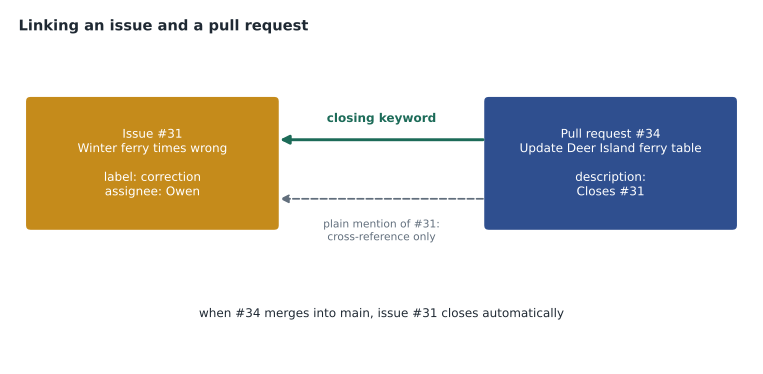
Issues and pull requests are most useful when they are linked, so that an issue shows the work that fixed it and a pull request shows why it exists. There are three common ways. A closing keyword in a pull request description, such as Closes #31, links the issue and closes it when the pull request merges into the default branch; the keywords are close, closes, closed, fix, fixes, fixed, resolve, resolves and resolved. The Development section in an issue's sidebar can link an existing pull request or branch, or create a new branch for the issue directly. And simply mentioning #31 in any comment creates a cross-reference that appears in the issue's timeline, without closing anything.
Large pieces of work can be broken down with sub-issues, child issues listed under a parent with their own progress count, and with task lists in the description. Issues can also record relationships such as blocked by another issue. Owen made the chapter 4 rewrite a parent issue with six sub-issues, one per section.
Finding issues: search and filters
The Issues tab has a search box that understands qualifiers. is:open or is:closed filters by state; label:correction filters by label; assignee:owen-tremblay or assignee:@me shows one person's work; milestone:"Coastal Day Hikes 3rd edition" shows a milestone; no:assignee finds work nobody has picked up; and words without qualifiers search titles and descriptions. Qualifiers combine, and a minus sign excludes, as in -label:duplicate. Common searches can be kept with saved views, and maintainers can store saved replies, reusable comment texts for answers they give often, such as thanking a reader and explaining when the next edition is due.
| Search | Finds |
|---|---|
| is:issue is:open label:safety | Open issues with the safety label |
| is:open no:assignee | Open items nobody has taken |
| assignee:@me is:open | Your own open work |
| is:closed reason:"not planned" | Issues closed as not planned |
| ferry -label:duplicate | Items mentioning ferry, excluding duplicates |
Notifications and subscriptions
You are subscribed to an issue when you open it, comment on it, are assigned to it or are mentioned in it, and you then receive notifications about new activity. You can unsubscribe from any issue, or subscribe to one you are just interested in. Repository watch settings decide what you hear about by default. Notifications can arrive in the web inbox, by email and on GitHub Mobile, and each can be configured separately in your account settings.
Keeping the issue list healthy
An issue list only helps if people trust it, so Priya showed the maintenance tools the team would use each week. Pinning keeps up to three important issues at the top of the Issues tab; the team pinned a short note explaining how to report a correction. Locking a conversation stops further comments when a thread has turned unproductive or the matter is settled, while keeping it readable. Transferring moves an issue to another repository in the same organization, with its comments, which was useful when a reader reported a website problem in trail-notes and it belonged in trailcheck. Closing an issue as not planned records that the team decided not to act, which is more honest than leaving it open forever, and marking an issue as a duplicate links it to the original so the conversation continues in one place.
Organizations can also define issue types, such as Bug, Task and Feature, that apply across all their repositories, so a report looks the same wherever it is filed. Owen set a fortnightly reminder to triage new items: read each one, apply labels and a type, add it to a milestone or close it with a reason, and assign anything urgent. By the end of January the 63-line spreadsheet had become 40 well-described issues, and nobody needed the spreadsheet again.
| Action | When to use it |
|---|---|
| Pin | An issue everyone should see first |
| Lock conversation | A settled or unproductive thread |
| Transfer | The issue belongs in another repository of the organization |
| Close as not planned | The team has decided not to act |
| Mark as duplicate | The same problem is already tracked elsewhere |
GitHub Discussions
Not everything is a task. Readers asked questions such as whether a trail was suitable for a dog, and volunteers suggested ideas that needed talking through before anyone decided to do them. Putting those in Issues clutters the work list. GitHub Discussions is a separate forum for a repository or organization, turned on in the settings, for conversations that are not units of work.
Discussions are organized into categories, such as Announcements, General, Ideas, Polls, Q&A and Show and tell, and maintainers can create their own. In a Q&A category, the person who asked can mark one reply as the answer, which then appears at the top. Discussions support threaded replies, reactions, polls, pinning important posts and labels. A discussion can be turned into an issue when it produces a concrete task, and an issue can be turned into a discussion when it turns out to be a question.
| Use Issues for | Use Discussions for |
|---|---|
| A specific correction or bug | Questions with many possible answers |
| A task with someone responsible | Ideas that need discussion before a decision |
| Work tracked in a milestone or project | Announcements and community news |
| Something that will be closed when done | Open-ended conversation and polls |
Worked problem
Issue or discussion?
Three messages arrive for the TrailCheck repository: a reader says the closures page shows a trail as open that the park closed yesterday; a volunteer suggests adding paddling routes to the site; and someone asks which hiking boots the guidebook authors use. Where should each go?
Show solution
- The wrong closure status is a specific, urgent problem with a clear fix, so it is an issue, labeled website and safety.
- Adding paddling routes is an idea that needs discussion about scope and effort before anyone commits to it, so it starts in Discussions under Ideas.
- The boot question is general conversation, not about the repository's work, so it belongs in Discussions under General or Q&A.
- If the paddling idea is approved, a maintainer converts it, or creates linked issues for the work.
Answer: One issue (the closure status) and two discussions (the paddling idea and the boots question).
Common mistakes
MistakeOpening an issue for every question and idea.
InsteadUse Issues for work and Discussions for questions, ideas and announcements.
MistakeCreating dozens of labels that nobody applies consistently.
InsteadKeep a short, agreed set of labels so filters stay reliable.
MistakeExpecting a plain #31 mention to close the issue.
InsteadOnly a closing keyword in a merged pull request, or closing by hand, closes it.
MistakeLeaving issues unassigned while several people work on them.
InsteadAssign yourself when you start so others know.
Summary and key terms
- Issues track bugs, corrections, tasks and requests, each with a number, description, comments and fields.
- Issue templates and forms collect complete reports; saved replies speed up common answers.
- Labels categorize work; milestones group work for a release and show progress; assignees show who is responsible.
- Closing keywords, the Development sidebar and mentions link issues to pull requests; sub-issues break work down.
- Search qualifiers such as is:open, label: and assignee:@me filter issues quickly.
- GitHub Discussions holds questions, ideas, polls and announcements in categories, with marked answers in Q&A.
- Issue
- A tracked item of work or conversation in a repository.
- Issue form
- A structured template with fields that people fill in when opening an issue.
- Label
- A colored tag that categorizes issues and pull requests.
- Milestone
- A group of issues and pull requests for a release or deadline, with progress.
- Sub-issue
- A child issue linked under a parent issue.
- Saved reply
- A stored comment text you can reuse.
- GitHub Discussions
- A forum for questions, ideas and announcements attached to a repository or organization.
Practice problems
Work each problem on paper first, then reveal the answer to check.
Which default label helps newcomers find suitable tasks?
Show answer
good first issue.
What search finds open issues that nobody is assigned to?
Show answer
is:open no:assignee.
In which Discussions category can a reply be marked as the answer?
Show answer
A Q&A category.
Lesson quiz · 5 questions
Score 60% or more to complete this lesson.
Create a free account to save your progress, take quizzes and earn a certificate.