
MSBA-141 · Lesson 9 of 12 · 18 min
Lifecycle and the Power Platform admin center
▶ Video coming soon A video version of this lesson is on the way.
By the ninth session, the sandbox had become crowded. Annelise's configuration, the key users' testing, Desmond's first experiments with code and a data migration rehearsal were all happening in the same environment, and on Tuesday a test import of 2,400 vendors had collided with Piotr's procurement testing. Kiri called the session to settle a question every implementation must answer: how many environments do we need, where are they managed, and how do code and data move between them?
Environments
An environment is a complete, separate instance of finance and operations apps with its own application, its own operations database and its own Dataverse database. What happens in one environment does not affect another. Every customer has one production environment, where the business runs, and one or more sandbox environments for configuration, testing, training and data migration rehearsals. Developers also need developer environments, where they write and debug code. Microsoft operates all of these as cloud services; the customer decides how many to create within its capacity and what each is for.
From Lifecycle Services to the Power Platform admin center
For most of the product's history, finance and operations environments were deployed and managed in Microsoft Dynamics Lifecycle Services, usually called LCS, a separate portal that held each customer's implementation project, environments, code packages, asset library, support requests and tools. Microsoft has been moving these responsibilities to the Power Platform admin center, the same portal that manages Dataverse environments for Power Apps and other Dynamics 365 apps. In this unified experience, a finance and operations environment is created as part of a Power Platform environment with a Dataverse database, and managed with the same lifecycle operations as the rest of the Power Platform.
There are two ways to get finance and operations apps in the unified model. An administrator can create a new environment from a template, enabling Dynamics 365 apps and choosing, for example, the Finance or Supply Chain Management template, which deploys the latest version. Or they can install the Dynamics 365 Finance and Operations Provisioning App on an existing environment that supports Dynamics 365 apps, choosing a supported version. Either way, the environment then has two addresses: an environment URL for model-driven and customer engagement apps and a finance and operations URL for the apps covered in this course.
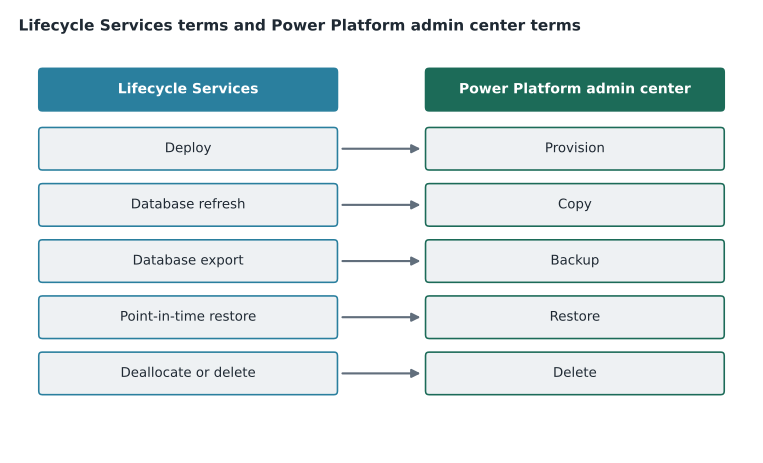
The vocabulary changes with the portal. What LCS called deploying an environment, the Power Platform admin center calls provisioning. A database refresh in LCS, which copied data from one environment to another, becomes a copy, and in the unified model a copy brings code with the data. A database export becomes a backup, kept in the cloud rather than downloaded as a file. Point-in-time restore becomes restore. Unified environments add operations LCS did not have, such as reset and convert to production for suitable sandboxes.
| Task | Lifecycle Services | Power Platform admin center |
|---|---|---|
| Create an environment | Deploy | Provision from a template or with the provisioning app |
| Bring production data to a sandbox | Database refresh | Copy (with code) |
| Keep a recoverable copy | Database export | Backup |
| Return to an earlier state | Point-in-time restore | Restore |
| Remove an environment | Deallocate or delete | Delete |
| Open a support request | LCS support | Help and support in the admin center |
Not everything moved one for one. Microsoft documents alternatives for capabilities that remain outside the admin center: project methodology and implementation project settings in the Dynamics Implementation portal or Azure DevOps, organization users in the Microsoft 365 admin center, business process modeling in the business process catalog, build environments through Microsoft-hosted agents in Azure DevOps, and translation through a Dynamics translation connector. Support requests are moving from LCS to Help and support in the Power Platform admin center in stages, with banners, then redirects, then removal of the LCS page. Customers with older LCS-managed environments still use LCS for those, and Microsoft provides a tutorial for copying an LCS environment into a unified one. Because this transition continues release by release, administrators should follow the current Microsoft Learn guidance rather than any fixed list.
Capacity instead of slots
The commercial model changed too. Under LCS, a subscription included a fixed number of sandbox and production slots, such as one tier-2 sandbox. The unified model uses capacity: storage in gigabytes for the Dataverse and operations databases, and compute measured in Power Platform requests. Licenses add entitlements, and add-on capacity can be bought. There is no strict limit on the number of environments, but each needs at least some free capacity in both database types to be provisioned. A sandbox that is no longer needed is deleted or reset to free capacity, and a transaction-less copy, which copies configuration and master data without transactions, keeps sandbox storage small.
Worked problem
Checking capacity before provisioning
Cobalt Ridge has 12 GB of operations database capacity and has used 10.4 GB across production and two sandboxes. A new sandbox copied from production would need about 3.1 GB, or about 0.9 GB as a transaction-less copy. Which can be provisioned without buying capacity?
Show solution
- Free operations capacity: 12 - 10.4 = 1.6 GB.
- A full copy needs 3.1 GB, which exceeds 1.6 GB.
- A transaction-less copy needs 0.9 GB, which fits, leaving 0.7 GB.
Answer: Only the transaction-less copy fits. A full copy would need more capacity or the deletion of an existing sandbox.
Unified environment types
Microsoft names three unified environment types. A unified production environment runs the business. A unified sandbox environment is a full non-production copy for testing, training and rehearsals, which can be converted to production when a project goes live. A unified developer environment is where a developer deploys and debugs code. The old all-in-one developer virtual machines from LCS, which ran the whole application on one Azure machine, are retired; developers now install the Power Platform tools and the X++ tools in Visual Studio on their own workstation, build solutions there and deploy to a developer or sandbox environment provisioned in the admin center. Developers can request credentials to the product database in developer environments for debugging.
How code moves
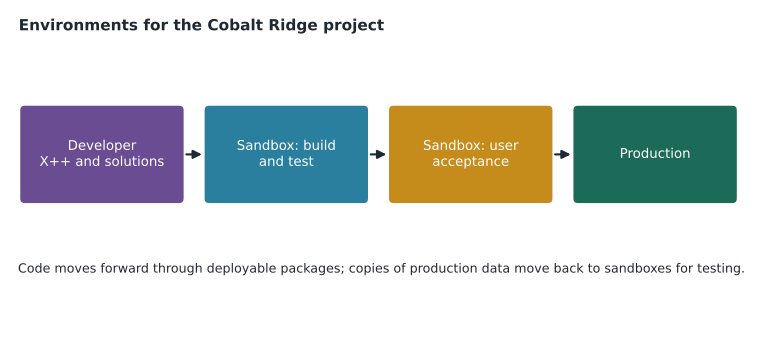
Code moves forward through environments in a controlled way. Desmond writes extensions in a developer environment and checks them into source control in Azure DevOps. A build pipeline compiles them into a deployable package, which is applied first to a test sandbox, then to the user acceptance sandbox, and finally to production at a scheduled time. In the unified model, code and Power Platform components are packaged together in solutions that can include finance and operations artifacts, so one release can contain X++ extensions, a Power Apps app and a Power Automate flow. Production is never changed by hand: if it is not in a package that passed testing, it does not go in.
How data moves
Data moves the other way. Production data is copied to sandboxes so that testing and training reflect reality, and so that a problem in production can be reproduced safely. A copy overwrites the target, so the team agrees a schedule: the user acceptance sandbox might be refreshed from production every month after go-live, never during a test cycle. Copies of production contain real customer, vendor and employee information, so access to sandboxes must be controlled as carefully as production, and some companies scramble sensitive fields after each copy. Configuration that should exist only in a sandbox, such as test email addresses and disabled integrations, is reapplied after each copy with a short checklist so that a test environment never sends real payment files or emails real customers.
Service updates
Microsoft updates every environment under One Version. Each environment has an update policy in the admin center that governs when service updates are applied, and customers can pause updates within the allowed limits. Microsoft also applies proactive quality updates, small packages of fixes, on a published schedule that is the same for unified and LCS-managed environments. Good practice is to let updates land on a sandbox first, run a regression test of the key processes, then allow them on production. Cobalt Ridge planned automated regression tests later, using task recordings as a starting point.
Monitoring and support
Administrators monitor environment health in the admin center and in the application. Inside finance and operations apps, pages such as batch job history, workflow monitoring, data management job history and the system diagnostics show what is happening. The admin center shows environment operations, capacity and service health, and it is where support requests are raised. When a problem might be Microsoft's, an administrator opens a support request with the environment and steps to reproduce, ideally with a task recording.
Administrator roles across the portals
The move to the Power Platform admin center also changed who can do what. Managing environments there depends on Microsoft Entra ID administrator roles such as Power Platform administrator and Dynamics 365 administrator, or on being an environment administrator for a specific environment. These are separate from the security roles inside finance and operations apps covered in lesson 5. Someone can be a Power Platform administrator who can copy and delete environments yet have no role at all inside the finance application, and a finance System administrator does not automatically control environments. Support requests need a suitable admin role too; Microsoft's guidance names roles such as Service Support Administrator and Helpdesk Administrator for access to Help and support. Cobalt Ridge decided that its IT administrator would hold the Power Platform administrator role, Desmond would be environment administrator for the developer and sandbox environments, and nobody would hold tenant-wide roles for convenience.
Dataverse alongside the operations database
Every unified environment includes Dataverse, and that opens two ways to share data between finance and operations apps and the rest of the Power Platform. Virtual tables make finance and operations data entities appear as tables in Dataverse without copying the data; a Power App can read and update customers or released products directly, and the application's business logic runs on each change. Dual-write copies data in near real time in both directions between finance and operations tables and Dataverse tables, which suits scenarios where Dynamics 365 Sales and Finance must share customers, products and orders. Dual-write is configured with table maps in the admin experience and needs careful planning of which side owns each record. Cobalt Ridge had no customer engagement apps yet, so it would start with virtual tables for a small Power App that Piotr's team wanted for receiving at the Denver warehouse.
Feature management per environment
Each environment has its own Feature management settings, which means that a feature turned on in the CONFIG sandbox is not automatically on in production. The configuration log recorded every feature enabled and why, and the go-live checklist included enabling the same list in production before data was loaded, because some features change data structures or behavior and must be turned on before transactions exist.
The Cobalt Ridge environment plan
At the end of the session Kiri wrote down the plan. One unified developer environment for Desmond. One sandbox for configuration and functional testing, called CONFIG. One sandbox for user acceptance testing, data migration rehearsals and training, called UAT. Production, provisioned three weeks before go-live from the UAT sandbox after the final rehearsal. Every environment owned by a named person who decided when it could be copied, reset or updated. The collision of vendor imports and procurement testing would not happen again, because migration rehearsals moved to UAT and functional testing stayed in CONFIG.
Thandeka asked what would happen if production failed on the morning of a payment run. Annelise explained that Microsoft is responsible for the availability of the service and keeps backups that support restore to an earlier point, while Cobalt Ridge is responsible for knowing its own recovery steps: who raises the support request, who decides whether to restore, how to reconcile transactions entered after the restore point, and how to tell the bank and suppliers. Kiri added a one-page incident procedure to the operations handbook, with names and phone numbers, and the team walked through it once in the UAT sandbox so that nobody would be reading it for the first time during a real outage.
Common mistakes
MistakeChanging production directly to fix an urgent problem.
InsteadFix and test in a sandbox, then deploy through a package or completed configuration.
MistakeCopying production to a sandbox in the middle of a test cycle.
InsteadAgree a copy schedule; a copy overwrites the target environment.
MistakeForgetting that sandbox copies contain real data.
InsteadControl sandbox access and disable or redirect integrations and email after each copy.
MistakeLooking for the all-in-one developer virtual machine.
InsteadUse unified developer environments with Visual Studio tools on a workstation.
Summary and key terms
- Environments are separate instances: production, sandboxes and developer environments.
- Microsoft is moving finance and operations environment management from Lifecycle Services to the Power Platform admin center.
- Unified environments include Dataverse and are provisioned from templates or with the provisioning app; operations are provision, copy, backup, restore, reset and delete.
- The unified model uses storage and compute capacity rather than fixed environment slots.
- Code moves forward in deployable packages; production data is copied back to sandboxes on a schedule; updates are tested in sandboxes first.
- Environment
- A separate instance of the apps with its own application and databases.
- Lifecycle Services (LCS)
- The portal historically used to deploy and manage finance and operations environments and projects.
- Unified environment
- A Power Platform environment with Dataverse that runs finance and operations apps.
- Deployable package
- A compiled set of code changes applied to environments in order.
- Transaction-less copy
- A copy of an environment that includes configuration and master data but not transactions.
Practice problems
Work each problem on paper first, then reveal the answer to check.
What is a database refresh called in the Power Platform admin center?
Show answer
A copy, which in the unified model includes code with the data.
Why are production copies to sandboxes sensitive?
Show answer
They contain real customer, vendor and employee data, and integrations or emails could reach real parties.
What replaced the LCS all-in-one developer virtual machines?
Show answer
Unified developer environments, with Visual Studio tools installed on a developer workstation.
Lesson quiz · 5 questions
Score 60% or more to complete this lesson.
Create a free account to save your progress, take quizzes and earn a certificate.