
MSBA-141 · Lesson 10 of 12 · 20 min
Copilot in finance and operations
▶ Video coming soon A video version of this lesson is on the way.
Talk of artificial intelligence had reached Cobalt Ridge's boardroom long before the project began, and the chief executive had asked Kiri a direct question: what would Copilot actually do for the finance and supply chain teams? Kiri passed the question to Annelise, who spent the tenth session showing what Copilot can do in finance and operations apps in late 2026, what it needs to work, and where a person must stay in charge. Thandeka arrived skeptical. Piotr arrived hopeful. Both left with a list of things to try.
Three ways Copilot appears
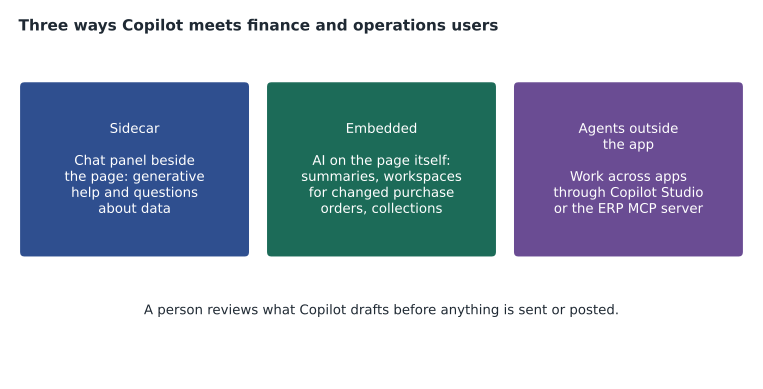
Microsoft describes three kinds of Copilot experience in finance and operations apps. The sidecar is a chat panel that opens beside the page a user is working on. It is the primary Copilot interface: users ask questions in natural language and receive answers, guidance and links. Embedded experiences put AI directly into pages and workspaces, such as summaries on a customer page or a workspace that highlights purchase orders whose confirmed details changed. Agents outside the app work across applications, for example in Microsoft 365 Copilot or Teams, and reach finance and operations data through connectors and tools built with Copilot Studio or through the Dynamics 365 ERP Model Context Protocol server, which lets agents call finance and operations actions in a controlled way.
Capabilities available across the apps
Some capabilities are available in all finance and operations apps. Generative help and guidance in the sidecar answers how-to questions using Microsoft's documentation, and makers can add company knowledge through Copilot Studio, so a clerk can ask how to reverse a posted vendor invoice and get steps with links. Workflow history summary turns a long approval history into a short explanation of who did what and why the document came back, which lesson 6 mentioned. Chat with finance and operations data lets users ask questions about records they have access to, such as the open balance of a vendor or orders due this week. Enhanced user feedback lets users rate responses with a thumbs-up or thumbs-down, which helps administrators judge quality. Some newer experiences, such as an immersive Home page and building agents with the ERP Model Context Protocol server, were in production-ready preview in late 2026; preview features may change and should be tested before wide use.
Capabilities in Finance
For Thandeka's team the most practical features were in collections and reconciliation. The collections coordinator summary gives a collections agent an AI-written summary of a customer's payment history and open items, and can draft a reminder letter with AI-generated text that the agent edits before sending. A customer page summary condenses key facts about a customer. Agent management and the Account Reconciliation Agent, in production-ready preview, aim to flag differences between subledgers and the general ledger and help resolve them during the close. Thandeka marked the reconciliation agent for a pilot after go-live, when there would be real data to reconcile.
Capabilities in Supply Chain Management
Piotr's list included AI summaries on supply chain pages, help with demand plan analysis, workload insights for warehouses, and the Supplier Communications Agent, in production-ready preview, which can automate follow-ups with vendors and handle purchase order updates and change requests according to rules the company defines. The embedded confirmed purchase orders with changes experience highlights orders where a vendor's confirmation changed a quantity, price or date, so buyers can review the changes rather than discovering them at receipt. Piotr's buyers spent hours each week comparing confirmations with orders; this was the feature he most wanted.
| Area | Capability | Type |
|---|---|---|
| All apps | Generative help and guidance | Sidecar |
| All apps | Workflow history summary | Embedded |
| All apps | Chat with finance and operations data | Sidecar |
| Finance | Collections coordinator summary and reminder drafts | Embedded |
| Finance | Account Reconciliation Agent (preview) | Agent |
| Supply Chain Management | Confirmed purchase orders with changes | Embedded |
| Supply Chain Management | Supplier Communications Agent (preview) | Agent |
Microsoft adds and changes Copilot features frequently, and Commerce and Project Operations have their own sets. The overview of Copilot capabilities on Microsoft Learn is the authoritative current list, and the release plans show what is coming.
What Copilot needs
Copilot features depend on the Dataverse side of the environment, which is one reason Microsoft has brought finance and operations apps into the Power Platform. Microsoft's enablement guidance lists the prerequisites. The environment must have Power Platform integration, which unified environments include by design and LCS-managed environments enable in Lifecycle Services; Copilot and agents are not supported in developer environments deployed through LCS. Specific Dynamics 365 apps must be installed in the Power Platform environment: Copilot for finance and operations apps for generative help and the sidecar, and Copilot in Dynamics 365 Finance or in Supply Chain Management for the summaries in those apps. Administrators check and install them in the Power Platform admin center under the environment's Dynamics 365 apps.
Two tenant-level settings matter. The Publish bots with AI features setting in the Power Platform admin center, enabled by default, must stay enabled for the sidecar's generative features. And depending on where the environment is hosted, administrators may need to allow data movement across regions for Copilot and generative AI features, if the AI services are not available in the environment's own region; generative answers in the sidecar also rely on Bing Search. If either is disabled, users either cannot open the sidecar or receive no answers. Individual features may also need to be turned on in Feature management or configured on their own setup pages, as with the collections coordinator summary.
Worked problem
Why the sidecar is empty
After go-live, a clerk in CRUS opens the Copilot sidecar and gets no answers. Generative help worked in the UAT sandbox. What should the administrator check?
Show solution
- Confirm in the Power Platform admin center that the Copilot for finance and operations apps Dynamics 365 app is installed in the production environment.
- Check that the Publish bots with AI features tenant setting is enabled.
- Check whether production is in a region that requires cross-region data movement for generative AI, and whether that is allowed.
- Confirm Bing Search is not disabled for the tenant, since sidecar generative answers rely on it.
- Compare with the UAT environment's settings to find the difference.
Answer: Usually a missing Copilot app in production or a tenant or region setting. Environment-level apps and settings do not copy automatically.
Extending Copilot
Copilot in finance and operations apps can be extended. Makers and developers use Copilot Studio to add topics, actions and knowledge to the sidecar, for example a topic that explains Cobalt Ridge's own expense policy or an action that creates a purchase requisition from a chat. Agents built in Copilot Studio can call finance and operations data and actions through connectors, and the ERP Model Context Protocol server provides a standard way for agents to discover and use those actions. Extensions run with the signed-in user's permissions, so security roles from lesson 5 still decide what Copilot can see and do on a user's behalf.
Responsible use
Annelise spent the second half of the session on responsible use, because Thandeka's skepticism was well founded. Copilot generates text and suggestions from patterns; it can be wrong, incomplete or confidently mistaken. Microsoft's design keeps a person in the loop: Copilot drafts, summarizes and suggests, and a user reviews and decides before anything is sent, posted or changed. A reminder letter is a draft until the collections agent sends it. A summary of a workflow history is a reading aid, not the record; the history itself remains the evidence.
Data access follows the user. Copilot works with the data the signed-in user is allowed to see, so a buyer cannot use chat to read payroll. That makes good security more important, not less: a user with excessive roles has an assistant that can surface everything those roles allow. Copilot interactions in Dynamics 365 are covered by Microsoft's enterprise data commitments, under which customer data is not used to train the foundation models, and administrators can review the data movement and feedback settings that apply to the tenant.
Worked problem
Deciding what to pilot
Kiri asks for a recommendation of two Copilot features to pilot in the first three months after go-live. The finance team's pain point is collections workload; the supply chain team's is checking vendor confirmations. Which features fit, and how should success be measured?
Show solution
- Finance: the collections coordinator summary and reminder drafts, measured by time per customer review and the share of drafts sent with only minor edits.
- Supply chain: confirmed purchase orders with changes, measured by changes caught before receipt and buyer hours spent on confirmations.
- Both: collect thumbs-up and thumbs-down feedback and review a sample of outputs each month for accuracy.
- Agents in preview wait until the core processes are stable.
Answer: Pilot the two embedded features that address known pain points, with clear measures and human review, and defer preview agents.
Asking good questions
Copilot answers better when it is asked better. Annelise gave the team a few habits for the sidecar. Be specific about the record and the period: ask for open invoices for vendor Lakehead Forge in CRCA due this month, not for unpaid bills. Say what you want back: a list, a total, steps, or a short explanation. Ask one thing at a time, and follow up rather than packing three questions into one. When Copilot gives steps for a process, check that they match the company's own configuration, because generative help draws on general documentation and does not know, for example, that Cobalt Ridge requires workflow approval on vendor invoices. And when an answer matters, open the records it refers to; Copilot is a fast way to find them, not a replacement for looking.
Piotr tried this in the sandbox with his buyers. Asking which purchase orders for the Akron plant had confirmations with later delivery dates than ordered produced a useful list; asking what was wrong with purchasing produced a polite but unhelpful paragraph. The lesson stuck.
Governing Copilot
Copilot needs an owner like any other capability. At Cobalt Ridge, Kiri assigned it to the IT administrator, with Thandeka and Piotr as business owners for their areas. Their checklist covered which features were enabled in which environment and why, which preview features were allowed and for whom, the tenant settings for data movement and AI features, a monthly look at feedback ratings and samples of output, user guidance on what Copilot is good and bad at, and a route for users to report a wrong or inappropriate answer. Microsoft's release plans were added to the reading list for each service update, because new Copilot features often arrive in the same releases as the updates the team would already be testing.
Training was part of governance too. Every user who would see Copilot got a short session covering what it can do, the rule that drafts are reviewed before use, and the reminder that it acts with their own permissions.
Copilot and the exams
The finance and operations exams include Copilot features relevant to each role, such as knowing which capabilities exist in Finance or Supply Chain Management and what is needed to enable them. Because this is the fastest-changing area of the product, the current exam study guide and the Copilot overview on Microsoft Learn are the sources to trust before an exam.
Desmond added a developer's note to the discussion. Because agents and Copilot Studio actions can create and change records, they deserve the same discipline as code: built in a sandbox, tested with users who hold the real roles, moved to production through solutions, and recorded in the configuration log. An agent that creates purchase requisitions is, in effect, a new way into the purchasing process, and the procurement workflow and policies from earlier lessons must still apply to whatever it creates. He proposed that no agent would be allowed to post a financial transaction directly; agents could draft and submit, and the existing workflows would decide.
Common mistakes
MistakeTreating a Copilot draft as final.
InsteadReview and edit every draft before sending, posting or approving.
MistakeAssuming Copilot can see data the user cannot.
InsteadCopilot works within the signed-in user's permissions, so roles still matter.
MistakeExpecting Copilot settings to copy between environments.
InsteadInstall the required Dynamics 365 apps and check settings in each environment.
MistakeRolling out preview agents to everyone at go-live.
InsteadPilot preview features after core processes are stable.
Summary and key terms
- Copilot appears in finance and operations apps as the sidecar, embedded experiences and agents that work across apps.
- All apps include generative help, workflow history summaries and chat with data; Finance and Supply Chain Management add role-specific features and preview agents.
- Prerequisites include Power Platform integration, the right Dynamics 365 Copilot apps, the Publish bots with AI features setting and, in some regions, cross-region data movement.
- Copilot Studio and the ERP Model Context Protocol server extend Copilot and build agents that act with the user's permissions.
- People review Copilot output before acting; security roles determine what Copilot can access.
- Sidecar
- The Copilot chat panel that opens beside the current page.
- Embedded experience
- AI built into an application page or workspace, such as a summary.
- Generative help and guidance
- Copilot answers to how-to questions based on documentation and company help content.
- Copilot Studio
- The tool for building and extending copilots and agents with topics, actions and knowledge.
- Model Context Protocol server
- A standard interface that lets agents discover and call finance and operations actions.
Practice problems
Work each problem on paper first, then reveal the answer to check.
Which Copilot experience is a chat panel beside the page?
Show answer
The sidecar.
Which Dynamics 365 app is needed for generative help and the sidecar?
Show answer
Copilot for finance and operations apps.
Why does good role design matter more with Copilot?
Show answer
Copilot can surface any data the user's roles allow, so excessive roles mean excessive exposure.
Lesson quiz · 5 questions
Score 60% or more to complete this lesson.
Create a free account to save your progress, take quizzes and earn a certificate.