
MSAZ-131 · Lesson 5 of 12 · 18 min
Microsoft Defender XDR and its components
▶ Video coming soon A video version of this lesson is on the way.
The phishing email from November 9 had a sequel. Two days later, a buyer in the head office purchasing team, Paul Lindqvist, received a similar message that looked as if it came from a long-standing paint supplier, asking him to review an updated price list. This one reached his inbox, because the sender's domain was new and nothing in the message matched a known attack. Paul clicked the link, saw a page that looked like a Microsoft sign-in page and stopped before typing his password, because the address in the browser was wrong. He reported the message with the button in Outlook. Within minutes, Ama Boateng had a single incident in front of her that showed the email, the other mailboxes that had received it, the click, the device Paul used and his account's recent sign-ins, all in one place. That incident came from Microsoft Defender XDR, and at the next security hour Sunil Rao walked through how it had been assembled.
What XDR means
Extended detection and response (XDR) builds on endpoint detection and response, which watches individual computers for threats, and extends it across other domains: email, identities, applications and cloud workloads. The key idea is correlation. An attack rarely touches only one system. A phishing email leads to a click, the click leads to a stolen password or a malicious file, the password leads to a sign-in, and the sign-in leads to data access. Separate tools see separate pieces. An XDR platform links the pieces into one incident with one timeline, so the team understands the whole attack and can respond across all the affected systems at once.
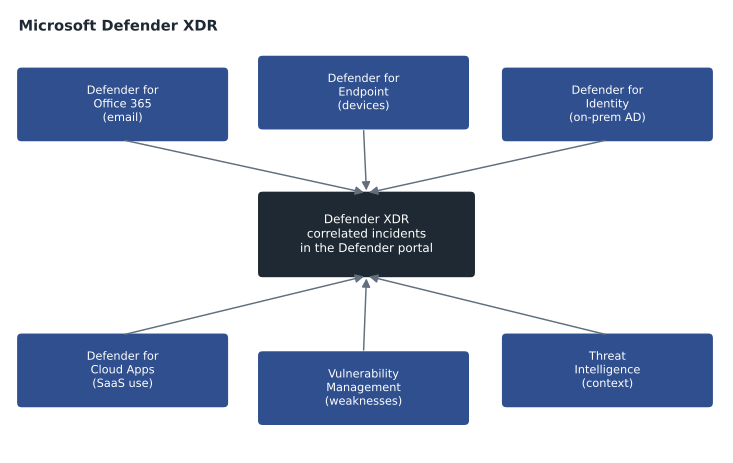
Microsoft Defender XDR is Microsoft's XDR suite. It brings together several Defender products, each protecting one domain, and correlates their signals in the Microsoft Defender portal. It can also take automatic investigation and response actions, such as removing a malicious email from every mailbox that received it, isolating an infected device or suspending a compromised account, depending on how the organization configures it. The SC-900 outline lists the components individually, so this lesson takes them one at a time.
Microsoft Defender for Office 365
Microsoft Defender for Office 365 protects email and collaboration tools, including Exchange Online, Microsoft Teams, SharePoint and OneDrive, against threats such as phishing, malicious attachments and dangerous links. Basic protection against spam and known malware comes with Exchange Online through Exchange Online Protection. Defender for Office 365 adds features such as Safe Attachments, which opens attachments in a safe isolated environment to see what they do before delivering them, and Safe Links, which checks links when they are clicked, not only when the email arrives. That second feature matters because attackers often send a harmless link and change what it points to after delivery.
Defender for Office 365 comes in plans. The first plan includes the core protections. The second plan adds tools for investigation and response, such as Threat Explorer, which lets analysts search for every message from a sender or containing a link, automated investigation and response, and attack simulation training, which sends realistic, harmless practice phishing messages to staff and offers short training to anyone who clicks. Sunil planned a simulation for January 2027, with Grace Oduya's agreement, because store managers approve supplier changes and are frequent targets.
Microsoft Defender for Endpoint
Microsoft Defender for Endpoint protects devices: Windows, macOS, Linux, Android and iOS. It combines several capabilities. Attack surface reduction settings stop common risky behaviors, such as office documents starting other programs. Next-generation protection is the antivirus layer, using cloud-delivered analysis as well as signatures. Endpoint detection and response (EDR) records what happens on each device, such as processes started, files changed and network connections made, and raises alerts when the pattern looks like an attack. Analysts can respond from the portal, for example by isolating a device from the network while keeping its connection to the security service, or by collecting an investigation package. Automated investigation can examine an alert and fix common problems without waiting for an analyst.
For Paul's laptop, Defender for Endpoint showed that the browser had visited the fake sign-in page and nothing else had happened: no file was downloaded and no new process ran. That evidence let Ama close the device part of the incident with confidence.
Microsoft Defender for Identity
Microsoft Defender for Identity protects on-premises Active Directory and related identity infrastructure, such as Active Directory Federation Services and Active Directory Certificate Services. Many organizations, including Harrow & Finch, still run Active Directory at head office and synchronize it with Microsoft Entra ID. Defender for Identity uses sensors on the domain controllers and other identity servers to learn normal behavior, then detects suspicious activity: reconnaissance against the directory, attempts to steal or misuse credentials, movement from one machine to another, and attempts to gain domain-wide control. It also reports identity security posture findings, such as accounts with weak settings or risky permissions.
Sunil drew a careful line here because the names are easy to mix up. Microsoft Entra ID Protection, covered in MSAZ-130, detects risk in cloud sign-ins to Microsoft Entra ID. Defender for Identity watches the on-premises directory. Both feed into Defender XDR, and together they cover a hybrid identity estate.
Microsoft Defender for Cloud Apps
Microsoft Defender for Cloud Apps is a cloud access security broker (CASB): a service that sits between users and the cloud applications they use and applies security policies to that use. It has four broad jobs. Discovery finds which cloud apps people are using, including ones IT never approved, often called shadow IT, by analyzing traffic logs and device data, and rates each app's risk. Visibility and control connect to sanctioned apps such as Microsoft 365 and other software-as-a-service products through their interfaces, to see activity and enforce policies. Data protection finds sensitive files in those apps and can apply controls, working with the Purview labels in lesson 9. Threat protection detects unusual behavior, such as mass downloads or sign-ins from impossible locations.
When Theo ran discovery against the head office firewall logs, it found thirty-one file-sharing and note-taking apps in use, four of them rated high risk. The team decided to block two, approve one and talk to the departments using the fourth.
Microsoft Defender Vulnerability Management
Microsoft Defender Vulnerability Management finds and helps prioritize weaknesses on devices: missing updates, vulnerable software versions, risky configurations and unsupported applications. It uses the same sensors as Defender for Endpoint, so there is nothing extra to install, and it ranks the findings by risk, taking into account how severe a weakness is, whether it is being exploited in the wild and how exposed the device is. It produces security recommendations and can create remediation requests for the IT team. Core capabilities come with Defender for Endpoint, and more are available with an add-on.
| Product | Protects | Example signal in the November 11 incident |
|---|---|---|
| Defender for Office 365 | Email and collaboration | The phishing message, its sender and the other recipients |
| Defender for Endpoint | Devices | Paul's laptop opened the fake sign-in page; no file or process followed |
| Defender for Identity | On-premises Active Directory | No unusual directory activity for Paul's account |
| Defender for Cloud Apps | Cloud app use | No unusual downloads from SharePoint after the click |
| Defender Vulnerability Management | Device weaknesses | The laptop's browser was up to date |
| Microsoft Entra ID Protection | Cloud sign-ins | No risky sign-in for Paul's account |
Microsoft Threat Intelligence and the Defender portal
Microsoft Threat Intelligence is the knowledge Microsoft gathers from the signals across its services and from its own researchers about threat actors, their tools, infrastructure and methods. It shows up in two ways. Inside the Defender products, it powers detections and enriches alerts with context about who might be behind an attack. For analysts, threat intelligence reports and profiles describe active threats, and the indicators they contain can be searched against the organization's data. Microsoft has also offered dedicated threat intelligence products; their packaging changes, so the exam concentrates on what the intelligence is for.
The Microsoft Defender portal is the shared console for all of this. It shows a unified incident queue, advanced hunting across email, endpoint, identity and app data with KQL, action centers for responses that need approval or have been taken automatically, and secure score views for Microsoft 365. As lesson 4 explained, Microsoft Sentinel is also being brought into this portal, so security operations teams can work in one place. Sunil's team now starts every morning in the Defender portal's incident queue rather than in six separate consoles.
# A simplified XDR correlation: alerts that share an entity are grouped into one incident.
alerts = [
    ("Defender for Office 365", "phishing email delivered", {"paul.l", "msg-4471"}),
    ("Defender for Office 365", "user clicked link", {"paul.l", "msg-4471", "url-fake-signin"}),
    ("Defender for Endpoint", "browser visited suspicious page", {"paul.l", "HF-LT-0312", "url-fake-signin"}),
    ("Defender for Cloud Apps", "new app consent in another team", {"jo.m", "app-notes"}),
]
incidents = []
for product, title, entities in alerts:
    for inc in incidents:
        if inc["entities"] & entities:
            inc["alerts"].append(f"{product}: {title}"); inc["entities"] |= entities
            break
    else:
        incidents.append({"alerts": [f"{product}: {title}"], "entities": set(entities)})
for n, inc in enumerate(incidents, 1):
    print(f"Incident {n}: {len(inc['alerts'])} alerts")
    for a in inc["alerts"]:
print(" ", a)Incident 1: 3 alerts
Defender for Office 365: phishing email delivered
Defender for Office 365: user clicked link
Defender for Endpoint: browser visited suspicious page
Incident 2: 1 alerts
Defender for Cloud Apps: new app consent in another teamWhat this code does
Groups security alerts from different Microsoft Defender products into incidents whenever they share an entity, such as the same user, message, device or web link. The phishing email, the click and the suspicious page visit become one incident, while an unrelated alert stays separate. This shows how Defender XDR turns many alerts into one story.
Automatic attack disruption and response actions
Defender XDR can go one step beyond correlation. For some high-confidence attack patterns, such as an account compromised through phishing and then used to change mailbox rules, or ransomware spreading between devices, Microsoft describes a capability called automatic attack disruption. When the evidence is strong enough, Defender XDR can contain the affected assets automatically, for example by disabling the compromised account or isolating the device, to stop the attack spreading while the team investigates. The actions are recorded in the action center and can be reversed.
Sunil reviewed which response actions the team would allow automatically and which would wait for an analyst. Removing a phishing message from every mailbox that received it was automatic, because the cost of a mistake is small and the message can be restored. Isolating a device or disabling an account needed an analyst's approval, except for the high-confidence attack disruption scenarios Microsoft runs itself. He wrote the choices into the incident response plan so that everyone, including Grace Oduya's store managers, knew what might happen to their devices and accounts and why.
The November 11 incident ended without any containment. The fake page was blocked for everyone in Defender for Office 365, the message was removed from the other mailboxes that had received it, Paul's password was changed as a precaution and his sessions were signed out. Ama's report credited Paul for reporting the message, and Sunil asked Carmen to use the story in the next staff newsletter.
Worked problem
Which product would see it?
For each event, name the Defender XDR component most likely to detect it: (1) an attachment that tries to start a hidden program when opened in a sandbox; (2) a laptop that begins encrypting many files rapidly; (3) an account querying the on-premises directory for every administrator group; (4) a user uploading thousands of files to an unapproved file-sharing app.
Show solution
- Attachments analyzed before delivery: Defender for Office 365, Safe Attachments.
- Suspicious behavior on a device: Defender for Endpoint.
- Reconnaissance against on-premises Active Directory: Defender for Identity.
- Unusual activity in a cloud app and use of an unapproved app: Defender for Cloud Apps.
Answer: Office 365, Endpoint, Identity and Cloud Apps respectively. Defender XDR would link them if they shared an account or device.
Common mistakes
MistakeConfusing Defender for Cloud with Defender for Cloud Apps.
InsteadDefender for Cloud protects cloud infrastructure; Defender for Cloud Apps is a cloud access security broker for SaaS use.
MistakeThinking Defender for Identity protects Microsoft Entra ID sign-ins.
InsteadIt protects on-premises Active Directory; Entra ID Protection covers cloud sign-ins.
MistakeTreating each Defender product as a separate island.
InsteadDefender XDR correlates their signals into shared incidents.
MistakeExpecting Safe Links to check a link only when the email arrives.
InsteadSafe Links checks at the time of the click, when the link may have changed.
Summary and key terms
- Extended detection and response (XDR) correlates threat signals across email, devices, identities and applications into single incidents.
- Microsoft Defender XDR combines Defender for Office 365 (email and collaboration, with Safe Attachments, Safe Links and attack simulation), Defender for Endpoint (device protection with attack surface reduction, next-generation protection and EDR), Defender for Identity (on-premises Active Directory), Defender for Cloud Apps (a cloud access security broker) and Defender Vulnerability Management.
- Microsoft Threat Intelligence informs detections and analysis, and the Microsoft Defender portal provides one incident queue, hunting and response.
- XDR
- Extended detection and response: correlated detection and response across several security domains.
- EDR
- Endpoint detection and response: recording and analyzing device activity to detect and respond to attacks.
- Safe Links
- A Defender for Office 365 feature that checks links when they are clicked.
- Safe Attachments
- A Defender for Office 365 feature that analyses attachments in an isolated environment.
- CASB
- Cloud access security broker: a service that applies security policies to cloud app use.
- Shadow IT
- Apps and services used without approval from IT.
- Microsoft Defender portal
- The shared console for Defender XDR incidents, hunting and response.
Practice problems
Work each problem on paper first, then reveal the answer to check.
Which Defender product protects on-premises Active Directory?
Show answer
Microsoft Defender for Identity.
What kind of tool is Defender for Cloud Apps?
Show answer
A cloud access security broker (CASB).
What is the main benefit of XDR over separate tools?
Show answer
It correlates signals from different domains into one incident.
Lesson quiz · 5 questions
Score 60% or more to complete this lesson.
Create a free account to save your progress, take quizzes and earn a certificate.