
MSAZ-131 · Lesson 1 of 12 · 19 min
Core Azure infrastructure security services
▶ Video coming soon A video version of this lesson is on the way.
On the Tuesday after the long weekend in November 2026, Sunil Rao, the IT security manager at Harrow & Finch Home Supply, booked the small meeting room beside the server room for a standing appointment he called the security hour. Project Skylight had already put the first workloads into Azure: a hub network, a site-to-site VPN from head office in Des Moines, test virtual machines for StockLine and a copy of the website on App Service. Sunil wanted the people who would run those systems to understand which Azure services protected them, and he wanted Ama Boateng, the security analyst on his team, to be ready for the SC-900 exam she plans to take online in February 2027. Ama had scored 640 on a practice run in early November, and her weakest areas were the product names. "Half the questions are about which tool does what," she said. "Defender for this, Defender for that." Sunil promised that by the end of the series she would be able to place every product on one page.
This course is the second half of the SC-900 path. MSAZ-130 covered security, compliance and identity concepts, such as Zero Trust, encryption, governance and Microsoft Entra. This course covers the solutions: the Azure services that protect infrastructure, Microsoft Defender for Cloud, Microsoft Sentinel, the Microsoft Defender XDR family, Microsoft Security Copilot, and the Microsoft Purview compliance tools. In the SC-900 skills outline dated October 21, 2026, Microsoft security solutions carry the largest weight of any section, 35 to 40 parts in 100, and compliance solutions carry 20 to 25. Together they are more than half of the exam.
Shared responsibility and layered protection
Sunil started where MSAZ-130 had finished. In the cloud, Microsoft secures the physical data centers, the hardware, the host operating systems and the global network; the customer secures what it builds and configures on top. For infrastructure as a service, such as virtual machines, that leaves the customer responsible for the guest operating system, the applications, the network rules, identities and data. Azure provides services that make the customer's share easier, but someone at Harrow & Finch still has to switch them on, configure them and watch what they report.
The organizing idea is defense in depth: several independent layers of protection, so that if one layer fails another still stands in the way. A common way to draw the layers runs from the outside in: physical security, identity and access, the perimeter, the network, compute, applications and finally the data itself. Each Azure service in this lesson lives mainly in one layer. Sunil drew the layers as rings on the whiteboard and asked Ama to place each service as he described it.
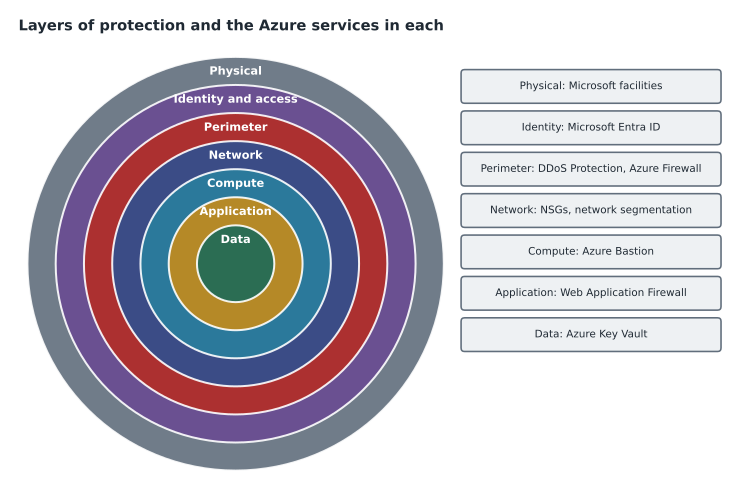
| Layer | What it protects against | Azure services in this course |
|---|---|---|
| Physical | Theft or tampering with hardware | Run by Microsoft in its data centers |
| Identity and access | Stolen or misused accounts | Microsoft Entra ID (MSAZ-130), Defender for Identity (lesson 5) |
| Perimeter | Floods of traffic and unwanted connections from the internet | Azure DDoS Protection, Azure Firewall |
| Network | Movement between systems that should not talk | Virtual network segmentation, network security groups |
| Compute | Exposed management ports and unpatched machines | Azure Bastion, Defender for Cloud (lesson 3) |
| Application | Attacks carried in web requests | Azure Web Application Firewall |
| Data | Exposure of secrets, keys and sensitive files | Azure Key Vault, Microsoft Purview (lessons 8 to 12) |
The services at a glance
The SC-900 outline lists seven core infrastructure security services. This lesson introduces all of them and goes deeper on two, Azure Bastion and Azure Key Vault. Lesson 2 goes deeper on network security groups, Azure Firewall, Web Application Firewall and DDoS Protection.
Azure DDoS Protection defends public endpoints against distributed denial of service attacks, in which very large volumes of traffic from many sources try to overwhelm a service so that real users cannot reach it. Every Azure customer gets basic platform protection; the paid tiers add tuning for the customer's own public IP addresses, monitoring, alerts and access to rapid-response support.
Azure Firewall is a managed, stateful firewall service that sits in a virtual network, usually a hub, and filters traffic flowing between networks and to and from the internet. It is a full Azure service with built-in high availability and scaling, so the customer does not manage firewall virtual machines.
Azure Web Application Firewall (WAF) protects web applications from common attacks carried inside HTTP requests, such as attempts to inject database commands or scripts. It runs on Azure Application Gateway, Azure Front Door or Azure Content Delivery Network, in front of the web servers it protects.
Network segmentation with virtual networks means dividing workloads into separate networks and subnets, and allowing only the traffic each one needs. Harrow & Finch already uses a hub and spoke design: the hub (10.40.0.0/16) holds shared services, StockLine has its own spoke (10.41.0.0/16) and the website another (10.42.0.0/16). Networks are isolated from each other until someone deliberately connects them.
Network security groups (NSGs) contain rules that allow or deny traffic to and from resources in a virtual network, based on source, destination, port and protocol. They are the basic traffic filter for subnets and network interfaces.
Azure Bastion gives administrators remote desktop and secure shell access to virtual machines through the Azure portal or native clients over an encrypted connection, so the machines do not need public IP addresses or open management ports on the internet.
Azure Key Vault stores and controls access to secrets, encryption keys and certificates, so that applications and administrators do not keep passwords and keys in code, scripts or configuration files.
Azure Bastion: closing the management ports
Ama had seen what happens to a virtual machine with remote desktop open to the internet. During the October test phase, a developer had given a StockLine test VM a public IP address so he could connect from home. Within an hour the machine's security log showed thousands of failed sign-in attempts from addresses all over the world. Nothing got in, because the password was long and the account was not a common name, but Sunil used the log as his opening example. "Automated scanners find every open management port on the internet," he said. "The question is not whether someone will try, but how long the door is open."
Azure Bastion removes the door. It is deployed into a dedicated subnet, named AzureBastionSubnet, in a virtual network, usually the hub. An administrator signs in to the Azure portal, where Microsoft Entra ID applies multifactor authentication and Conditional Access, then opens a session to the VM through Bastion. Bastion connects to the VM's private IP address inside the virtual network. The VM itself needs no public IP address, and the network security group on its subnet can block remote desktop and secure shell from the internet entirely.
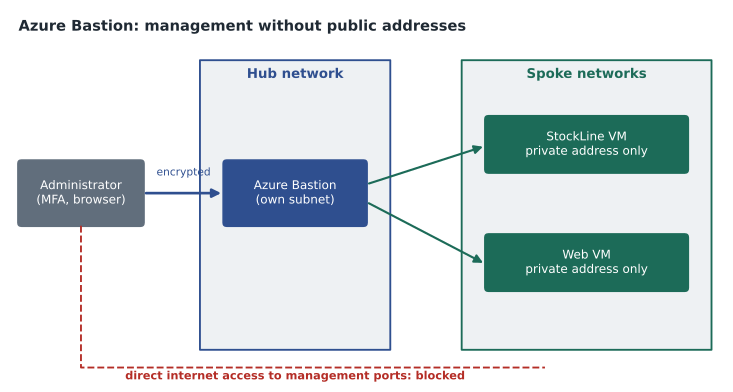
Bastion has several tiers, and their names and features change over time, so Theo Marchand, who had built the landing zone, checked the current documentation before choosing one. The ideas the exam tests are stable: Bastion provides secure remote access to VMs without exposing them publicly, it is a managed service with no agent to install on the VM, and it reduces the attack surface of the compute layer. Sunil added one practical point: Bastion sessions can be logged, which gives the security team a record of who connected to which machine and when.
Azure Key Vault: secrets out of code
The second deep dive came from a code review. Liam Ferreira, a junior developer on StockLine, had found a configuration file in an old branch of the code that contained the SQL Server password for the test database in plain text. The file had been in the repository for three years. Nobody had abused it, as far as anyone knew, but anyone who could read the repository could read the password.
Azure Key Vault solves this kind of problem. A key vault holds three kinds of items. Secrets are small values such as passwords, connection strings and API keys. Keys are cryptographic keys used for encryption and signing; they can be protected by hardware security modules, and in some tiers they never leave that hardware. Certificates are TLS and other certificates, which Key Vault can store, renew and deploy. Access to a vault is controlled through Microsoft Entra ID and Azure role-based access control, and every access can be logged.
Instead of keeping a password in a file, an application is given an identity of its own, called a managed identity, and permission to read one secret from the vault. When it starts, it asks Key Vault for the secret. If the secret changes, the application picks up the new value without a code change. If the application is compromised, the security team can see from the vault's logs which secrets it read, and can remove its access immediately.
| Item | Examples | Typical use at Harrow & Finch |
|---|---|---|
| Secret | Passwords, connection strings, API keys | The StockLine database connection string; the payment gateway API key |
| Key | RSA and elliptic-curve keys | Customer-managed keys for encrypting storage accounts |
| Certificate | TLS certificates | The certificate for harrowfinch.com, renewed automatically |
Key Vault has its own protections against mistakes. Soft delete keeps deleted vaults and items for a retention period so they can be recovered, and purge protection prevents anyone from permanently deleting them until that period ends. Sunil made both mandatory through Azure Policy, which MSAZ-102 explained. He also asked for one vault per application and environment, so that the website's test environment could never read StockLine's production secrets.
az keyvault create \
  --name kv-stockline-prod-cus \
  --resource-group rg-stockline-prod-cus \
  --location centralus \
  --enable-rbac-authorization true \
  --enable-purge-protection true
Liam's clean-up took an afternoon. The old password was changed, the new connection string went into Key Vault, the test application was given a managed identity with permission to read that one secret, and the configuration file was removed from the repository history. Sunil added a scan for secrets to the build pipeline, so that the next mistake would be caught before it was merged.
A first inventory
To end the session, Sunil asked Ama to check the Skylight environment against the seven services. She wrote a short script to sort what she had found, using a simple list rather than live Azure data. The point was the habit: know which protections exist, which are switched on, and which are still on the to-do list.
services = {
    "DDoS Protection (paid tier)": "planned for the public web entry point",
    "Azure Firewall": "deployed in the hub",
    "Web Application Firewall": "planned in front of the website",
    "Virtual network segmentation": "hub and two spokes in place",
    "Network security groups": "on every spoke subnet",
    "Azure Bastion": "deployed in the hub",
    "Azure Key Vault": "one vault per app and environment",
}
done = [s for s, state in services.items() if not state.startswith("planned")]
todo = [s for s, state in services.items() if state.startswith("planned")]
print("In place:", len(done), "of", len(services))
for s in todo:
print("Still to do:", s, "->", services[s])In place: 5 of 7 Still to do: DDoS Protection (paid tier) -> planned for the public web entry point Still to do: Web Application Firewall -> planned in front of the website
What this code does
Lists the Azure infrastructure security services in the design with the status of each, such as deployed or planned. It prints the ones still to do. This gives a simple checklist of network protections and where they will be applied.
Worked problem
Placing services in layers
An auditor asks which layer of protection each of these controls belongs to: a rule that blocks traffic from the web spoke to the StockLine spoke; a vault that holds the payment gateway key; a service that absorbs a traffic flood against the public website address.
Show solution
- Blocking traffic between spokes is network segmentation and a network security group rule, in the network layer.
- A vault holding a key protects secrets and data, so it belongs with the data layer.
- Absorbing a traffic flood against a public address is DDoS Protection, at the perimeter.
Answer: Network layer, data layer and perimeter layer respectively. Each control covers a different way an attacker could get through.
Common mistakes
MistakeThinking Microsoft secures everything in Azure.
InsteadMicrosoft secures the platform; the customer configures and monitors the services on top.
MistakeGiving a VM a public IP address so administrators can reach it.
InsteadUse Azure Bastion so VMs need no public address or open management ports.
MistakeKeeping passwords and connection strings in configuration files.
InsteadStore them in Azure Key Vault and let applications read them with managed identities.
MistakeRelying on a single security control.
InsteadLayer controls so that one failure does not expose the system.
Summary and key terms
- Security in Azure is shared: Microsoft secures the platform, the customer secures what it builds.
- Layered protection places independent controls from the perimeter to the data.
- The core infrastructure services in the SC-900 outline are Azure DDoS Protection, Azure Firewall, Azure Web Application Firewall, network segmentation with virtual networks, network security groups, Azure Bastion and Azure Key Vault.
- Azure Bastion provides remote access to VMs without public IP addresses or open management ports.
- Azure Key Vault stores secrets, keys and certificates with access controlled by Microsoft Entra ID, plus soft delete and purge protection.
- Defense in depth
- A strategy of several independent layers of security controls.
- Azure Bastion
- A managed service for remote desktop and secure shell access to VMs over private addresses.
- Azure Key Vault
- A service that stores and controls access to secrets, keys and certificates.
- Managed identity
- An identity in Microsoft Entra ID that Azure gives to a resource so it can authenticate without stored credentials.
- Soft delete
- A Key Vault setting that keeps deleted items recoverable for a retention period.
- Purge protection
- A Key Vault setting that prevents permanent deletion until the retention period ends.
Practice problems
Work each problem on paper first, then reveal the answer to check.
Which service lets administrators reach a VM without giving it a public IP address?
Show answer
Azure Bastion.
Name the three kinds of item Azure Key Vault stores.
Show answer
Secrets, keys and certificates.
Which layer does Azure DDoS Protection mainly protect?
Show answer
The perimeter, where public endpoints meet the internet.
Lesson quiz · 5 questions
Score 60% or more to complete this lesson.
Create a free account to save your progress, take quizzes and earn a certificate.