
MSAZ-131 · Lesson 11 of 12 · 18 min
Insider risk, eDiscovery and audit
▶ Video coming soon A video version of this lesson is on the way.
Not every risk comes from outside. In October 2026, a sales coordinator at the Ames distribution center resigned to join a competitor. In her last week, she downloaded the full contractor customer list and the year's pricing agreements to a personal cloud drive. Nobody noticed until a contractor mentioned that the competitor's new rep already knew his discount. By then the question was no longer how to stop it, but whether the company could show what had happened, and that took Theo Marchand two days of searching through logs by hand. This security hour covered the three Purview solutions that address that story from different angles: insider risk management, which watches for risky patterns by people inside the organization, eDiscovery, which finds and preserves content for legal matters, and audit, which records what users and administrators did.
Carmen Ortiz joined the session, and so did Lena Fischer from HR, because these tools involve looking at what employees do. Sunil Rao opened with the principle that governs all three: they must be used for defined, legitimate purposes, by a small number of authorized people, with controls on who can see what. US law gives employers wide latitude to monitor company systems, but state laws and good practice still call for clear notice and limits, and Harrow & Finch's acceptable use policy tells staff that activity on company systems may be reviewed for security and legal reasons.
Insider risk management
Microsoft Purview Insider Risk Management helps organizations detect, investigate and act on risky activities by people inside the organization, whether malicious, such as stealing data before leaving, or accidental, such as repeatedly sharing sensitive files with personal accounts. It does this by combining signals that each look harmless alone into patterns that are worth a look.
Insider risk policies are built from policy templates for common scenarios. Examples include data theft by departing users, data leaks, data leaks by priority users such as executives, and security policy violations. Each template uses indicators, which are the activities the policy watches: downloading many files from SharePoint, copying to USB, uploading to personal cloud storage, lowering sensitivity labels, sending email to personal addresses, printing large numbers of documents. Some templates use a triggering event to start watching a user. For the departing-users template, the trigger is a resignation or termination date, which can come from an HR data connector that imports dates from the HR system.
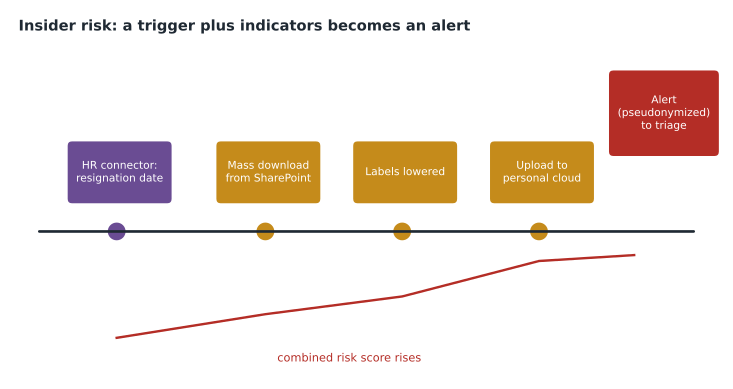
When the indicators for a user add up to enough risk, the policy raises an alert with a risk score. Analysts triage alerts, dismissing those with innocent explanations and escalating others into cases, where they can review the activity timeline and the content involved, add notes, notify the user, or escalate to eDiscovery or to HR and legal. Privacy is built in. By default, user names are pseudonymized in alerts and cases, so analysts see an anonymous identifier rather than a name until there is a reason to reveal it, and access is controlled by specific roles for administrators, analysts, investigators and auditors. Insider risk management can also feed adaptive protection, which tightens DLP rules automatically for users whose risk level is elevated, for example blocking USB copying only for them.
Lena asked the obvious question: would this have caught the sales coordinator? Probably, Sunil said. With an HR connector supplying her resignation date and a departing-users policy watching downloads and uploads to personal cloud storage, the combination would very likely have produced an alert during her last week, while there was still time to act. The team decided to deploy the departing-users policy first, in early 2027, with Lena and Carmen agreeing the escalation process before any alert is reviewed.
eDiscovery
Electronic discovery (eDiscovery) is the process of identifying, preserving, collecting, reviewing and producing electronic information for legal cases, investigations and regulatory requests. When Harrow & Finch's lawyers asked for every email and document relating to the competitor and the former coordinator, they were asking for eDiscovery.
Microsoft Purview eDiscovery works across Exchange mailboxes, SharePoint sites, OneDrive accounts, Teams chats and channels, and Microsoft 365 groups. Its work is organized in cases, each with its own members and permissions. Inside a case, investigators can run searches with keywords and conditions, such as dates, senders and file types; place holds, which preserve content in specified locations so it cannot be permanently deleted while the matter is open, even if a user deletes it; and export results for lawyers. More advanced capabilities, historically sold as eDiscovery (Premium), add custodian management, where the people whose data matters are identified and notified of a legal hold, review sets where collected content is processed, deduplicated and tagged, analytics such as grouping near-duplicate documents and email threads, and machine-learning models that help predict which documents are relevant.
Microsoft has been moving its eDiscovery tools into a single, unified experience in the Purview portal, replacing the separate classic Content search, eDiscovery (Standard) and eDiscovery (Premium) screens, with the advanced features depending on licensing. The exam expects the concepts: cases, searches, holds, review and export, with premium features for large matters.
| eDiscovery step | Purpose | Example in the competitor matter |
|---|---|---|
| Create a case | Organize work and control who can see it | Case "Pricing disclosure 2026" with Carmen and outside counsel |
| Identify custodians and locations | Decide whose data and which places matter | The former coordinator's mailbox and OneDrive; the sales team site |
| Place holds | Preserve content so it cannot be permanently deleted | Hold on those locations for the duration of the matter |
| Search and collect | Find relevant items with keywords and conditions | Messages mentioning the competitor or the pricing files since August |
| Review | Tag, deduplicate and analyze items | Lawyers mark items as relevant or privileged |
| Export | Produce results for legal use | Export relevant items for counsel |
Audit
Microsoft Purview Audit records user and administrator activities across Microsoft 365 services in a unified audit log: who opened, shared or downloaded files in SharePoint and OneDrive, who changed mailbox permissions, who signed in, who changed a DLP policy or a sensitivity label, and many other events. Searching the audit log is often the first step in any investigation, and it was the log Theo had searched by hand. He would have been quicker with the audit search tool, which can filter by date, user, activity and file and export the results.
Audit comes in two levels. Audit (Standard) is turned on by default for most organizations and keeps audit records for a limited period; Microsoft's documentation at the time of writing describes 180 days. Audit (Premium) keeps records longer by default, with options for longer retention through audit retention policies and add-on licenses, records additional intelligent insights events that matter in investigations, such as when mail items were accessed, and gives higher-bandwidth access to the audit data through the API. Retention periods and licensing change, so check the current documentation; the exam tests the difference between the two levels rather than exact numbers.
# Search a small extract of audit records for one user's file activity in one week.
records = [
    ("2026-10-19", "coordinator", "FileDownloaded", "Contractor customer list.xlsx"),
    ("2026-10-19", "coordinator", "FileDownloaded", "Pricing agreements 2026.zip"),
    ("2026-10-20", "coordinator", "FileUploadedToCloud", "Pricing agreements 2026.zip"),
    ("2026-10-20", "buyer", "FileAccessed", "Paint price list.pdf"),
    ("2026-10-21", "coordinator", "SensitivityLabelChanged", "Contractor customer list.xlsx"),
]
week = ("2026-10-19", "2026-10-23")
hits = [r for r in records if r[1] == "coordinator" and week[0] <= r[0] <= week[1]]
for day, user, action, item in hits:
    print(day, action.ljust(24), item)
print(len(hits), "matching events for review")2026-10-19 FileDownloaded Contractor customer list.xlsx 2026-10-19 FileDownloaded Pricing agreements 2026.zip 2026-10-20 FileUploadedToCloud Pricing agreements 2026.zip 2026-10-21 SensitivityLabelChanged Contractor customer list.xlsx 4 matching events for review
What this code does
Searches a small extract of audit records for one user's file activity during one week. It prints the matching events, such as downloads, an upload to a personal cloud service and a change to a sensitivity label, and counts them. An investigator would review this trail when a departing employee is suspected of taking data.
The events in the sketch are invented for illustration, but they show the kind of trail the real audit log keeps, and why Sunil wanted Audit (Premium) for the accounts most likely to be involved in investigations: the longer retention means the records are still there when a problem comes to light months later.
How the three fit together
Insider risk management raises an alert about a pattern of behavior. Audit provides the detailed record of each activity behind it. If the matter becomes legal, eDiscovery preserves and collects the content involved. Ama wrote the distinction on a study card: insider risk asks whether someone inside is putting data at risk; eDiscovery asks what content exists for a legal matter and keeps it safe; audit asks who did what, and when.
Governance for sensitive investigations
Before any of these tools are switched on, Carmen and Lena wrote a short governance note, which the leadership team approved in November 2026. It names the purposes for which insider risk management and eDiscovery may be used: protecting company and customer data, responding to legal requirements and investigating suspected policy breaches. It names who may hold each role. Insider risk analysts are Ama and one colleague; investigators who may see real names are Sunil and Lena, and only after a case is escalated; eDiscovery managers are Carmen and outside counsel. It requires every escalation and every eDiscovery case to have a recorded reason.
The note also deals with the opposite risk: that the tools are not used when they should be. An insider risk alert that nobody reviews is a known risk ignored, which is worse than not knowing. Alerts are reviewed twice a week, and the governance note sets a target time for triage. Audit (Premium) retention for the mailboxes of executives and finance staff was chosen because investigations involving those roles are more likely to start late, after a problem comes to light months afterwards.
Ama asked how the three solutions would have changed the October story. Insider risk management would likely have raised an alert during the coordinator's last week, giving HR and Sunil a chance to act. Audit would have shown each download and upload in minutes rather than two days. And if the matter had gone to court, eDiscovery would have preserved her mailbox and OneDrive before they were deleted under the normal leaver process, which in October had already removed her OneDrive thirty days after she left.
That last point led to one more change: the leaver process now checks with Carmen before an account is deleted if there is any open matter, so that content can be placed on hold first.
For the exam, Ama noted the words that point to each solution. Phrases such as departing employees, risky behavior by staff, data theft from inside and pseudonymized alerts point to insider risk management. Legal hold, custodians, review sets, litigation and producing documents point to eDiscovery. Who did what and when, activity records, log retention and investigation timelines point to audit. Mixing them up is easy under time pressure, because all three are used during investigations.
Lena added a point from the HR side. Employees are more likely to accept monitoring when they know what is watched and why, and less likely to feel targeted when the same rules apply to everyone. The acceptable use policy was updated in November 2026 to describe the purposes in plain words, and the change was announced to all staff before any policy was planned to go live.
Worked problem
Which solution?
Choose the Purview solution for each request: (1) lawyers need every email between two people from March to June preserved and exported; (2) HR wants early warning when departing staff download unusual amounts of data; (3) the security team needs to know who changed a DLP policy last Tuesday.
Show solution
- Preserving and exporting content for a legal matter is eDiscovery, with a hold and an export.
- Early warning about risky activity by departing staff is insider risk management, using the departing-users template and an HR connector.
- Finding who changed a policy and when is a search of the audit log.
Answer: eDiscovery, insider risk management and audit respectively.
Common mistakes
MistakeThinking insider risk management shows analysts names immediately.
InsteadUser names are pseudonymized by default until there is reason to reveal them.
MistakeConfusing a hold with a backup.
InsteadA hold preserves content in place for a legal matter so it cannot be permanently deleted.
MistakeAssuming audit records are kept for ever.
InsteadRetention depends on the audit level and retention policies.
MistakeUsing these tools without agreed purposes and roles.
InsteadDefine legitimate purposes, limit access by role and follow privacy and employment law.
Summary and key terms
- Insider risk management detects risky activity by people inside the organization using policy templates, indicators and triggering events such as resignation dates from an HR connector; alerts are scored, pseudonymized by default, triaged and escalated to cases, and can drive adaptive protection. eDiscovery identifies, preserves, collects, reviews and exports content for legal matters through cases, searches, holds, review sets and export, with premium capabilities for large matters.
- Audit records user and administrator activity in a unified audit log; Audit (Premium) adds longer retention, additional investigation events and higher-bandwidth access.
- Insider risk management
- A Purview solution that detects and helps investigate risky activities by insiders.
- Indicator
- An activity an insider risk policy watches, such as mass downloads.
- Pseudonymization
- Replacing names with identifiers so analysts do not see who is involved by default.
- eDiscovery
- Finding, preserving and producing electronic information for legal purposes.
- Hold
- A preservation that prevents content from being permanently deleted during a matter.
- Custodian
- A person whose data is relevant to an eDiscovery case.
- Audit log
- The record of user and administrator activities across Microsoft 365.
Practice problems
Work each problem on paper first, then reveal the answer to check.
Which Purview solution can use a resignation date from an HR connector?
Show answer
Insider risk management.
What does an eDiscovery hold do?
Show answer
It preserves content so it cannot be permanently deleted while a matter is open.
What does Audit (Premium) add to Audit (Standard)?
Show answer
Longer retention, additional investigation events and higher-bandwidth API access.
Lesson quiz · 5 questions
Score 60% or more to complete this lesson.
Create a free account to save your progress, take quizzes and earn a certificate.