
MSAZ-131 · Lesson 3 of 12 · 18 min
Microsoft Defender for Cloud
▶ Video coming soon A video version of this lesson is on the way.
By the third security hour, Skylight had more than eighty Azure resources across five subscriptions, and Sunil Rao faced a problem every security manager in the cloud meets sooner or later. Nobody could check eighty resources by hand every week, and the number would be in the hundreds by the end of 2027. He needed a tool that would look at every resource continuously, compare its settings with good practice, tell him what to fix first, and warn him if something was attacked. That tool is Microsoft Defender for Cloud, and it is one of the most heavily tested products in the security solutions section of SC-900.
What Defender for Cloud is
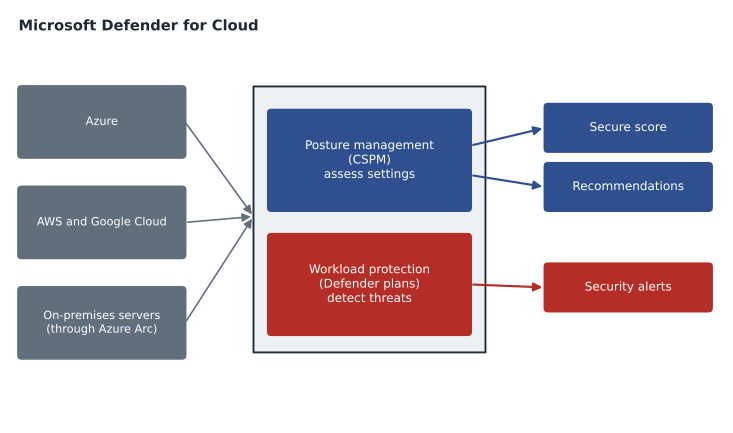
Microsoft describes Defender for Cloud as a cloud-native application protection platform (CNAPP): a single product that combines several jobs that used to need separate tools. The two jobs the SC-900 outline names are cloud security posture management (CSPM) and cloud workload protection (CWP). Posture management asks whether resources are configured securely. Workload protection watches running workloads, such as servers, databases and storage accounts, for threats and raises alerts when something suspicious happens. Defender for Cloud also helps with security from development to runtime, for example by scanning infrastructure-as-code templates and container images, but the exam concentrates on posture and workload protection.
Defender for Cloud covers Azure natively. It can also connect to Amazon Web Services and Google Cloud accounts, so that one console shows the posture of all three clouds, and it can cover servers in on-premises data centers through Azure Arc, which MSAZ-102 introduced. Harrow & Finch has no other public cloud today, but the warehouse vendor hosts a reporting tool in another provider's cloud, and Sunil noted that the option exists if Harrow & Finch ever takes it over.
Posture management: secure score and recommendations
Posture management starts with an assessment. Defender for Cloud continuously checks each resource against a set of security controls. By default it uses the Microsoft cloud security benchmark, a set of Microsoft-written guidance for securing cloud resources that draws on widely used industry frameworks. When a resource does not meet a control, Defender for Cloud produces a recommendation: a plain description of the problem, the resources affected, the risk and the steps to fix it. Many recommendations include a quick fix or link to an Azure Policy assignment that can apply the change across many resources at once.
The recommendations roll up into the secure score, a single number that shows how much of the recommended security is in place. In principle, each security control is worth a number of points, and you earn those points in proportion to the share of affected resources that are healthy. Fixing a recommendation on every resource it applies to earns the full points for that control. The score is shown for the whole environment and for each subscription, so Sunil can see which part of the estate needs attention. A higher score means a stronger posture; it does not mean the environment cannot be attacked.
# A simplified secure score: each control earns its points in proportion to healthy resources.
controls = {
    "Enable MFA": (10, 48, 50),          # (max points, healthy, total)
    "Secure management ports": (8, 9, 12),
    "Apply system updates": (6, 30, 40),
    "Encrypt data in transit": (4, 20, 20),
}
earned = 0
for name, (pts, healthy, total) in controls.items():
    part = pts * healthy / total
    earned += part
    print(f"{name:26s} {part:5.2f} of {pts}")
maximum = sum(p for p, _, _ in controls.values())
print(f"Score: {earned:.1f} of {maximum} points, or {earned / maximum * 100:.0f} out of 100")Enable MFA 9.60 of 10 Secure management ports 6.00 of 8 Apply system updates 4.50 of 6 Encrypt data in transit 4.00 of 4 Score: 24.1 of 28 points, or 86 out of 100
What this code does
Calculates a simplified secure score: each security control is worth a maximum number of points, earned in proportion to how many resources are healthy for that control. Adding the points gives an overall score out of the maximum and out of 100. Fixing controls with many unhealthy resources raises the score most.
Ama ran the sketch above with figures like those in the real portal and saw where the biggest gains were: the management ports control was worth many points and only three quarters of the affected VMs were healthy, which matched the October incident. The real score uses Microsoft's own point values and controls, which change as the benchmark is updated, so she treated the script as a way to understand the idea, not to predict the portal's exact number.
Security policies and standards
Recommendations come from security standards assigned to each subscription or account. The Microsoft cloud security benchmark is assigned by default. Organizations can add standards for regulations or frameworks that apply to them, and Defender for Cloud then shows a regulatory compliance dashboard that maps each requirement to the checks that support it. Under the covers, many of these checks are Azure Policy definitions grouped into initiatives, which is why MSAZ-102's governance work and Defender for Cloud fit together: policy can audit or enforce a setting, and Defender for Cloud reports it as a security recommendation.
Sunil was careful about one point the exam also tests. A compliance dashboard that shows green does not mean the organization is compliant with a regulation. It means the technical checks Microsoft can automate are passing. Many requirements involve processes, people and documents that no cloud tool can see. Lesson 8 returns to this distinction with Compliance Manager.
| Term | Meaning |
|---|---|
| Security control | A group of related recommendations, such as securing management ports |
| Recommendation | A specific finding with affected resources and steps to fix it |
| Secure score | A measure of how much recommended security is in place |
| Security standard | A set of controls assessed for a scope, such as the Microsoft cloud security benchmark |
| Regulatory compliance dashboard | A view that maps standards and regulations to automated checks |
Free and paid posture management
Defender for Cloud has a free foundational level. Foundational CSPM includes the secure score, recommendations based on the Microsoft cloud security benchmark, asset inventory and basic policy management at no extra charge. The paid Defender CSPM plan adds deeper analysis. Two features are worth knowing by name. Attack path analysis looks at how weaknesses connect, for example a VM exposed to the internet that has a vulnerability and permission to read a storage account with sensitive data, and shows the paths an attacker could follow, so the team can break the most dangerous chains first. Cloud security explorer lets the team query the environment in plain terms, such as finding every VM exposed to the internet that has high-severity vulnerabilities. The paid plan also adds agentless scanning of machines and data-aware features that show where sensitive data is exposed.
Plan names and their exact features change, and the exam stays at the level of the ideas: foundational posture management is free, enhanced posture management is a paid plan, and the paid plan helps prioritize risk by context rather than by a flat list.
Workload protection: the Defender plans
Posture management tells you what is weak. Workload protection tells you when something is being attacked. Defender for Cloud provides it through a set of Defender plans, each switched on per subscription and billed separately. Each plan watches one type of workload and adds protections suited to it.
| Defender plan | What it adds (examples) |
|---|---|
| Defender for Servers | Endpoint detection through Microsoft Defender for Endpoint, vulnerability assessment, just-in-time VM access, file integrity monitoring |
| Defender for Storage | Detection of unusual access and of malware uploaded to storage accounts |
| Defender for Databases | Threat detection and vulnerability assessment for Azure SQL, other database services and SQL Server on machines |
| Defender for Containers | Hardening, image vulnerability scanning and runtime threat detection for Kubernetes clusters |
| Defender for App Service | Detection of attacks against web apps running on App Service |
| Defender for Key Vault | Alerts on unusual attempts to access or exploit key vaults |
| Defender for Resource Manager | Alerts on suspicious management operations in the subscription |
Just-in-time VM access is a good example of how workload protection and posture management meet. Instead of leaving a management port closed for ever or open for ever, an administrator requests access for a limited time from a specific address. Defender for Cloud opens the port in the NSG for that time and closes it again. Harrow & Finch uses Azure Bastion for most access, but the warehouse vendor's support staff need occasional direct access to their two VMs, and just-in-time access gives them that without a permanent opening.
When a plan detects something suspicious, such as a sign-in from an unusual location followed by a new administrator account on a server, Defender for Cloud raises a security alert with a severity, the affected resource, what was observed and suggested responses. Related alerts can be grouped into incidents. Alerts can be sent by email, streamed to Microsoft Sentinel (lesson 4) and viewed with alerts from other Defender products in the Microsoft Defender portal (lesson 5).
Putting it to work at Harrow & Finch
Sunil's plan for Skylight was written as a decision in November 2026. Foundational CSPM is already on for every subscription. Defender for Servers will be switched on for the production subscriptions before StockLine moves, Defender for Databases for the planned Azure SQL Managed Instance, and Defender for Storage for the storage accounts that hold supplier documents and backups. The paid Defender CSPM plan will be trialled for one quarter to see whether attack path analysis finds risks the free recommendations miss. Ama will review the secure score every Monday and report the five recommendations with the most points still available.
Working the recommendation list
A new Defender for Cloud environment often shows dozens of recommendations at once, and teams can freeze in front of the list. Sunil gave Ama a simple order for working through it. Start with recommendations that have the most secure score points still available and affect production. Next, look for recommendations that affect resources exposed to the internet, because those are the ones automated scanners find first. Then group the rest by owner, so each team receives one list for its own resources instead of a long list for everyone.
Some recommendations will not fit the business, and Defender for Cloud allows them to be exempted for a resource with a reason and an expiry date, so the decision is recorded rather than forgotten. Ama exempted one recommendation for the warehouse vendor's VMs, where the vendor's support contract forbade installing an extra agent, with an expiry date that matched the contract renewal in 2027. Every exemption is reported on the Monday list until it expires, so nothing stays exempt by accident.
Ama also learned to read the severity of each recommendation and alert. Recommendations carry a severity that reflects the risk of leaving them unfixed, and alerts carry a severity that reflects how likely and how serious the observed activity is. Neither replaces judgment: a medium recommendation on the payment database can matter more than a high one on a test VM that will be deleted next week.
Worked problem
Reading a recommendation
Defender for Cloud reports: "Management ports of virtual machines should be protected with just-in-time network access control." It applies to 12 VMs, of which 9 are healthy. The control is worth 8 points. How many points does it currently earn, and what would fixing all 12 VMs gain?
Show solution
- The control earns points in proportion to healthy resources: 9 of 12 is three quarters.
- Three quarters of 8 points is 6 points.
- Fixing the remaining 3 VMs would earn the full 8 points, a gain of 2 points.
Answer: About 6 of 8 points now, rising to 8 when all 12 VMs are healthy. The real portal uses its own point values, but the principle is the same.
Common mistakes
MistakeTreating a high secure score as proof that nothing can be attacked.
InsteadSecure score measures recommended settings; threats still need detection and response.
MistakeThinking a green compliance dashboard means legal compliance.
InsteadIt shows automated technical checks; processes and documents must also be in place.
MistakeConfusing posture management with workload protection.
InsteadPosture management finds weak settings; workload protection plans detect active threats.
MistakeAssuming Defender for Cloud covers only Azure.
InsteadIt can connect AWS and Google Cloud accounts and cover on-premises servers through Azure Arc.
Summary and key terms
- Microsoft Defender for Cloud is a cloud-native application protection platform that combines cloud security posture management and cloud workload protection for Azure, other clouds and on-premises servers through Azure Arc.
- Posture management assesses resources against security standards, by default the Microsoft cloud security benchmark, and produces recommendations that roll up into the secure score; a regulatory compliance dashboard maps standards to automated checks.
- Foundational CSPM is free; the paid Defender CSPM plan adds attack path analysis and cloud security explorer.
- Workload protection is delivered by Defender plans for servers, storage, databases, containers and other workloads, which raise security alerts.
- CNAPP
- Cloud-native application protection platform: a product combining posture management, workload protection and related functions.
- CSPM
- Cloud security posture management: continuous assessment of resource configurations against good practice.
- Cloud workload protection
- Threat detection and protection for running workloads such as servers and databases.
- Secure score
- A Defender for Cloud measure of how much recommended security is in place.
- Microsoft cloud security benchmark
- The default set of security controls Defender for Cloud assesses.
- Attack path analysis
- A paid CSPM feature that shows how combined weaknesses could be exploited.
- Just-in-time VM access
- Opening a management port only for an approved time and source.
Practice problems
Work each problem on paper first, then reveal the answer to check.
What are the two main functions of Defender for Cloud named in the SC-900 outline?
Show answer
Cloud security posture management and cloud workload protection.
Which standard does Defender for Cloud assess by default?
Show answer
The Microsoft cloud security benchmark.
Which feature shows how several weaknesses could be chained by an attacker?
Show answer
Attack path analysis in the paid Defender CSPM plan.
Lesson quiz · 5 questions
Score 60% or more to complete this lesson.
Create a free account to save your progress, take quizzes and earn a certificate.