
MSAZ-131 · Lesson 12 of 12 · 18 min
Data lifecycle and records management
▶ Video coming soon A video version of this lesson is on the way.
The last security hour of the series, on November 12, 2026, started with two complaints that pulled in opposite directions. Dana Whitcombe wanted to be sure that invoices, payment records and supplier contracts were kept for as long as the company's accountants and the law require, and could not be quietly deleted. Grace Oduya wanted the opposite for store email: managers' mailboxes were full of years-old promotional messages and shift chatter that nobody needed, and every one of them was something the company might have to search in a legal matter. Carmen Ortiz summed up the problem: "Keep what we must, for as long as we must, and get rid of the rest on purpose." That is the job of Microsoft Purview Data Lifecycle Management and Microsoft Purview Records Management, which use the same building blocks: retention policies and retention labels.
Why retention matters
Keeping information too briefly can break legal and business requirements: tax records, contracts, employment files and safety reports often must be kept for years. Keeping information too long has costs too. It takes storage, it makes searches slower and eDiscovery larger, and it increases the harm if data is stolen, because there is more to steal. Privacy laws, including several state privacy laws, expect personal information to be kept only as long as it is needed for the purpose it was collected for. A good retention approach does both halves: it keeps what is required and deletes the rest deliberately and consistently.
In Microsoft 365, retention settings can do three things to content: retain only, keeping it for a period even if users delete it; delete only, removing it after a period; or retain and then delete, keeping it for a period and deleting it at the end. When a user deletes or edits content that is under retention, Microsoft 365 keeps a copy in a hidden location, such as the Preservation Hold library in SharePoint and OneDrive or the Recoverable Items folder in Exchange, so the user's day-to-day experience is unchanged but the retained copy survives.
Retention policies
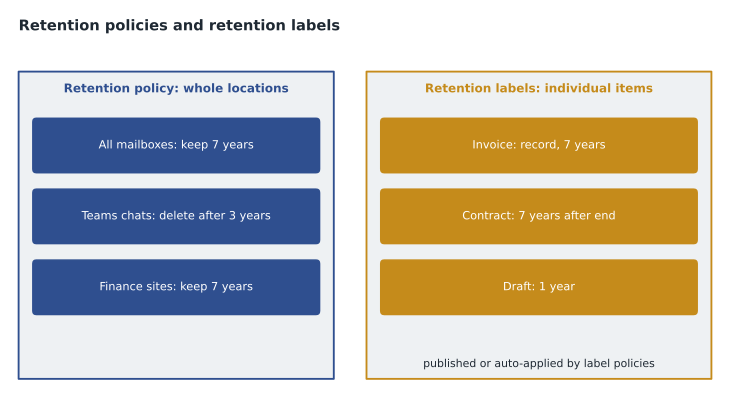
A retention policy applies the same retention settings to whole locations or to parts of them: all mailboxes, specific SharePoint sites, all OneDrive accounts, Teams chats or channel messages, Microsoft 365 group content, and other supported locations. Retention policies are the simplest way to set a baseline. Harrow & Finch's plan, decided in November 2026 for rollout in early 2027, includes a retention policy that keeps Exchange email for seven years and then deletes it, and another that deletes Teams chat messages after three years, both chosen after advice from the company's lawyers and accountants.
| Retention policy | Locations | Setting | Reason |
|---|---|---|---|
| Email baseline | All Exchange mailboxes | Retain 7 years, then delete | Covers business records sent by email |
| Chat baseline | Teams chats | Delete after 3 years | Chat is informal and rarely a record |
| Store promotions | Store shared mailboxes | Delete after 1 year | Promotional messages have no lasting value |
| Finance sites | Finance SharePoint sites | Retain 7 years, then delete | Accounting and payment records |
Retention labels and label policies
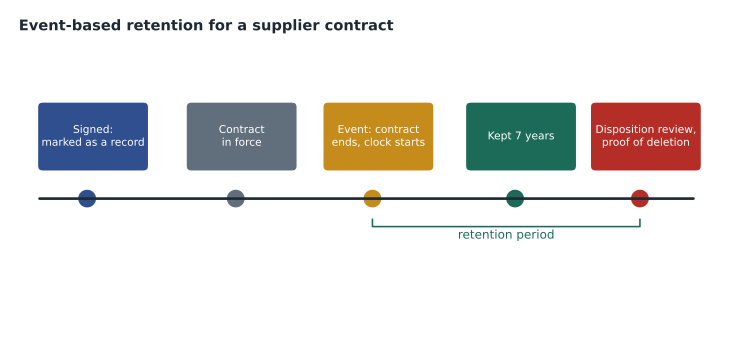
A retention policy works at the level of a location. Sometimes different items in the same place need different treatment: in the finance site, an invoice may need to be kept for seven years, a signed contract for seven years after it ends, and a draft for only one year. Retention labels handle this. A retention label is applied to individual items, such as a document or an email, and carries its own retention settings. Labels can start their retention period from when the item was created, last modified or labeled, or from an event, such as the end of a contract or the departure of an employee, which is called event-based retention.
Like sensitivity labels, retention labels must be published before people can use them. A retention label policy either publishes labels so users can apply them manually in Outlook, SharePoint, OneDrive and Office apps, or auto-applies them to content that matches conditions, such as a sensitive information type, keywords or a trainable classifier like the supplier contract classifier from lesson 9. A location can have a default retention label, so that every document saved to a particular library gets the label automatically. Each item can have only one retention label at a time, although it can have both a retention label and a sensitivity label.
When settings conflict: the principles of retention
An item can be covered by several retention policies and a retention label at once, and their settings may disagree. Microsoft applies the principles of retention to decide the outcome, in this order. First, retention wins over deletion: if any setting says keep, the item is kept. Second, the longest retention period wins: if several settings say keep, the longest applies. Third, explicit inclusion wins over implicit inclusion: a label on the item, or a policy aimed at that specific location, wins over a general policy for all locations when it comes to deletion. Fourth, the shortest deletion period wins among the remaining deletion settings. Ama found it easiest to remember as a rule of caution: never delete something another rule still needs to keep.
# Apply the first two principles of retention to one email covered by several settings.
settings = [
    ("Email baseline policy", "retain", 7),
    ("Store promotions policy", "delete", 1),
    ("Legal matter label", "retain", 10),
]
keep = [years for _, kind, years in settings if kind == "retain"]
if keep:
    print(f"Retention wins over deletion: keep for {max(keep)} years (longest retention wins)")
else:
    shortest = min(years for _, kind, years in settings if kind == "delete")
print(f"No retention applies: delete after {shortest} years")Retention wins over deletion: keep for 10 years (longest retention wins)
What this code does
Works out what happens to one email covered by several retention settings, applying the first two principles of retention. Keeping an item wins over deleting it, and among retention settings the longest period wins. So the email is kept for 10 years.
Records management
Some content is more than retained: it is an official record that must not be changed. Records management in Purview builds on retention labels. A retention label can be configured to mark items as records when applied. A record can be read but its content cannot be edited, depending on settings it may be unlocked for edits with versions kept, and it cannot be deleted until its retention period ends. A label can also mark items as regulatory records, a stricter form for content that regulations require to be immutable: once applied, even administrators cannot remove the label or shorten its retention, so organizations use this option only when they are sure they need it.
Records management adds tools around the labels. A file plan lists the organization's retention labels with descriptive information, such as the business function, category, citation of the requirement and the department responsible, so that the labels form a documented records schedule; labels can be created and imported in bulk. Disposition review lets designated reviewers check content at the end of its retention period and decide whether to delete it, extend its retention or relabel it, and proof of disposition records which items were deleted and when, which auditors often ask for.
| Feature | Data Lifecycle Management | Records Management |
|---|---|---|
| Retention policies for locations | Yes | Yes |
| Retention labels and label policies | Yes | Yes |
| Mark items as records or regulatory records | No | Yes |
| File plan | No | Yes |
| Disposition review and proof of disposition | No | Yes |
| Event-based retention | Basic use through labels | Yes, as part of a records schedule |
Dana's finance records were a clear case for records management. Invoices and payment records will get a retention label that marks them as records and keeps them for seven years from creation, then sends them to disposition review by the finance manager. Signed supplier contracts will get an event-based label: retain for seven years after the contract ends, with the end date triggered when the purchasing team records it. HR files will be handled separately under HR's own schedule. None of these will be regulatory records, because the company's lawyers found no requirement strict enough to justify making them immutable even to administrators.
The whole picture
Sunil closed the series by returning to Ama's original complaint about product names. On one page, she placed every product from the course. Azure infrastructure services protect networks, access and secrets. Defender for Cloud manages cloud posture and protects workloads. Sentinel collects and correlates security data and automates responses. Defender XDR protects email, devices, identities and cloud apps and correlates their signals, with Security Copilot helping analysts work faster. In Purview, Compliance Manager tracks regulations; classification, sensitivity labels and DLP find and protect data; insider risk management, eDiscovery and audit support investigations; and Data Lifecycle Management and Records Management keep what must be kept and remove what should not. The Service Trust Portal and Microsoft's privacy principles describe Microsoft's own share. She still had three months before her exam, and MSAZ-190 would take her through the review.
Building the retention schedule
Before configuring anything, Carmen asked each department for a list of the kinds of information it creates and what rules applied to each. The answers became a retention schedule: a table of record categories, the period each must be kept, what starts the clock, who owns the category and what happens at the end. Finance listed invoices, payment records, payroll summaries and tax filings; purchasing listed supplier contracts and price agreements; HR listed employee files and training records; stores listed incident reports and safety inspections. The lawyers and accountants reviewed the periods, and Carmen turned each category into a retention label in the file plan, with the citation recorded against it.
The schedule also listed what had no lasting value and could be deleted sooner: promotional emails, routine shift messages, duplicate copies of reports and personal notes. Grace's store mailboxes fell mostly into that group, which is why the store promotions policy deletes after one year. Content with no business or legal reason to keep it is a cost and a risk, and the schedule made it possible to delete it on purpose rather than by accident.
Rollout will be gradual, starting in 2027. Baseline retention policies come first, because they cover the most content with the least effort. Default retention labels for the finance and purchasing libraries come next, so new documents saved there are labeled automatically. Auto-apply policies for supplier contracts, using the trainable classifier, follow once the classifier has been tested. Disposition review begins only when the first labeled content reaches the end of its period, years from now, but the reviewers are named in the file plan from the start.
Ama asked how retention relates to backups. They solve different problems, Sunil said. Backups protect against loss and help recover from failures or ransomware; retention policies and labels decide how long information is kept and when it is deliberately removed, for legal and business reasons, and they apply inside Microsoft 365 itself. A company usually needs both, and confusing them leads either to keeping deleted data in backups long after policy says it should be gone, or to assuming retention protects against a destructive attack.
Worked problem
Applying the principles
An email in a store mailbox is covered by the store promotions policy (delete after 1 year) and the email baseline policy (retain 7 years, then delete). A legal matter later puts a retention label on it that retains for 10 years. How long is it kept?
Show solution
- Retention wins over deletion, so the delete-after-1-year setting cannot delete it while any retention applies.
- Two settings retain it, for 7 and 10 years; the longest retention period wins.
- It is kept for 10 years from its start date, then the deletion settings can apply.
Answer: Ten years. The principles of retention always resolve conflicts in favor of keeping content that any setting still requires.
Common mistakes
MistakeThinking a retention policy and a retention label are the same.
InsteadPolicies apply to locations; labels apply to individual items and are published or auto-applied by label policies.
MistakeExpecting a shorter deletion setting to override a retention setting.
InsteadRetention wins over deletion, and the longest retention period wins.
MistakeUsing regulatory records by default.
InsteadRegulatory records cannot be unlabeled or shortened even by administrators; use them only when required.
MistakeAssuming deleted content under retention is gone.
InsteadA copy is kept in a hidden location such as the Preservation Hold library until retention ends.
Summary and key terms
- Data Lifecycle Management and Records Management in Microsoft Purview keep content for required periods and delete it when no longer needed.
- Retention policies apply settings to whole locations such as mailboxes, sites and Teams chats.
- Retention labels apply settings to individual items and are published or auto-applied by retention label policies, including event-based retention.
- When settings conflict, retention wins over deletion, the longest retention wins, explicit inclusion wins over implicit and the shortest deletion wins.
- Records management adds marking items as records or regulatory records, file plans, disposition review and proof of disposition.
- Retention policy
- Retention settings applied to whole locations or parts of them.
- Retention label
- Retention settings applied to an individual item.
- Retention label policy
- A policy that publishes or auto-applies retention labels.
- Event-based retention
- Retention that starts when a defined event occurs, such as a contract ending.
- Record
- An item marked by a retention label so that it cannot be edited or deleted during retention.
- Regulatory record
- A stricter record whose label and retention cannot be changed even by administrators.
- Disposition review
- A review of content at the end of its retention period before it is deleted.
Practice problems
Work each problem on paper first, then reveal the answer to check.
What is the first principle of retention?
Show answer
Retention wins over deletion.
How many retention labels can an item have at one time?
Show answer
One.
Which records management feature documents labels as a records schedule?
Show answer
The file plan.
Lesson quiz · 5 questions
Score 60% or more to complete this lesson.
Create a free account to save your progress, take quizzes and earn a certificate.