
MSAZ-131 · Lesson 4 of 12 · 18 min
Microsoft Sentinel: SIEM and SOAR
▶ Video coming soon A video version of this lesson is on the way.
On the morning of November 9, 2026, Ama Boateng found three separate warnings waiting for her. Defender for Cloud had flagged an unusual sign-in to a test VM. The VPN gateway's log showed a burst of failed connections from an unfamiliar address. And a store manager had forwarded an email asking him to approve a "new supplier payment portal." Each warning lived in a different console. Ama spent the morning copying details into a spreadsheet to see whether they were connected, and by lunch she had concluded they were not: the sign-in was a developer on a new laptop, the VPN failures came from a misconfigured device at the Ames distribution center, and the email was a phishing attempt that the mail filter had already moved to junk. At the next security hour, Sunil Rao used her morning as the reason for this lesson. "You did the right analysis," he said. "But you did it by hand, and it took four hours. That is what a SIEM is for."
SIEM and SOAR
Security information and event management (SIEM) is the practice, and the type of tool, that collects security data from many sources into one place, analyses it to detect threats, and helps analysts investigate. A SIEM takes in logs and alerts from identity systems, servers, firewalls, applications, cloud services and security products. It normalizes them so they can be searched together, applies detection rules that look for suspicious patterns across sources, and turns matches into alerts and incidents that analysts can work through.
Security orchestration, automation and response (SOAR) is the practice, and the type of tool, that automates the response. Microsoft's outline expands the acronym as security orchestration automated response; the meaning is the same. Instead of an analyst copying an address from an alert into a firewall rule by hand, a SOAR playbook does it: when a certain kind of incident appears, it gathers more information, notifies the right people, blocks the address, disables the account or opens a ticket, with a human approving the steps that need judgment. SIEM finds and organizes; SOAR acts.
Before cloud SIEMs, organizations bought servers and storage for their SIEM and had to size them for the busiest day of the year. Microsoft Sentinel is a cloud-native SIEM and SOAR solution: Microsoft runs the infrastructure, it scales with the amount of data, and customers pay for the data they analyze and keep rather than for hardware.
Collect: data connectors and the workspace
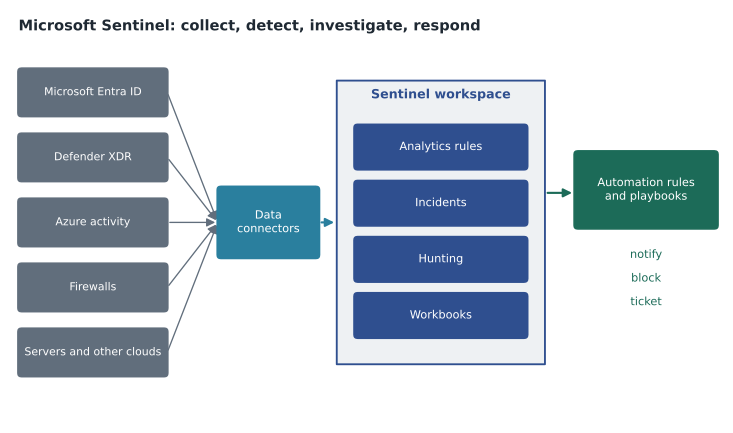
Sentinel stores its data in a Log Analytics workspace, the same kind of workspace Azure Monitor uses, which MSAZ-102 described. Data reaches the workspace through data connectors. Microsoft provides connectors for its own services, such as Microsoft Entra ID sign-in and audit logs, Azure activity logs, Microsoft Defender XDR, Defender for Cloud and Microsoft 365, and many of these take only a few selections to enable. Other connectors bring in data from firewalls, network devices, other clouds, software-as-a-service applications and on-premises servers, often through standard log formats such as syslog and Common Event Format, collected by an agent.
Connectors, along with detection rules, workbooks and playbooks for particular products or scenarios, are packaged as solutions in the Sentinel content hub. Theo Marchand installed the solutions for Microsoft Entra ID, Azure activity, Microsoft Defender XDR and the brand of firewall that protects the stores' internet links. Each solution brought ready-made detections, which saved Sunil's small team from writing them all from scratch.
Sunil was candid about cost. Because Sentinel charges for the data ingested and retained, collecting everything without thinking can be expensive. Sentinel offers different tiers of storage for data that is analyzed often and data that only needs to be kept for investigations or compliance. The team decided which logs were worth analyzing in real time and which only needed to be kept, and Dana Whitcombe received a monthly estimate with the same budget alerts that MSAZ-102 set up for other subscriptions.
Detect: analytics rules and threat intelligence
An analytics rule is a detection. It runs on a schedule or in near real time, queries the data, and raises an alert when the results match a suspicious pattern. Rules are written in Kusto Query Language (KQL), the same read-only query language used in Azure Monitor. Microsoft and partners provide templates, so teams can start from proven rules and adjust them. Some detections use machine learning, and Sentinel's user and entity behavior analytics (UEBA) builds a picture of normal activity for each user and device so that unusual activity stands out.
SigninLogs
| where TimeGenerated > ago(1h)
| where ResultType != "0"
| summarize Failures = count() by UserPrincipalName, IPAddress
| where Failures > 20
| order by Failures desc
Sentinel can also use threat intelligence: information about addresses, domains, file hashes and other indicators known to be linked to attacks. Indicators from Microsoft and from other feeds can be matched against the organization's own logs, so that a connection from a store till to a known malicious domain raises an alert even if nothing else about it looks unusual.
Investigate: incidents and hunting
Alerts that relate to the same attack are grouped into an incident. An incident has a severity, a status, an owner and a timeline, and brings together the alerts, the entities involved, such as accounts, hosts, IP addresses and files, and the evidence. Analysts work incidents from a queue rather than chasing individual alerts. An investigation view shows how the entities relate, so an analyst can see in one picture that the account which failed to sign in twenty times then succeeded, created a mailbox rule and connected to a server.
Not every attack trips a rule. Hunting is the proactive search for threats that have not yet raised alerts. Sentinel provides hunting queries, many mapped to the tactics in the widely used MITRE ATT&CK framework, and lets analysts save results, turn a good query into a new analytics rule, or explore data in notebooks for deeper analysis. Workbooks are interactive dashboards built on the workspace data, such as a sign-in overview or a firewall traffic summary, which Sunil uses in his monthly report to the leadership team.
# Correlate failed sign-ins that are followed by a success from the same address.
events = [
    ("09:01", "ama.b", "203.0.113.7", "fail"), ("09:01", "ama.b", "203.0.113.7", "fail"),
    ("09:02", "store12", "198.51.100.4", "fail"), ("09:02", "ama.b", "203.0.113.7", "fail"),
    ("09:03", "ama.b", "203.0.113.7", "success"), ("09:05", "store12", "198.51.100.4", "success"),
]
fails = {}
for time, user, ip, result in events:
    key = (user, ip)
    if result == "fail":
        fails[key] = fails.get(key, 0) + 1
    elif fails.get(key, 0) >= 3:
        print(f"{time} possible password guessing then success: {user} from {ip} after {fails[key]} failures")
    else:
print(f"{time} normal sign-in: {user} after {fails.get(key, 0)} failures")09:03 possible password guessing then success: ama.b from 203.0.113.7 after 3 failures 09:05 normal sign-in: store12 after 1 failures
What this code does
Looks through sign-in events for addresses that fail several times and then succeed for the same account. Several failures followed by a success is flagged as possible password guessing that worked, while a single failure followed by success is treated as normal. This kind of correlation is what a SIEM such as Microsoft Sentinel automates.
Ama's sketch shows the idea behind many sign-in detections. The real rules work over millions of rows, use thresholds tuned to the organization and add context such as location and device, but the pattern, failures followed by a success, is the same. The addresses in the example come from ranges reserved for documentation, so they belong to no real system.
Respond: automation rules and playbooks
Sentinel's SOAR side has two parts. Automation rules are simple, central rules that run when incidents are created or updated: they can assign an owner, change severity, add tags, close known false positives or run a playbook. Playbooks are workflows built on Azure Logic Apps, with connectors to hundreds of services. A playbook might enrich an incident with information about an address, post a message to the security team's channel in Microsoft Teams, ask an analyst to approve blocking an account, and then disable the account in Microsoft Entra ID and open a ticket.
| Stage | Sentinel feature | Harrow & Finch example |
|---|---|---|
| Collect | Data connectors, content hub solutions, workspace | Entra ID sign-ins, Azure activity, Defender XDR, store firewall logs |
| Detect | Analytics rules, UEBA, threat intelligence | Many failed sign-ins followed by success; connections to known bad domains |
| Investigate | Incidents, entities, hunting, notebooks, workbooks | One incident for the November 9 phishing email and the clicks that followed |
| Respond | Automation rules, playbooks on Logic Apps | Notify the team in Teams; with approval, disable the account and reset sessions |
Sunil's rule for automation was cautious. Anything that only gathers information or notifies people can run automatically. Anything that blocks a person or a system needs an analyst's approval in the playbook, at least until the team trusts the detection. "A playbook that locks out every store manager on a Saturday morning is a denial of service we did to ourselves," he said.
Sentinel and the Microsoft Defender portal
Sentinel has traditionally been managed in the Azure portal. Microsoft has been bringing it into the Microsoft Defender portal, so that Sentinel and the Defender XDR products described in lesson 5 share one incident queue, one hunting experience and one set of automation. Microsoft has announced that the Sentinel experience in the Azure portal will be retired, and reports in early 2026 put the date at March 31, 2027, after an earlier deadline was extended. For SC-900, the important idea is the direction: Sentinel is the SIEM and SOAR, Defender XDR is extended detection and response, and Microsoft brings them together in one security operations experience. Harrow & Finch decided to set up Sentinel in the Defender portal from the start, so the team would not need to move later.
Running a small security operations team
Harrow & Finch does not have a round-the-clock security operations center. Sunil's team is Ama, one other analyst and himself, plus Theo for infrastructure changes. Sentinel shapes how a team that small can work. Incidents have severities, so the team agreed that high-severity incidents page the analyst on call, including overnight, while medium and low incidents wait for the morning queue. Automation rules assign incidents to the right person by type and add context before anyone looks, so the first five minutes of each incident are spent deciding, not gathering.
Sunil also set targets the team could measure from Sentinel's own data: how long incidents wait before someone starts work on them, how long they take to close, and how many turn out to be false positives. A detection that produces many false positives wastes the team's time and trains people to ignore it, so any rule with more than a handful of false positives in a month is tuned or retired. The targets will be reviewed each quarter from 2027, and Sunil expected them to show where an outside managed detection service might eventually help.
Ama added one practical note to her study cards: Sentinel and Defender for Cloud are often confused in exam questions because both raise alerts. Defender for Cloud protects and assesses cloud resources and raises alerts about them; Sentinel collects alerts and logs from Defender for Cloud and many other sources and correlates them across the whole organization. If a question asks where alerts from many products and non-Microsoft systems come together for investigation and automated response, the answer is Sentinel.
Worked problem
SIEM or SOAR?
Classify each task as SIEM or SOAR: (1) collecting firewall and sign-in logs into one workspace; (2) a rule that detects sign-ins from two countries within ten minutes; (3) automatically posting new high-severity incidents to the team channel; (4) with approval, disabling an account involved in an incident.
Show solution
- Collecting and normalizing logs is a SIEM function.
- Detecting a pattern across data with a rule is a SIEM function.
- Automatically notifying people when an incident appears is orchestration and automation, a SOAR function.
- Taking a response action through a playbook is a SOAR function.
Answer: SIEM: tasks 1 and 2. SOAR: tasks 3 and 4. Microsoft Sentinel does both.
Common mistakes
MistakeThinking Sentinel is only a log store.
InsteadIt also detects threats with analytics rules, groups alerts into incidents and responds with automation.
MistakeConfusing SIEM and SOAR.
InsteadSIEM collects, detects and supports investigation; SOAR automates and orchestrates the response.
MistakeCollecting every log at the most expensive tier.
InsteadChoose which data needs real-time analysis and which only needs to be kept.
MistakeAutomating account lockouts on day one.
InsteadStart with enrichment and notification; add approvals before disruptive actions.
Summary and key terms
- Security information and event management (SIEM) collects and analyses security data from many sources to detect threats and support investigation; security orchestration, automation and response (SOAR) automates the response.
- Microsoft Sentinel is a cloud-native SIEM and SOAR solution.
- It collects data through connectors into a Log Analytics workspace, detects threats with KQL analytics rules, UEBA and threat intelligence, groups alerts into incidents for investigation and hunting, and responds through automation rules and playbooks built on Azure Logic Apps.
- Microsoft is bringing Sentinel into the Microsoft Defender portal alongside Defender XDR.
- SIEM
- Security information and event management: collecting, correlating and analyzing security data.
- SOAR
- Security orchestration, automation and response: automating response workflows.
- Data connector
- A Sentinel component that brings data from a source into the workspace.
- Analytics rule
- A scheduled or near-real-time query that raises alerts when it finds a suspicious pattern.
- Incident
- A group of related alerts and entities investigated together.
- Hunting
- Proactively searching data for threats that have not raised alerts.
- Playbook
- An automated response workflow built on Azure Logic Apps.
Practice problems
Work each problem on paper first, then reveal the answer to check.
What does SOAR add to a SIEM?
Show answer
Automated and orchestrated response through rules and playbooks.
Where does Microsoft Sentinel store the data it collects?
Show answer
In a Log Analytics workspace.
Which service are Sentinel playbooks built on?
Show answer
Azure Logic Apps.
Lesson quiz · 5 questions
Score 60% or more to complete this lesson.
Create a free account to save your progress, take quizzes and earn a certificate.