
LVT-130 · Lesson 12 of 12 · 19 min
Capstone: installing and certifying a floor
The capstone follows the sixth floor of the Kellerman Building from the first pull to the day Brightwater's IT manager, Lucia Ferreira, signs the acceptance. It uses every lesson in the course: the plan, the pathways, the pull, the room, the terminations, the cords, verification, certification and troubleshooting. It ends with the records and the warranty submission, which are as much a part of the installation as the cable. Maya leads one of the two crews and, for the last two weeks, the whole floor, while Dev moves on to the next job at St. Brendan's and reviews her work from there.
Week 1: plan, pathways and the first pulls
The installation plan from lesson 1 sets the order: zones Z1 and Z2 first, because their ceilings close first, then around the floor clockwise, with the offices, meeting rooms and ceiling devices following the general contractor's ceiling schedule. Maya's materials order of 104 boxes arrives in two deliveries; she checks the cable type, category, jacket rating and manufacturer against the approved submittals, and sets aside the six boxes with a different print lot so that they can be traced if a problem appears.
The pathway walk for Z1 and Z2 finds the duct conflict described in lesson 2, which is resolved at the coordination meeting with a new J-hook route. Maya signs the pathway checklist for each zone and Dev countersigns it from photographs. The first pulls go well: twelve cables at a time from boxes in room 6A, guided at each corner, with the pull sheets filled in with box numbers and length marks. By the end of the week, Z1 to Z3 are pulled and dressed onto the ladder rack, with their service loops laid as horseshoes.
| Week | Zones or areas | Main work | Hold points |
|---|---|---|---|
| 1 | Z1, Z2, Z3 | Pathway checks, first pulls, room ladder rack | Pathway signed before each pull |
| 2 | Z4, Z5, Z6, offices | Pulls, first terminations, first-ten tests | First ten of each termination type tested |
| 3 | Z7, Z8, meeting rooms, ceiling devices | Pulls, terminations, room dressing | Room inspection before panel termination |
| 4 | All | Certification testing, troubleshooting | Daily result review |
| 5 | All | Corrections, channel samples, records | Final review, warranty submission |
Week 2: terminations and the first-ten rule
Termination starts in zone Z1 while pulling continues in Z4 to Z6. The first ten outlet jacks and the first ten panel ports are tested with the verification tester as they are finished, as the quality plan requires. The outlets are fine; at the panel, the first ten pass the wiremap but Maya's measurements, the routine from lesson 5, show the jacket stripped back too far on four of them. She stops panel termination for an hour, shows the crew the ripcord method and the trim after seating, and re-terminates the four. The zone box connectors are punched down by Renée, who has the most punch-down experience, and tested the same way.
The port map from lesson 7 changes once. Brightwater converts two offices into a small project room, which needs four outlets instead of six. The two freed links are labeled as spares rather than renumbered, the records are updated, and the outlet drawings are marked up for the as-built set. The meeting room boxes that were too shallow are replaced by the electrical contractor before those outlets are terminated, a result of the troubleshooting in lesson 11 having been found on the first rooms.
Week 3: the room
By week 3, room 6A holds all 348 cables on the ladder rack, grouped by zone. The racks are anchored and braced, the managers are in place, including the wider manager between racks 1 and 2 that lesson 4's fill check called for, and the bonding hardware is installed and visible. Dev's room inspection, done on a video call with Maya walking him around the room, passes with two items: one zone group's straps are too tight at the radius drop, and a box of jacks has been left on top of rack 3. Both are fixed the same day.
Panel termination follows the port map, one panel at a time, with each panel's first ten links tested before the next starts. The panels are labeled with the full identifiers above each row, the port icons match the outlet jack colors, and the cables are labeled within 12 in of each termination. At the end of the week, Maya photographs every panel front and rear and every open zone box for the records, before the covers go on.
Week 4: certification
Certification starts with the tester setup from lesson 10: firmware and limits checked, permanent link adapters fitted, reference set, the TIA Category 6A permanent link limit selected, the cable's NVP set, and the identifier list loaded from the port map. Two testers are used, one with each crew, each with a current calibration certificate in the submittals. The six camera MPTLs are tested with the plug-accepting adapter and the MPTL limit named in the test plan, and the desk links through the zone boxes are tested from panel to desk outlet.
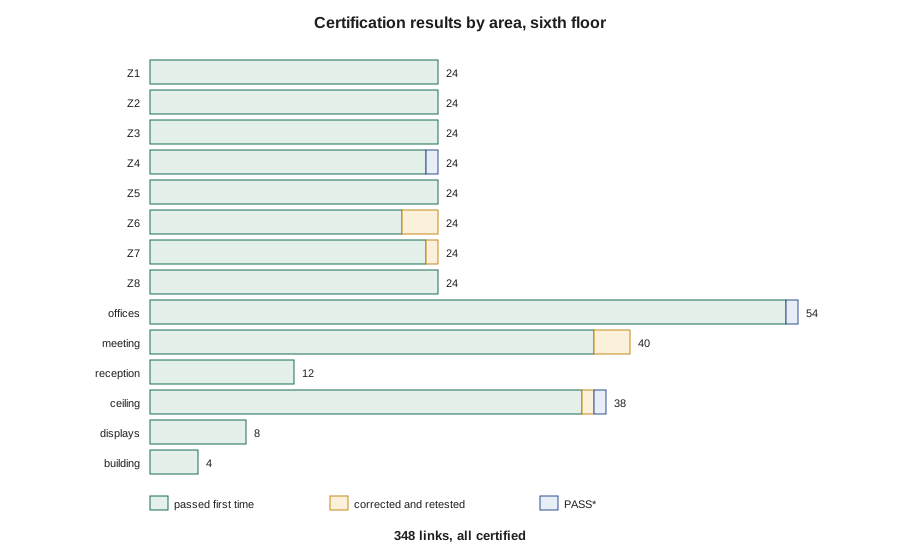
The first week's results were the ones lesson 11 worked through: three short meeting room links failing NEXT from one apprentice's terminations, one return loss failure from a strap cinched at a beam clamp, one open from a cap pressed on at an angle, and one long camera link that turned out to be a wrong NVP setting followed by a decision to re-pull. By the end of week 4, all 348 links have been tested and all have passed, three of them as PASS*.
Week 5: checking the results before submission
Before anything goes to the manufacturer, Maya checks the results as a set. A certification campaign can pass every link and still produce a submission that is rejected: a result saved under the wrong identifier, a link tested twice under two names, a link never tested at all, or a result saved with the wrong limit. The code below is the check she runs on the downloaded results. It compares the identifiers in the results with the port map, counts the verdicts and finds the smallest margin and the longest link.
import random
random.seed(6)
# identifiers expected from the port map: panels A to G full, panel H to port 12
expected = [f"6A-{p}{n:02d}" for p in "ABCDEFG" for n in range(1, 49)] + [f"6A-H{n:02d}" for n in range(1, 13)]
# results downloaded from the tester: identifier -> (verdict, worst margin in dB, length in m)
results = {link: ("PASS", round(random.uniform(1.2, 7.5), 1), round(random.uniform(14, 66), 1)) for link in expected}
results["6A-B48"] = ("PASS*", 0.4, 67.2)
results["6A-E31"] = ("PASS*", 0.5, results["6A-E31"][2])
results["6A-G40"] = ("PASS*", 0.3, results["6A-G40"][2])
del results["6A-D17"]                       # skipped in the identifier sequence
results["6A-D17A"] = ("PASS", 3.9, 41.0)    # the same link saved under a typed name
results["6A-J01"] = ("PASS", 5.2, 0.0)      # not a link: a test of the reference cord

counts = {}
for verdict, margin, length in results.values():
    counts[verdict] = counts.get(verdict, 0) + 1
missing = [x for x in expected if x not in results]
extra = [x for x in results if x not in expected]
worst = min((r[1], k) for k, r in results.items() if k in expected)
longest = max((r[2], k) for k, r in results.items() if k in expected)
print("results downloaded:", len(results), counts)
print("in the port map but not tested:", missing)
print("tested but not in the port map:", extra)
print(f"smallest margin: {worst[0]} dB on {worst[1]}")
print(f"longest link: {longest[0] * 3.281:.1f} ft on {longest[1]}")results downloaded: 349 {'PASS': 346, 'PASS*': 3}
in the port map but not tested: ['6A-D17']
tested but not in the port map: ['6A-D17A', '6A-J01']
smallest margin: 0.3 dB on 6A-G40
longest link: 220.5 ft on 6A-B48The check finds two problems that every link passing would have hidden. Link 6A-D17 has no result under its own identifier: the crew skipped it in the sequence, tested it later and typed its name by hand as 6A-D17A. And there is a result for 6A-J01, a panel that does not exist, which turns out to be a test of a reference cord that was saved by mistake. Maya renames the 6A-D17A result to 6A-D17 in the management software, which keeps the original test data intact, and deletes the reference cord result. The smallest margin is 0.3 dB, one of the three PASS* results she must list for Brightwater, and the longest link is 6A-B48 at 220 ft, matching the route measured in lesson 2.
Channel samples, cords and the room handover
Brightwater's specification also calls for channel tests on a 5 percent sample with the project's cords in place. Maya chooses 18 links: the longest in each zone, the three PASS* links, the two links with the training room's 24 AWG cords and a random selection of the rest. All 18 pass the Category 6A channel limit. The cords are then installed to the cord schedule from lesson 4, with the measured lengths, and the room is dressed for handover: every cord through the managers, no slack stuffed behind the switches, blanking panels in empty rack spaces and nothing stored on the floor.
Records and as-builts
The records package is the last deliverable. Under the owner's TIA-606 scheme, it includes the as-built drawings showing every outlet with its identifier and every pathway as installed, including the rerouted J-hook runs; the port map; the zone box records showing which room cable connects to which desk cable at each consolidation point; the test results in native format with a summary report; the list of PASS* results; the panel and zone box photographs; and the attic stock list. The building owner's administration database gets the same identifiers, so that the base building's records and Brightwater's agree.
The warranty submission
The manufacturer's warranty application includes the certified installer's details, the approved product list as installed, the test results, and a statement that the installation followed the manufacturer's instructions and the standards. The warranty team reviews the results: the limit selected, the adapters, the calibration dates of both testers, and every link's result. Two weeks later, the 25-year system warranty is issued for 348 links. It covers the cabling as a system, including the first set of cords, for applications the manufacturer lists, provided the owner continues to use the manufacturer's components for moves, adds and changes.
Lucia signs the acceptance after a walk-through with Maya and Colette: the room, a sample of outlets and zone boxes, the labels, and a demonstration of looking up a desk's port on the map inside the room door. Her one request is a copy of the port map in a spreadsheet for her team, which Maya prepares from the records the same afternoon.
What the floor teaches
- Planning decides most results: the RFIs, the labels before cable and the first-ten rule prevented far more failures than testing found.
- Pathways and pulls are invisible once the ceiling closes, so they must be right the first time.
- Terminations are where most failures are made, and they cluster by person and method.
- The tester's setup is part of the measurement: reference, limit, NVP and identifiers.
- Failures and marginal results are clues to causes; fixing the cause protects the links that passed.
- Records are part of the installation, and the warranty depends on them.
Worked problem
Accepting a PASS* result
Lucia asks whether the three PASS* links will be a problem for 10 gigabit Ethernet. How should Maya answer?
Show solution
- A PASS* result means the link met the Category 6A permanent link limit, by less than the tester's accuracy.
- The specification accepts PASS* results but requires them to be listed, which they are.
- The manufacturer's warranty accepts them, and covers the links for the applications Category 6A supports, including 10 gigabit Ethernet.
- Two of the three links are long; the channel tests on all three, with the project's cords, passed.
Answer: The links are certified and warranted; the list lets Lucia's team know where the floor's smallest margins are if a problem ever appears.
Common mistakes
MistakeSubmitting results without checking identifiers against the port map.
InsteadCross-check for missing, duplicate and extra results first.
MistakeEditing a result's data to rename it.
InsteadRename in the management software, which keeps the test data intact.
MistakeLeaving cords and room tidying to the owner.
InsteadInstall the cords to the schedule and hand over a dressed room.
MistakeTreating as-builts as a copy of the design drawings.
InsteadMark every reroute, spare and change.
MistakeTelling the owner that any component can be used for future changes.
InsteadExplain that the warranty depends on continuing with the manufacturer's components.
Summary and key terms
- The floor was installed in five weeks, zone by zone, with hold points for pathways, first terminations, the room and daily results.
- Termination problems were caught early by the first-ten rule and measurement of the preparation.
- All 348 links were certified to the Category 6A permanent link limit, three as PASS*.
- Results were cross-checked against the port map before submission, finding a mislabeled result and a stray test.
- A 5 percent channel sample, the cords and a dressed room completed the physical handover.
- The records package and the warranty submission are deliverables in their own right.
- The owner accepted the floor after a walk-through, with a 25-year system warranty issued.
- As-built drawings
- Drawings updated to show the installation as actually built.
- Records package
- The drawings, port map, test results and other documents handed to the owner.
- Channel sample
- A selection of links tested as channels with the actual cords.
- Acceptance
- The owner's formal agreement that the work is complete.
- System warranty
- A manufacturer's warranty covering the cabling as a system for listed applications.
Practice problems
Work each problem on paper first, then reveal the answer to check.
The port map lists 348 links and the downloaded results contain 349 records with one link missing. How many problem records are there?
Show answer
Two extra records and one missing link: three to resolve.
Why is a result renamed in the management software rather than retyped?
Show answer
The software keeps the original test data and history intact.
Which links make a good channel sample?
Show answer
The longest in each zone, the marginal ones and a random selection.
What must the owner keep doing for the warranty to remain valid?
Show answer
Use the manufacturer's components for moves, adds and changes.
Lesson quiz · 5 questions
Score 60% or more to complete this lesson.
Create a free account to save your progress, take quizzes and earn a certificate.