
INS-410 · Lesson 10 of 12 · 22 min
Calculation tools and software
▶ Video coming soon A video version of this lesson is on the way.
Nobody at Coldstream does fifty heat loss calculations by hand. For Anika's list, Raj used NAIMA's 3E Plus program for the pipe and fitting losses and his own spreadsheet for the costs and paybacks. Priya's job was to check him. "The program never makes an arithmetic mistake," Raj said, "and it never notices when I type the wrong thing. That's what you're for."
This lesson describes the calculation tools insulators use, what they need and what they produce, how to check a program's answer by hand, the input mistakes that cause most wrong results, and how to record a calculation so that it can be trusted later.
3E Plus
3E Plus is a free insulation thickness and heat loss program published by NAIMA, the North American Insulation Manufacturers Association. Its name stands for energy, environment and economics. It has been used across the industry for decades, first as desktop software and, since 2022, as an online version that NAIMA has continued to update; NIA's Insulation Outlook has published guides to its features. It calculates by the methods of ASTM C680, which lesson 9 described.
For a pipe, duct or flat surface, 3E Plus can calculate:
- Heat loss or gain and surface temperature for each thickness of a chosen insulation, bare and insulated, as tables that can be compared.
- The thickness for personnel protection, given a maximum surface temperature.
- The thickness for condensation control, given the ambient temperature, humidity and a margin.
- Energy and money saved, and emissions avoided, given the fuel, efficiency, price and hours.
- Economic thickness tables, given the costs and financial inputs, as lesson 3 described.
NAIMA also publishes a companion 3E Estimator for estimating the installed cost of mechanical insulation, which can feed the economic calculations. Other programs and calculators do similar work: several insulation manufacturers offer online calculators for their own products, engineering firms use general heat transfer software, and many contractors, like Raj, keep spreadsheets for routine work. For unusual shapes, such as heavy supports or complex equipment, engineers sometimes use finite element software that calculates heat flow in two or three dimensions.
What the program needs
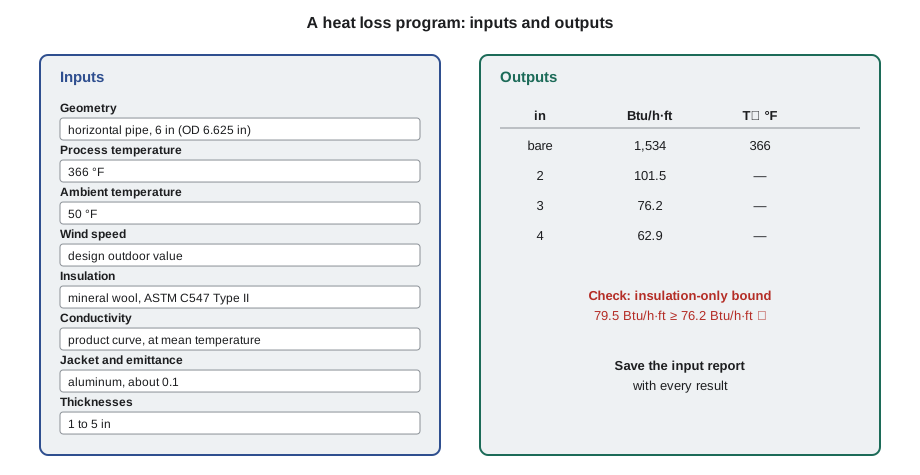
The inputs are the same as those of lesson 1, entered into boxes:
| Input | Typical entry for the kettle line | Common mistake |
|---|---|---|
| Geometry and size | Horizontal pipe, 6 in (the program supplies the 6.625 in outside diameter) | Choosing copper tube instead of steel pipe, or entering 6 in as a diameter |
| Process temperature | 366 °F | Using the boiler pressure instead of the line temperature |
| Ambient temperature | 50 °F outdoors | Using a summer value for a winter loss |
| Wind speed | A design outdoor wind speed | Leaving it at zero for outdoor work |
| Insulation | Mineral wool pipe insulation, ASTM C547 Type II, with its conductivity curve | Choosing a generic material whose curve differs from the product |
| Jacket | Aluminum, emittance about 0.1 | Leaving the default emittance for a different jacket |
| Thicknesses | 1 to 5 in in standard steps | Comparing sizes that are not made |
Programs usually carry a library of materials with conductivity curves, typical of each ASTM type. For a design, enter the curve from the actual product's data sheet if the program allows it; the generic curve may differ by 10 in 100 or more at high temperatures.
How wrong inputs change the answer
Priya tested Raj's claim by deliberately making the two commonest mistakes on the kettle line and comparing the results with the correct one, using the method and assumptions of lesson 3.
Worked problem
The cost of two input mistakes
The correct heat loss of the outdoor kettle line with 3 in of mineral wool is 76.2 Btu/h·ft. Find the result if (a) the pipe is entered with a 6.000 in outside diameter instead of 6.625 in, and (b) the conductivity is taken as 0.24 Btu·in/h·ft²·°F, a room-temperature value, instead of 0.31 at the mean temperature.
Show solution
- (a) With the smaller diameter, the same calculation gives 71.0 Btu/h·ft, about 7 in 100 low.
- (b) With the room-temperature conductivity, it gives 59.6 Btu/h·ft, about 22 in 100 low.
- Over the 210 ft outdoor run and 7,550 hours, mistake (b) would understate the remaining loss by (76.2 − 59.6) × 210 × 7,550 ÷ 10⁶ = 26.3 MMBtu a year.
Answer: Both mistakes make the insulation look better than it is. The conductivity mistake is three times as large as the diameter mistake, which is why a conductivity must always be read at the mean temperature.
Other mistakes act in the other direction. A wind speed entered for an indoor pipe overstates the bare loss and therefore the saving; a high emittance entered for a new aluminum jacket understates the jacket temperature, which matters for personnel protection. Every input deserves a second look.
Checking a program by hand
A program's answer should never be accepted without a rough check. Three quick checks catch most errors:
- The insulation-only bound. As lesson 2 showed, the heat loss through the insulation alone, ignoring the surface film, is always a little higher than the true answer. For the kettle line, 2π × (0.31 ÷ 12) × 316 ÷ ln(6.3125 ÷ 3.3125) = 79.5 Btu/h·ft, a little above the program's 76.2. A program result above the bound is wrong.
- The bare-to-insulated ratio. On hot steam lines, a sensible thickness typically cuts the bare loss to about a tenth or a twentieth. A ratio of one half, or one hundredth, deserves a look.
- The surface temperature. It must lie between ambient and the pipe temperature, close to ambient for a well-insulated hot line and a few degrees below ambient for a cold one.
Worked problem
The insulation-only bound for the kettle line
Check the 76.2 Btu/h·ft result for the kettle line with 3 in of mineral wool, k = 0.31, pipe at 366 °F, air at 50 °F.
Show solution
- r₁ = 3.3125 in, r₂ = 6.3125 in; ln(6.3125 ÷ 3.3125) = ln 1.906 = 0.6449.
- Bound: 2π × (0.31 ÷ 12) × 316 ÷ 0.6449 = 51.29 ÷ 0.6449 = 79.5 Btu/h·ft.
- The program's 76.2 Btu/h·ft is 4 in 100 below the bound, as expected for an outdoor surface film.
Answer: The result passes the check.
These checks take a minute and need only a calculator. Raj asks every apprentice who works with him to do them on at least one line of every program run.
Spreadsheets and records
Raj's spreadsheet takes the program's heat losses and does the rest: lengths, equivalent lengths for fittings, hours, cost of heat, savings, installed costs, paybacks and CO₂. It is simple, and he keeps it simple on purpose: each column has a heading with its units, each input is in a colored cell with its source noted beside it, and each formula is the same down the column. Spreadsheets fail in quiet ways: a formula copied wrong in one row, units mixed between columns, a number typed over a formula. The defenses are the same as for the program, a hand check on a sample row and a second person's look.
Every calculation that goes to an owner should be recorded so that it can be checked and repeated:
- The program's input report and output tables, saved as a file and printed to the job folder.
- The version of the program or spreadsheet used.
- The source of every owner-supplied input: hours, fuel price, efficiency, design conditions.
- The person who ran it and the person who checked it, with dates.
When Anika's corporate office questioned one of the audit's numbers on the morning of Friday, November 13, she was able to send them Raj's input report within the hour. Records like that are how a contractor's numbers earn trust.
A program run for the condensate tunnel
Raj ran the condensate tunnel line from lesson 11 through the program while Priya watched, and she checked it against her own hand calculation. The inputs and the results were:
| Input or result | Value |
|---|---|
| Geometry | Horizontal pipe, 3 in (3.500 in outside diameter) |
| Process temperature | 203 °F |
| Ambient temperature, wind | 68 °F, still air (tunnel) |
| Bare surface emittance | 0.8 (oxidized steel) |
| Insulation | 1 ½ in glass fiber pipe insulation, typical k = 0.25 Btu·in/h·ft²·°F at its mean temperature |
| Jacket | PVC, emittance 0.9 |
| Bare loss | about 300 Btu/h·ft |
| Insulated loss | about 26 Btu/h·ft |
| Jacket temperature | within a few degrees of the tunnel air |
Priya's hand checks agreed: the insulation-only bound was a little above the insulated loss, the insulated loss was about one eleventh of the bare loss, and the jacket temperature was just above the tunnel air. Raj saved the input report to the Kellerton job folder with her initials as checker, and the numbers went into lesson 12's table.
A spreadsheet that can be checked
Raj's savings spreadsheet has one row per item and the same columns for every job:
| Column | Contents |
|---|---|
| Item and location | Tag number, area and description |
| Size and temperature | Nominal size, actual outside diameter, operating temperature |
| Quantity | Length, or count and equivalent length |
| Loss before and after | From the program, per unit length, with the run identified |
| Saving | Difference × quantity, in power units |
| Energy per year | Saving × hours, converted to GJ or MMBtu |
| Money per year | Energy × cost of heat |
| Installed cost | From the estimate |
| Payback and CO₂ | Cost ÷ money saved; fuel saved × emission factor |
Every input cell is colored, every formula column is locked, and the inputs sheet holds the hours, efficiency, prices and factors in one place, so that a change to the gas price changes every row at once. Priya's check was to pick one row at random and work it through on a calculator, from the program's losses to the payback; it matched.
When to question the tool
Programs and spreadsheets deserve trust when their inputs are right and their results pass a hand check. They deserve questions when a result surprises an experienced person: a payback much shorter or longer than similar items, a surface temperature that does not match a measurement, a thickness that differs from the plant standard for no clear reason. The surprise may be a real finding, or it may be a typing error, and the only way to know is to look. Raj tells apprentices that the most useful thing they can say about a calculation is, "That number looks wrong to me. Can we check it?"
Units and versions
Programs work in the units chosen at the start of a run, and mixing them is a classic error: a temperature entered in Fahrenheit into a box expecting Celsius, or a length in feet into a box expecting meters, produces a result that looks plausible and is badly wrong. Check the unit setting before entering anything, and check that the output units are the ones the report needs. Programs are also updated: material libraries change, methods are refined, and results from an old version may differ slightly from a new one. Recording the version on every saved report means that a result can be reproduced, or explained, years later.
Beyond pipe and duct
Some problems do not fit any standard program. A large support with a heavy steel shoe on a cold line, a valve body with a complicated shape, or a vessel with many nozzles may lose much of its heat through details that a simple cylinder or flat wall cannot represent. For these, engineers use two- or three-dimensional heat flow software, or tests, and insulators use the results as guidance for details such as insert lengths and insulation extensions. For everyday work, the standard programs and good details are enough.
Software does not remove the need to understand the physics, it raises it. An insulator who has worked a few calculations by hand, as in lessons 2 to 6, can look at a program's table and see at once whether it makes sense. One who has never done so can only copy the numbers. The hand methods in this course are for checking and for understanding, and the software is for doing the volume of work a real proposal needs.
Common mistakes
MistakeAccepting a program result without a check.
InsteadDo the insulation-only bound, the ratio and the surface temperature checks on at least one line.
MistakeUsing the program's generic conductivity curve for a design.
InsteadEnter the actual product's data where the program allows.
MistakeEntering the nominal size as a diameter.
InsteadChoose the pipe size and let the program supply the actual outside diameter, or enter the actual diameter.
MistakeLeaving default wind or emittance values unchanged.
InsteadSet them for the actual location and jacket.
MistakeSending results without the inputs.
InsteadSave and send the input report with every result.
Summary and key terms
- NAIMA's 3E Plus calculates heat loss and gain, surface temperature, personnel protection and condensation thickness, savings, emissions and economic thickness, using ASTM C680 methods.
- Programs need the same inputs as hand calculations, and every input is a chance for a mistake.
- A room-temperature conductivity understates the kettle line's loss by about 21 in 100; a wrong diameter by about 7 in 100.
- Check results with the insulation-only bound, the bare-to-insulated ratio and the surface temperature.
- Record inputs, versions, sources and checkers for every calculation.
- 3E Plus
- NAIMA's free program for insulation heat loss, surface temperature, thickness, savings and emissions calculations.
- 3E Estimator
- NAIMA's companion tool for estimating installed costs of mechanical insulation.
- Insulation-only bound
- The heat loss through the insulation alone, ignoring the surface film, which is always slightly higher than the true loss.
- Input report
- A printed or saved record of every input used in a program run.
- Conductivity curve
- A material's thermal conductivity at a range of mean temperatures.
- Finite element analysis
- A computer method that calculates heat flow in complex two- or three-dimensional shapes.
Practice problems
Work each problem on paper first, then reveal the answer to check.
Which ASTM practice does 3E Plus follow?
Show answer
ASTM C680.
A program gives a heat loss above the insulation-only bound. What does that mean?
Show answer
There is an input or calculation error.
Which input mistake changed the kettle line result more, the diameter or the conductivity?
Show answer
The conductivity, about 21 in 100 against about 7 in 100.
What should be saved with every program result?
Show answer
The input report, the version, the sources of inputs, and who ran and checked it.
Name one effect of entering wind for an indoor bare pipe.
Show answer
It overstates the bare loss and therefore the saving.
Lesson quiz · 5 questions
Score 60% or more to complete this lesson.
Create a free account to save your progress, take quizzes and earn a certificate.