
HSE-221 · Lesson 11 of 12 · 26 min
Electronic permit systems
For most of their history, permit systems ran on paper: carbon-copy books, permit racks in the control room and magnetic boards on the wall. Over the past two decades many sites have moved to electronic permit-to-work systems, often called ePTW. These systems promise faster permit preparation, automatic clash detection, better links to isolations and maintenance records, and data for monitoring. They can deliver all of this, but they also bring new risks. This lesson describes what electronic permit systems do, how they change the way people work, what can go wrong, and how to introduce one well. Products and vendors are described generally; features vary and change, so check current details with suppliers at the time of writing.
What an electronic permit system does
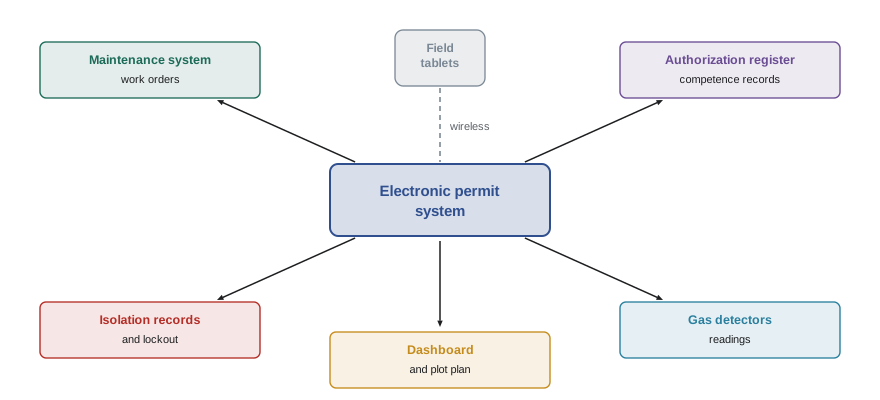
An electronic permit system replaces the paper forms, registers and boards with software, usually accessed through desktop computers in control rooms and offices and through tablets or rugged phones in the field. Typical functions include:
- Permit request and preparation, often generated from a maintenance work order in the computerized maintenance management system (CMMS), so that equipment details, location and planned dates carry over automatically.
- Templates and prompts for each permit type, with mandatory fields and rules that prevent a permit from being issued until required precautions, certificates and signatures are complete.
- Libraries of standard job hazard analyses and isolation plans for repetitive tasks, which can be reused and adapted.
- Isolation management, with each isolation point, lock number and verification recorded, and rules that stop isolations from being removed while any linked permit is live.
- Gas test recording, sometimes with readings sent directly from connected gas detectors.
- Electronic signatures with identity checks, such as personal logins, badges or biometrics, and automatic checks that the signer holds the right authorization for that role, area and permit type.
- Clash detection that compares the location, time and type of each permit with others and with the site's conflict matrix, warning the issuer of possible simultaneous operations.
- Live dashboards and plot plans showing every planned, live, suspended and closed permit by location.
- Automatic handover reports listing permits, isolations and overrides for each area at shift change.
- Records and analytics for audits, investigations and performance indicators.
Benefits
Sites that have moved to electronic permits commonly report several benefits:
- Speed and consistency: permit preparation is faster because data carries over from work orders and standard templates. Every permit of a type looks the same and contains the same required fields.
- Enforced rules: the system can refuse to proceed if a required gas test is missing, if an isolation is not verified, if a signer is not authorized or if the permit has expired.
- Better coordination: everyone sees the same live picture of work in progress, and clash detection highlights conflicts automatically.
- Traceability: every action is time-stamped and attributed to a person, which helps audits and investigations.
- Data for improvement: permit counts, cycle times, revalidation rates and audit findings can be analyzed to find bottlenecks and weaknesses.
Measuring the effect on cycle time
One common reason for introducing an electronic system is to reduce the time permits take to prepare and issue, so that issuers spend more time in the field and less at the desk. A simple way to estimate the benefit is to compare total cycle time before and after.
Here \( N \) is the number of permits in a period and \( t_{\text{paper}} \) and \( t_{\text{electronic}} \) are the average issuer times per permit under each system.
Worked problem
Estimating issuer time saved
A plant issues about 2,400 permits a year. A time study finds that preparing, issuing and closing a paper permit takes an issuer 42 minutes on average. In a pilot area using an electronic system, the average is 30 minutes, but issuers also spend about 3 minutes per permit on extra steps such as photographing isolations. How many issuer hours per year would the electronic system save, and what is that in 8-hour shifts?
Show solution
- Net electronic time per permit: \( 30 + 3 = 33 \) minutes.
- Saving per permit: \( 42 - 33 = 9 \) minutes.
- Annual saving: \( 2400 \times 9 = 21\,600 \) minutes, or \( 21\,600 / 60 = 360 \) hours.
- In 8-hour shifts: \( 360 / 8 = 45 \) shifts per year.
- The time is only a benefit if issuers spend it in the field on site visits, checks and coaching rather than on more paperwork.
Answer: About 360 issuer hours, or 45 eight-hour shifts, per year.
New risks
Electronic systems can create problems of their own, and several have been reported in industry reviews and incident investigations:
- Screen focus: issuers may spend more time at a screen and less at the work site, issuing permits remotely because the system allows it. The joint site visit must remain mandatory.
- Tick-box behavior: mandatory fields and drop-down lists make it easy to complete a permit without thinking. A permit can be fully compliant in the software and still wrong in the field.
- Over-trust in automation: users may assume the clash detection has found every conflict, but it can only compare what has been entered. A permit with the wrong location or a vague description will not clash with anything.
- Template drift: standard job hazard analyses and isolation plans can be reused for jobs that are similar but not the same, carrying over precautions that do not fit.
- System outages: power, network or software failures can stop permit work entirely unless there is a tested paper fallback procedure.
- Cyber security: permit systems are linked to maintenance, control and identity systems, and must be protected like other operational technology. The CISSP courses and ROB-360 discuss security for connected systems; for permit systems, the key points are access control, logging and keeping the fallback ready.
- Field usability: small screens, gloves, cold, rain and hazardous area restrictions on electronic devices can make field use awkward. Tablets used in classified areas must be certified for that area.
| Risk | Typical control |
|---|---|
| Remote issuing without site visit | Require geolocated or field-device signature at issue, plus audit of site visits |
| Tick-box completion | Free-text fields for key hazards in the user's own words; field verification audits |
| Wrong location entered | Selection from plot plan or asset tag, not free text; area authority review |
| Template misuse | Templates reviewed and approved; prompt to confirm each precaution applies |
| System outage | Tested paper fallback with pre-numbered forms and a reconciliation step |
| Unsuitable devices in hazardous areas | Use devices certified for the area classification |
| Cyber threats | Access control, logging, patching and network separation |
Introducing an electronic system
Moving from paper to electronic permits is a significant change and should be managed as one, using the site's management of change process. Good practice includes:
- Fix the process first. An electronic system will speed up a bad permit process as easily as a good one. Review and improve the permit procedure before configuring the software.
- Involve users from the start: issuers, holders, operators and contractors should help choose and configure the system.
- Pilot in one area, compare results with paper areas and adjust before rolling out.
- Train everyone, including contractors, and assess competence on the new system before granting authorizations.
- Keep the joint site visit and face-to-face handover; the software supports them but does not replace them.
- Plan and practice the paper fallback, including how permits issued on paper during an outage are entered into the system afterwards.
- Monitor leading indicators, such as site visit compliance and field audit findings, after go-live to catch new failure modes early.
In the US, electronic records must still meet OSHA retention requirements, such as keeping canceled confined space entry permits for at least one year under 1910.146(e)(6), and personal information such as training records may be subject to state privacy laws.
What stays the same
An electronic system changes the tools, not the principles. The issuer still owns the state of the plant and must see it before issuing a permit. The holder still owns the work and must brief the crew face to face. Isolations must still be verified at the equipment, gas tests must still be done at the right place with a working instrument, and handover must still include a conversation. Sites that keep these principles at the center of their electronic system get the benefits of speed and data without losing the human checks that actually prevent incidents.
Choosing a system
When comparing electronic permit products, sites usually look at how well the system fits their existing procedure and permit types, how easily it links to their maintenance system and authorization records, how it works on field devices in all weather and in hazardous areas, how flexible its clash detection and conflict rules are, how it handles outages and paper fallback, what reports and indicators it provides, and what support and training the supplier offers. Visiting another site that already uses the product, and asking its issuers rather than its managers how it works in practice, is often the most useful step in the evaluation.
The cost of a system is not only the license. Configuration, data migration, devices, training, integration with other systems and ongoing administration often cost more than the software itself. A realistic business case includes these costs and counts only the benefits the site expects to capture, such as issuer time actually redeployed to the field.
Data from electronic systems
One of the most valuable side effects of an electronic system is data. Because every permit, revalidation and close-out is time-stamped, sites can see patterns that were invisible on paper: which areas generate the most permits, how long permits wait for issue, how often revalidations are late, which contractors have the most suspended or reissued permits, and how issuer workload peaks during the day. This data supports staffing decisions, coordination planning and targeted audits. It must be interpreted carefully, though; a low number of findings recorded in the system may mean the system is working, or it may mean nobody is looking.
Mixed paper and electronic sites
Many organizations run paper permits at some sites and electronic permits at others, or use electronic permits for most work but keep paper for remote locations without network coverage. Mixed systems need clear rules about which applies where, how paper permits are recorded in the electronic register, and how issuers and holders who move between sites are trained in both. Contractors who work at several sites can find the differences confusing, so the core principles and the language used on the forms should be kept the same wherever possible, even when the tools differ.
Whatever the tool, the test of a permit system is the same: does every hazardous non-routine job get the right precautions, verified in the field, understood by the crew and maintained until the work is safely closed? An electronic system that helps answer yes to that question is worth having; one that only produces neater records is not.
Training for an electronic system
Training for an electronic system should cover the permit principles first and the software second. People need to understand why each step exists before they learn which button to press, or the system becomes a sequence of screens to get through. Practical training on realistic jobs, using the same devices people will use in the field, works far better than demonstrations. Refresher training is needed after major software updates, which can change screens and workflows in ways that confuse experienced users. Sites should also train a small group of super users in each area, who can help colleagues, collect feedback and report problems to the system administrators.
Common mistakes
MistakeBuying software to fix a weak permit process.
InsteadImprove the procedure first, then configure the system to support it.
MistakeLetting issuers sign permits remotely without visiting the site.
InsteadKeep the joint site visit mandatory and check it in audits.
MistakeTrusting clash detection to find every conflict.
InsteadUse clash detection as one tool, alongside coordination meetings and area authority review.
MistakeHaving no tested paper fallback.
InsteadPrepare and practice a fallback procedure for system outages.
MistakeUsing ordinary tablets in hazardous areas.
InsteadUse devices certified for the area classification.
Summary and key terms
- Electronic permit systems handle requests, permits, isolations, signatures, clash detection, dashboards and records.
- Benefits include speed, consistency, enforced rules, coordination and data for improvement.
- Time saved is only a benefit if issuers use it in the field.
- New risks include remote issuing, tick-box behavior, over-trust, template drift, outages and cyber threats.
- Clash detection can only compare what has been entered accurately.
- Introduce systems through management of change, with pilots, training and a tested fallback.
- Electronic records must still meet legal retention and privacy requirements.
- ePTW
- Electronic permit-to-work system.
- CMMS
- Computerized maintenance management system, the source of work orders.
- Clash detection
- Automatic checking of permits for conflicts in place, time and work type.
- Electronic signature
- A signature made in software, tied to a verified user identity.
- Template
- A reusable standard permit, hazard analysis or isolation plan.
- Paper fallback
- A tested manual procedure used when the electronic system is unavailable.
- Dashboard
- A live display of permit status across the site.
- Cycle time
- The total time to prepare, issue and close a permit.
- Management of change
- The formal process for reviewing and approving changes.
- Certified device
- Equipment approved for use in a classified hazardous area.
Practice problems
Work each problem on paper first, then reveal the answer to check.
Name five functions of an electronic permit system.
Show answer
Requests, templates, isolation management, gas test records, signatures, clash detection, dashboards, handover reports, analytics.
What is the biggest risk of remote issuing?
Show answer
Skipping the joint site visit.
Why can clash detection miss conflicts?
Show answer
It only compares what has been entered; wrong locations or vague descriptions defeat it.
1,000 permits save 6 minutes each. How many hours is that?
Show answer
\( 6000/60 = 100 \) hours.
Why fix the permit process before installing software?
Show answer
Software speeds up a bad process as easily as a good one.
What should happen during a system outage?
Show answer
Use the tested paper fallback and reconcile records afterwards.
What special requirement applies to tablets in classified areas?
Show answer
They must be certified for the area.
How can a site reduce tick-box behavior in an electronic system?
Show answer
Require free-text hazard descriptions and audit permits in the field.
Which process should govern the introduction of an electronic system?
Show answer
Management of change.
Give one leading indicator to watch after go-live.
Show answer
Site visit compliance or field audit findings.
Lesson quiz · 5 questions
Score 60% or more to complete this lesson.
Create a free account to save your progress, take quizzes and earn a certificate.