
GCP-222 · Lesson 9 of 12 · 19 min
Data retention, lifecycle and backup
▶ Video coming soon A video version of this lesson is on the way.
Thursday, November 5, brings a visitor: Daniel Ferreira, Birchline's general counsel, who has written the company's new records retention schedule. He has two requests for the data team, and they pull in opposite directions. Some data must be kept for years and must not be deleted early, even by accident. Other data, especially personal information about customers, must be deleted once it is no longer needed, and Birchline must be able to show that it was. Aisha and Mateo spend the session turning his schedule into settings, and then look at what protects data when something goes wrong.
Retention: keeping long enough, and not too long
A retention schedule says how long each kind of record is kept and what happens at the end. Daniel's schedule for the data team has four lines. Sales and tax records are kept for seven years, which comfortably covers the record-keeping periods the IRS and Ohio can ask about, usually three to seven years, with a margin for audits that start late. Raw till and web files are kept for 400 days, long enough to rebuild a year of curated data. Web clickstream events are kept for 25 months, enough for year-on-year comparisons. Customer contact details on returns are kept for two years after the last return and then deleted or anonymized, because state privacy laws and Birchline's own privacy notice commit it to keeping personal information only as long as it is needed.
Daniel is careful to say that these periods are Birchline's decisions, made with advice, and that the exact legal minimums depend on the record and the jurisdiction. The data team's job is to make each line of the schedule true in the systems: nothing deleted early, everything deleted on time, and evidence of both.
Cloud Storage: classes, lifecycle rules and locks
GCP-220 introduced the four Cloud Storage classes, Standard, Nearline, Coldline and Archive, which trade a lower storage price for higher access charges and a minimum storage duration: about 30 days for Nearline, 90 for Coldline and 365 for Archive, with an early-deletion charge for objects removed sooner. Autoclass can move objects between classes automatically based on how often they are read. For data whose access pattern is predictable, such as landing files that are read in the first few days and then almost never, explicit lifecycle rules are cheaper and clearer.
A lifecycle rule is an action, such as Delete or SetStorageClass, with conditions, such as the object's age in days, a name prefix, whether it is the live version, or how many newer versions exist. Rules run automatically, usually within a day of the condition being met. The landing bucket's rules, set in GCP-220, move objects to Coldline after 30 days and delete them after 400.
{
  "lifecycle": {
    "rule": [
      {"action": {"type": "SetStorageClass", "storageClass": "COLDLINE"},
       "condition": {"age": 30, "matchesPrefix": ["pos/", "web/"]}},
      {"action": {"type": "Delete"},
       "condition": {"age": 400, "matchesPrefix": ["pos/", "web/"]}}
    ]
  }
}
Mateo checks what the rules save, using illustrative prices of 0.020 dollars per GiB-month for Standard and 0.004 for Coldline, and the landing bucket's steady intake of about 600 GiB a month.
# Steady-state monthly storage cost of the landing bucket, with and without lifecycle rules
intake = 600            # GiB of new files each month
standard, coldline = 0.020, 0.004   # illustrative prices, dollars per GiB-month
keep_days, cold_after = 400, 30

def months(days): return days / 30.4      # average month length

stored_total = intake * months(keep_days)            # GiB held at any time
in_standard = intake * months(cold_after)
in_coldline = stored_total - in_standard

all_standard = stored_total * standard
with_rules = in_standard * standard + in_coldline * coldline
print(f"stored at any time: {stored_total:,.0f} GiB")
print(f"all in Standard:  {all_standard:,.2f} dollars a month")
print(f"with lifecycle:   {with_rules:,.2f} dollars a month")
print(f"saving: {all_standard - with_rules:,.2f} dollars a month")stored at any time: 7,895 GiB all in Standard: 157.89 dollars a month with lifecycle: 41.05 dollars a month saving: 116.84 dollars a month
What this code does
This estimates how much data the landing bucket holds once it has filled up: 600 GiB arriving each month and each file kept for 400 days. It then prices that data two ways, all in the Standard class, or in Standard for the first 30 days and Coldline after that, using illustrative prices. The output shows the bucket holds roughly 7,900 GiB at any time and that the lifecycle rules cut the monthly bill by about three quarters.
About 158 dollars a month in Standard against about 41 with the rules, before access charges. The saving is real but modest at Birchline's size; the more important effect is that the 400-day rule guarantees the files are deleted on schedule, which is what Daniel asked for.
For records that must not be deleted early, Cloud Storage offers a retention policy on a bucket: no object can be deleted or overwritten until it is older than the retention period. A retention policy can be locked, after which it can never be removed or shortened, only lengthened, and the bucket cannot be deleted while it holds protected objects. Locking is permanent, so Birchline locks only the tax-records bucket, with a seven-year policy, after Daniel has signed off. Object holds prevent deletion of individual objects, for example while a legal matter is open, until the hold is released.
Two features protect against mistakes rather than enforce rules. Object versioning keeps the previous version when an object is overwritten or deleted, and lifecycle conditions on noncurrent versions keep the cost under control. Soft delete keeps deleted objects recoverable for a retention window, seven days by default and configurable up to 90, and is on for new buckets unless turned off; soft-deleted data is billed like live data while it is kept.
BigQuery: expiration, time travel and snapshots
BigQuery handles retention with expiration settings. A dataset can have a default table expiration, applied to every new table, which suits scratch datasets: Birchline's scratch dataset deletes tables after seven days. A table can have its own expiration time. And a partitioned table can have a partition expiration, which deletes each partition once it is older than the setting, so curated.web_events keeps 25 months of daily partitions automatically. For data that must be deleted on a schedule, partition expiration is the cleanest tool, because it deletes whole days without any query.
BigQuery also protects against accidents. Time travel lets you query or restore a table as it was at any point in the time travel window, seven days by default and configurable per dataset from two to seven days, using FOR SYSTEM_TIME AS OF in a query or by copying the old state to a new table. A deleted table can be restored within the window too. After the window, fail-safe keeps the data for another seven days, but only Google's support team can recover it. Under the default logical storage billing, time travel and fail-safe storage is included in the storage price; under physical storage billing, it is charged separately.
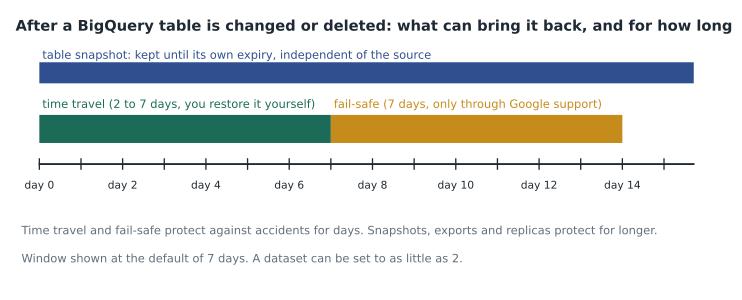
Time travel and fail-safe cover days, not months. For longer protection, a table snapshot preserves a table's contents at a moment, cheaply, because it stores only the data that later changes in the source; it can be kept until its own expiration and restored to a new table. Birchline takes a snapshot of each curated table on the first of every month and keeps it for 13 months. Table clones are writable copies that also share storage with their source, useful for testing a change on real data. And exports to Cloud Storage, in Avro or Parquet, give a copy outside BigQuery for the seven-year records.
-- Restore last Tuesday morning's version of a table that was overwritten by mistake
CREATE TABLE curated.returns_daily_restored AS
SELECT * FROM curated.returns_daily
  FOR SYSTEM_TIME AS OF TIMESTAMP("2026-11-03 09:00:00-05");

-- Monthly snapshot kept for about 13 months
CREATE SNAPSHOT TABLE snapshots.sales_20261101
CLONE curated.sales
OPTIONS (expiration_timestamp = TIMESTAMP_ADD(CURRENT_TIMESTAMP(), INTERVAL 395 DAY));
High availability and disaster recovery
Retention and backups answer 'can we get it back?'. Availability answers 'can we keep working when something fails?'. Two numbers frame every design. The recovery point objective (RPO) is how much recent data you can afford to lose, measured in time. The recovery time objective (RTO) is how long you can afford to be without the system. A nightly backup gives an RPO of up to a day; synchronous replication gives an RPO of zero.
Location is the first defense. A regional bucket or dataset stores data redundantly across zones in one region, which survives the loss of a zone. A dual-region bucket stores data in two specific regions, and a multi-region across a large area such as the United States, which survives the loss of a region. For Canada, where there is no Canadian multi-region, the configurable dual-region pairing Montréal and Toronto, described in GCP-220, keeps data in the country while surviving the loss of either city's region. Dual-regions replicate asynchronously by default; turbo replication, for an extra charge, targets replicating new objects within about 15 minutes.
For databases such as the shop's Cloud SQL instance, the options are layered. Automated backups run daily and, with point-in-time recovery turned on, the logs between them let you restore to any moment in the retention window, typically losing only a few minutes of data. High availability configuration places a standby in a second zone with synchronous replication; if the primary fails, Cloud SQL fails over automatically in about a minute, using the same IP address. Read replicas, including in another region, offload reads and can be promoted to a standalone primary in a disaster, with an RPO that depends on replication lag. Enhanced backups, managed through Google's Backup and DR service, store backups in a separate project with enforced retention, so even a compromised production project cannot delete them.
| Need | Cloud Storage | BigQuery | Cloud SQL |
|---|---|---|---|
| Undo an accidental change within days | Soft delete, versioning | Time travel (2 to 7 days) | Point-in-time recovery |
| Keep a long-term copy | Archive class, locked retention policy | Snapshots, exports to Cloud Storage | Automated and on-demand backups, enhanced backups |
| Survive a zone failure | Regional or wider location | Regional or multi-region dataset | High availability standby |
| Survive a region failure | Dual-region or multi-region | Multi-region dataset or cross-region replica | Cross-region read replica, promoted |
| Delete on schedule | Lifecycle Delete rule | Table or partition expiration | Backup retention settings |
Worked problem
Setting the web events retention
curated.web_events is partitioned by event_date and must keep 25 months of data. Daniel also wants Birchline to be able to recover from an accidental deletion for as long as possible, and finance wants storage costs kept down. What settings should Aisha use?
Show solution
- 25 months is about 25 × 30.4 = 760 days, so set the partition expiration to 761 days, rounding up so no partition is removed a day early.
- Each daily partition is then deleted automatically about 25 months after its date, with no scheduled DELETE needed.
- Keep the dataset's time travel window at the maximum of 7 days, so an accidental deletion can be undone without Google support for a week.
- Add a monthly snapshot kept for 13 months for the curated tables that feed finance; web events are not needed for finance, so they do not need one.
Answer: Partition expiration of 761 days, time travel at 7 days, and no extra snapshots for web events. The expiration enforces the schedule; time travel covers accidents.
Common mistakes
MistakeDeleting data with scheduled DELETE statements when expiration would do.
InsteadUse partition or table expiration, which deletes on schedule without queries or failures.
MistakeLocking a retention policy before the period is agreed.
InsteadLocking is permanent; agree the period with legal first, and test on an unlocked bucket.
MistakeTreating time travel as a backup.
InsteadTime travel covers at most seven days; use snapshots or exports for longer protection.
MistakeKeeping personal data forever because storage is cheap.
InsteadDelete or anonymize it when the retention period ends, as privacy law and policy require.
MistakeAssuming a dual-region bucket replicates new data instantly.
InsteadDefault replication is asynchronous; use turbo replication when a short RPO matters.
MistakeRunning Cloud SQL without point-in-time recovery.
InsteadTurn on automated backups and point-in-time recovery, and test a restore.
Summary and key terms
- A retention schedule sets how long each kind of record is kept; the data team makes it true by preventing early deletion and enforcing timely deletion.
- Cloud Storage uses classes with minimum durations, lifecycle rules to change class and delete, retention policies that can be locked permanently, object holds, versioning and soft delete, which keeps deleted objects for 7 days by default and up to 90.
- BigQuery uses dataset, table and partition expiration, time travel of 2 to 7 days, a further 7 days of fail-safe through support, snapshots, clones and exports.
- Availability is planned with RPO and RTO, using regional, dual-region and multi-region locations, turbo replication, and for Cloud SQL backups, point-in-time recovery, high availability standbys, read replicas and enhanced backups.
- Retention schedule
- A document stating how long each kind of record is kept and what happens afterward.
- Lifecycle rule
- A Cloud Storage rule that changes the class of, or deletes, objects that meet conditions.
- Retention policy
- A bucket setting that stops objects being deleted before a set age; it can be locked.
- Soft delete
- Keeping deleted Cloud Storage objects recoverable for a set number of days.
- Partition expiration
- A BigQuery setting that deletes partitions older than a given age.
- Time travel
- BigQuery's ability to query or restore a table as it was within the last 2 to 7 days.
- Table snapshot
- A cheap, read-only copy of a BigQuery table at a point in time.
- RPO and RTO
- How much data loss, and how much downtime, a system can tolerate.
Practice problems
Work each problem on paper first, then reveal the answer to check.
What happens after BigQuery's time travel window ends?
Show answer
Fail-safe keeps the data for seven more days, recoverable only through Google support.
Why lock only the tax-records bucket's retention policy?
Show answer
Locking cannot be undone, so it is used only where the period is agreed and must be enforced.
Which Cloud SQL feature fails over automatically when a zone fails?
Show answer
High availability, with a standby in another zone.
What is the default soft delete window for a new bucket?
Show answer
Seven days.
Lesson quiz · 5 questions
Score 60% or more to complete this lesson.
Create a free account to save your progress, take quizzes and earn a certificate.