
GCP-222 · Lesson 4 of 12 · 19 min
Workflows and event-driven pipelines
▶ Video coming soon A video version of this lesson is on the way.
Thursday's session, on October 29, is about the till files. Each of Birchline's 40 stores sends its nightly sales file to the landing bucket gs://bl-data-landing between about 22:30 and 02:00, and for two years a scheduled load at 02:30 has picked up whatever had arrived. Store 31's file came in at 02:41 last week, missed the load, and that store showed zero sales on the morning dashboard. Aisha's fix, which she and Mateo design today, is to stop waiting for the clock and load each file the moment it arrives.
Events instead of timetables
In an event-driven pipeline, something happening starts the work: a file is written, a message is published, a table is updated, a job finishes. Nothing polls and nothing guesses. The benefits are speed, because data is processed seconds after it arrives, and correctness, because a late file is simply processed late rather than missed. The costs are new kinds of failure to design for: events that arrive twice, arrive out of order, or describe something that is not finished yet.
Google Cloud's main tools for this are Eventarc, which routes events from sources to destinations, Workflows, which runs a sequence of steps in response, and Pub/Sub, which carries messages between systems. Small pieces of custom logic run in Cloud Run services or Cloud Run functions, the service previously called Cloud Functions.
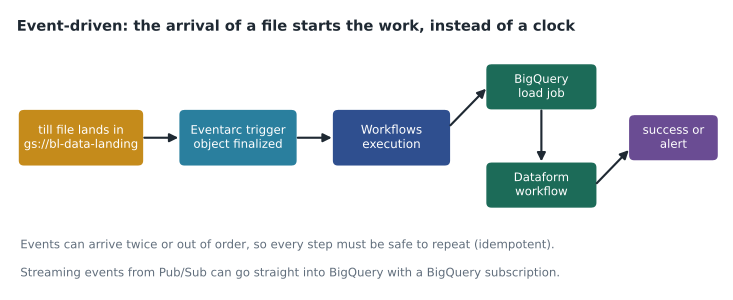
Eventarc triggers
An Eventarc trigger has three parts. The event source and type say what to listen for: for example, the object finalized event from Cloud Storage, which fires when a new object is fully written to a bucket, or a message published to a Pub/Sub topic, or an entry in Cloud Audit Logs such as a BigQuery job completing. Filters narrow the events, for example to one bucket. And the destination says what to start: a Cloud Run service, a Workflows workflow, a Cloud Run function, or a service on Google Kubernetes Engine. The trigger runs as a service account that must be allowed to start the destination.
The exact event type matters. A bucket emits different events when an object is created, deleted, archived or has its metadata changed. The finalized event is the right one for new files, because it fires only once the upload is complete, so the pipeline never reads half a file. Large uploads should still be written to a temporary name and renamed, or copied in as one object, because some tools write partial objects and then overwrite them.
# Start the till-file workflow whenever a new object is finalized in the landing bucket
gcloud eventarc triggers create till-file-arrived \
  --location=us-east5 \
  --event-filters="type=google.cloud.storage.object.v1.finalized" \
  --event-filters="bucket=bl-data-landing" \
  --destination-workflow=load-till-file \
  --destination-workflow-location=us-east5 \
  --service-account=ev-till-files@bl-data-prod.iam.gserviceaccount.com
Workflows
Workflows is a serverless service that runs a series of steps written in YAML or JSON. Each step can call a Google Cloud API through a built-in connector, call any HTTP endpoint, assign variables, branch on a condition, loop, run branches in parallel, wait, or raise an error. It keeps the state of every execution, retries failed calls according to a policy, and records each execution's inputs, outputs and logs. There are no servers to run, and it is billed by the steps executed, which for a pipeline of a dozen steps a night is a very small amount.
The workflow Aisha and Mateo write receives the event from Eventarc, which includes the bucket and object name, and does four things: ignore files that are not till files, load the file into a raw table for its store and date, record the load in a control table, and, once all 40 stores have reported for the day, start the Dataform workflow that builds the curated tables.
# load-till-file.yaml (Workflows syntax; runs in Google Cloud, not in the browser)
main:
  params: [event]
  steps:
    - init:
        assign:
          - name: ${event.data.name}
          - project: "bl-data-prod"
    - only_till_files:
        switch:
          - condition: ${not(text.match_regex(name, "^pos/pos_[0-9]{2}_[0-9]{8}[.]csv$"))}
            return: "ignored"
    - load:
        call: googleapis.bigquery.v2.jobs.insert
        args:
          projectId: ${project}
          body:
            configuration:
              load:
                sourceUris: ${["gs://bl-data-landing/" + name]}
                destinationTable: {projectId: "bl-data-prod", datasetId: "raw", tableId: "pos_sales_load"}
                writeDisposition: "WRITE_APPEND"
                skipLeadingRows: 1
    - record:
        call: googleapis.bigquery.v2.jobs.query
        args:
          projectId: ${project}
          body:
            query: ${"CALL raw.record_till_file('" + name + "')"}
            useLegacySql: false
    - done:
        return: "loaded"
Workflows uses its own expression syntax, with dollar signs and curly brackets around expressions, which is why it looks different from the SQL elsewhere in this course. The pattern matters more than the syntax: check the input, do the work through a connector that waits for the job to finish, record what happened, and return a result that the execution history shows.
Duplicates, order and idempotency
Eventarc and Pub/Sub deliver events at least once. In normal operation each event arrives once, but after a network problem or a retry, the same event can arrive twice. Events can also arrive in a different order from the one in which they happened. A pipeline that appends rows every time it sees an event will eventually double-count a store's sales, so the design must make processing an event a second time harmless.
Aisha's design uses the object name as a key. The control table records every file that has been loaded, with its generation number, a value Cloud Storage changes each time an object is overwritten. Before loading, the procedure checks whether that name and generation are already recorded; if so, it does nothing. If a store resends a corrected file, the generation changes, and the procedure replaces that store's rows for that date instead of adding to them. Mateo models the rule with a short simulation.
# Process a stream of file events at most once per (file name, generation)
events = [
    ("pos_12_20261028.csv", 1), ("pos_15_20261028.csv", 1),
    ("pos_12_20261028.csv", 1),          # duplicate delivery
    ("pos_31_20261028.csv", 1),
    ("pos_15_20261028.csv", 2),          # store 15 resent a corrected file
]
loaded = {}     # file name -> generation already loaded
for name, gen in events:
    if loaded.get(name) == gen:
        print(f"skip    {name} gen {gen} (already loaded)")
    elif name in loaded:
        print(f"replace {name} gen {loaded[name]} -> gen {gen}")
        loaded[name] = gen
    else:
        print(f"load    {name} gen {gen}")
        loaded[name] = gen
print("files in the table:", len(loaded))load pos_12_20261028.csv gen 1 load pos_15_20261028.csv gen 1 skip pos_12_20261028.csv gen 1 (already loaded) load pos_31_20261028.csv gen 1 replace pos_15_20261028.csv gen 1 -> gen 2 files in the table: 3
What this code does
This plays back five file-arrival events, including one duplicate and one corrected file, and keeps a record of which version of each file has already been loaded. For each event it decides whether to load the file, skip it because that exact version is already in, or replace an older version. The output shows that the duplicate is ignored and the correction replaces the earlier rows, so the table ends with exactly one version of each store's file.
Three stores, three files in the table, no matter how many events arrived. The same principle applies to every event-driven step: give each unit of work a key, and make a second attempt at the same key a no-op or a replacement, never an addition.
Streams from Pub/Sub
Not every event is a file. The online shop publishes web events, such as product views and checkout errors, to the Pub/Sub topic web-events, which GCP-220 set up. For data that only needs to land in BigQuery, a BigQuery subscription writes each message straight into a table, with no code or pipeline in between; it can map the topic's schema to the table's columns or store the whole message in one column. When messages must be transformed, joined or aggregated in flight, such as the checkout errors counted per minute, a Dataflow streaming pipeline reads from a subscription instead. Messages that repeatedly fail can be sent to a dead-letter topic for later inspection, so one bad message does not block the rest.
| Event or need | Typical design |
|---|---|
| A file lands in a bucket and must be loaded | Eventarc trigger on object finalized → Workflows → BigQuery load job |
| Messages must land in BigQuery unchanged | Pub/Sub BigQuery subscription |
| Messages must be aggregated or joined as they stream | Pub/Sub → Dataflow streaming pipeline → BigQuery |
| A small custom step, such as removing a field or calling an API | Eventarc or Pub/Sub → Cloud Run service or Cloud Run function |
| SQL transformations should run after new data arrives | Workflows or Eventarc starts a Dataform workflow invocation |
| A long-running batch job should start when its input appears | Eventarc → Workflows → Dataflow template or Dataproc job |
Workflows or Airflow?
Mateo asks the obvious question: if Workflows can call APIs in order, branch and retry, why does Birchline keep an Airflow environment at all? Aisha's answer is that the two overlap but have different strengths. Workflows is serverless and event-friendly: nothing runs between executions, an execution can start within a second of an event, and a short pipeline costs almost nothing. It is a good fit for pipelines of a few to a few dozen steps, written by people comfortable with YAML.
Airflow is built around schedules and history: it understands logical dates, catchup and backfills, shows every run of every DAG on one screen, and has a very large library of operators for systems outside Google Cloud. Its DAGs are Python, so they can be generated, tested and reused like any other code. For the warehouse exports, with their file-server sensor and supplier FTP drop, Airflow is the better tool; for the till files, which arrive one at a time and need four steps each, Workflows is.
Workflows can also wait. A step can pause until a callback URL is called, which lets a workflow hand work to another system and resume when it reports back, or it can poll a long-running job such as a Dataflow pipeline until it finishes, sleeping between checks without paying for the time. An execution can run for up to a year, so even a slow external approval fits. What Workflows does not give you is Airflow's scheduler view of thousands of past runs by date; for that, Birchline relies on the control table and on Cloud Logging, which lesson 5 covers.
Worked problem
Deciding when the day is complete
Birchline has 40 stores. By 01:15 on October 29 the control table shows 38 distinct till files for October 28, including two from store 15 (generations 1 and 2). Store 27 was closed that day and sends no file. One file is still missing. Should the curated build start?
Show solution
- Count distinct stores, not files: store 15's two generations are one store, so 38 files means 37 stores.
- Store 27 was closed, so 39 stores are expected to report, not 40.
- 37 of 39 expected stores have reported, so two are missing, not one.
- The rule is to build when all expected stores have reported, or at 02:30 at the latest with a warning listing the missing stores.
Answer: Not yet. Two expected stores are missing. If they have not reported by 02:30, the build runs anyway and the alert names the two stores, so the dashboard can show them as missing rather than as zero sales.
Common mistakes
MistakeTriggering on every object event in a bucket.
InsteadFilter to the finalized event and the right bucket, and ignore files that do not match the expected name pattern.
MistakeAssuming each event arrives exactly once.
InsteadDesign for at-least-once delivery: key each unit of work and make repeats harmless.
MistakeCounting files to decide that a day is complete.
InsteadCount distinct expected sources, allowing for corrections and closures.
MistakeWriting a Cloud Run service just to copy Pub/Sub messages into BigQuery.
InsteadUse a BigQuery subscription when no transformation is needed.
MistakeLetting one malformed message block a subscription.
InsteadSet a dead-letter topic and a maximum number of delivery attempts.
Summary and key terms
- Event-driven pipelines start work when something happens instead of at a fixed time, which makes them faster and keeps late data from being missed.
- Eventarc routes events such as Cloud Storage object finalized, Pub/Sub messages and audit log entries to destinations such as Workflows, Cloud Run and Cloud Run functions.
- Workflows runs serverless steps in YAML or JSON with connectors, branching, retries and execution history.
- Delivery is at least once, so every step must be idempotent, keyed for example by object name and generation.
- BigQuery subscriptions load Pub/Sub messages directly, Dataflow handles transformations in flight, and dead-letter topics isolate bad messages.
- Event-driven pipeline
- A pipeline whose steps start when an event occurs rather than on a timetable.
- Eventarc
- A Google Cloud service that routes events from sources to destinations.
- Object finalized event
- The Cloud Storage event that fires when a new object has been completely written.
- Workflows
- A serverless service that runs sequences of steps defined in YAML or JSON.
- Connector
- A built-in Workflows step for calling a Google Cloud API and waiting for the result.
- At-least-once delivery
- A guarantee that each event arrives, possibly more than once.
- BigQuery subscription
- A Pub/Sub subscription that writes messages directly into a BigQuery table.
- Dead-letter topic
- A topic that receives messages that could not be processed after several attempts.
Practice problems
Work each problem on paper first, then reveal the answer to check.
Why is the object finalized event the right one for new files?
Show answer
It fires only once an object has been completely written, so the pipeline does not read a partial file.
What makes the till-file load safe when an event arrives twice?
Show answer
The control table records each file name and generation, and a repeat of the same pair is skipped.
When should messages go through Dataflow rather than a BigQuery subscription?
Show answer
When they must be transformed, joined or aggregated as they stream.
Name two destinations an Eventarc trigger can start.
Show answer
Any two of: Workflows, Cloud Run services, Cloud Run functions, GKE services.
Lesson quiz · 5 questions
Score 60% or more to complete this lesson.
Create a free account to save your progress, take quizzes and earn a certificate.