
GCP-222 · Lesson 12 of 12 · 19 min
Lab walkthrough: an automated daily pipeline
▶ Video coming soon A video version of this lesson is on the way.
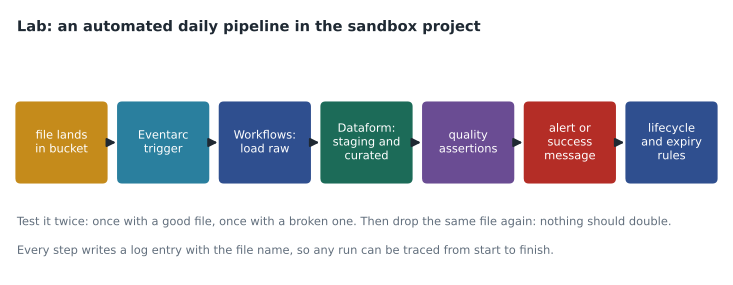
Friday, November 13, is lab day. Aisha gives Mateo the afternoon and a brief: in his sandbox project, bl-sandbox-mateo, build a small version of the till-file pipeline that runs itself every day, using what the last eleven sessions covered, then try to break it. The lab uses three sample stores and a week of invented sales files, so nothing touches production data. Aisha will review it on Monday with one question: would she be happy to be on call for it?
Step 1: write the requirements down
Mateo starts with a short page, because Aisha always asks for one. The pipeline loads each store's daily sales file when it arrives, builds a curated daily sales table, and checks it. It must be idempotent: a file loaded twice must not double the sales. A corrected file must replace the earlier one. A bad file must be set aside without stopping the other stores. The curated table must be ready by 06:00 for the stores that have reported, and any store missing at 06:00 must be listed. Raw files are kept 400 days, curated data 25 months. Only the pipeline's service accounts can write; Mateo's analyst group can read curated data only. Every query has a bytes limit. The page also names the owner, Mateo for the lab, and links to the runbook he will write last.
Step 2: storage and permissions
He creates the landing bucket in the sandbox's primary region, us-east5 (Columbus), with uniform bucket-level access, public access prevention enforced, soft delete at seven days, and the lifecycle rules from lesson 9: Coldline after 30 days, delete after 400. In BigQuery he creates three datasets, raw, staging and curated, and sets partition expiration on curated.daily_sales to 761 days. Three service accounts get narrow roles: one for the Eventarc trigger that may only start the workflow; one for the workflow, with Storage Object Viewer on the bucket, Data Editor on raw and Job User on the project; and one for Dataform, with Data Editor on staging and curated, Data Viewer on raw and Job User. Every resource gets the labels team=analytics-lab and pipeline=lab-daily-sales.
gcloud storage buckets create gs://bl-sandbox-mateo-landing \
  --location=us-east5 \
  --uniform-bucket-level-access --public-access-prevention \
  --soft-delete-duration=7d
gcloud storage buckets update gs://bl-sandbox-mateo-landing --lifecycle-file=lifecycle.json
bq mk --dataset --location=us-east5 --label=pipeline:lab-daily-sales bl-sandbox-mateo:raw
bq mk --dataset --location=us-east5 --label=pipeline:lab-daily-sales bl-sandbox-mateo:staging
bq mk --dataset --location=us-east5 --label=pipeline:lab-daily-sales bl-sandbox-mateo:curated
Keeping everything in one location matters more than it looks: a BigQuery load from a bucket in another location fails, and a query that joins datasets in different locations is refused. Mateo checks the location of every resource before moving on.
Step 3: trigger and workflow
The Eventarc trigger listens for the object finalized event on the landing bucket and starts the workflow, as in lesson 4. The workflow checks the file name against the expected pattern, pos_SS_YYYYMMDD.csv, and moves anything else to a rejected folder. For a valid name it records the file's name and generation in raw.file_log; if that exact pair is already there, it stops, which makes duplicate events harmless. Otherwise it loads the file into raw.pos_lines with the store and sales date taken from the name, replacing any rows from an earlier generation of the same file. If the load fails, for example because of a bad row, the workflow moves the file to a quarantine folder, logs an error with the file name, and ends; the other stores are unaffected.
Step 4: Dataform for staging and curated
Transformations live in a small Dataform repository. A staging table, staging.pos_lines_clean, casts types, drops test transactions and keeps one row per sale line. The curated table, curated.daily_sales, is incremental: each run rebuilds only the sales dates that have new or changed files, so older partitions are untouched and can reach long-term storage pricing. Dataform works out the order from the references between files, so staging always runs before curated. Each table has assertions, Dataform's built-in data checks, that fail the run if any rows break them: sale_line_id must be unique, store_id must be one of the expected stores, and net_sales must not be null.
-- definitions/curated/daily_sales.sqlx  (Dataform)
config {
  type: "incremental",
  uniqueKey: ["sale_date", "store_id"],
  bigquery: { partitionBy: "sale_date", labels: { pipeline: "lab-daily-sales" } },
  assertions: { nonNull: ["sale_date", "store_id", "net_sales"] }
}
SELECT sale_date, store_id, SUM(net_sales) AS net_sales, COUNT(*) AS lines
FROM ${ref("pos_lines_clean")}
${ when(incremental(), `WHERE sale_date IN (SELECT sale_date FROM ${ref("changed_dates")})`) }
GROUP BY sale_date, store_id
The workflow starts a Dataform workflow invocation once a file has loaded, and Dataform's own queries run with a maximum bytes billed setting in the repository's defaults. A second, scheduled Dataform run at 05:30 picks up any stragglers and then runs the 06:00 freshness check, which lists stores with no file for the previous day.
Step 5: monitoring and alerts
Mateo creates three alerting policies in Cloud Monitoring, each sending to his own email for the lab and naming the runbook: a log-based alert on any error entry from the workflow, which catches quarantined files; an alert on failed Dataform workflow invocations, which catches assertion failures; and the freshness check, which fails with an error when any expected store is missing at 06:00. A log sink sends the pipeline's logs to a BigQuery dataset so that a week of runs can be reviewed with SQL.
Step 6: try to break it
Aisha's last instruction was the most important one: a pipeline is not finished until someone has tried to break it. Mateo writes down five tests and their expected results before running any of them, then works through them. Before using the cloud services, he checks his loading and checking logic with a small local model of the pipeline.
import sqlite3
db = sqlite3.connect(":memory:")
db.executescript("""
CREATE TABLE file_log (name TEXT, gen INT, PRIMARY KEY (name, gen));
CREATE TABLE pos_lines (store INT, day TEXT, line_id TEXT, net REAL, name TEXT, gen INT);
""")
files = {  # (name, generation) -> rows of (line_id, net_sales)
    ("pos_12_20261110.csv", 1): [("12-1", 40.0), ("12-2", 60.0)],
    ("pos_15_20261110.csv", 1): [("15-1", 25.0), ("15-2", None)],      # bad row: no amount
    ("pos_15_20261110.csv", 2): [("15-1", 25.0), ("15-2", 35.0)],      # corrected file
}
def arrive(name, gen):
    if db.execute("SELECT 1 FROM file_log WHERE name=? AND gen=?", (name, gen)).fetchone():
        return "skipped duplicate"
    rows = files[(name, gen)]
    if any(net is None for _, net in rows):
        return "quarantined"
    store, day = int(name[4:6]), name[7:15]
    db.execute("DELETE FROM pos_lines WHERE name=?", (name,))          # replace older generations
    db.executemany("INSERT INTO pos_lines VALUES (?,?,?,?,?,?)",
                   [(store, day, lid, net, name, gen) for lid, net in rows])
    db.execute("INSERT INTO file_log VALUES (?,?)", (name, gen))
    return f"loaded {len(rows)} rows"

for ev in [("pos_12_20261110.csv", 1), ("pos_12_20261110.csv", 1),
           ("pos_15_20261110.csv", 1), ("pos_15_20261110.csv", 2)]:
    print(ev[0], "gen", ev[1], "->", arrive(*ev))
print("curated:", db.execute("SELECT store, SUM(net), COUNT(*) FROM pos_lines GROUP BY store").fetchall())
expected = {12, 15, 31}
reported = {r[0] for r in db.execute("SELECT DISTINCT store FROM pos_lines")}
print("missing at 06:00:", sorted(expected - reported))pos_12_20261110.csv gen 1 -> loaded 2 rows pos_12_20261110.csv gen 1 -> skipped duplicate pos_15_20261110.csv gen 1 -> quarantined pos_15_20261110.csv gen 2 -> loaded 2 rows curated: [(12, 100.0, 2), (15, 60.0, 2)] missing at 06:00: [31]
What this code does
This is a small working model of the pipeline in an in-memory database. It receives four file events: a good file, the same file again, a file with a missing amount, and a corrected version of that file. For each event it skips exact repeats, sets aside files with bad rows, and otherwise replaces any earlier version of that store's file before loading. It then totals sales per store and lists expected stores with no data. The output shows the duplicate ignored, the bad file quarantined, the corrected file loaded once, correct totals for the two stores, and store 31 reported as missing.
The model behaves as the requirements say: 100 dollars for store 12, 60 for store 15 from the corrected file, and store 31 listed as missing. Mateo then runs the same five tests against the real pipeline in the sandbox and records the results.
| Test | Expected | Result in the sandbox |
|---|---|---|
| Good file for each store | Loaded, curated rows built, no alerts | As expected; 3 stores loaded within 2 minutes of upload |
| Same file uploaded twice | Second event skipped, totals unchanged | As expected after one fix: the first version compared names only and skipped corrected files |
| File with a missing amount | Quarantined, error alert, other stores unaffected | As expected; alert arrived in about 3 minutes |
| Corrected file for the same store and day | Earlier rows replaced, totals updated | As expected once the generation check was added |
| No file for store 31 | Store 31 listed as missing at 06:00 | As expected; freshness check failed and alerted |
The second test found the one real bug: Mateo's first version of the control step compared file names but not generations, so a corrected file was skipped as a duplicate. Fixing it took ten minutes; finding it in production would have meant a store's sales staying wrong until someone noticed.
Step 7: the runbook and the review
Last, Mateo writes the runbook: what each alert means, what to check first, what is safe to do alone, such as releasing a quarantined file after it has been corrected, and who owns the data. He adds the costs for the week from the billing export, filtered by the pipeline label: a few cents, mostly Workflows steps and BigQuery storage. On Monday, Aisha reads the requirements page, the test table and the runbook before she looks at any code, and asks him to walk her through one quarantined file from upload to alert using only the logs. He can. She says yes to her own question, with one change: the freshness alert should go to a group, not to Mateo's personal email.
What changes for production
The sandbox pipeline is a rehearsal, and Mateo lists what would change before anything like it reached production. The alerts would go to the on-call channel. The service accounts and roles would be created from code, reviewed by Teresa's team, rather than by hand. The Dataform repository would be connected to Git with a pull-request review, and the workflow definition would live in the same repository. A staging project would run the same pipeline against copies of real files for a week before the switch. And the control table's run summaries would be added to the morning stand-up's dashboard alongside the other pipelines, so the new pipeline is watched the same way as the old ones from its first night.
Worked problem
Checking the 06:00 deadline
In production, files usually arrive by 02:00. The workflow takes about 3 minutes per file, Dataform's incremental build takes 9 minutes, and assertions take 2 minutes. A late file arrives at 05:40. Will its store be in the 06:00 numbers if the scheduled 05:30 run has already finished?
Show solution
- The file triggers its own workflow at 05:40, which loads it by about 05:43.
- The workflow then starts a Dataform invocation, which builds curated by about 05:52.
- Assertions finish by about 05:54.
- The 06:00 freshness check runs after that and finds the store present.
Answer: Yes. Because each file starts its own run, a file arriving at 05:40 is in the curated table by about 05:54, six minutes before the check. A file arriving after about 05:46 would be listed as missing at 06:00 and added a few minutes later.
Common mistakes
MistakeTesting only with good files.
InsteadWrite down tests for duplicates, corrections, bad data and missing data, with expected results, before running them.
MistakeComparing file names alone to detect duplicates.
InsteadCompare name and generation, so a corrected file is loaded and an exact repeat is skipped.
MistakeCreating resources in mixed locations.
InsteadKeep buckets and datasets for one pipeline in one location.
MistakeSending alerts to a personal address.
InsteadSend them to a group or on-call channel, with a runbook link.
MistakeLeaving the runbook until something breaks.
InsteadWrite it as part of the build; a reviewer should read it before the code.
Summary and key terms
- The lab built a small automated pipeline end to end: written requirements, a bucket with uniform access, public access prevention, soft delete and lifecycle rules, datasets with partition expiration, narrow service accounts and labels, an Eventarc trigger on new files, a workflow that checks names, records name and generation, loads or quarantines files, and a Dataform repository with an incremental curated table and assertions.
- Alerting policies, a log sink and a freshness check cover failures and silence.
- A written test plan, run first against a local model and then in the sandbox, found a real bug, and a runbook makes the pipeline something another person can support.
- Incremental table
- A Dataform table that processes only new or changed data on each run.
- Assertion
- A Dataform data check that fails a run if any rows break a rule.
- Quarantine
- Setting a bad file or record aside so it can be fixed without stopping other work.
- Generation
- A Cloud Storage number that changes each time an object is overwritten.
- Test plan
- A list of tests with their expected results, written before testing.
- Runbook
- Instructions for responding to a pipeline's alerts.
- Workflow invocation
- One run of a Dataform workflow, started by a schedule or an API call.
- Freshness check
- A scheduled check that data for the expected period has arrived.
Practice problems
Work each problem on paper first, then reveal the answer to check.
What bug did the duplicate-file test find?
Show answer
The control step compared names only, so corrected files were wrongly skipped.
Why must the bucket and datasets share a location?
Show answer
Loads and queries across locations fail.
Why is the curated table incremental?
Show answer
It rebuilds only changed dates, which is faster and lets older partitions reach long-term pricing.
What did Aisha change before approving the pipeline?
Show answer
The freshness alert must go to a group rather than a personal email.
Lesson quiz · 5 questions
Score 60% or more to complete this lesson.
Create a free account to save your progress, take quizzes and earn a certificate.