
GCP-222 · Lesson 11 of 12 · 19 min
Cost management for data workloads
▶ Video coming soon A video version of this lesson is on the way.
On Tuesday, November 10, the session has a guest with a spreadsheet. Dana Leclair, Birchline's chief financial officer, has been looking at the billing export, and the data platform's bill for September was just under 4,000 dollars, about twice what she had budgeted. She does not want the team to stop doing useful work; she wants to know where the money goes, which parts are worth it, and how to stop a single mistake from costing a month's budget again. Aisha and Mateo go through the bill line by line.
Where the money goes
A data platform's costs come from a few places. BigQuery compute is charged either by the bytes each query scans, under on-demand pricing, or by the slot capacity used, under the editions model. BigQuery storage is charged per GiB per month, with a lower long-term rate for table data not changed for 90 days. Pipeline services charge for what they run: Dataflow for worker time, managed Airflow for its environment around the clock, Workflows per step, Cloud Run per request and CPU time. Cloud Storage charges for stored data by class, for operations, and for data moved out of Google Cloud or between regions. And Cloud Logging charges for log volume above a free allowance, which surprises teams that log every row.
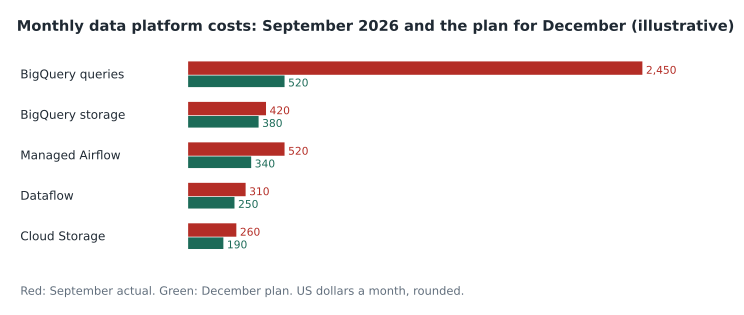
September's total is 3,960 dollars, and the planned December total is 1,680. Most of the difference is one line: BigQuery queries. GCP-221 already found and fixed the biggest single cause, a marketing dashboard tile that scanned about 1,400 GiB each time it loaded and cost about 1,810 dollars in September. The rest of the plan comes from smaller changes in every line, and from controls that stop the next mistake early.
Controlling BigQuery query costs
Under on-demand pricing, Birchline pays 6.25 US dollars per TiB scanned at US list prices, with the first TiB each month free; prices in other locations, including the Canadian regions, differ slightly. The levers are the ones GCP-221 covered: select only needed columns, filter on partition columns, cluster large tables on common filters, use materialized views or summary tables for dashboards, and check the bytes estimate or run a dry run before running anything large.
Three controls stop mistakes from becoming bills. Maximum bytes billed is a setting on a query or a scheduled query that makes it fail, at no charge, if it would scan more than a limit; Birchline sets it on every scheduled query and in the defaults of the analysts' tools. Custom quotas limit how many bytes a project, or each user in a project, can scan per day; Birchline's bl-analytics project allows each analyst 2 TiB a day, which is far more than normal work needs but stops a runaway loop. And require partition filter on large tables refuses queries that would scan every partition.
# A scheduled or ad hoc query that refuses to scan more than 50 GiB
bq query --use_legacy_sql=false --maximum_bytes_billed=53687091200 \
  "SELECT store_id, SUM(net_sales) FROM curated.sales
   WHERE sale_date BETWEEN '2026-10-01' AND '2026-10-31' GROUP BY store_id"
On-demand or capacity?
Under the editions model, Birchline would pay for slot-hours instead of bytes, at pay-as-you-go rates of about 0.04 dollars per slot-hour for Standard, 0.06 for Enterprise and 0.10 for Enterprise Plus at US list prices, with autoscaling that adds slots as queries need them, and lower rates for one- or three-year commitments. Which is cheaper depends on the workload. Workloads that scan a lot of data with simple queries favor capacity; workloads with modest scanning favor on-demand. Mateo compares the two for October using the job history.
# October usage from INFORMATION_SCHEMA.JOBS (both projects), compared under two pricing models
tib_scanned = 85.0             # TiB billed under on-demand
slot_hours_used = 11500.0      # total_slot_ms / 3,600,000, summed over jobs
autoscale_overhead = 1.5       # autoscaling bills slots in steps and for at least a minute
on_demand_price = 6.25         # US dollars per TiB, first TiB free
edition_prices = {"Standard": 0.04, "Enterprise": 0.06}   # dollars per slot-hour, pay as you go

on_demand = (tib_scanned - 1) * on_demand_price
print(f"on-demand: {on_demand:,.2f} dollars")
for name, price in edition_prices.items():
    cost = slot_hours_used * autoscale_overhead * price
print(f"{name} edition: {cost:,.2f} dollars")on-demand: 525.00 dollars Standard edition: 690.00 dollars Enterprise edition: 1,035.00 dollars
What this code does
This takes a month of BigQuery usage, the data scanned and the slot time used, and prices it two ways: by the amount of data scanned, after the free first TiB, and by the slot time that an autoscaling edition would bill, allowing for the extra slot time autoscaling charges for. The output shows the monthly cost under on-demand pricing and under two editions, so the team can see which model is cheaper for this workload.
On-demand comes to 525 dollars for October, against about 690 for Standard and 1,035 for Enterprise once the autoscaling overhead is included. For Birchline's current workload, on-demand stays. The comparison is worth repeating every quarter, because the answer changes as data and usage grow, and Enterprise features such as some security and governance options could change the decision on their own.
Storage, pipelines and logs
BigQuery storage has two settings that matter. Long-term pricing applies automatically to data not modified for 90 days, roughly halving its price, so tables that are rebuilt in full every night never reach it; rebuilding only the changed partitions lets older partitions age into the cheaper rate. And a dataset can be billed on logical bytes, the uncompressed size, or physical bytes, the compressed size on disk, which is often several times smaller for retail data but adds a separate charge for time travel and fail-safe storage. Birchline's curated dataset compresses about four to one, so switching it to physical billing is part of the plan; the raw dataset, with less compression and more churn, stays logical.
Managed Airflow was the third-largest line. The environment had been created larger than needed, with more workers and a larger database than two DAGs require. Resizing it to the smallest size that runs the warehouse exports comfortably, and moving the two simple DAGs to Workflows and Dataform, brings it to about 340 dollars. Dataflow costs fall by right-sizing workers for the streaming checkout-errors pipeline and using lower-cost scheduling, FlexRS, for the weekly batch job that does not need to start immediately. Cloud Storage costs fall through the lifecycle rules from lesson 9 and by keeping soft delete at its seven-day default on the landing bucket rather than the 90 days someone set. Logging costs, small today, are kept small by not logging individual rows in pipeline code.
Seeing and allocating costs
Dana's real request is visibility. Three tools provide it. Billing export to BigQuery, which Birchline set up in GCP-101 to the bl_billing dataset, writes detailed cost rows for every service, SKU and project every day, so cost questions become SQL. Labels, key-value pairs on projects, datasets, jobs, buckets and many other resources, flow into the billing export, so costs can be split by team, pipeline or environment; Birchline labels every scheduled query, Dataflow job and Airflow environment with team and pipeline labels. And budgets with alert thresholds email the finance and data teams when spending reaches set fractions of a budget, or publish to Pub/Sub so that automation can react.
Budgets warn; they do not stop spending. A budget alert at 50, 90 and 100 parts in every 100 of the monthly budget tells people in time to act, but the actual limits come from maximum bytes billed, custom quotas and right-sized resources. Aisha's rule is that every control that matters should be one that prevents the cost, not one that reports it afterwards.
| Control | What it does | Prevents or reports? |
|---|---|---|
| Maximum bytes billed | Fails a query that would scan more than a limit | Prevents |
| Custom query quotas | Caps bytes scanned per user or project per day | Prevents |
| Require partition filter | Refuses queries that would scan all partitions | Prevents |
| Budgets and alerts | Notifies at set fractions of a budget | Reports |
| Billing export and labels | Shows costs by service, project, team and pipeline | Reports |
| Recommender | Suggests idle or oversized resources | Reports |
Reading the billing export
Mateo's homework from Dana is to answer her next question himself: which pipeline cost the most in October? With the billing export in BigQuery and labels on every job, it is one query. The export's standard table has a row per service, SKU, project and day, with the cost, any credits, and the labels of the resources involved. Grouping October's rows by the pipeline label and summing cost plus credits gives the answer: the nightly sales pipeline cost about 210 dollars, most of it in Dataflow and BigQuery storage, while an unlabeled group of costs, about 340 dollars, turns out to be ad hoc analysis in the analytics project, which is expected and has its own budget.
Two habits make the export trustworthy. Labels must be applied when resources are created, through templates and code, because costs incurred before a label is added are not relabeled. And everyone reading the numbers must remember that the export lags real usage by up to a day and that some charges, such as committed-use discounts and credits, appear as separate rows, so totals must add credits to costs before they match the invoice.
Dana ends the session with the arrangement she wants from now on: a monthly 30-minute review with the data team, a one-page summary built from the billing export, and an explanation for any service whose cost moved by more than a quarter. 'I don't mind paying for things that are useful,' she tells Mateo. 'I mind being surprised.' The data team adds a scheduled query that builds the summary table on the third of each month, labeled, with a bytes limit, as every scheduled query now is.
Mateo's query takes four seconds, scans 38 MiB of billing data and, under the analytics project's quota, could not have cost more than a few cents even if he had got it wrong.
Worked problem
Setting a custom quota
Birchline's 18 analysts scanned 31 TiB in October across 21 working days. The heaviest single analyst-day was 0.9 TiB. The team wants a per-user daily quota that never blocks normal work but limits a runaway query loop to a predictable cost. What quota, and what is the worst-case daily cost for one user?
Show solution
- Average per analyst per working day: 31 / (18 × 21) = 31 / 378 ≈ 0.082 TiB.
- The heaviest real day, 0.9 TiB, is about eleven times the average, so the quota must sit comfortably above it.
- A quota of 2 TiB per user per day is a little more than twice the heaviest day.
- Worst case for one user who hits the quota: 2 × 6.25 = 12.50 dollars a day, ignoring the free first TiB.
Answer: Set 2 TiB per user per day. Normal work is never blocked, and a runaway loop costs at most about 12.50 dollars a day for that user instead of hundreds.
Common mistakes
MistakeRelying on budget alerts to cap spending.
InsteadBudgets only notify; use maximum bytes billed, quotas and right-sizing to prevent costs.
MistakeRebuilding whole tables nightly when only recent partitions change.
InsteadRebuild only changed partitions so older ones reach long-term storage pricing.
MistakeChoosing capacity pricing without measuring.
InsteadCompare on-demand and editions from job history, including autoscaling overhead, and repeat quarterly.
MistakeLeaving a managed Airflow environment at its original size.
InsteadResize it to the workload, and move simple pipelines to cheaper tools.
MistakeRunning scheduled queries without a bytes limit.
InsteadSet maximum bytes billed on every scheduled query.
Summary and key terms
- Data platform costs come from BigQuery compute and storage, pipeline services such as Dataflow and managed Airflow, Cloud Storage and logging.
- On-demand BigQuery pricing charges per TiB scanned, and editions charge per slot-hour with autoscaling and commitments; the right choice comes from measuring the workload.
- Maximum bytes billed, custom quotas and required partition filters prevent costly mistakes, while budgets, the billing export to BigQuery, labels and the recommender report costs.
- Storage costs fall through long-term pricing and physical billing where data compresses well; pipeline costs fall through right-sizing and choosing simpler tools.
- On-demand pricing
- BigQuery compute charged by the bytes each query scans.
- Editions
- BigQuery capacity pricing charged by slot-hours, with autoscaling and commitments.
- Maximum bytes billed
- A query setting that makes a query fail, without charge, if it would scan more than a limit.
- Custom quota
- A limit on how much data a project or user can scan per day.
- Long-term storage
- A lower BigQuery storage rate for data not modified for 90 days.
- Physical storage billing
- Billing BigQuery storage by compressed bytes on disk rather than logical bytes.
- Label
- A key-value pair on a resource that appears in billing data for cost allocation.
- Budget alert
- A notification when spending reaches set fractions of a budget.
Practice problems
Work each problem on paper first, then reveal the answer to check.
Why did the September query bill fall so much in the December plan?
Show answer
The marketing dashboard tile that cost about 1,810 dollars was fixed in GCP-221, and smaller fixes and limits cover the rest.
What does a budget alert do when spending passes the budget?
Show answer
It notifies people or systems; it does not stop spending.
Why might rebuilding a whole table every night cost more in storage?
Show answer
Rewritten data never ages into the cheaper long-term storage rate.
How many bytes is a 50 GiB maximum bytes billed setting?
Show answer
53,687,091,200 bytes.
Lesson quiz · 5 questions
Score 60% or more to complete this lesson.
Create a free account to save your progress, take quizzes and earn a certificate.