
GCP-222 · Lesson 10 of 12 · 20 min
Data privacy and sensitive data protection
▶ Video coming soon A video version of this lesson is on the way.
Friday, November 6, continues where Daniel Ferreira left off. Birchline's marketing team wants to study which customers return products most often, which means linking returns to customer accounts. Teresa Okonjo has agreed in principle, on conditions: the analysts must never see names, email addresses or phone numbers; the data must be protected even if a table is copied somewhere it should not be; and Birchline must be able to show how. Aisha and Mateo work through the tools that make those conditions possible.
Privacy principles before tools
Privacy law differs between countries, but its core ideas are similar. In the United States there is no single federal privacy law for retailers; a growing number of states have their own, such as California's, which applies to Birchline's online shoppers there, while Ohio had no comprehensive privacy law as of 2026. Card data in both countries falls under the PCI DSS standard. Daniel summarizes what matters for the data team in five principles.
| Principle | What it means for a pipeline |
|---|---|
| Purpose | Collect and use personal information only for stated purposes, such as processing returns |
| Minimization | Keep only the fields a purpose needs; drop or transform the rest early |
| Retention | Delete or anonymize personal information when the purpose is finished |
| Access | Let only the people who need personal information see it, and record who did |
| Security | Protect it in transit and at rest, and be able to show how |
Minimization is the most powerful, because data that is never stored cannot leak. The returns portal pipeline already drops customer phone numbers before loading, as GCP-220 described. For the marketing study, the question is how to let analysts link returns to customers without letting them know who the customers are.
Finding sensitive data: Sensitive Data Protection
You cannot protect data you do not know you have. Sensitive Data Protection, the service previously called Cloud Data Loss Prevention, finds and transforms sensitive information. Its inspection looks for infoTypes, patterns such as EMAIL_ADDRESS, PHONE_NUMBER, CREDIT_CARD_NUMBER, US_SOCIAL_SECURITY_NUMBER and over a hundred others, and reports each finding with a likelihood. Custom infoTypes can match Birchline's own patterns, such as its loyalty card numbers.
Its discovery service goes further: it profiles BigQuery tables and Cloud Storage buckets across a project or organization on a schedule, records which columns and files appear to contain which infoTypes, and assigns each a sensitivity and risk level. The results can feed the catalog and trigger alerts. When Teresa turned discovery on for bl-data-prod last month, it found two surprises: a free-text notes column in the returns table where staff sometimes typed customer phone numbers, and an old scratch table holding a copy of customer emails. The first now has a de-identification step; the second was deleted.
Transforming sensitive data: de-identification
De-identification changes sensitive values so that the data is still useful without exposing who it is about. Sensitive Data Protection offers several transformations, and the right one depends on what the data must still be used for.
| Transformation | Example | Keeps | Use when |
|---|---|---|---|
| Redaction | Remove the value entirely | Nothing | The field is never needed |
| Masking | Show only the last four digits of a card | A small hint for humans | People need to recognize, not use, the value |
| Bucketing | Age 37 becomes 35 to 44 | Rough grouping | Analysis needs ranges, not exact values |
| Date shifting | Shift each customer's dates by a random but consistent offset | Intervals between events | Order and gaps matter, exact dates do not |
| Deterministic tokenization | Replace an email with the same token every time | Ability to join and count by person | Records must be linked without revealing identity |
| Format-preserving encryption | Replace a 16-digit number with another 16-digit number | Format, and reversibility with the key | Downstream systems expect the original format |
For the marketing study, deterministic tokenization is the answer. Each customer's email is replaced by a token produced with a secret key, so the same email always produces the same token. Analysts can count returns per token and join returns with orders by token, but they cannot turn a token back into an email without the key, which only the security team can use. Mateo sketches the idea with a keyed hash from Python's standard library; in production the transformation runs in Sensitive Data Protection with a key held in Cloud KMS.
import hmac, hashlib

secret_key = b"demo-key-held-by-security-team"     # in production: a Cloud KMS key, never in code

def token(value):
    digest = hmac.new(secret_key, value.strip().lower().encode(), hashlib.sha256).hexdigest()
    return "cust_" + digest[:12]

def mask_card(card):
    return "*" * (len(card) - 4) + card[-4:]

returns = [
    ("ana.silva@example.com", "4111111111111111", 89.00),
    ("Ana.Silva@example.com ", "4111111111111111", 45.50),
    ("jo.park@example.com", "5500000000000004", 120.00),
]
for email, card, amount in returns:
print(token(email), mask_card(card), f"{amount:.2f}")cust_39fb6888c1e0 ************1111 89.00 cust_39fb6888c1e0 ************1111 45.50 cust_42ff4e6f5cc3 ************0004 120.00
What this code does
This replaces each customer email with a token made from the email and a secret key, after removing spaces and capital letters, and hides all but the last four digits of each card number. It prints the transformed version of three returns. The output shows that the two returns from the same customer, typed slightly differently, get the same token, so analysts can still count returns per customer, while the email addresses and full card numbers never appear.
Two details in the sketch matter in real systems. Values are normalized, trimmed and lowercased, before tokenizing, or the same person typed two ways would become two people. And the key is the whole protection: anyone who holds it can recompute tokens for known emails and identify customers, so it lives in Cloud KMS with access for a handful of people, never in code or in the analysts' project. Tokenized data is pseudonymized, not anonymized: it is still personal information in law, because it can be linked back with the key, and it is still protected accordingly.
Column-level and row-level controls in BigQuery
Some users need some sensitive columns. BigQuery handles this inside the table, without copies. Column-level access control uses policy tags: a security administrator creates a taxonomy of tags, such as restricted and confidential, in Policy Tag Manager, attaches tags to sensitive columns, and grants the Fine-Grained Reader role on a tag to the groups allowed to see those columns. Everyone else gets an access error if a query selects the column. Policy Tag Manager survived the shutdown of Data Catalog in June 2026 and still uses the Data Catalog API, which must stay enabled for it.
Dynamic data masking builds on policy tags: instead of an error, users without the Fine-Grained Reader role see a masked value, defined by a data policy on the tag, such as NULL, a SHA-256 hash of the value, the last four characters, or a default value for the type. Masking is applied at query time, so the stored data is unchanged and different groups see different things from the same table. Row-level security, introduced in GCP-221, uses row access policies to filter which rows each group can see, for example limiting each regional manager to their region's stores.
-- Row-level security: regional managers see only their region's rows
CREATE ROW ACCESS POLICY east_region_only
ON curated.returns_daily
GRANT TO ("group:east-managers@birchline.example")
FILTER USING (region = "East");
Encryption and keys
All data in Google Cloud is encrypted at rest by default, and traffic between users and Google, and between Google's services, is encrypted in transit, mostly with TLS. Encryption at rest happens whatever you configure; what you can choose is who controls the key that protects the data.
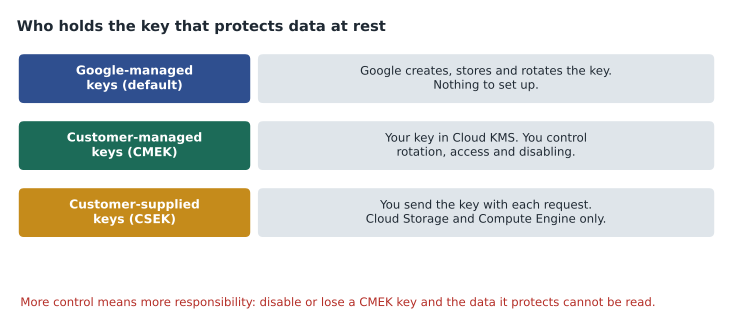
With Google-managed encryption keys (GMEK), the default, Google handles everything. With customer-managed encryption keys (CMEK), the data is protected by a key you create in Cloud KMS, Google Cloud's key management service, in a key ring in a location you choose. You decide who may use the key, how often it rotates and whether it is disabled, and Cloud Audit Logs record every use. A BigQuery dataset can be given a default CMEK key, so every table created in it is protected by that key; Cloud Storage buckets, Pub/Sub topics, Dataflow jobs and Cloud SQL instances support CMEK too. Keys can also be held in hardware security modules through Cloud HSM, or outside Google entirely through Cloud External Key Manager. With customer-supplied encryption keys (CSEK), available for Cloud Storage and Compute Engine only, you supply the key with each request and Google never stores it, which means losing it loses the data.
CMEK is a control and a responsibility. Disabling a key makes the data unreadable almost immediately, which is useful in an emergency and dangerous by accident, and destroying a key version makes the data protected by it unrecoverable. Birchline uses CMEK for the restricted customer dataset and the tax-records bucket, where its audits ask for customer-controlled keys, and GMEK everywhere else, where CMEK would add cost and risk without a requirement behind it.
Showing that the controls work
Teresa's third condition was that Birchline must be able to show how the data is protected. Controls that exist only in someone's memory do not satisfy an auditor or a regulator. For the marketing study, the evidence pack has four parts. First, a short written assessment of the project , the kind of privacy review that several state laws and Birchline's own policy expect, describing the purpose, the data, the risks and the controls. Second, the configuration: the policy tags, data policies, authorized view and key permissions, exported from the console or kept as code. Third, the logs: Cloud Audit Logs data access entries for the restricted table, showing that only the pipeline's service account reads the raw columns. Fourth, a test: a member of the marketing group runs a query selecting every column of the base table, and the result shows an access error for the restricted columns, which is saved with the assessment.
Aisha adds one more step she learned the hard way at a previous job: put a review date on the assessment. Studies end, teams change and data drifts, so the access granted for the marketing study expires in a year unless the owner renews it, using an IAM condition with an end date on the grant.
Worked problem
Designing access for the marketing study
The marketing analysts group needs: returns per customer over 24 months, the product and store of each return, and each customer's home province or state. They must not see names, emails, phone numbers or full postal codes. The returns table has customer_email, customer_name, phone, postal_code, province_or_state, product, store_id, return_date and amount. What should they get?
Show solution
- customer_email: deterministic token, created in the pipeline with a key held in Cloud KMS, so returns can be counted per customer.
- customer_name and phone: not included in the marketing view at all, following minimization.
- postal_code: masked by a data policy showing only the first three characters, or left out if the area is not needed.
- province_or_state, product, store_id, return_date and amount: visible, as they identify nobody on their own.
- Grant the group Data Viewer on an authorized view that selects these columns, with the restricted columns policy-tagged in the base table.
Answer: An authorized view with the token, partial postal code and business columns; no names or phone numbers; the base table's sensitive columns policy-tagged and masked; the token key in Cloud KMS. The study can count and compare customers without identifying any of them.
Common mistakes
MistakeTreating tokenized data as anonymous.
InsteadTokens can be linked back with the key, so the data is pseudonymized and still personal information.
MistakeTokenizing values without normalizing them.
InsteadTrim and lowercase, or otherwise standardize, values first, so one person yields one token.
MistakeStoring the tokenization key in code or the analysts' project.
InsteadKeep it in Cloud KMS with access limited to the security team.
MistakeUsing CMEK everywhere by default.
InsteadUse it where a requirement calls for it; it adds cost and the risk of unreadable data if a key is disabled.
MistakeCopying a table and leaving out sensitive columns as the only control.
InsteadUse policy tags, masking and authorized views on one governed table instead of many copies.
Summary and key terms
- Privacy law in both countries asks businesses to use personal information only for stated purposes, keep only what they need, delete it on time, limit access and secure it.
- Sensitive Data Protection, formerly Cloud DLP, inspects data for infoTypes, discovers sensitive data across projects, and de-identifies it with redaction, masking, bucketing, date shifting, tokenization and format-preserving encryption.
- Tokenized data is pseudonymized, not anonymized.
- BigQuery protects columns with policy tags and Fine-Grained Reader, masks them with data policies, and filters rows with row access policies.
- Data is encrypted at rest and in transit by default; keys can be Google-managed, customer-managed in Cloud KMS, or customer-supplied for Cloud Storage and Compute Engine.
- Personal information
- Information about an identifiable individual.
- Sensitive Data Protection
- Google Cloud's service for finding and de-identifying sensitive data, formerly Cloud DLP.
- infoType
- A kind of sensitive data that Sensitive Data Protection can detect, such as an email address.
- De-identification
- Transforming data so that individuals are harder or impossible to identify.
- Pseudonymization
- Replacing identifiers with tokens that can be linked back with a key.
- Policy tag
- A label on a BigQuery column that controls who can read it.
- Dynamic data masking
- Showing masked values to users without access to a policy-tagged column.
- CMEK
- A customer-managed encryption key held in Cloud KMS that protects data at rest.
Practice problems
Work each problem on paper first, then reveal the answer to check.
Why is deterministic tokenization suitable for the marketing study?
Show answer
It gives each customer the same token every time, so returns can be counted and joined without revealing identity.
What does a user without Fine-Grained Reader see when querying a masked column?
Show answer
The masked value defined by the data policy, such as NULL or a hash.
Which services support customer-supplied encryption keys?
Show answer
Cloud Storage and Compute Engine.
What happens if a CMEK key protecting a dataset is disabled?
Show answer
The data it protects becomes unreadable until the key is enabled again.
Lesson quiz · 5 questions
Score 60% or more to complete this lesson.
Create a free account to save your progress, take quizzes and earn a certificate.