
GCP-220 · Lesson 6 of 12 · 20 min
Loading data into BigQuery
▶ Video coming soon A video version of this lesson is on the way.
Thursday, October 22, is the first time Mateo loads real data into Birchline's production project. The ingestion plan from lesson 5 sends most sources toward BigQuery, but there are several different ways to get data into a BigQuery table, and they differ in cost, speed and what can go wrong. Ravi wants Mateo to know all of them, and to choose the simplest one that meets each need.
The ways into a BigQuery table
| Method | How it works | Best for | Cost notes |
|---|---|---|---|
| Batch load job | BigQuery reads files from Cloud Storage (or an upload) and writes them to a table | Nightly files, one-time history loads | Batch loads using the shared pool of slots are free; you pay for storage |
| LOAD DATA statement | The same load expressed in SQL | Loads written into SQL scripts or Dataform | As for load jobs |
| Query results (INSERT, MERGE, CREATE TABLE AS SELECT) | A query writes its results into a table | Building staging and curated tables in ELT | Billed as queries |
| Storage Write API | Applications or pipelines stream rows into a table | Streaming from Dataflow, Pub/Sub subscriptions and applications | Billed by data ingested; the recommended streaming method |
| BigQuery Data Transfer Service | A managed, scheduled transfer from a supported source | SaaS reporting data, other clouds' storage, warehouse migrations | Depends on the connector; many Google sources are free |
| Datastream | Change data capture into tables that mirror a database | Operational databases such as the shop's MySQL | Billed by data processed by Datastream |
| External or BigLake table (no load) | Data stays in Cloud Storage and BigQuery reads it at query time | Exploration, data shared with other engines, rarely queried archives | Queries are billed; no BigQuery storage cost |
Batch load jobs
A load job is the workhorse for files. It reads one or more files, applies a schema, and writes the rows into a table in a single operation that either succeeds completely or fails without writing anything. That all-or-nothing behavior is valuable: a half-loaded night is impossible. Load jobs that use BigQuery's shared slot pool are free of charge, which makes them the cheapest way to bring large volumes in; the trade-off is that the shared pool gives no guarantee about how quickly a job starts when the system is busy.
bq load \
  --source_format=CSV \
  --skip_leading_rows=1 \
  --replace \
  --max_bad_records=0 \
  bl-data-prod:raw.pos_sales_20261021 \
  "gs://bl-data-landing/pos/2026/10/21/pos_*_20261021.csv" \
  ./pos_sales_schema.json
Each option in the command reflects a decision from earlier lessons. The explicit schema file avoids auto-detection. Skipping the header row matches the data contract. Setting the number of bad records allowed to zero means one malformed line fails the whole load, which is the right choice for financial data: Ravi would rather know about the bad line than lose it silently. For less critical feeds, a small allowance lets the load succeed and the bad lines are reported in the job's errors.
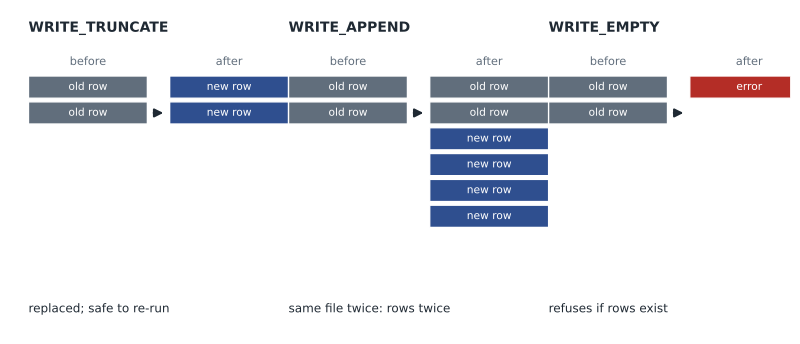
The write disposition says what happens if the table already has data. WRITE_APPEND adds the new rows, WRITE_TRUNCATE replaces the table's contents (the --replace flag above), and WRITE_EMPTY loads only if the table is empty. A related setting, the create disposition, decides whether the job may create the table if it does not exist. Choosing the disposition is how a load is made idempotent: replacing one night's table or partition can be repeated safely, while appending the same files twice doubles them.
| Write disposition | Effect | Safe to re-run? | Use at Birchline |
|---|---|---|---|
| WRITE_TRUNCATE | Replace the table or partition contents | Yes | Reloading one night's partition of raw.pos_sales |
| WRITE_APPEND | Add rows to what is there | Only if duplicates are handled | Adding a newly arrived late store file, with deduplication in staging |
| WRITE_EMPTY | Write only if the table is empty | Yes (fails the second time) | One-time history load, to prevent an accidental second load |
Loading into partitions
Rather than one table per night, Birchline's raw.pos_sales is a single table partitioned by business date. Each night's load replaces only its own partition, so a re-run of October 21 cannot touch October 20. A load job can target one partition with a partition decorator, the table name followed by a dollar sign and the date, or a query can replace a partition. Partitioning also makes queries cheaper when they filter on the date, which GCP-221 covers in depth.
bq load --source_format=CSV --skip_leading_rows=1 --replace \
  --time_partitioning_field=business_date \
  'bl-data-prod:raw.pos_sales$20261021' \
  "gs://bl-data-landing/pos/2026/10/21/*.csv" ./pos_sales_schema.json
Checking that a load is complete
A successful load job proves only that the files it found were loaded. It says nothing about files that did not arrive. Mateo adds a check after each night's load: compare the files and rows loaded against what was expected. The stores' upload script writes a small manifest file with the row count of each store's file, which gives the check something to compare against.
# Compare last night's load with the stores' manifest.
manifest = {"001": 812, "002": 640, "003": 915, "012": 701, "019": 588, "027": 0, "031": 920}
loaded   = {"001": 812, "002": 640, "003": 915, "012": 701, "031": 1840}
closed_today = {"027"}               # known closures from the reference table

problems = []
for store, expected in sorted(manifest.items()):
    got = loaded.get(store, 0)
    if store in closed_today and got == 0:
        continue
    if got == 0:
        problems.append(f"store {store}: file missing ({expected} rows expected)")
    elif got != expected:
        problems.append(f"store {store}: loaded {got}, manifest says {expected}")

print(f"Stores expected: {len(manifest)}, loaded: {len(loaded)}")
print("\n".join(problems) if problems else "All stores complete")Stores expected: 7, loaded: 5 store 019: file missing (588 rows expected) store 031: loaded 1840, manifest says 920
What this code does
It compares two lists: how many rows each store said it sent, from the manifest, and how many rows were loaded for that store. Stores known to be closed are skipped. Any store with no rows loaded is reported as missing a file, and any store whose loaded count differs from its manifest is reported with both numbers. The result shows one missing file and one store loaded twice, which the team must chase before the morning report.
In this sample night, store 019's file never arrived and store 031 appears twice, exactly the double upload that staging deduplication will catch. The check does not fix either problem, but it turns both into a message at 03:30 instead of a surprise at 09:00. The same check will later move into an automated quality scan, in lesson 10.
Loading semi-structured data
Newline-delimited JSON loads much like CSV, with --source_format=NEWLINE_DELIMITED_JSON. Nested objects become STRUCT columns and arrays become REPEATED columns, as long as the schema describes them. The returns portal's export is a single JSON array with a phone number in every record, so it needs the light transformation planned in lesson 1 before it can load. A small Cloud Run job reads the export, drops the phone number, writes one record per line to the landing bucket, and then starts the load. The unmasked file is deleted from the portal's export folder once the job confirms the load.
For data whose fields change often, such as the raw web event payloads, loading the whole record into a column of the JSON type avoids a schema change every time the shop's developers add a field. The trade-off, as lesson 2 explained, is that the fields inside have no declared types until a query extracts them.
External tables and BigLake tables
Sometimes data should not be loaded at all. An external table leaves files in Cloud Storage and reads them at query time. Mateo used one in lesson 3 for exploration. External tables are convenient, but every query reads and parses the files again, performance is lower than native storage, and some features, such as table preview and certain caching, are not available.
A BigLake table is an improved kind of external table. It uses a connection with its own service account, so users can be given access to the table without being given access to the files in the bucket, and it supports fine-grained controls such as column-level security on data that stays in open formats like Parquet or Apache Iceberg. BigLake is a good fit when the same files must be used by BigQuery and by other engines such as Spark on Dataproc. Birchline's supplier invoices and photo metadata may end up there; for now, the warehouse data is loaded as native tables because it is queried constantly.
| Option | Where data lives | Query speed | Access control | Fit |
|---|---|---|---|---|
| Native table | BigQuery storage | Fastest | Table, column and row level | Data queried often |
| External table | Cloud Storage | Slower; files read every query | Users also need access to the files | Exploration, rare queries |
| BigLake table | Cloud Storage, open formats | Better than external, with caching of metadata | Table, column and row level, through a connection | Shared data lakes used by several engines |
Streaming into BigQuery
For records that arrive one by one, BigQuery's Storage Write API is the recommended way to stream. It supports exactly-once delivery when used with streams that track offsets, and it is what Dataflow and Pub/Sub BigQuery subscriptions use behind the scenes. The older streaming insert method, called tabledata.insertAll, still works but is now the legacy option. Lesson 7 shows Birchline's web events arriving this way.
Transfers and change data capture into BigQuery
Two managed services fill tables without any load code. For Google Ads, Mateo sets up a BigQuery Data Transfer Service transfer: he chooses the Google Ads connector, the customer account, the destination dataset raw in us-east5, and a daily schedule. The service creates the reporting tables and refreshes them each day, and it can backfill earlier dates on request. Its transfer runs appear in the console with their status, which the team watches like any other job.
For the shop's MySQL database, Datastream will write changes into BigQuery tables that mirror the source tables. Datastream can apply the changes so that the BigQuery table always shows the latest state of each row, with a configurable staleness limit that trades freshness for cost. The plan is to point Datastream at the orders, order lines and product tables only, not the whole database: the customer table holds personal data that the analytics team does not need in raw form.
Which method for which feed
| Birchline feed | Method | Write behavior |
|---|---|---|
| Store till files | Batch load job into a date partition | Replace the night's partition |
| Warehouse history | Batch load of Parquet files | WRITE_EMPTY, one time |
| Returns export | Cloud Run job masks and converts, then a batch load | Replace the night's partition |
| Google Ads | BigQuery Data Transfer Service | Managed by the transfer |
| Shop orders and products | Datastream | Changes applied continuously |
| Web events | Storage Write API through a Pub/Sub BigQuery subscription | Append, with duplicates handled in staging |
| Staging and curated tables | Queries (CREATE TABLE AS SELECT, MERGE) | Rebuild or merge |
Common mistakes
MistakeAppending a night's files again after a failure.
InsteadLoad into a date partition with WRITE_TRUNCATE so a re-run replaces instead of doubling.
MistakeAllowing many bad records in a financial load to make it succeed.
InsteadAllow zero bad records for critical data and investigate every failure.
MistakeAssuming a successful load job means all files arrived.
InsteadCompare loaded files and rows with a manifest or an expected list.
MistakeUsing external tables for data queried all day.
InsteadLoad frequently queried data into native tables, or use BigLake tables when it must stay in open formats.
MistakeBuilding new streaming code on the legacy insertAll method.
InsteadUse the Storage Write API, directly or through Dataflow or a Pub/Sub subscription.
Worked problem
A failed night and a re-run
The load for October 21 fails at 03:05 because store 012's file has a line with a missing column. The store resends a corrected file at 07:40. How should Mateo re-run the load so the result is correct?
Show solution
- Confirm the failure: with max_bad_records set to zero, the job wrote nothing, so the partition for October 21 is still empty.
- Check that the corrected file has replaced the bad one in gs://bl-data-landing/pos/2026/10/21/.
- Run the same load command again with --replace into the October 21 partition of raw.pos_sales.
- Run the completeness check against the manifest: all 40 stores, row counts matching.
- Rebuild the staging partition for that date and let the morning report run.
Answer: Because the load is all-or-nothing and replaces one partition, simply re-running it after the file is fixed gives a correct, complete night.
Summary and key terms
- Batch load jobs read files from Cloud Storage into tables in one all-or-nothing operation and are free when using the shared slot pool.
- Explicit schemas, header handling and a bad-record limit belong in every regular load.
- Write dispositions (WRITE_TRUNCATE, WRITE_APPEND, WRITE_EMPTY) decide whether a re-run replaces, adds or refuses; loading into date partitions with replace makes loads idempotent.
- A successful job does not prove completeness, so compare with a manifest.
- External tables read files at query time; BigLake tables add access control and suit shared data lakes.
- The Storage Write API is the recommended streaming method.
- BigQuery Data Transfer Service and Datastream fill tables without load code.
- Load job
- A BigQuery operation that reads files and writes them into a table in one step.
- Write disposition
- A setting that decides whether a write replaces, appends to or requires an empty table.
- Partition decorator
- A table name followed by a dollar sign and a date, used to target one partition.
- Manifest
- A file listing what a delivery should contain, used to check completeness.
- BigLake table
- A table over files in Cloud Storage that uses a connection for access and supports fine-grained security.
- Storage Write API
- BigQuery's recommended interface for streaming rows into tables.
- Idempotent
- Producing the same result whether run once or several times.
Practice problems
Work each problem on paper first, then reveal the answer to check.
Why are batch load jobs attractive for large volumes?
Show answer
They are free when using the shared slot pool and either fully succeed or write nothing.
Which write disposition makes a nightly partition load safe to re-run?
Show answer
WRITE_TRUNCATE, replacing that partition.
What does a BigLake table add over a plain external table?
Show answer
Access through a connection, so users do not need bucket permissions, and fine-grained security.
Which interface should new streaming code use?
Show answer
The Storage Write API.
Lesson quiz · 5 questions
Score 60% or more to complete this lesson.
Create a free account to save your progress, take quizzes and earn a certificate.