
GCP-220 · Lesson 4 of 12 · 20 min
Cleaning and transforming data
▶ Video coming soon A video version of this lesson is on the way.
Thursday's session, on October 15, turns the profile findings into rules. Mateo arrives with the list he agreed with Nadia Brooks from the store systems team: remove the duplicate lines a till resends after a network drop, keep refunds but flag them, mark free promotional items, standardize the SKU and tender values, and convert local till times into proper timestamps. Ravi wants each rule written once, in a place everyone can read, and applied the same way every night.
Cleaning versus transforming
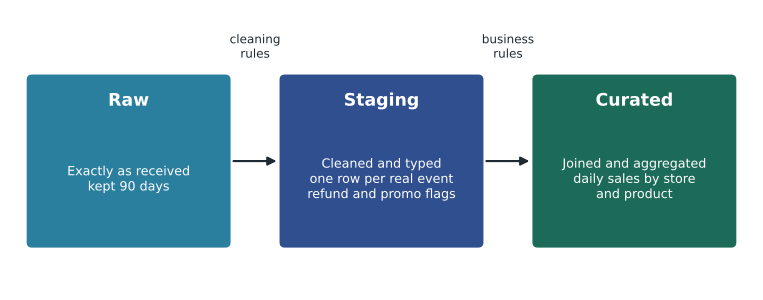
The two words are often used together, but they describe different work. Cleaning fixes problems in the data so that it says what it is supposed to say: removing duplicates, correcting formats, handling missing values, rejecting impossible values. Transforming changes the shape or meaning of correct data for a purpose: joining sales to the product catalog, converting currencies, aggregating to daily totals, or pivoting rows into columns. Cleaning usually happens first, in staging. Transformation into business-ready tables happens in the curated layer.
The common cleaning operations
Most cleaning falls into a small number of operations. Knowing them by name helps when reading exam scenarios, which often describe a symptom and ask for the operation that fixes it.
| Operation | Symptom | Typical fix in BigQuery SQL |
|---|---|---|
| Deduplication | The same record appears more than once | SELECT DISTINCT, or ROW_NUMBER() with QUALIFY to keep one row per key |
| Standardization | The same value written different ways (card, CARD, Card) | UPPER, TRIM, REPLACE, or a mapping table |
| Type conversion | Numbers or dates stored as text | CAST, or SAFE_CAST and SAFE.PARSE_DATE so bad values become NULL instead of failing |
| Handling missing values | Empty fields where a value is expected | COALESCE to a default, a flag column, or rejection to an error table |
| Validation against reference data | Codes that do not exist, such as an unknown store | JOIN to a reference table and route unmatched rows aside |
| Range and rule checks | Impossible values, such as a quantity of 6,000 | WHERE conditions or CASE expressions that flag or reject |
| Splitting and parsing | Several facts in one field (TNT-2P-GRN holds category, size and color) | SPLIT, REGEXP_EXTRACT |
| Time zone handling | Local times without a zone | TIMESTAMP(datetime_value, time_zone) |
Writing the staging transformation
Because Birchline follows ELT, the raw till files are loaded unchanged into raw.pos_sales, with the till time in a DATETIME column, and staging is built from raw with SQL. Ravi and Mateo write the staging query together. Each block of the query does one of the agreed rules, and a comment says why.
CREATE OR REPLACE TABLE `bl-data-prod.staging.pos_sales` AS
WITH typed AS (
  SELECT
    r.store_id,
    r.txn_id,
    TIMESTAMP(r.txn_local, s.time_zone)             AS txn_ts,      -- local till time to a real moment
    UPPER(TRIM(r.sku))                              AS sku,         -- manual entry at one store
    r.qty,
    r.unit_price,
    COALESCE(r.discount, 0)                         AS discount,
    CASE WHEN r.unit_price = 0 THEN 'PROMO'
         ELSE UPPER(TRIM(r.tender)) END             AS tender,      -- free items have no tender
    r.qty < 0                                       AS is_refund,
    r.unit_price = 0                                AS is_promo,
    r.source_file
  FROM `bl-data-prod.raw.pos_sales` AS r
  JOIN `bl-data-prod.reference.stores` AS s USING (store_id)        -- unknown stores drop out here
)
SELECT * FROM typed
QUALIFY ROW_NUMBER() OVER (
  PARTITION BY store_id, txn_id, txn_ts, sku, qty, unit_price
  ORDER BY source_file) = 1;                                        -- till resends after a network drop
Three details in the query are typical of good staging SQL. The QUALIFY clause filters on the result of a window function, so ROW_NUMBER() can number the copies of each line and keep only the first; this removes exact duplicates while keeping legitimate repeated purchases, which differ in their timestamp. The join to the store reference table both supplies the time zone and quietly drops any row from a store that does not exist; Ravi notes that silent dropping is dangerous, and lesson 10 adds a check that counts and reports such rows instead. And the boolean flags is_refund and is_promo keep the information analysts need without changing the original values.
Mateo asks why the query uses TIMESTAMP(txn_local, time_zone) instead of just storing local time. The answer is that analysts will ask questions such as "how many sales happened in the first hour after opening across all stores" and also "what happened nationally between 21:00 and 22:00 Eastern on Black Friday". The first needs local time, which can always be recovered from the timestamp and the store's zone; the second needs a single, comparable moment. Storing the true moment and the zone keeps both questions answerable.
The query rebuilds the whole staging table each time it runs. For a few million rows that is quick and cheap, and it has a valuable property: running it twice gives the same result as running it once. A job with that property is called idempotent, and it means a failed night can simply be re-run without creating extra rows. As the table grows, the team will switch to rebuilding only recent days, for example with a MERGE statement or by replacing one date partition at a time, but the same principle holds: re-running a day must never double it.
Failing safely: SAFE functions and error tables
An ordinary CAST stops the whole query if one value cannot be converted, which can be the right behavior for a nightly job that should never see bad values. More often, the better choice is to convert what can be converted and set the rest aside for review. BigQuery's SAFE_CAST and the SAFE. prefix on functions return NULL instead of an error.
SELECT
  return_id,
  SAFE_CAST(refund_amount AS NUMERIC)                    AS refund_amount,
  SAFE.PARSE_DATETIME('%Y-%m-%d %H:%M', returned_at_text) AS returned_at
FROM `bl-data-prod.raw.returns`;

-- Rows that could not be converted go to an error table for review
INSERT INTO `bl-data-prod.staging.returns_errors`
SELECT *, CURRENT_TIMESTAMP() AS caught_at
FROM `bl-data-prod.raw.returns`
WHERE SAFE_CAST(refund_amount AS NUMERIC) IS NULL
   OR SAFE.PARSE_DATETIME('%Y-%m-%d %H:%M', returned_at_text) IS NULL;
The error table is as important as the safe conversion. A NULL that nobody looks at is just a quieter way to lose data. Ravi's rule is that every staging job either produces zero error rows or produces a count that someone sees the next morning.
A cleaning function you can test
Some rules are easier to reason about outside SQL. Mateo writes the SKU and tender standardization as a small Python function so that he can test it against examples Nadia gave him, before translating it into the SQL above. Testing a rule on known cases first is a habit worth building.
import re

def clean_sku(raw):
    """Upper-case, trim, and turn spaces or underscores into hyphens."""
    s = raw.strip().upper()
    s = re.sub(r"[ _]+", "-", s)
    return s if re.fullmatch(r"[A-Z0-9]+(-[A-Z0-9]+)+", s) else None

def clean_tender(raw, unit_price):
    if unit_price == 0:
        return "PROMO"
    t = (raw or "").strip().upper()
    return t if t in {"CARD", "CASH", "GIFT"} else "UNKNOWN"

tests = [(" stk-al-08", "STK-AL-08"), ("TNT_2P_GRN", "TNT-2P-GRN"), ("btl 1l blu", "BTL-1L-BLU"), ("12345", None)]
for raw, expected in tests:
    got = clean_sku(raw)
    print(f"{raw!r:14} -> {got!r:14} {'ok' if got == expected else 'FAILED'}")

print(clean_tender("card", 19.95), clean_tender("", 0.0), clean_tender("voucher", 40.0))' stk-al-08' -> 'STK-AL-08' ok 'TNT_2P_GRN' -> 'TNT-2P-GRN' ok 'btl 1l blu' -> 'BTL-1L-BLU' ok '12345' -> None ok CARD PROMO UNKNOWN
What this code does
It defines two cleaning rules and tries them on known examples. The SKU rule trims spaces, upper-cases the code and turns spaces or underscores into hyphens, then returns nothing if the result still does not look like a product code. The tender rule labels free items as promotions, upper-cases the payment type and marks anything not on the approved list as unknown. Each test line shows the input, the cleaned value and whether it matched the expected answer.
The last tender test is a good example of why rules need owners. One store recorded a paper voucher, which is not in the approved list. The function marks it UNKNOWN rather than guessing, and Mateo adds a question for Nadia: should VOUCHER become a valid tender, or should the store stop accepting them? Data cleaning keeps turning up business questions like this, and the practitioner's job is to surface them, not to answer them alone.
Tools for cleaning and transforming
SQL in BigQuery is the default for Birchline, but Google Cloud offers several ways to clean and transform data, and the exam expects you to know when each fits.
| Tool | Style | Best fit | Notes |
|---|---|---|---|
| BigQuery SQL (scheduled queries, scripts) | Code | ELT inside BigQuery | Simple and powerful; organize with views and staging tables |
| Dataform | Code (SQLX) with version control | A set of related SQL transformations with dependencies, tests and documentation | Runs in BigQuery; integrates with Git; covered in GCP-222 |
| BigQuery data preparation | Visual, with Gemini suggestions | Analysts cleaning a table step by step without writing all the SQL | Generally available since March 2025; produces SQL; scheduled through Dataform |
| Cloud Data Fusion | Visual pipelines, many connectors | ETL from many sources with little code | Lesson 9 |
| Dataflow | Code (Apache Beam) or templates | Large-scale or streaming transformation | Lesson 8 |
| Dataproc | Managed Spark and Hadoop | Teams with existing Spark jobs | Mostly outside this course |
BigQuery data preparation deserves a closer look because it is designed for people in Mateo's position. It opens on a table, samples it, and uses Gemini in BigQuery to suggest steps as cards: standardize this date format, trim these strings, deduplicate on these columns, join to that table. Each card shows the SQL it would apply, and the user can accept, edit or reject it. Validation steps can route failing rows to an error table, and the finished preparation writes to a destination table with full refresh, append, incremental or upsert behavior. Google's documentation notes some limits: the suggestions are based on a sample, the sources and destinations must be in the same location, and the preparation is scheduled through Dataform rather than run on its own.
Older material and some practice questions mention Dataprep, a visual cleaning tool from Trifacta, now part of Alteryx, that was sold through Google Cloud. It is a partner product with its own licensing rather than a core Google service, and for new work inside BigQuery, Google now points users to BigQuery data preparation. If an exam question offers Dataprep for visual cleaning, read the other options carefully: a newer native option may be the intended answer.
Recording what was done
Every rule the team agreed has a reason and an owner, and Ravi keeps them in a short rules register next to the SQL in the team's Git repository. When Finance asks next year why the October sales differ from the till's own report by 1,214 dollars, the register shows that the difference is exactly the duplicate lines removed on two nights when store 031's till lost its connection.
| Rule | Reason | Owner | Where applied |
|---|---|---|---|
| Remove exact duplicate lines | Tills resend after a network drop | Store systems (Nadia Brooks) | staging.pos_sales QUALIFY |
| Flag negative qty as refund | Refunds are recorded as negative sales | Finance | staging.pos_sales is_refund |
| Tender PROMO when price is 0 | Free promotional items have no tender | Marketing | staging.pos_sales CASE |
| Upper-case and trim sku | Manual entry at one store | Store systems | staging.pos_sales UPPER(TRIM()) |
| Convert till time with store time zone | Tills record local time without a zone | Analytics (Ravi Menon) | staging.pos_sales TIMESTAMP() |
Common mistakes
MistakeDeleting refunds and zero-price rows as bad data.
InsteadKeep real business events and flag them; delete only true errors such as duplicates.
MistakeUsing CAST everywhere and letting one bad value fail the job.
InsteadUse SAFE_CAST or SAFE. functions where appropriate, and send unconvertible rows to an error table.
MistakeWriting NULLs for bad values and never reporting them.
InsteadCount error rows every run and make sure someone sees the count.
MistakeCleaning in a spreadsheet and loading the result.
InsteadWrite rules as SQL or pipeline code so they run the same way every time and can be reviewed.
Worked problem
Deduplicating with ROW_NUMBER
Store 031 sent these lines for basket T7720: (09:12:05, TNT-2P-GRN, 1, 289.00), (09:12:05, TNT-2P-GRN, 1, 289.00) and (09:12:40, TNT-2P-GRN, 1, 289.00). The customer actually bought two tents, scanned separately. Which rows should staging keep?
Show solution
- Partition by store_id, txn_id, txn_ts, sku, qty and unit_price.
- The first two lines have the same timestamp and values, so they fall in one partition; ROW_NUMBER numbers them 1 and 2.
- The third line has a different timestamp, 09:12:40, so it is its own partition and gets number 1.
- QUALIFY ROW_NUMBER() = 1 keeps the first copy of the 09:12:05 line and the 09:12:40 line.
Answer: Keep two rows: one 09:12:05 line and the 09:12:40 line, which together match the two tents bought.
Summary and key terms
- Cleaning fixes problems so data says what it should; transforming reshapes correct data for a purpose.
- Common cleaning operations are deduplication, standardization, type conversion, handling missing values, validation against reference data, range checks, parsing and time zone handling.
- In ELT, staging tables are built from raw tables with SQL; QUALIFY with ROW_NUMBER removes duplicates, and SAFE_CAST returns NULL instead of failing.
- Bad rows should go to an error table that someone reviews.
- BigQuery SQL, Dataform and BigQuery data preparation work inside BigQuery; Data Fusion and Dataflow transform data on the way in.
- Each rule should have a recorded reason and owner.
- Cleaning
- Fixing errors and inconsistencies so data is accurate and consistent.
- Transforming
- Reshaping or combining correct data for a particular use.
- Staging layer
- Tables holding cleaned, typed data built from raw data.
- QUALIFY
- A clause that filters rows by the result of a window function.
- SAFE_CAST
- A conversion that returns NULL instead of raising an error when a value cannot be converted.
- Error table
- A table that holds rows rejected by cleaning rules, for review.
- BigQuery data preparation
- A visual tool in BigQuery that suggests cleaning steps with Gemini and produces SQL.
- Rules register
- A list of cleaning rules with their reasons, owners and where they are applied.
Practice problems
Work each problem on paper first, then reveal the answer to check.
What does QUALIFY ROW_NUMBER() OVER (PARTITION BY ...) = 1 do?
Show answer
It keeps one row for each set of identical key values and drops the other copies.
Why use SAFE_CAST instead of CAST in staging?
Show answer
So that one bad value becomes NULL and can be routed to an error table instead of failing the whole job.
Which Google tool suggests cleaning steps with Gemini and produces SQL?
Show answer
BigQuery data preparation.
Why are refunds flagged rather than deleted?
Show answer
They are real business events; deleting them would overstate sales.
Lesson quiz · 5 questions
Score 60% or more to complete this lesson.
Create a free account to save your progress, take quizzes and earn a certificate.