
GCP-220 · Lesson 2 of 12 · 20 min
Data formats, schemas and data types
▶ Video coming soon A video version of this lesson is on the way.
In the second session, on Thursday, October 8, Ravi opens a folder of sample files that arrived overnight: a store sales export, a returns export, a product catalog extract and a supplier price list. "Before we load anything," he says, "we need to know what we are holding." Choosing the right load settings, the right storage and the right column types all depends on understanding the format and the schema. Mistakes here are cheap to fix on day one and expensive to fix after a year of loads.
Structured, semi-structured and unstructured data
Lesson 1 introduced the three kinds of data. The distinction matters because each kind tends to have its own home on Google Cloud. Structured data, with fixed columns and types, fits tables in BigQuery or a relational database such as Cloud SQL. Semi-structured data, such as JSON with nested or optional fields, can be loaded into BigQuery using nested and repeated columns or the JSON data type, or kept in a document database such as Firestore. Unstructured data, such as images, PDFs and audio, lives as objects in Cloud Storage, and can be referred to from BigQuery through object tables when it needs to be analyzed.
| Kind | Birchline example | Typical home | How it is queried |
|---|---|---|---|
| Structured | Store sales, online orders | BigQuery tables; Cloud SQL for the shop itself | SQL over columns |
| Semi-structured | Returns export, web events, product attributes | BigQuery nested columns or JSON columns; Firestore for app data | SQL with field paths, UNNEST and JSON functions |
| Unstructured | Product photos, scanned supplier invoices | Cloud Storage | Object tables and AI functions, or outside BigQuery |
Common file formats
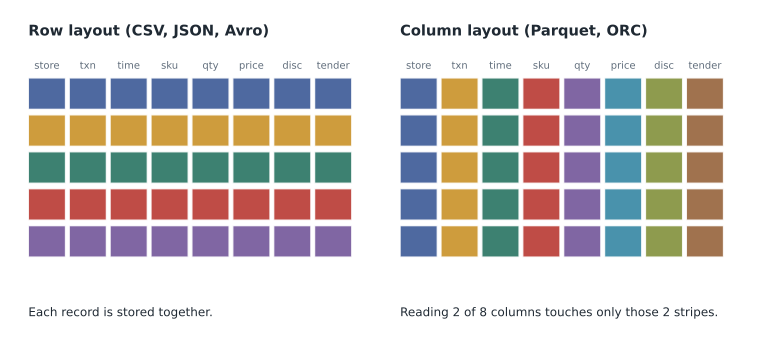
Most data reaches Google Cloud as files, and BigQuery can load several file formats directly. They differ in whether they carry their own schema, whether they are compressed and splittable, and whether they are stored by row or by column.
| Format | Layout | Carries its schema? | Strengths | Weaknesses |
|---|---|---|---|---|
| CSV | Text, one row per line | No (a header row at most) | Universal, easy to read and produce | No types, ambiguous quoting and delimiters, no nested data |
| JSON (newline-delimited) | Text, one JSON object per line | No, but fields are named | Handles nested and optional fields | Larger than binary formats; types can be guessed wrongly |
| Avro | Binary, by row | Yes, embedded | Self-describing, compact, good for streaming and exports | Not readable without tools |
| Parquet | Binary, by column | Yes, embedded | Compact, fast for reading a few columns, widely used in data lakes | Not readable without tools; less suited to row-by-row writes |
| ORC | Binary, by column | Yes, embedded | Similar to Parquet, common in Hadoop systems | Less common outside the Hadoop world |
BigQuery's documentation notes that JSON must be newline-delimited for loading: each line holds one complete record. A file that contains a single large JSON array, as many applications export, has to be converted first. The returns portal does exactly that, so it is one of the reasons the returns data needs a light transformation before loading.
For loading speed, Google's documentation recommends Avro as the preferred format for loading into BigQuery because its data blocks can be read in parallel even when compressed, and Parquet and ORC also load efficiently. Compressed CSV and JSON files load more slowly because a gzip file cannot be split, so a single worker has to read it from start to finish. For Birchline's small store files that hardly matters. For the ten-year history export from the old warehouse, it matters a great deal, so Ravi plans to export that history to Parquet or Avro rather than to gzipped CSV.
What a schema is
A schema describes the shape of the data: the names of the fields, their data types, whether they may be empty, and for nested data, how the fields fit inside each other. In BigQuery, every table has a schema, and each column has a name, a type and a mode. The mode is NULLABLE (the value may be missing), REQUIRED (it must be present) or REPEATED (the column holds an array).
A schema can come from three places. Self-describing formats such as Avro, Parquet and ORC carry it inside the file. For CSV and JSON, BigQuery can auto-detect a schema by sampling the file, or you can supply one explicitly, as a JSON schema file or in the load command. Auto-detection is handy for exploring a file, but Ravi insists on explicit schemas for anything that will be loaded every night. A sample that happens to contain only whole numbers will make a price column an INTEGER, and the first night a price of 24.99 arrives, the load fails.
[
  {"name": "store_id",   "type": "STRING",    "mode": "REQUIRED"},
  {"name": "txn_id",     "type": "STRING",    "mode": "REQUIRED"},
  {"name": "txn_ts",     "type": "TIMESTAMP", "mode": "REQUIRED"},
  {"name": "sku",        "type": "STRING",    "mode": "REQUIRED"},
  {"name": "qty",        "type": "INT64",     "mode": "REQUIRED"},
  {"name": "unit_price", "type": "NUMERIC",   "mode": "REQUIRED"},
  {"name": "discount",   "type": "NUMERIC",   "mode": "NULLABLE"},
  {"name": "tender",     "type": "STRING",    "mode": "NULLABLE"}
]
BigQuery data types that matter for loading
Choosing the right type for each column prevents a whole category of errors. Mateo works through the store sales columns one by one with Ravi, and the reasoning is more useful than the final list.
| Type | Use for | Birchline example | Common mistake |
|---|---|---|---|
| STRING | Text, and codes that look like numbers | store_id "007", sku, postal codes | Making codes INT64 and losing leading zeros |
| INT64 | Whole numbers you count or add | qty | Using it for identifiers that are not quantities |
| NUMERIC | Exact decimals, especially money | unit_price, discount | Using FLOAT64 for money and getting rounding errors |
| FLOAT64 | Measurements where tiny rounding is acceptable | Delivery distance, sensor readings | Using it for currency |
| BOOL | True or false | is_loyalty_member | Loading "Y" and "N" without converting |
| DATE | A calendar date with no time | business_date | Storing dates as text like "10/08/2026" |
| TIMESTAMP | An exact moment, stored in UTC | txn_ts | Forgetting which time zone the source used |
| DATETIME | A date and time with no time zone | A store's local opening time | Mixing it with TIMESTAMP in comparisons |
| JSON | Semi-structured values whose fields vary | Raw web event payloads | Using it when the fields are known and stable |
| STRUCT and ARRAY (RECORD, REPEATED) | Nested fields and lists inside a row | An order with its order lines | Flattening everything and duplicating order headers |
Two choices deserve a closer look. First, money should be NUMERIC, not FLOAT64. A floating-point number cannot represent most decimal fractions exactly, so adding thousands of prices can produce totals that are off by a fraction of a cent. That is harmless for a temperature but not for a ledger that Finance reconciles to the cent.
# Why money should not be stored as a floating-point number.
from decimal import Decimal

prices = [0.10] * 30_000          # thirty thousand items priced at ten cents
float_total = sum(prices)
exact_total = sum(Decimal("0.10") for _ in range(30_000))

print(f"Float total:   {float_total!r}")
print(f"Exact total:   {exact_total}")
print(f"Difference: {Decimal(repr(float_total)) - exact_total}")Float total: 3000.0 Exact total: 3000.00 Difference: 0.00
What this code does
It adds up thirty thousand prices of ten cents twice: once with ordinary floating-point numbers and once with exact decimal numbers, like BigQuery's NUMERIC type. The exact total is precisely 3,000 dollars, while the floating-point total is slightly off because ten cents cannot be stored exactly in binary. The tiny difference shows why money columns should use an exact decimal type.
Second, timestamps need a known time zone. The store tills record local time without a zone. Birchline's stores span more than one time zone, so 9:00 at a store in Denver is not the same moment as 9:00 in Columbus. Loading the till time straight into a TIMESTAMP column would treat it as UTC and shift every sale by several hours. The team decides to load the till time as DATETIME in a raw column, add each store's time zone from the store reference table, and compute a proper TIMESTAMP in staging.
Nested and repeated data
BigQuery can store nested data directly. An online order with three order lines can be one row whose lines column is an ARRAY of STRUCTs, each holding a sku, a quantity and a price. Storing data this way avoids repeating the order header three times and often makes queries cheaper, because related data is read together. JSON files with nested objects load naturally into this shape, and Avro and Parquet carry nested schemas too.
{"order_id": "W-1048812", "placed_at": "2026-10-07T14:22:05Z", "customer_ref": "C-88213",
 "lines": [{"sku": "TNT-2P-GRN", "qty": 1, "price": "289.00"},
           {"sku": "STK-AL-08",  "qty": 2, "price": "14.50"}]}
The alternative is the JSON data type, which stores a whole JSON value in one column and lets queries reach into it with JSON functions. It suits data whose fields change often or are not known in advance, such as the raw payload of a web event that the shop's developers keep extending. Where the fields are known and stable, typed nested columns are better, because each field gets a proper type and BigQuery can read just the fields a query needs.
Schema evolution
Sources change. The shop team adds a gift_message field; a supplier renames a column; the till software update adds a loyalty_id. A load that expects the old schema can fail, or worse, silently put values in the wrong columns. BigQuery allows some changes safely when you append data: adding new NULLABLE columns and relaxing a REQUIRED column to NULLABLE. These are controlled by load options that allow field addition and field relaxation. Other changes, such as renaming a column or changing its type, need a deliberate migration.
For CSV files, column order matters, because a CSV has no field names apart from an optional header. If a supplier inserts a new column in the middle, every column after it shifts one place. JSON and the binary formats match fields by name, so a new field does not move the others. This is one more reason Ravi asks partners to send newline-delimited JSON or Parquet when they can.
| Change in the source | Effect on a CSV load | Effect on a JSON or Avro load | Team response |
|---|---|---|---|
| New column added at the end | Load fails unless allowed or ignored | Extra field ignored or added if allowed | Allow field addition in staging, review, then add to the schema |
| New column added in the middle | Later columns shift; values land in the wrong columns | No shift, fields are matched by name | Reject the file and ask for the agreed layout |
| Column renamed | Values load under the old name | Old column empty, new field ignored | Update the schema and the mapping deliberately |
| Type changed (price becomes text) | Load errors on bad values | Load errors on bad values | Fix at the source or load into a text column and convert in staging |
A data contract
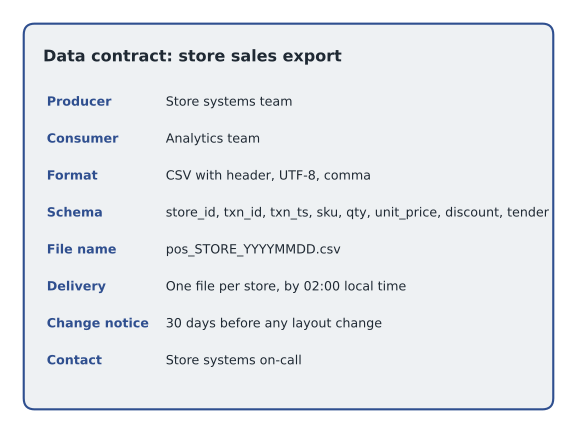
To reduce surprises, the team writes a short data contract for each regular feed: a document agreed with the people who produce the data, stating the format, the schema, the delivery time, the file naming pattern and who to contact when something changes. It is not a Google Cloud feature, just good practice, but it turns schema changes from midnight surprises into planned work. The store systems team agrees the first contract for the till exports: CSV with a header, UTF-8 encoding, comma delimiter, one file per store per night named pos_STORE_YYYYMMDD.csv, delivered by 02:00 local time.
Common mistakes
MistakeRelying on schema auto-detection for a nightly load.
InsteadUse an explicit schema so that one unusual sample cannot change a column's type.
MistakeStoring prices as FLOAT64.
InsteadUse NUMERIC for money so that totals are exact.
MistakeMaking store numbers and postal codes INT64.
InsteadKeep codes that are not quantities as STRING to keep leading zeros and letters.
MistakeLoading local till times straight into a TIMESTAMP column.
InsteadLoad them as DATETIME, add the store's time zone and convert in staging.
MistakeLoading a JSON file that holds one big array.
InsteadConvert it to newline-delimited JSON, one record per line, before loading.
Worked problem
Choosing types for the returns export
A returns record has: return_id ("R-20261007-0042"), store_id ("012"), order_ref (sometimes empty), returned_at ("2026-10-07 16:40", store local time), refund_amount ("64.95"), reason_code ("SZ"), and items, a list of skus with quantities. Choose a BigQuery type and mode for each.
Show solution
- return_id: STRING, REQUIRED (an identifier, not a number).
- store_id: STRING, REQUIRED (keeps the leading zero).
- order_ref: STRING, NULLABLE (in-store returns without an online order leave it empty).
- returned_at: DATETIME, REQUIRED in raw; convert to TIMESTAMP in staging using the store's time zone.
- refund_amount: NUMERIC, REQUIRED (money).
- reason_code: STRING, REQUIRED.
- items: RECORD, REPEATED, with sku STRING and qty INT64 inside.
Answer: Identifiers and codes as STRING, money as NUMERIC, the local time as DATETIME until converted, and the item list as a repeated record.
Summary and key terms
- Structured data fits tables, semi-structured data fits nested or JSON columns, and unstructured data lives in Cloud Storage.
- CSV and JSON are text formats without embedded types; Avro, Parquet and ORC are binary and carry their own schema.
- Avro is Google's preferred load format, and compressed CSV and JSON load more slowly because gzip files cannot be split.
- JSON must be newline-delimited to load.
- Use explicit schemas for regular loads, NUMERIC for money, STRING for codes, and handle time zones deliberately.
- Nested and repeated columns store related data together; the JSON type suits fields that change often.
- Appending can add NULLABLE columns or relax REQUIRED ones, but renames and type changes need planning.
- A data contract agrees format, schema and delivery with the data's producer.
- Schema
- The names, types and modes of the fields in a dataset.
- Mode
- Whether a BigQuery column is NULLABLE, REQUIRED or REPEATED.
- Auto-detection
- BigQuery inferring a schema by sampling a CSV or JSON file.
- Newline-delimited JSON
- A file with one complete JSON record on each line.
- Columnar format
- A file layout that stores each column together, such as Parquet or ORC.
- NUMERIC
- BigQuery's exact decimal type, suited to money.
- STRUCT and ARRAY
- Nested fields and lists stored inside one BigQuery row.
- Data contract
- An agreement with a data producer on format, schema, delivery and change notice.
Practice problems
Work each problem on paper first, then reveal the answer to check.
Why does Ravi avoid auto-detection for nightly loads?
Show answer
A sample can lead BigQuery to choose the wrong type, and the load then fails or misreads later data.
Which formats carry their own schema?
Show answer
Avro, Parquet and ORC.
Why are compressed CSV files slow to load in bulk?
Show answer
A gzip file cannot be split, so one worker must read it from start to finish.
What happens to a CSV load if a column is inserted in the middle?
Show answer
Every later column shifts, so values land in the wrong columns.
Lesson quiz · 5 questions
Score 60% or more to complete this lesson.
Create a free account to save your progress, take quizzes and earn a certificate.