
GCP-220 · Lesson 12 of 12 · 21 min
Lab walkthrough: ingesting a messy dataset
▶ Video coming soon A video version of this lesson is on the way.
The twelfth session, on Thursday, November 12, is a lab. Ravi gives Mateo one night of the returns portal's export, copied into his sandbox project, bl-sandbox-mateo, and asks him to take it all the way from file to a curated table, explaining each choice as he goes. The returns feed was chosen because it is small enough to see every record and messy enough to need every skill from the course. Nothing in the sandbox touches production; once Ravi has reviewed the result, the same steps will be built into the real pipeline in bl-data-prod.
The lab follows the order of the course. Each step below names the lesson it draws on, so it doubles as a review.
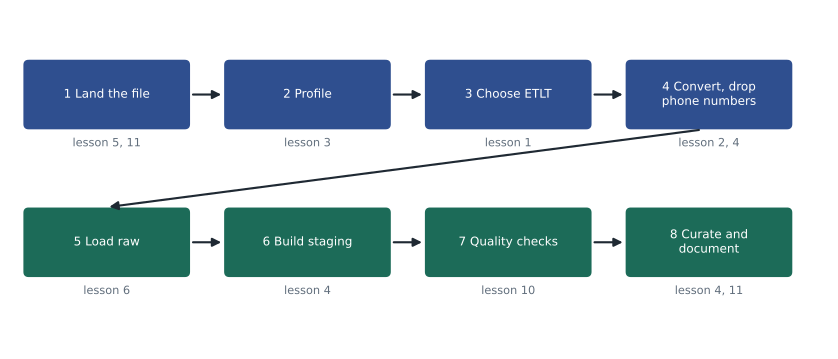
Step 1: land the file (lessons 5 and 11)
The export arrives as one file, returns_2026-11-11.json, about 140 KB. Mateo creates a regional bucket in us-east5, the same location as the sandbox's BigQuery datasets, with uniform bucket-level access and a lifecycle rule that deletes objects after 30 days, because sandbox data should not linger. He uploads the file with gcloud storage; a scheduled transfer would be overkill for a lab.
gcloud storage buckets create gs://bl-sandbox-mateo-landing \
  --location=us-east5 --uniform-bucket-level-access
gcloud storage buckets update gs://bl-sandbox-mateo-landing --lifecycle-file=delete_after_30d.json
gcloud storage cp returns_2026-11-11.json gs://bl-sandbox-mateo-landing/returns/2026/11/11/
Step 2: profile the export (lesson 3)
Mateo opens the file and finds the first problem immediately: it is a single JSON array, not newline-delimited JSON, so BigQuery cannot load it as it is. Rather than guessing at the rest, he profiles it in a notebook. The profile shows 312 records. Every record has return_id, store_id, returned_at, refund_amount, items and an updated_at stamp written by the portal; 6 have no reason_code; 41 have an order_ref and the rest are in-store returns without one; every record has a customer_phone field; returned_at is written in two formats, "2026-11-11 16:40" from most stores and "11/11/2026 4:40 PM" from the three stores still on the old till software; 4 records share a return_id with another record, because the portal exported them twice after an edit; and 2 refund amounts are written with a currency symbol in front of the number.
| Finding | Count | Decision |
|---|---|---|
| File is one JSON array | 1 file | Convert to newline-delimited JSON before loading |
| customer_phone present | 312 records | Remove before loading (ETLT) |
| reason_code missing | 6 records | Keep; set to UNKNOWN in staging; warning-level quality rule |
| Two returned_at formats | 27 records in the old format | Parse both formats in staging |
| Duplicate return_id after edits | 4 records (2 pairs) | Keep the most recently edited version in staging |
| Currency symbol in refund_amount | 2 records | Strip the symbol before converting to NUMERIC |
| Same sku listed twice in items | 9 records | Sum quantities per sku in staging |
Step 3: choose the pattern (lesson 1)
The phone number must never reach BigQuery, so pure ELT is out. Everything else can be done in SQL after loading, so full ETL is unnecessary. The pattern is ETLT: a light transformation before loading that converts the format and drops the phone number, then the cleaning and reshaping in BigQuery. Mateo writes this down as the first line of the lab notes, because a reviewer's first question will be why the raw table is not truly raw.
Step 4: the light transformation (lessons 2 and 4)
In production this step will run as a small Cloud Run job triggered after the export lands. In the lab, Mateo writes the same logic in Python and runs it on a sample of the export to check it.
import json

export = """[
 {"return_id": "R-20261111-0007", "store_id": "012", "order_ref": null, "returned_at": "2026-11-11 10:05",
  "refund_amount": "64.95", "reason_code": "SZ", "customer_phone": "555-0142", "updated_at": "2026-11-11T15:10:02Z",
  "items": [{"sku": "JKT-RN-M-BLK", "qty": 1}]},
 {"return_id": "R-20261111-0019", "store_id": "031", "order_ref": "W-1051220", "returned_at": "11/11/2026 4:40 PM",
  "refund_amount": "$28.90", "reason_code": null, "customer_phone": "555-0199", "updated_at": "2026-11-11T21:47:30Z",
  "items": [{"sku": "STK-AL-08", "qty": 1}, {"sku": "STK-AL-08", "qty": 1}]}
]"""

records = json.loads(export)
lines = []
for r in records:
    r.pop("customer_phone", None)            # never leaves this step
    lines.append(json.dumps(r, separators=(",", ":")))

ndjson = "\n".join(lines)
print(f"records in: {len(records)}, lines out: {len(lines)}")
print("phone numbers remaining:", ndjson.count("customer_phone"))
print(ndjson)records in: 2, lines out: 2
phone numbers remaining: 0
{"return_id":"R-20261111-0007","store_id":"012","order_ref":null,"returned_at":"2026-11-11 10:05","refund_amount":"64.95","reason_code":"SZ","updated_at":"2026-11-11T15:10:02Z","items":[{"sku":"JKT-RN-M-BLK","qty":1}]}
{"return_id":"R-20261111-0019","store_id":"031","order_ref":"W-1051220","returned_at":"11/11/2026 4:40 PM","refund_amount":"$28.90","reason_code":null,"updated_at":"2026-11-11T21:47:30Z","items":[{"sku":"STK-AL-08","qty":1},{"sku":"STK-AL-08","qty":1}]}What this code does
It reads the export, which is one large list of return records, removes the customer phone number from every record, and writes each record back out on its own line. That one-record-per-line layout is the newline-delimited JSON that BigQuery can load. The output confirms how many records went in and came out, shows that no phone numbers remain, and prints the converted lines so they can be checked.
The output also shows what this step deliberately does not do: the second record still has its unusual date, its currency symbol and its repeated SKU. Fixing those belongs in staging, where the rules are written in SQL that the team can review, and where the raw table keeps the values as they arrived. The only things that must happen before loading are the format conversion, without which the load cannot run, and the removal of the phone number, which must never be stored.
Step 5: load into raw (lesson 6)
Mateo loads the converted file into raw.returns with an explicit schema. In raw, refund_amount and returned_at are STRING, because the profile showed values that would fail a strict type, and the goal of raw is to keep exactly what arrived. Items are a REPEATED RECORD with sku and qty. The table is partitioned by load date, and the load replaces that day's partition so it can be re-run.
bq load --source_format=NEWLINE_DELIMITED_JSON --replace \
  --time_partitioning_type=DAY \
  'bl-sandbox-mateo:raw.returns$20261111' \
  gs://bl-sandbox-mateo-landing/returns/2026/11/11/returns_2026-11-11.ndjson \
  ./returns_raw_schema.json
The job reports 312 rows loaded and no errors. Mateo checks the count against the profile, 312 records, and moves on.
Step 6: build staging (lesson 4)
The staging query applies every decision from step 2. Mateo writes it so that each rule is a separate, commented expression.
CREATE OR REPLACE TABLE `bl-sandbox-mateo.staging.returns` AS
WITH parsed AS (
  SELECT
    return_id, store_id, order_ref,
    COALESCE(SAFE.PARSE_DATETIME('%Y-%m-%d %H:%M', returned_at),
             SAFE.PARSE_DATETIME('%m/%d/%Y %I:%M %p', returned_at))         AS returned_local,  -- two till formats
    SAFE_CAST(REGEXP_REPLACE(refund_amount, r'[^0-9.]', '') AS NUMERIC)     AS refund_amount,   -- strip symbols
    COALESCE(reason_code, 'UNKNOWN')                                        AS reason_code,
    ARRAY(SELECT AS STRUCT UPPER(sku) AS sku, SUM(qty) AS qty
          FROM UNNEST(items) GROUP BY UPPER(sku))                           AS items,           -- repeated skus
    _PARTITIONTIME AS loaded_at
  FROM `bl-sandbox-mateo.raw.returns`
  WHERE _PARTITIONTIME = TIMESTAMP('2026-11-11')
)
SELECT p.* EXCEPT (returned_local),
       TIMESTAMP(p.returned_local, s.time_zone) AS returned_at
FROM parsed AS p
JOIN `bl-sandbox-mateo.reference.stores` AS s USING (store_id)
QUALIFY ROW_NUMBER() OVER (PARTITION BY return_id ORDER BY p.updated_at DESC) = 1;      -- keep latest edit
The result has 310 rows: the 312 raw records minus the 2 older copies of edited returns. Mateo checks the arithmetic against the profile, which found 4 records in 2 pairs, so exactly 2 should disappear. He also checks that no row has a NULL refund_amount or returned_at, which would mean a value that neither the format rules nor the symbol stripping could handle; there are none. If there had been, they would go to an error table, as in lesson 4.
Step 7: run quality checks (lesson 10)
Mateo creates a Dataplex data quality scan on staging.returns with the rules from lesson 10's worked example, plus two that the lab revealed: the refund must be greater than zero, and every return must have at least one item. He runs it on demand.
| Rule | Type | Threshold | Result |
|---|---|---|---|
| Row count above 50 | Table condition | Must hold | Pass (310) |
| Newest returned_at is yesterday | Table condition | Must hold | Pass |
| return_id unique | Uniqueness | All rows | Pass |
| reason_code not UNKNOWN | Row condition | 980 in 1,000 rows | Pass (304 of 310, about 981 in 1,000) |
| refund_amount greater than 0 | Row condition | All rows | Pass |
| At least one item | Row condition | All rows | Pass |
| store_id in the store list | Set (from reference) | All rows | Pass |
Every rule passes, but the reason_code rule only just passes, at about 981 in 1,000 against a threshold of 980. Mateo notes it as something to watch: if the share of returns without a reason keeps creeping up, the portal's form may need the field made mandatory, which is a conversation with Jules Baptiste's team rather than a data fix.
Step 8: curate and document (lessons 4 and 11)
The curated table answers the question the merchandising team actually asks: which products come back, how often and why. Mateo builds curated.returns_by_product_day, one row per business date, store, SKU and reason, with the quantity returned and the refund value, by unnesting the items in staging and joining the product catalog for category and brand. It is partitioned by business date, like the sales tables, so the two can be compared cheaply.
Finally, he documents the feed in the team's repository: the data contract with the portal team, the ETLT decision and why, the raw and staging schemas, the rules register, the quality rules and their thresholds, and the location and retention settings. Ravi's review takes twenty minutes and produces three comments: add the error table even though it was empty today, put the two date formats in the data contract so the portal team knows they exist, and set the raw partitions to expire after 400 days like the sales feed.
| Item | Value |
|---|---|
| Pattern | ETLT: convert and drop phone before load; clean in BigQuery |
| Landing | Regional bucket, lifecycle delete (30 days in sandbox, 400 in production) |
| Raw | raw.returns, partitioned by load day, text types for messy fields, replace per partition |
| Staging | staging.returns: two date formats parsed, symbols stripped, latest edit kept, skus summed |
| Quality | Dataplex scan: 7 rules, volume and freshness blocking |
| Curated | curated.returns_by_product_day, partitioned by business date |
| Location | us-east5 (Columbus) throughout |
Moving the lab into production is mostly a matter of replacing manual steps with triggers. The portal will drop its export into the production landing bucket each night; an Eventarc trigger on the new object will start the Cloud Run job that converts the file and removes phone numbers; the job will start the load; and the staging, quality scan and curated steps will run as a scheduled Dataform workflow at 04:30, after the sales pipeline. Lesson 5's rule about service accounts applies throughout: the Cloud Run job gets its own service account that can read the export folder and write to the landing bucket and the raw dataset, and nothing else. Orchestration of the whole chain is the subject of GCP-222.
Looking back over the course
Mateo's notes from the twelve sessions fit on one page, and they line up with the first section of the exam guide. Preparing and processing data: choose ETL, ELT or ETLT by where sensitive fields and heavy logic must be handled; choose a transfer tool by what is moving and from where; profile before cleaning; write cleaning rules with reasons. Extracting and loading: know the formats and their schemas; choose batch, micro-batch or streaming by how fresh the data must be; load with explicit schemas into partitions so loads can be re-run; choose storage by access pattern and location type; and check quality at every layer. The next course, GCP-221, picks up the curated tables and turns them into analysis and dashboards.
Common mistakes
MistakeFixing every problem in the pre-load transformation.
InsteadDo only what must happen before loading; keep business rules in reviewable SQL in staging.
MistakeTyping messy raw fields strictly and letting the load fail.
InsteadKeep doubtful fields as text in raw and convert them safely in staging.
MistakeAccepting a row count without reconciling it.
InsteadCheck every count against the profile: 312 in, 2 duplicates removed, 310 out.
MistakeSkipping documentation because the lab was small.
InsteadRecord the pattern, schemas, rules, checks and settings so the feed can be reviewed and maintained.
Worked problem
Explaining the count
A reviewer asks why staging.returns has 310 rows when the export had 312 records. What should Mateo answer, and how can he prove it?
Show solution
- The profile found 2 pairs of records sharing a return_id because the portal exported edited returns twice.
- The staging rule keeps the version of each return_id with the latest updated_at stamp, so 2 rows are removed.
- 312 minus 2 is 310, which matches the staging count.
- Proof: a query on raw.returns grouping by return_id and keeping groups with more than one row returns exactly 2 return_ids, each with 2 rows.
Answer: Two duplicate exports of edited returns were removed by the latest-edit rule; a GROUP BY on return_id in raw shows exactly those two pairs.
Summary and key terms
- The lab took one night of the returns export from file to curated table: land the file in a regional bucket with a lifecycle rule; profile it; choose ETLT because phone numbers must not be stored; convert the JSON array to newline-delimited JSON and drop the phone field before loading; load into a partitioned raw table with an explicit schema and text types for messy fields; build staging with SQL rules for date formats, currency symbols, duplicates and repeated SKUs; run a Dataplex quality scan; and build a partitioned curated table with full documentation.
- Every count was reconciled: 312 records in, 2 duplicates removed, 310 rows in staging.
- The same steps map onto the first section of the exam guide.
- Sandbox project
- A separate project for experiments that cannot affect production.
- ETLT
- A light transformation before loading, with the main transformation afterwards.
- Newline-delimited JSON
- One JSON record per line, the JSON layout BigQuery loads.
- Raw layer
- Tables that keep data as it arrived, with doubtful fields as text.
- Staging layer
- Tables with cleaned, typed and deduplicated data.
- Curated layer
- Tables shaped for the questions the business asks.
- Reconciliation of counts
- Checking that rows in, rows removed and rows out add up.
Practice problems
Work each problem on paper first, then reveal the answer to check.
Why was the phone number removed before loading rather than in staging?
Show answer
It must never be stored in BigQuery, so it cannot wait until after the load.
Why are refund_amount and returned_at text in the raw table?
Show answer
Some values would fail a strict type; raw keeps exactly what arrived and staging converts safely.
How many rows should staging have, and why?
Show answer
310: the 312 records minus 2 older copies of edited returns.
Which rule only just passed, and what should happen next?
Show answer
reason_code not UNKNOWN, at about 981 in 1,000; watch it and raise the form design with the portal team if it worsens.
Lesson quiz · 5 questions
Score 60% or more to complete this lesson.
Create a free account to save your progress, take quizzes and earn a certificate.