
GCP-220 · Lesson 1 of 12 · 22 min
The data practitioner role on Google Cloud
▶ Video coming soon A video version of this lesson is on the way.
Birchline Outfitters is halfway through moving its data warehouse from an aging SQL Server box in the head-office server room to BigQuery. The cloud migration team has already built the projects, networks and billing structure, and Owen Mitchell's Workspace rollout is under way. The data itself, though, still needs people who understand it: where each file comes from, what each column means, which numbers can be trusted and how fresh they must be. That work belongs to Ravi Menon's analytics team, and this course follows its newest member as he learns to do it on Google Cloud.
Mateo Alvarez joined Birchline two years ago as a store sales analyst. He knows the business well. He can tell you which stores sell the most kayaks in May, why the warehouse in Groveport ships more on Mondays, and how a returned tent shows up in the weekly report. Until now he has worked mostly in spreadsheets and in SQL queries against the old warehouse. Ravi has asked him to become the team's first certified data practitioner, so that someone on the team can prepare and load data on Google Cloud without waiting for the platform engineers. Mateo plans to sit the Associate Data Practitioner exam in the spring of 2027.
Ravi set up twice-weekly sessions on Tuesday and Thursday afternoons, starting on October 6, 2026. This course follows the first twelve, which cover the first section of the exam: preparing and ingesting data. Later courses cover analysis and presentation (GCP-221), pipelines and data management (GCP-222), and exam readiness (GCP-194).
What a data practitioner does
A data practitioner sits between the people who build data platforms and the people who use data to make decisions. Platform or data engineers design the large pipelines, the streaming systems and the shared infrastructure. Analysts and business users ask questions and read dashboards. The practitioner does the everyday work that connects the two: finding the right data, checking whether it is complete and correct, cleaning it, loading it into the right place, and making it ready for analysis. On a small team, as at Birchline, the same person may also build simple scheduled pipelines and manage access to the datasets they look after.
Ravi describes the job in terms of questions the practitioner must be able to answer for any dataset on the team:
- Where does it come from, and how does it get here? (source system, file or stream, transfer tool)
- What does it look like? (format, schema, data types, size, how often it changes)
- Can it be trusted? (completeness, accuracy, duplicates, freshness)
- What has to happen to it before anyone uses it? (cleaning, standardizing, joining, aggregating)
- Where should it live, and for how long? (storage service, location, storage class, retention)
- Who may see it, and how will we know if something goes wrong? (access, monitoring, quality checks)
Each of those questions maps onto a part of the exam. This course concentrates on the first five, and leaves most of the last one to GCP-222.
The Associate Data Practitioner exam
Google's exam guide groups the exam into four sections. The weights below are approximate, as the guide gives them, and they tell Mateo where to spend his study time. Preparation and ingestion is the largest single section, which is why the team starts here.
| Section | Approximate share of the exam | Covered in |
|---|---|---|
| 1. Data preparation and ingestion | About 30 in every 100 questions | This course (GCP-220) |
| 2. Data analysis and presentation | About 27 in every 100 | GCP-221 |
| 3. Data pipeline orchestration | About 18 in every 100 | GCP-222 |
| 4. Data management | About 25 in every 100 | GCP-222 |
Within the first section, the guide lists two groups of skills. The first is preparing and processing data: telling ETL, ELT and ETLT apart, choosing a data transfer tool, assessing data quality and cleaning data. The second is extracting and loading data into storage systems: recognizing data formats, choosing an extraction tool, selecting a storage solution (including the type of location, such as regional, dual-region, multi-region or zonal), classifying data as structured, semi-structured or unstructured, and loading data with the right tool. Every lesson in this course maps to one or more of those skills, and lesson 12 brings them together in a lab.
The certification page lists the practical details. The exam lasts two hours and has 50 to 60 multiple choice and multiple select questions. It is offered in English and Japanese, online with a remote proctor or at a testing center, and the certification is valid for three years. The registration fee is 125 US dollars plus tax. Google recommends about six months of hands-on experience with data on Google Cloud, which is one reason Ravi wants Mateo doing real work on Birchline's data rather than only reading.
Three ways to arrange the work: ETL, ELT and ETLT
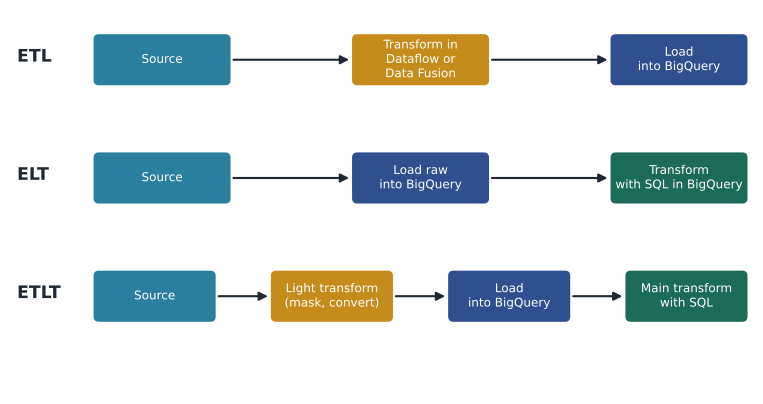
Every data job involves three activities: extracting data from a source, transforming it into a useful shape, and loading it into a destination. The order of those activities is a design choice, and the exam expects you to know the three common patterns.
In ETL (extract, transform, load), data is transformed before it reaches the destination. A processing tool such as Dataflow or Cloud Data Fusion reads the source, cleans and reshapes the data, and writes only the finished result. ETL suits cases where raw data must not land in the destination at all, for example because it contains fields that must be removed first, or where the transformations are heavy and better done by a processing engine.
In ELT (extract, load, transform), raw data is loaded first, usually into BigQuery, and then transformed inside the destination with SQL. This has become the most common pattern on Google Cloud because BigQuery can transform large tables quickly, the raw data stays available for re-processing if a rule turns out to be wrong, and analysts can write and review the transformations themselves. Tools such as Dataform and BigQuery data preparation are built for this pattern.
In ETLT (extract, transform, load, transform), a light transformation happens on the way in and the heavier work happens after loading. The first transformation usually handles things that must happen early: masking or removing sensitive fields, fixing file encodings, or converting a format so that it can be loaded at all. The second stage does the business logic in the warehouse.
| Pattern | Where transformation happens | Good fit at Birchline | Watch out for |
|---|---|---|---|
| ETL | Before loading, in Dataflow or Data Fusion | Web events that must be filtered and enriched in real time | Raw data is not kept unless you also store it separately |
| ELT | After loading, in BigQuery with SQL | Nightly store sales files and the product catalog | Raw tables can hold sensitive or messy data, so access to them must be tight |
| ETLT | A little before loading, most after | Returns portal exports that contain customer phone numbers to be masked first | Two places where logic lives, which must both be documented |
Ravi's rule of thumb for the team is "ELT unless there is a reason not to". Loading raw data first and keeping it means that when a cleaning rule is wrong, the team can fix the rule and re-run it instead of asking a store to resend last month's files. The reasons not to are real, though: personal data that should never sit in a raw table, streams that need to be acted on in seconds, and files that cannot be loaded until they are converted.
A map of the services
Google Cloud has many data services, and much of the exam is about choosing between them. Mateo finds it helps to sort them by the job they do rather than by name. Lessons later in the course look at each in detail.
| Job | Main services | Covered in |
|---|---|---|
| Move files and data into Google Cloud | Storage Transfer Service, Transfer Appliance, BigQuery Data Transfer Service, gcloud storage, Database Migration Service, Datastream | Lessons 5 and 6 |
| Store data | Cloud Storage, BigQuery, Cloud SQL, AlloyDB, Spanner, Bigtable, Firestore | Lesson 11 |
| Receive events | Pub/Sub | Lesson 7 |
| Process and transform | Dataflow, Dataproc, Cloud Data Fusion, Dataform, BigQuery SQL, BigQuery data preparation | Lessons 4, 8 and 9 |
| Explore and analyze | BigQuery, BigQuery Studio notebooks, Colab Enterprise, Looker, Data Studio (formerly Looker Studio) | Lesson 3 here; GCP-221 |
| Orchestrate and govern | Cloud Composer, Workflows, Cloud Scheduler, Dataplex, IAM, Cloud KMS | GCP-222 |
Two services appear in almost every lesson. Cloud Storage is object storage: it holds files of any kind in buckets, and it is usually the first place data lands when it arrives from outside. BigQuery is Google's serverless data warehouse: it stores tables and runs SQL over them without anyone managing servers, and it is where most of Birchline's prepared data will live.
Birchline's data estate
In the first session, Ravi and Mateo list the data sources the team is responsible for. The inventory is rough, but it gives every later lesson a real example to work with.
| Source | What it holds | How it arrives today | Volume (approximate) | Freshness needed |
|---|---|---|---|---|
| Store point of sale | Every sale and refund at 40 stores | One CSV file per store each night | About 30,000 rows a night in total | Next morning |
| Online shop orders | Orders, order lines, payments | MySQL database behind Birchline.shop | About 4,000 orders a day | Within an hour |
| Product catalog | About 18,000 products and their attributes | Same MySQL database | A few hundred changes a day | Within an hour |
| Web events | Page views, searches, add-to-cart clicks | Not captured yet | About 2 million events a day expected | Within a minute for some uses |
| Returns portal | Return requests and reasons | JSON export each night | About 300 returns a day | Next morning |
| Supplier price lists | Cost prices from about 60 suppliers | Spreadsheets by email, monthly | Small | Within a week |
| Old warehouse | Ten years of history | SQL Server database | About 1.2 TB | One-time move |
The table already shows why one tool will not do everything. Nightly store files suit a batch load. The shop database changes all day and is wanted within the hour, which points toward change data capture. Web events arrive continuously and some uses need them within a minute, which points toward streaming. The old warehouse is a one-time bulk move. Choosing the approach for each is the subject of lesson 5.
Mateo also notices that the estate mixes three kinds of data. Store sales and orders are structured: fixed columns with fixed types. Returns exports and web events are semi-structured: JSON records whose fields can vary from one record to the next. Product photos and scanned supplier invoices are unstructured: files whose content has no columns at all. The kind of data affects where it is stored and how it is loaded, and lesson 2 returns to it.
Sizing the work
Before choosing tools, Ravi asks Mateo to estimate how much data the nightly store files add each month, because the answer affects storage cost and how long loads take. Mateo uses an average row size measured from a sample file.
# Rough monthly volume of the nightly store sales files.
stores = 40
rows_per_store_per_night = 750      # average from last month's files
bytes_per_row = 180                 # measured from a sample CSV file
nights = 30

rows = stores * rows_per_store_per_night * nights
megabytes = rows * bytes_per_row / 1_000_000
print(f"Rows per month: {rows:,}")
print(f"Size per month: about {megabytes:,.0f} MB")
print(f"Size per year: about {megabytes * 12 / 1000:,.1f} GB")Rows per month: 900,000 Size per month: about 162 MB Size per year: about 1.9 GB
What this code does
The calculation multiplies the number of stores by the average rows each store sends per night and by the nights in a month, which gives the rows added each month. It then multiplies by the measured size of one row to estimate megabytes per month and per year. The result shows that the store files are small by cloud standards, so the choice of tool will depend more on freshness and reliability than on size.
A gigabyte or two a year is tiny for BigQuery. The lesson for Mateo is that store sales are not a big data problem; they are a reliability problem. Forty files must arrive every night, in the expected format, without duplicates, and the team must know by eight in the morning if one is missing. Web events are the opposite: small individually but numerous, at about 2 million a day, and their challenge is volume and speed.
Working practices for the team
Ravi sets out a few practices that the rest of the course builds on. They are not Google rules, but they reflect how experienced teams use the services.
- Land raw data unchanged in a landing bucket or raw dataset, and keep it for an agreed time, so loads can be re-run.
- Separate raw, staging and curated data. At Birchline these become the BigQuery datasets raw, staging and curated in the project bl-data-prod.
- Keep data in the same location throughout a pipeline: us-east5 (Columbus, Ohio), so that loads and queries do not cross regions.
- Write every transformation down, preferably as SQL kept in version control, so that anyone can see how a number was produced.
- Check data quality at every stage, and treat a failed check as an incident, not an inconvenience.
The location rule matters for more than speed. Birchline keeps customer data in US regions, and cardholder data falls under PCI DSS wherever it is stored, so every bucket and dataset that holds customer information is created in a US region. Columbus is the primary region and Council Bluffs, Iowa, the second region for backups. Several states have their own consumer privacy laws, which Teresa Okonjo's security team tracks.
Common mistakes
MistakeStarting with a favorite tool and fitting every source to it.
InsteadStart from the source, its format, volume and freshness, then choose the tool.
MistakeTransforming data on the way in and discarding the original.
InsteadKeep the raw data for an agreed period so that loads can be repeated when a rule changes.
MistakeTreating ELT as always better than ETL.
InsteadUse ETL or ETLT when sensitive fields must be removed early or when results are needed in seconds.
MistakeCreating datasets in whatever location the console suggests.
InsteadChoose the location deliberately and keep a pipeline's buckets and datasets in the same one.
Worked problem
Choosing a pattern for the returns export
The returns portal sends a nightly JSON export with return requests. Each record includes the customer's phone number, which the analytics team does not need and the security team does not want stored in the warehouse. Which pattern should Mateo use, and why?
Show solution
- List the requirements: the data is wanted the next morning, so batch is fine; one field must never reach the warehouse.
- ELT would load the phone number into a raw table before removing it, which breaks the requirement.
- Full ETL would put all the business logic into a processing tool, which is more than needed for 300 records a night.
- ETLT fits: a light first step drops or masks the phone number as the file is loaded, and the remaining cleaning and joining happens in BigQuery with SQL.
Answer: Use ETLT: remove the phone number before loading, then do the rest of the work in BigQuery.
Summary and key terms
- A data practitioner finds, checks, cleans, loads and prepares data for analysis, and on small teams may also build simple pipelines and manage access.
- The Associate Data Practitioner exam has four sections, and preparation and ingestion is the largest at about 30 in every 100 questions.
- ETL transforms before loading, ELT loads first and transforms in the warehouse, and ETLT does a light transform on the way in and the rest after.
- ELT is the common default on Google Cloud because BigQuery transforms quickly and the raw data stays available.
- Sorting services by job (move, store, receive, process, explore, govern) makes choosing between them easier.
- Structured, semi-structured and unstructured data are stored and loaded differently.
- Data practitioner
- Someone who prepares, loads and manages data so that it is ready for analysis.
- ETL
- Extract, transform, load: data is transformed before it reaches the destination.
- ELT
- Extract, load, transform: raw data is loaded first and transformed inside the destination.
- ETLT
- A light transformation on the way in, followed by the main transformation after loading.
- Structured data
- Data with fixed columns and types, such as a sales table.
- Semi-structured data
- Data with labeled fields that can vary between records, such as JSON.
- Unstructured data
- Files with no columns, such as images, audio or scanned documents.
- Landing bucket
- A Cloud Storage bucket where raw data first arrives before loading.
Practice problems
Work each problem on paper first, then reveal the answer to check.
Which exam section carries the most weight?
Show answer
Data preparation and ingestion, at about 30 in every 100 questions.
Why does Ravi prefer ELT by default?
Show answer
BigQuery transforms data quickly, analysts can write the SQL, and keeping raw data allows loads to be re-run when a rule changes.
Name one reason to choose ETL or ETLT instead.
Show answer
Sensitive fields must be removed before loading, or results are needed within seconds.
Why are the nightly store files a reliability problem more than a size problem?
Show answer
They add only a gigabyte or two a year, but 40 files must arrive correctly every night.
Lesson quiz · 5 questions
Score 60% or more to complete this lesson.
Create a free account to save your progress, take quizzes and earn a certificate.