
GCP-211 · Lesson 8 of 12 · 19 min
Google Sites, Forms and other apps
▶ Video coming soon A video version of this lesson is on the way.
Beyond Gmail, Calendar, Drive, Meet and Chat, a Workspace account includes a long list of other services: Sites, Forms, Keep, Tasks, Groups for Business, Vids, AppSheet, Data Studio (formerly Looker Studio) and dozens of consumer Google services such as YouTube and Maps that users can reach with their work accounts. Each one is on or off for each OU, and each has its own settings. "This is the lesson where people get lazy," Sofia says. "They switch everything on, and a year later the legal team asks why store staff are posting product photos to a personal blog with their work accounts." This lesson covers how to turn services on and off, the settings for Sites and Forms, and how to decide about the rest.
Turning services on and off
In the Admin console under Apps, Google Workspace, each core service shows its status: on for everyone, off for everyone, or on for some OUs or groups. Changing the status for an OU or configuration group works like any other setting: children inherit unless they override. Turning a service off hides it from users in that OU and blocks access; it does not delete their existing data in most services, so turning it back on restores what was there.
Additional Google services, listed separately, are Google products that are not part of the Workspace core agreement, such as YouTube, Blogger, Google Maps features, Google Photos, Google Ads and Search Console. They are governed by Google's general terms rather than the Workspace agreement, and some do not offer the same data protection commitments. Many organizations turn most of them off and allow a few that have a business purpose. Some additional services cannot be turned off individually at the OU level, and Google adds and changes the list over time, so Owen reviews it rather than copying an old checklist.
| Service | Head office | Stores and warehouses | Why |
|---|---|---|---|
| Gmail, Calendar, Drive, Meet, Chat | On | On | Core work |
| Sites | On | Off at first | Head office builds the intranet; store staff only read it |
| Forms | On | On | Store checklists and surveys |
| Keep and Tasks | On | On | Personal notes and task lists |
| AppSheet | IT and E-commerce only | Off | Low-code apps need governance |
| Data Studio | Data and analytics, Finance | Off | Dashboards on governed data |
| YouTube | Marketing and Communications, with restricted mode for others | Off | Brand channel and training videos |
| Blogger and other additional services | Off unless requested | Off | No business need; outside core terms |
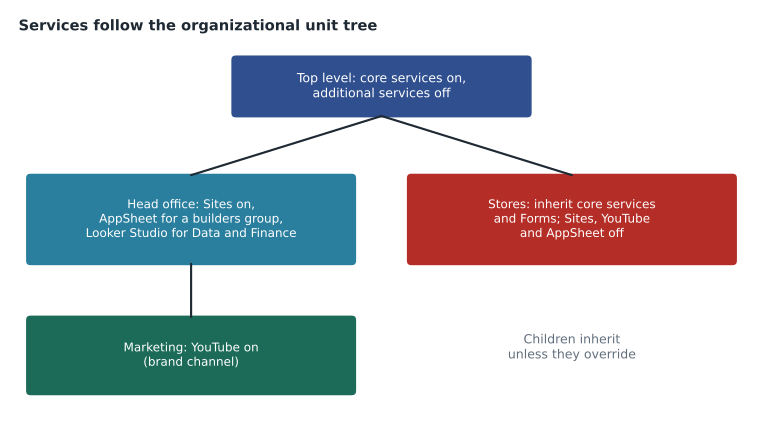
Configuration groups help when a service must be on for people scattered across OUs. AppSheet, for example, will be on for the group cfg-appsheet-builders, which holds ten people in IT and E-commerce, rather than for whole OUs, so that a new builder is added by group membership after a short training session.
Google Sites
Google Sites builds websites from a drag-and-drop editor, with pages that embed Docs, Sheets, Calendar, Forms, Maps and video. Sites are stored in Drive and shared like files, which is why most of their settings concern sharing and publishing.
- Creating sites: whether users in an OU can create new Sites.
- Editing: whether users can edit sites created by others, following Drive sharing.
- Publishing: whether sites can be published to the whole web or only within the organization, which follows the Drive sharing settings for the OU.
- Custom URLs: administrators can map a site to a web address on one of the account's domains, such as intranet.birchline.example, through the Admin console's custom URL settings and a DNS record.
Birchline's intranet is the main Sites project. It will be built by the Communications team, owned by a shared drive so that it does not belong to one person, published only within the organization and given the custom address intranet.birchline.example. Stores will read it from the shared tablets; only Communications can edit. A second site, the store operations manual, will be built from the existing manual in Word and embedded checklists from Forms.
Sofia warns about one habit from the old intranet: putting confidential documents on a page because the page is internal. A published internal site is visible to everyone in the organization, including contractors in the Contractors OU, so files embedded on it should be shared just as widely or the page will show access requests.
Google Forms
Google Forms collects responses into a Sheet. Administrators control a few important things.
| Setting | What it controls | Birchline's choice |
|---|---|---|
| Sharing and response collection | Whether forms can accept responses from people outside the organization | Inside only by default; Marketing may collect from customers |
| Default for new forms | Whether new forms collect respondents' email addresses | Collect verified addresses for internal forms |
| File upload questions | Whether forms can ask respondents to upload files, stored in the form owner's Drive | Allowed for internal forms only |
| Phishing protection | Google scans forms for password-collection patterns and can block forms that look like phishing | On (it is not optional in most accounts) |
Stores will use Forms for daily opening checklists, incident reports and stocktake counts. Each store's responses go to a Sheet in the operations shared drive, where regional managers see them all. Forms accept responses only from signed-in Birchline accounts, so every response is tied to a person, which is what the operations team needs for the incident reports. Marketing's customer surveys are the exception: they collect responses from the public and are created by the Marketing team, whose OU allows external responses.
File uploads need care. When a form asks respondents to upload a photo of damaged goods, the files go to a folder in the form owner's Drive, and storage counts against the owner. Owen asks the operations team to create such forms in the operations shared drive, so that uploaded files belong to the organization and the folder does not fill one manager's storage.
Low-code and analytics apps
AppSheet lets people build small apps on top of Sheets and other data without writing code, and it can write data back. That is useful for the warehouses' equipment inspection app and risky without governance, because an app built by one person can expose data to many. AppSheet has its own admin settings for which data sources builders may connect to and whether apps may be shared outside the organization. Birchline will start with the ten builders in the configuration group and an internal-only sharing rule.
Data Studio builds dashboards from Sheets, BigQuery and other sources. Ravi's team will use it on the BigQuery warehouse from the Google Cloud courses, with dashboards shared to named groups. Data Studio is governed partly from its own settings and partly by the sharing of the data sources it reads, so Ravi's rule is that dashboards use the data team's service account connections rather than each builder's personal access.
Keep, Tasks and the smaller services
Keep (notes) and Tasks (task lists) are personal tools that appear in the side panel of Gmail, Calendar and Docs. They have few settings; the main question is whether notes may be shared outside the organization, which Birchline turns off. Google Groups for Business controls whether users can create groups themselves and whether groups may have outside members, which the first course covered under groups. Early access apps, when Google offers them, let administrators try new services before general release, which Birchline allows only for the IT OU.
Frontline editions and service availability
Frontline Standard, which most store and warehouse staff will have, includes the core collaboration services but with smaller storage and some services or features missing compared with Enterprise editions. When a service is on for /Stores but a store employee's license does not include it, the employee simply does not get it. Owen therefore checks each service against the edition table before announcing anything to stores, and the help desk's knowledge base will list which services store staff have.
Services that depend on each other
Some services rely on others, so turning one off can break another in ways users notice before administrators do. Sites and Forms store their files in Drive, so an OU with Drive off cannot create them. Meet recordings and transcripts are saved to Drive. Chat files are stored in Drive. Calendar invitations are sent through Gmail for users who have it. Owen builds a short dependency table for the help desk so that a ticket such as "I can't create a form" leads quickly to the right setting.
| If this is off | This stops working or changes | Example ticket |
|---|---|---|
| Drive | Creating Sites, Forms, Docs files; saving recordings and Chat files | "Create form is grayed out" |
| Gmail | Mail notifications for Calendar, Drive comments and Chat | "I never get meeting invitations by email" |
| Calendar | Meeting scheduling with rooms; Meet links added to events | "No rooms appear when I book" |
| Chat | Chat in Gmail and in Docs comments assigned through Chat | "The Chat panel disappeared" |
Apps Script
Apps Script lets users write small programs that automate Sheets, Gmail, Calendar and Drive. Many organizations find dozens of scripts written by staff years ago that send reports, copy files or call outside services. Scripts run with the permissions of the user who authorizes them, so a script can read whatever that user can read, and a script shared with others can ask each of them to authorize it. Apps Script projects that request access to Google data are treated as apps for the purposes of the API controls in lesson 10, and administrators can see which scripts users have authorized. Birchline will allow Apps Script for head office but review any script that requests broad access, such as reading all of a user's Gmail, before it is used by more than its author.
Newer services also appear regularly. Google Vids, for example, creates short videos from documents and templates and is included in some editions. When a new service appears in the Admin console, it is often on by default for editions that include it, which is one reason Sofia reviews the services list each quarter as part of change management (lesson 11) rather than assuming the list she approved at launch is still the list users see.
Deciding about a service
Sofia gives Owen a short set of questions for any service someone asks to turn on.
- Is there a business need, and who is asking for it?
- Is the service covered by the Workspace agreement, or is it an additional service with different terms?
- Where does its data live, can it be retained and searched by Vault, and can it be shared outside?
- Which OUs or configuration groups need it, and which licenses include it?
- Who supports it, and who decides when the request is no longer needed?
The questions turn a quick yes into a short record, kept in the change log described in lesson 11. When Marketing asks for YouTube, the record says: business need, the brand channel and training videos; additional service under Google's general terms; channel owned by a brand account managed by Communications; on for Marketing and Communications only; restricted mode for everyone else who watches embedded training videos.
Common mistakes
MistakeSwitching on every service for everyone at launch.
InsteadDecide per service and per OU or configuration group, with a reason recorded.
MistakeTreating additional Google services like core services.
InsteadCheck their terms and data protections; most organizations keep them off unless needed.
MistakePublishing an internal site with embedded files shared to a smaller audience.
InsteadShare embedded files at least as widely as the site, or keep them off the page.
MistakeLetting store forms upload photos into one manager's My Drive.
InsteadCreate the form in a shared drive so uploads belong to the organization.
Worked problem
A request for Sites in the stores
Three store managers ask to build their own store web pages on Google Sites to share local events with customers. Stores currently have Sites off. What should Owen consider, and what is a reasonable answer?
Show solution
- Business need: sharing local events with customers is a marketing activity, and Birchline's public website already has store pages managed by E-commerce.
- Publishing: public sites from stores would need sharing to the web for /Stores, which the sharing plan in lesson 6 does not allow.
- Support and brand: forty separate store sites would be hard to keep current and consistent.
- A better answer: the managers send events through a Form owned by E-commerce, which publishes them on the official store pages.
- Keep Sites off for /Stores; record the request and the decision in the change log.
Answer: Keep Sites off for stores, and meet the need through a Form feeding the official store pages.
Summary and key terms
- Each core service can be on or off per OU or configuration group, and turning a service off usually keeps its data.
- Additional Google services such as YouTube and Blogger are outside the core agreement; turn on only those with a business need.
- Sites settings cover creation, editing, publishing and custom URLs; publish internal sites inside the organization and own important sites from a shared drive.
- Forms settings cover outside responses, collecting addresses and file uploads, which go to the owner's Drive.
- AppSheet and Data Studio need governance through configuration groups and their own settings.
- Frontline editions lack some services.
- Decide each service with a short, recorded set of questions.
- Core service
- A service covered by the Google Workspace agreement, such as Gmail or Drive.
- Additional Google service
- A Google product outside the core Workspace agreement, such as YouTube or Blogger.
- Service status
- Whether a service is on or off for an OU or group.
- Custom URL
- A web address on the organization's domain mapped to a Google Site.
- File upload question
- A Forms question that stores respondents' files in the form owner's Drive.
- AppSheet
- Google's low-code tool for building apps on data such as Sheets.
- Data Studio
- Google's tool for building dashboards and reports from data sources.
- Early access apps
- New Google services that administrators can try before general release.
Practice problems
Work each problem on paper first, then reveal the answer to check.
What happens to users' data when a core service is turned off for their OU?
Show answer
Access is blocked and the service is hidden; in most services the data is kept and returns if the service is turned on again.
Why will AppSheet be on for a configuration group rather than an OU?
Show answer
The builders are spread across OUs, and access is given after training by adding them to the group.
Why should store forms with file uploads live in a shared drive?
Show answer
Uploaded files go to the form owner's Drive; in a shared drive they belong to the organization.
Lesson quiz · 5 questions
Score 60% or more to complete this lesson.
Create a free account to save your progress, take quizzes and earn a certificate.